Here are the best free Violin VST plugins for Windows and Mac. We have included video demos, feature lists, pros, cons, and plugin ratings.
How we rate Violin plugins: We rate each Violin plugin based on sound quality, design, performance, features, usability, and compatibility. We rate plugins on a scale of 1 to 100.
Table of Contents

I have spent over 15 years testing and comparing hundreds of free and paid VST plugins, supported by hands-on demos on our YouTube channel, which has 12,000+ subscribers.
Best Free Violin VST Plugins
This table compares Violin VST plugins by operating system, bit version, format, and rating.
| # | Plugins | Ratings | OS | Formats |
|---|---|---|---|---|
| 1 | Layers | Windows Mac | VST, VST3, AU, AAX | |
| 2 | The Free Orchestra | Windows Mac | Kontakt | |
| 3 | Labs Strings | Windows Mac | VST, AU | |
| 4 | Slinky Violin | Windows Mac | Kontakt, SFZ | |
| 5 | Orchestral Strings One | Windows Mac | VST, AU | |
| 6 | One Track Orchestra | Windows Mac | N/A | |
| 7 | Serpo | Windows Mac | VST, AU | |
| 8 | VSCO2 Violin | Windows Mac | VST, AU | |
| 9 | LDK1609 Violin | Windows Mac | VST, AU | |
| 10 | Edirol Orchestral | Windows | VST | |
| 11 | Violins | Windows Mac | VST | |
| 12 | Sonatina Violin Library | Windows Mac | VST, AU | |
| 13 | Sonatina Orchestra Module | Windows | VST | |
| 14 | DSK Strings | Windows | VST | |
| 15 | DSK Overture | Windows | VST |
1. Layers
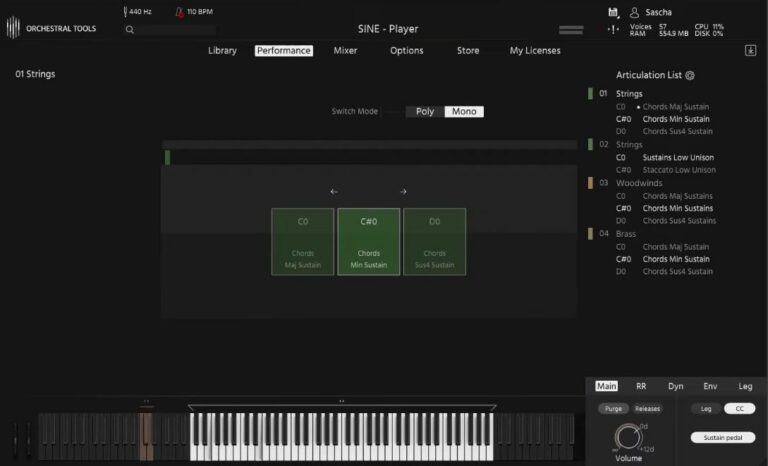
OS: Windows Win Mac Mac Bit Version: 64-bit Developer: Orchestral Tools Size: 10 GB Rating: 92/100
Layers offers a simple way to bring authentic orchestral sound into your music. It includes high-quality recordings of strings, woodwinds, and brass captured at the Teldex Scoring Stage. With one touch, you can create rich chords and shape dynamics using your MIDI controller.
This free plugin runs in the SINE player and lets you mix multiple microphone positions for added depth. It’s useful for quick sketches, cinematic scores, or adding orchestral color to modern tracks. Layers gives you professional sound quality that fits easily into your creative workflow.
Features
- Free Orchestral VST Instrument
- Includes Strings, Woodwinds, And Brass
- Recorded At Teldex Scoring Stage
- High-Quality 24-Bit 48kHz Samples
- Multiple Mic Positions Available
- Blend Layers Using MIDI Controller
- Runs In Free SINE Player
- Supports VST, VST3, AU, And AAX
- Simple And Intuitive Interface
- Ideal For Quick Orchestral Sketches
Pros
- Completely free high-quality orchestral sounds
- Recorded at world-class Teldex stage
- Multiple mic positions for depth
- Runs in free SINE player
- Download only what you need
- Smooth blending of instrument layers
- Flexible mic merging feature
- Easy one-touch chord creation
- Clear, realistic orchestral tones
- Light on CPU performance
Cons
- Needs SINE player to run
- Large 17GB file size
- Few articulations for instruments
- No solo instrument recordings
- Limited dynamic layer control
- No built-in effect controls
- Minimal sound customization options
- Requires strong computer performance
- Limited expression and velocity layers
- Less flexible than paid libraries
Testimonials
Tips
- Use modulation and expression controls to shape dynamics for more life-like horn parts.
- I like to pan each section slightly left or right to match a real orchestra’s layout.
- I use reverb inside my DAW to make the horns sound like they’re in a concert hall.
- Layer solo horn patches over ensembles to add definition and character.
- Experiment with different mic positions to find the tone that fits your mix best.
- Apply gentle compression to control peaks in loud brass passages.
- Use automation in your DAW to make dynamic swells in horn lines more expressive.
2. The Free Orchestra
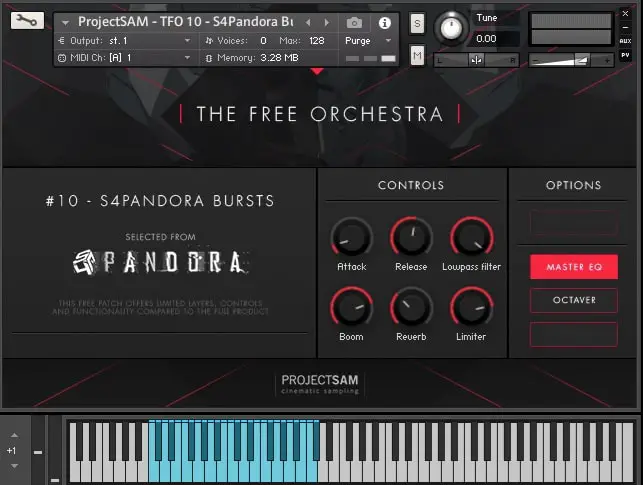
OS: Windows Win Mac Mac Bit Version: 64-bit Developer: ProjectSAM B.V Size: 920 MB Rating: 82/100
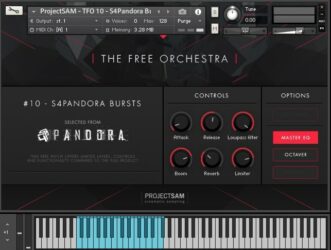
The Free Orchestra offers a range of cinematic sounds drawn from ProjectSAM’s well-known libraries. It includes strings, brass, choirs, and sound effects recorded in a concert hall, giving users an authentic orchestral feel. The library includes 16 free instruments and 10 multi setups.
This collection is suited for film scoring, trailer music, or adding dramatic layers to any track. Each preset is ready to use with expressive controls such as reverb, EQ, and dynamics. The Free Orchestra runs in Kontakt Player and works on both Windows and macOS systems.
Features
- Includes 16 Free Orchestral Instruments
- Works With Free Kontakt Player
- Recorded In A Concert Hall
- Offers Cinematic String And Brass Sounds
- Completely Free With No Hidden Costs
- Simple And Clear Control Interface
- Built-In Reverb And Limiter Tools
- Has Octaver And Master EQ Options
- Usable In Commercial Music Projects
- Ideal For Cinematic And Trailer Music
Pros
- Completely free with no limits
- High quality cinematic sound design
- Works with free Kontakt Player
- Recorded in real concert hall
- Includes 16 free instruments
- Has 10 creative multis
- Compact library with big sound
- Built-in reverb and EQ
- Quick setup through Native Access
- Great gateway to ProjectSAM sound
Cons
- Requires full Kontakt installation
- Limited control over articulations
- No deep sound customization tools
- Interface feels dated and small
- Few microphone positions available
- Lacks round-robin sample variation
- Smaller library than paid suites
- Some patches sound too similar
- Heavy CPU use on some systems
- No standalone version available
Testimonials
Audio Demo
Tips
- I use the mod wheel to control dynamics for a more emotional and real-sounding performance.
- I try layering The Free Orchestra cello with another string plugin to make the sound fuller and richer.
- I always adjust the reverb and volume to match my mix so the cello doesn’t sound too far away or too strong.
- Use automation on volume and expression to make cello parts feel more human and less robotic.
- Adjust velocity in your MIDI notes to control how soft or strong each bow stroke sounds.
- I often use EQ to remove extra low-end rumble and make space for other instruments in the mix.
- Try using an external convolution reverb to make the cello sound like it’s in a real concert hall.
3. Labs Strings
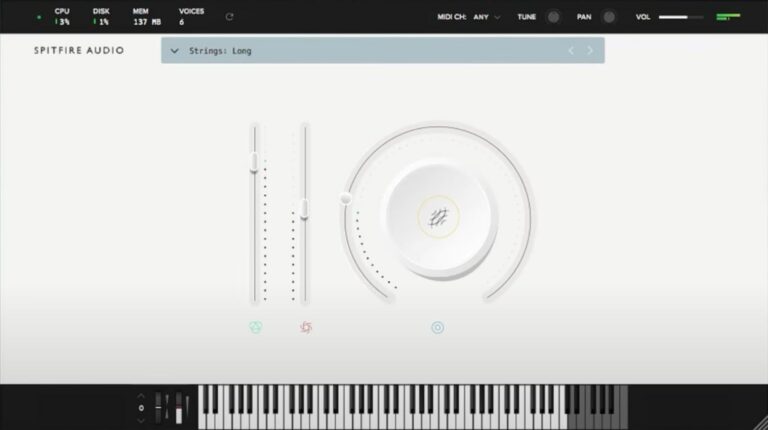
OS: Windows Win Mac Mac Bit Version: 64-bit Developer: Spitfire Audio Size: 698.4 MB Rating: 78/100
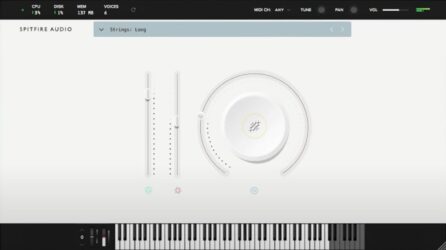
Labs Strings offers the sound of fourteen top London string players, recorded at Spitfire Audio’s studio by engineer Harry Wilson. Using a mix of quality microphones, including the vintage BBC AXB1, the plugin delivers warm, emotional tones that feel natural and expressive.
Its simple controls let you shape volume, expression, and texture with ease. The sounds lean toward smooth, cinematic pads rather than fast, detailed playing. Ideal for adding depth, mood, or soft layers, Labs Strings brings rich orchestral color to any music project.
Features
- Features Fourteen London String Players
- Recorded At Spitfire Headquarters
- Includes Vintage BBC AXB1 Microphone
- Offers Three Distinct String Sounds
- Simple And Clean User Interface
- Big Circle Dial For Tone Shaping
- Expression Slider For Dynamics
- Instrument Menu For Sound Selection
- Available In VST And AU Formats
- Runs On 64-Bit Architecture
Pros
- Rich cinematic string sound quality
- Small ensemble for intimate tone
- Low CPU usage and memory
- Emotional, expressive string dynamics
- Recorded with premium microphones
- Created by top London players
- Wide stereo image and warmth
- Instantly adds cinematic atmosphere
- High quality for a free plugin
- Perfect for film scoring moods
Cons
- Very few articulation options
- Limited tone shaping controls
- No real mic mix options
- Baked-in reverb hard to remove
- Not good for fast playing
- Lacks full orchestral depth
- Audible noise on left channel
- High memory use for size
- Limited dynamic range control
- No legato performance option
Testimonials
Tips
- I adjust the expression and dynamics sliders to make the strings sound more real.
- I layer different articulations to make my music sound more alive.
- Using the built-in reverb can make the strings sound more lush and wide.
- Automating volume and panning can make the strings feel more dynamic and alive.
- Balancing the volume across different string sections keeps the mix clear.
- Keeping some space between string layers helps prevent a muddy mix.
- Using MIDI expression makes the strings sound more like real players.
4. Slinky Violin

OS: Windows Win Mac Mac Bit Version: 64-bit Developer: decent|SAMPLES Size: 148 MB Rating: 78/100
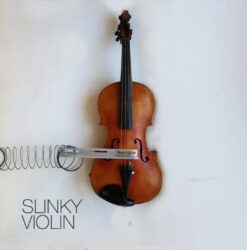
Slinky Violin is a free sampled instrument created by attaching a slinky to a violin, producing dusty, metallic, and haunting tones. It includes soft and loud velocity layers, along with a duet patch that combines both ranges.
The library is available for Kontakt, SFZ, and Decent Sampler. A mod wheel patch controls dynamics, while convolution reverb adds space. It contains 24-bit, 48 kHz samples and is 148 MB in size.
Features
- Five Patch Versions
- Two Velocity Layers
- Velocity Controls Volume
- Forte And Piano Layers
- Duet Layer Playback
- Modwheel Dynamic Control
- Convolution Reverb With Level Control
- Available In Three Formats
- 24-Bit, 48 KHz Samples
- 148 MB Library Size
Pros
- Offers a rare violin sound
- Creates haunting musical textures
- Works with three sample formats
- Supports free Decent Sampler
- Supports flexible SFZ playback
- Works with full Kontakt
- Includes five useful patches
- Offers a duet patch
- Includes modwheel dynamics control
- Built-in convolution reverb adds depth
Cons
- Not a realistic violin
- Only two velocity layers
- No true legato transitions
- No bow or articulation controls
- No round robin note variation
- Limited dynamic shaping options
- No native VST3 or AU
Testimonials
Tips
- I start with the soft sound to make gentle pads and quiet melodies.
- I raise the dynamic control to make the violin sound stronger and more present.
- I turn the Slinky control slowly to find new tones between violin and string machine sounds.
- I add a little reverb to place the violin in a larger space.
- I automate the Slinky control so the sound changes during the song.
- I layer Slinky Violin with a piano or pad for more depth.
- Change the MIDI velocity to add feeling and movement to each note.
5. Orchestral Strings One

OS: Windows Win Mac Mac Bit Version: 32-bit, 64-bit Developer: Sound Magic Size: 204 MB Rating: 70/100
Orchestral Strings One offers the sound of a full orchestral string section recorded in the famous Berliner Hall. It combines 14 violins, 10 violas, 8 cellos, and 6 double basses into one instrument powered by the NEO Hybrid Modeling Engine for an expressive, natural tone.
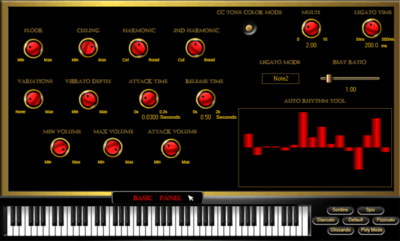
This plugin provides control over legato, dynamics, and tone color through nearly 20 adjustable settings. With multiple articulations, microphone positions, and real-time key switching, it delivers a realistic string performance that works well for both studio use and live playing.
Features
- Full String Orchestra Setup
- NEO Hybrid Modeling Engine
- Real-Time Articulation Switching
- Expressive Legato Control System
- Multiple Microphone Position Options
- Built-In High-Quality Reverb
- 64-Step Phrase Sequencer
- Low CPU And RAM Usage
- Harmonic And 2nd Harmonic Layers
- Customizable Vibrato Depth Setting
Pros
- Recorded in famous Berliner Hall
- Includes full string orchestra layers
- Uses hybrid modeling for realism
- Multiple microphone positions available
- Real-time control with key switches
- Auto Rhythm Tool speeds workflow
- Sequencer helps create string phrases
- Legato feels smooth and natural
- Small download for large orchestra
- Free professional-quality sound option
Cons
- Crashes when switching presets fast
- Uses more memory than expected
- More CPU hungry than others
- Sometimes fails to load in DAW
- Settings don’t always save correctly
- UI looks old and small
- Not retina or 4K ready
- Limited articulations for pro users
- Less realistic than big libraries
- Slow response on older computers
Testimonials
Tips
- I always adjust the expression control to make soft and loud parts feel more natural.
- I try layering two different string sections together for a fuller sound.
- Combine multiple articulations, like legato and staccato, for more lifelike playing.
- Keep string sections panned across the stereo field to mimic a real orchestra setup.
- Use a MIDI controller with a mod wheel to control dynamics smoothly.
- Balance the volume of violins, violas, cellos, and basses for a rich ensemble sound.
- Apply gentle compression to even out the string dynamics without losing expression.
6. One Track Orchestra
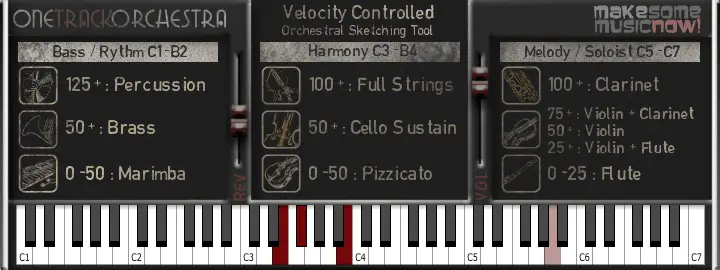
OS: Windows Win Mac Mac Bit Version: 64-bit Developer: Misery Factor Size: 47 MB Rating: 64/100
One Track Orchestra offers a fast way to sketch full orchestral ideas in your DAW using just one track. It combines strings, brass, woodwinds, and percussion across the keyboard, letting you create quick arrangements without setting up multiple instruments or templates.
Each section reacts to velocity, giving different tones depending on how softly or hard you play. With only reverb and volume controls, it stays simple while letting you focus on ideas. It’s ideal for songwriters, game jam projects, or quick demos needing instant orchestral sound.
Features
- Full Orchestra On One Track
- Free 64-Bit VST Instrument
- Includes Strings, Brass, Woodwinds, Percussion
- Keyboard Mapped Instrument Sections
- Velocity Responsive Sound Changes
- Simple Reverb And Volume Controls
- Low CPU And Memory Usage
- Fast Loading And Low Latency
- Works Well In Most DAWs
- Based On VSCO Community Samples
Pros
- Full orchestra on one track
- Light on CPU usage
- Works well on low-spec PCs
- Includes strings, brass, and woodwinds
- Instant cinematic sound with reverb
- Free alternative to big libraries
- Quick setup for fast scoring
- No need for multisample setup
- Very small footprint and file size
- 64-bit support for modern DAWs
Cons
- Very limited sound realism
- No multiple articulations support
- Lacks round-robin sampling variety
- User interface looks outdated
- Not suitable for final productions
- Can sound flat or synthetic
- Velocity mapping feels inconsistent
- Crashes when changing presets fast
- Limited dynamic expression range
- No updated versions or support
Testimonials
Tips
- Use velocity control to make horn notes sound more real and expressive.
- Layering multiple horn articulations can give a more natural and full sound.
- Reverb and room simulation can make virtual horns sound more like a live recording.
- Use EQ to remove low rumbles and keep the horn section clear in the mix.
- Panning different horn parts slightly left and right helps them sound wide and balanced.
- Try using compression to control horn dynamics if they jump out too much in the mix.
7. Serpo
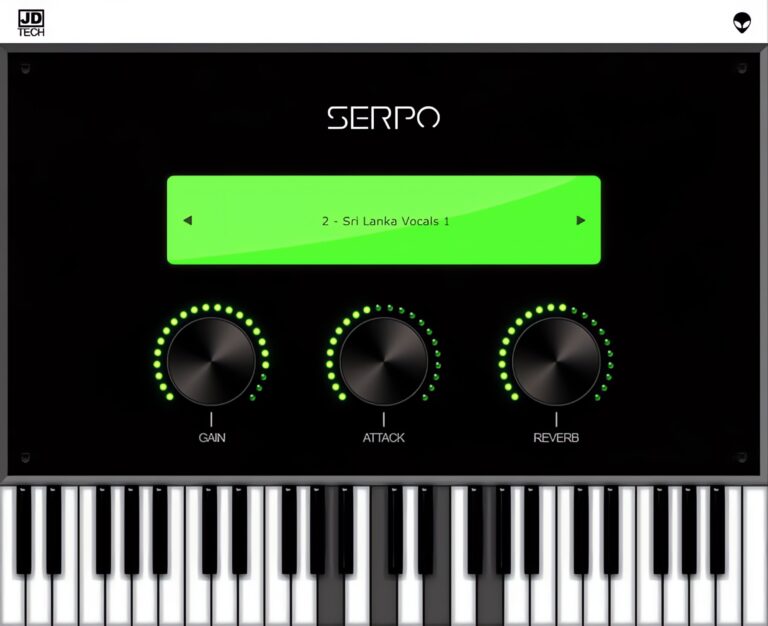
OS: Windows Win Mac Mac Bit Version: 32-bit, 64-bit Developer: JD TECH Size: 30 MB Rating: 63/100
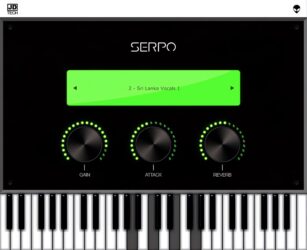
Serpo offers a free and simple way to explore a wide range of sounds for music creation. Developed by JD TECH, it includes instruments such as piano, violin, guitar, trumpet, and drums, along with male and female vocals. Each sound is sampled from artists around the world.
The plugin includes basic controls like gain, attack, and reverb to shape tone and depth. Its built-in preset selector allows quick sound changes for different styles. Serpo works on both Windows and Mac, making it a practical tool for producers seeking fresh, ready-to-use sounds.
Features
- Free Rompler VST Plugin
- Original Sounds From Artists
- User-Friendly Interface Design
- Reverb Effect For Depth
- Preset Selector For Quick Access
- Built-In Virtual Keyboard
- Light On CPU Usage
- Works On Windows And Mac
- Supports VST And AU Formats
- Includes Leads, Pads, And Basses
Pros
- Free to download and use
- Works on Windows and Mac
- Wide mix of real instruments
- Includes horns and brass sounds
- Low CPU use during play
- Fast loading with no extras
- Includes reverb for space depth
- Attack control for sound shaping
- Better variety than most free horns
- Lightweight but good sound quality
Cons
- Sound quality below pro standards
- Missing detailed horn articulations
- Lacks multilayer instrument sampling
- No modulation or LFO options
- Does not support MIDI learn
- No velocity sensitivity options
- Limited to basic sound shaping
- Few updates since initial release
- Bugs and crashes sometimes reported
- Not optimized for big projects
Testimonials
Tips
- I like to play with the attack and release knobs to make the horn sound smoother or punchier.
- I often use a MIDI keyboard to control Serpo because it helps me get more natural-sounding notes.
- I use a small amount of reverb to make the horn sound like it’s in a real room.
- I like to use EQ to cut some low frequencies so the horn doesn’t clash with the bass.
- Automate the expression or modulation wheel in your DAW for more lifelike horn phrasing.
- Layer Serpo with another horn plugin to get a fuller, more realistic brass section sound.
- Adding light compression can help control horn dynamics and keep the volume steady.
8. VSCO2 Violin
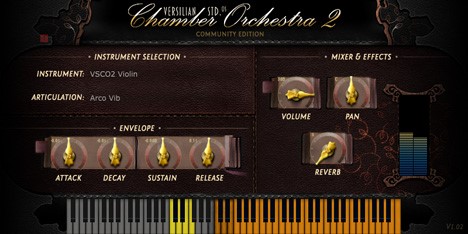
OS: Windows Win Mac Mac Bit Version: 32-bit, 64-bit Developer: bigcat Instruments Size: 100 MB Rating: 61/100
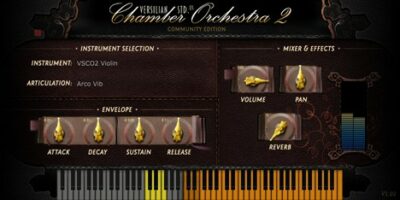
VSCO2 Violin is a sampled solo violin from Bigcat Instruments, recorded by Versilian Studios and Sam Gossner. It includes six playing styles: arco vibrato, forte and piano variants, pizzicato, spiccato, and tremolo, covering sustained, short, and expressive parts.
The plugin provides attack, decay, sustain, release, volume, pan, and reverb controls, plus an on-screen keyboard and level meter. It runs on Windows and Mac in VST and AU formats, with 32-bit and 64-bit support.
Features
- Sampled Solo Violin Instrument
- Six Violin Articulations
- Arco Vibrato Playing Styles
- Pizzicato And Spiccato Articulations
- Tremolo Violin Articulation
- Adjustable Attack, Decay, Sustain
- Adjustable Release And Volume
- Stereo Pan Control
- Built-In Reverb Control
- Playable Note Range Display
Pros
- Includes expressive vibrato choices
- Offers soft and strong arco
- Adds pizzicato and spiccato styles
- Includes tremolo for added tension
- Built-in attack and decay controls
- Adjustable sustain and release
- Reverb adds room depth
- No sampler plugin is needed
Cons
- Only six playing styles
- No legato articulation included
- No marcato articulation included
- No harmonic articulation included
- No round-robin controls listed
- Sound may feel less realistic
- Spiccato has a note bug
Testimonials
Tips
- I start with a simple violin line before adding more notes. This helps me hear the sound clearly.
- I use the mod wheel to shape long notes when the plugin supports it. Slow changes can make the violin sound more alive.
- I keep my MIDI notes inside the violin’s playable range. Notes outside that range may not play correctly.
- I adjust note velocity to control attack and volume. Soft notes can sound gentle, while stronger notes can sound bold.
- I add a little reverb to place the violin in a room. I avoid using too much, so the sound stays clear.
- Try different articulations when they are available, such as sustain, pizzicato, tremolo, or spiccato. Many VSCO2 instruments use keyswitches to change articulations.
- Humanize MIDI timing by moving a few notes slightly off the grid. Small changes can make the performance feel less mechanical.
9. LDK1609 Violin

OS: Windows Win Mac Mac Bit Version: 32-bit, 64-bit Developer: bigcat Instruments Size: 174 MB Rating: 59/100
LDK1609 Violin is a sampled acoustic violin recorded from an E. H. Roth 1925 instrument. It includes 250 samples across six playing styles: arco with or without vibrato, pizzicato, spiccato, and tremolo.
The plugin provides volume, pan, and envelope controls for shaping the sound. It supports MIDI input and is available for Windows and Mac in VST and AU formats, with 32-bit and 64-bit versions.
Features
- 250 Recorded Violin Samples
- Arco Without Vibrato
- Arco With Vibrato
- Pizzicato Without Vibrato
- Pizzicato With Vibrato
- Spiccato Playing Style
- Tremolo Playing Style
- Attack Decay Sustain Release
- MIDI Keyboard Input
- VST And AU Formats
Pros
- Natural sampled acoustic violin tone
- Recorded from a 1925 Roth violin
- 250 samples for detailed playing
- Six useful playing articulations
- Arco without vibrato sounds clean
- Arco vibrato adds warm expression
- Pizzicato choices add rhythmic variety
- Spiccato brings lively short notes
- Tremolo adds tension and movement
- Focused solo violin sound
Cons
- Only one velocity layer
- No round robin variation
- No clear legato switching
- No dynamic layer control
- Single violin limits arrangements
- No ensemble or orchestra patches
- Instrument loading may fail
Testimonials
Tips
- I start with the arco non-vibrato sound on F1 because it is the default setting. This gives me a clear violin tone for testing notes.
- I use F#1 for arco vibrato when I want a warmer and more singing sound. Vibrato works well for slow melodies.
- I press G1 for pizzicato non-vibrato when I need short, plucked notes. This sound is useful for light rhythms.
- I press A1 for spiccato when I want quick, bouncing notes. This works well for lively patterns and repeated rhythms.
- I use E1 for tremolo when I need a shaking, tense sound. I keep the notes short if the part starts to sound too busy.
- I add small changes to note timing and volume so the part does not sound too perfect. Tiny changes can make a violin line feel more human.
- I use MIDI expression or volume automation to shape each phrase. I make notes grow louder, then softer, like a real player would.
10. Edirol Orchestral

OS: Windows Win Bit Version: 32-bit Developer: Paul Cecchetti Music Size: 89.6 MB Rating: 57/100
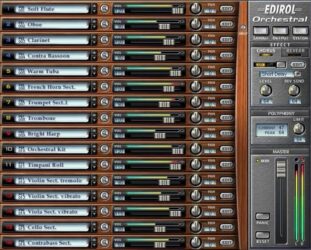
Edirol Orchestral is a discontinued Windows plug-in with acoustic sounds for strings, woodwinds, brass, percussion, keyboards, and piano. It includes vibrato, tremolo, pizzicato, and spiccato articulations, plus 16-part multitimbral operation and up to 128 voices.
The plug-in offers multiple outputs, MIDI control, chorus, reverb, delay, and instrument search. It is available in 32-bit VST and DXi formats, so 64-bit systems may require a bridge. Some hosts may not recall presets or settings correctly.
Features
- Premium Acoustic Instrument Sounds
- Strings, Woodwinds, And Brass
- Realistic Vibrato And Tremolo
- Pizzicato And Spiccato Articulations
- Sixteen-Part Multitimbral Operation
- 128-Voice Polyphony Support
- Up To 24-Bit, 96kHz Resolution
- Multiple Audio Output Options
- Assignable MIDI Control
- Chorus, Reverb, And Delay
Pros
- Broad brass and woodwind selection
- Realistic vibrato and tremolo articulations
- Useful pizzicato and spiccato articulations
- Sixteen instrument slots at once
- Up to 128 voices polyphony
- Sixteen-part multitimbral performance
- High-quality 24-bit sampling
- Supports sampling rates up to 96 kHz
- Multiple audio outputs available
- Fully assignable MIDI controls
Cons
- Only works on Windows
- Uses outdated 32-bit technology
- Needs a bridge on 64-bit systems
- Does not support modern VST3
- Limited brass playing styles
- No true legato brass lines
- Sounds less natural than newer libraries
Testimonials
Tips
- I use the velocity controls to shape each note. Softer hits sound gentle, while harder hits sound stronger.
- I adjust the room or reverb level to help the brass sound like it is playing in a real space.
- I layer trumpet, trombone, and French horn patches for a fuller brass section.
- Keep brass parts in a comfortable pitch range. Very high or very low notes may sound less natural.
- Use an equalizer to remove muddy low sounds and add a little brightness when needed.
- Use automation to change volume, expression, or filter settings during the song.
- Listen to the brass with the whole mix, not only by itself. A sound that seems small alone may fit the song perfectly.
11. Violins

OS: Windows Win Mac Mac Bit Version: 32-bit Developer: Freemusicproduction.net Size: 141 MB Rating: 53/100
Violins is a 32-bit VST instrument with 13 violin types, including classic, vibrato, and pizzicato sounds. It provides controls for articulation, unison, glide, pitch, volume, filters, envelopes, and reverb, and runs on Windows and Mac.
Its two LFOs, modulation matrix, step modulator, arpeggiator, and recorder create changing patterns and recorded performances. Up to 16 instrument slots support layered parts, while mute, solo, MIDI, mix, and effects controls help shape each sound.
Features
- 13 Distinct Violin Types
- Classic, Vibrato, And Pizzicato Sounds
- Articulation And Vibrato Controls
- Unison, Glide, And Pitch Controls
- Filter Types With X-Y Pad
- Amp, Filter, Pitch, And User Envelopes
- Modulation Matrix For Sound Changes
- Step-Based Sound Modulator
- Arpeggiator With Performance Recorder
- Up To 16 Instrument Slots
Pros
- Offers 13 distinct violin sounds
- Includes sustain and vibrato styles
- Adds pizzicato and other articulations
- Supports unison and glide modes
- Adds an expressive X-Y filter pad
- Offers a built-in modulation matrix
- Creates rhythmic step changes
- Includes a built-in arpeggiator
- Records and replays performances
- Supports up to 16 parts
Cons
- Only supports old 32-bit VST
- Sounds less natural than sampled violins
- No true legato control listed
- No round-robin sample variation listed
- Only basic violin styles included
- No velocity layers listed
- No microphone or room choices
Tips
- I start by checking that HALion Sonic SE 3.4.30 or newer is installed before loading the Violins instrument. This helps avoid setup problems.
- I try each violin type to find the sound that fits my song. The instrument includes 13 violin types to explore.
- I keep the violin part in a comfortable playing range. Very high or very low notes may sound less natural.
- I change the note lengths to make the part feel more real. Short notes can sound light, while long notes can sound smooth.
- I adjust the velocity of each MIDI note. Small changes in volume can make the performance feel more human.
- I add gentle reverb when I want a large room sound. I use less reverb when I want the violin to sound close.
- Check the plugin in both solo and full-mix mode. A sound that is beautiful alone may need changes to fit the whole song.
12. Sonatina Violin Library

OS: Windows Win Mac Mac Bit Version: 32-bit, 64-bit Developer: bigcat Instruments Size: 112 MB Rating: 52/100
Sonatina Violin Library is a free sampled violin plugin made from edited Sonatina Symphonic Orchestra samples. It offers nine sound groups, including solo violin, sustained, tremolo, staccato, and pizzicato sections for first and second violins.
Volume, pan, and ADSR controls shape the sound, while the piano and on-screen keyboards show playable notes and range. It runs on Windows and Mac in VST and AU formats, with 32-bit and 64-bit support.
Features
- Sampled Violin Instrument
- Nine Violin Sound Groups
- Solo Violin Sound
- First Violin Sustains
- First Violin Tremolo
- First Violin Staccato
- First Violin Pizzicato
- Second Violin Sustains
- VST And AU Formats
- 32-Bit And 64-Bit Support
Pros
- Nine violin sound groups
- Includes solo violin sounds
- Includes first violin sections
- Includes second violin sections
- Offers tremolo and pizzicato
- Has sustain and staccato options
- Uses sampled violin sounds
- Works in VST and AU
- Simple ADSR sound shaping
- Built-in piano keyboard
Cons
- Limited to basic violin controls
- Only nine sampled groups
- No dedicated legato control
- No vibrato control listed
- No velocity response listed
- May crash some music programs
- Can glitch during playback
Testimonials
Tips
- I keep the Sonatina Violin plugin and its “.instruments” folder together. This helps the plugin find its sound files after installation.
- I draw small changes in MIDI volume instead of keeping every note at the same level. These changes can make the melody sound more like a player is shaping it.
- Try the available playing styles, such as arco, vibrato, tremolo, spiccato, and pizzicato, when the plugin provides them. Different styles can give the same melody very different moods.
- Use a small amount of reverb to place the violin in a room. Too much reverb can make the notes blurry.
- Use automation to raise the volume at the start of a phrase and lower it at the end. This simple move can make a sampled violin sound more alive.
- Check the violin in the full mix, not only when it is soloed. A sound that seems thin alone may fit perfectly with the other instruments.
13. Sonatina Orchestra Module

OS: Windows Win Bit Version: 32-bit, 64-bit Developer: bigcat Instruments Size: 654 MB Rating: 52/100
Sonatina Orchestra Module is a VST rompler with 20 orchestral instruments and more than 50 articulations. It includes solo and section sounds for strings, brass, woodwinds, and percussion, plus piano, harp, and choir. Articulations include pizzicato and staccato.
Its controls include volume, pan, attack, decay, sustain, and release, with an on-screen keyboard for playing notes. Based on samples from the Sonatina Symphonic Orchestra library, it is designed for film scores, game music, and other orchestral parts on Windows.
Features
- Complete Orchestral Instrument Rompler
- Twenty Orchestral Instruments Included
- Over Fifty Playing Articulations
- Solo Major Instrument Sounds
- Full Instrument Section Sounds
- Pizzicato String Section Articulations
- Staccato Strings Brass And Flute
- Large Orchestral Percussion Section
- Grand Piano And Harp Included
- Choir Instrument Included
Pros
- Complete orchestra in one plugin
- Twenty instruments cover core needs
- Over fifty playing options
- Solo parts for major instruments
- Full sections include viola
- Full sections include double bass
- Useful pizzicato string parts
- Strong staccato choices for scoring
- Large percussion section included
- Includes piano, harp, and choir
Cons
- Windows-only plugin support
- No reliable Mac support
- Host controls are not exposed
- DAW automation becomes difficult
- Some sustain loops sound broken
- Decay response seems unreliable
- No clear dynamic expression controls
Testimonials
Tips
- I use separate tracks for strings, woodwinds, brass, and percussion. This makes the orchestra easier to control.
- I change note lengths to create more feeling. Short notes can sound sharp, while long notes can sound smooth.
- I add a small amount of reverb to place the instruments in the same room. Too much reverb can make the music sound muddy.
- Write parts that fit the real range of each instrument. Very high or very low notes may sound weak or unnatural.
- Use different articulations for different jobs. Sustained notes, short notes, pizzicato, and tremolo can give the same section very different sounds.
- Do not make every instrument play all the time. Leaving space helps the main melody stand out.
- Use velocity to shape the music when the plugin responds to it. Stronger notes can add energy, while softer notes can sound gentle.
14. DSK Strings

OS: Windows Win Bit Version: 32-bit Developer: DSK Music Size: 31 MB Rating: 50/100
DSK Strings offers four classic string instruments—violin, viola, cello, and contrabass—with adjustable layers and 22 waveforms for flexible sound design. It includes delay and flanger effects that can be shaped with MIDI automation for greater control during performance or mixing.
You can fine-tune pitch using the micro-detuner, shift octaves, and shape tone through ADSR controls. Reverb, portamento, and stereo width options help create natural depth and movement, making DSK Strings a solid tool for adding expressive, realistic string sounds to your music.
Features
- Two Instrument Layers
- Twenty-Two Waveforms
- Four Instrument Groups
- Micro-Detuner For Fine Tuning
- ADSR Envelope Controls
- Reverb With Size And Width
- Delay And Flanger Effects
- MIDI Automation Support
- Portamento Time Control
- Stereo Spread Adjustment
Pros
- Includes cello, viola, and violin
- Two sound layers for mixing
- Has 22 colorful waveforms
- Fine-tuning with micro-detuner
- Built-in delay and flanger effects
- Supports MIDI automation control
- Adjustable ADSR for sound shaping
- Reverb options add real depth
- Smooth portamento between notes
- Flexible for creative sound design
Cons
- Very low overall volume output
- Only works on Windows systems
- No 64-bit plugin version
- Crashes often in some DAWs
- High CPU use on weak PCs
- Latency issues when recording live
- Limited preset variety available
- No macOS support at all
- Does not save presets reliably
- Sounds less real than newer VSTs
Testimonials
Tips
- I use the mod wheel to bring life to my cello sounds, making them feel more real and alive.
- I adjust the attack and release knobs so the notes fade in and out smoothly, like real players.
- I mix in a bit of reverb to make the strings sound like they’re in a big hall.
- I use MIDI velocity to control how soft or hard the notes play for more feeling.
- Panning violins, violas, and cellos to different spots can mimic a real orchestra layout.
- Adding a soft compressor can give the cello more presence in the mix.
- Automation of volume and tone adds life and emotion to a simple string track.
15. DSK Overture
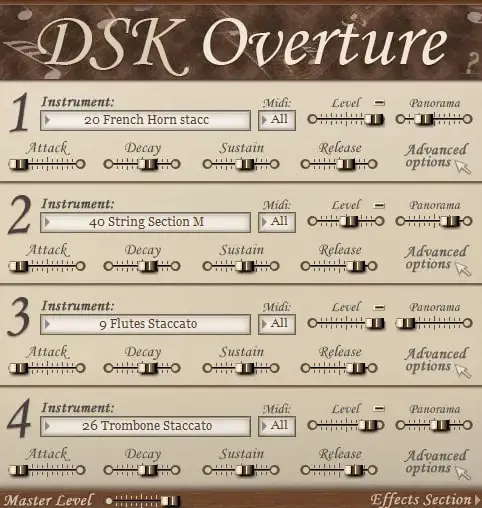
OS: Windows Win Bit Version: 32-bit Developer: DSK Music Size: 85 MB Rating: 47/100
DSK Overture is a free orchestral plugin that brings a range of classic instruments into one simple tool. It includes strings, brass, woodwinds, and percussion, letting you mix up to four layers for rich and varied sounds. Each section can be shaped with volume, pan, and filter controls.
It offers built-in effects like reverb, delay, and chorus to add depth and space to your tracks. With MIDI control for each layer, you can create quick orchestral sketches or experiment with layered textures in your music projects.
Features
- Four Instrument Layers Available
- Adjustable Amp Envelope Controls
- Advanced Multimode Filter Options
- Built-In Reverb, Delay, Chorus
- Supports MIDI Automation
- Velocity Sensitive Sound Response
- Attack, Decay, Sustain, Release Settings
- Simple Instrument Selector Interface
- MIDI Channel Selection Feature
- Master Volume Level Adjustment
Pros
- Four instrument layers per instance
- Offers both solo and section presets
- Includes built-in reverb and delay
- Customizable envelope controls
- Advanced filter options available
- Supports MIDI automation control
- Can use four MIDI channels
- Lightweight compared to some libraries
- Simple interface for quick setup
- Free and easy to download
Cons
- Only works on Windows systems
- No 64-bit plugin version
- Heavy CPU use on laptops
- Can crash during big projects
- Strings lack real warmth
- Some samples are out of tune
- Few updates or bug fixes
- Noise and crackles on playback
- Very limited sound customization
- Sample quality lower than rivals
Testimonials
Tips
- I try changing the attack and release settings to make notes sound smoother.
- I use EQ to remove any muddiness from the cello low tones.
- I use reverb to make the cello sound like it’s playing in a big room.
- Apply light compression to the cello to keep the sound steady and clear.
- Experiment with note dynamics for expressive cello performances.
- Use automation to make the cello volume rise and fall naturally over time.
- Blending cello plugins with other strings can create a realistic symphonic sound.
Free Violin Samples
Here are a couple of links for free violin samples and authentic violin sounds.
- Free Sound – This website has hundreds of free violin string samples to download.
- Looperman – This site offers a vast collection of royalty-free violin loops, samples, and sounds uploaded by other musicians.
- Philharmonia – Thousands of free recordings of Philharmonia musicians are available to download.
- Sample Focus – Offers free Violin samples and loops.
Best Violin VST Plugins Compared
This table compares the top violin VST plugins by features, controls, effects, formats, and more.
| Details | Layers | The Free Orchestra | Labs Strings | Slinky Violin | Orchestral Strings One | One Track Orchestra | Serpo | VSCO2 Violin | LDK1609 Violin | Edirol Orchestral |
|---|---|---|---|---|---|---|---|---|---|---|
| Image | 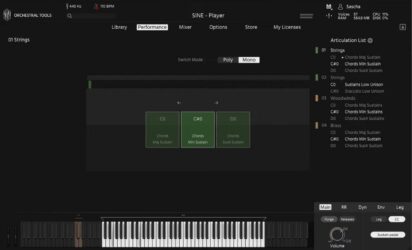 |
 |
 |
 |
 |
 |
 |
 |
|
 |
| Rating | ||||||||||
| OS | Windows, Mac | Windows, Mac | Windows, Mac | Windows, Mac | Windows, Mac | Windows, Mac | Windows, Mac | Windows, Mac | Windows, Mac | Windows |
| Formats | VST, VST3, AU, AAX | Kontakt | VST, AU | Kontakt, SFZ | VST, AU | N/A | VST, AU | VST, AU | VST, AU | VST |
| Bit Version | 64-bit | 64-bit | 64-bit | 64-bit | 32-bit, 64-bit | 64-bit | 32-bit, 64-bit | 32-bit, 64-bit | 32-bit, 64-bit | 32-bit |
| Developer | Orchestral Tools | ProjectSAM B.V | Spitfire Audio | decent|SAMPLES | Sound Magic | Misery Factor | JD TECH | bigcat Instruments | bigcat Instruments | Paul Cecchetti Music |
| License | Freeware | Freeware | Freeware | Freeware | Freeware | Donationware | Freeware | Freeware | N/A | Freeware |
| Sample-Based | Yes | Yes | Yes | Yes | Yes | Select | Select | Yes | Yes | Yes |
| Download Size | 10 GB | 920 MB | 698.4 MB | 148 MB | 204 MB | 47 MB | 30 MB | 100 MB | 174 MB | 89.6 MB |
| CPU Load | Low | Low | Low | Low | Low | Low | Low | Low | Low | Low |
| Polyphony | 150 | 64 | 64 | N/A | 60 | 8 | 8 | 32 | 32 | 128 |
| Features | Orchestral layers, One-touch chords, Dynamic blending, Multiple mic positions, High-quality recordings, Intuitive interface, Free download | Free library, Cinematic instruments, Orchestral sounds, Concert hall recording, Kontakt Player compatible, Creative multis, User-friendly interface | Intimate Ensemble, Cinematic Sound, Expressive Controls, Tone Shaping, Simple Interface, Instant Mood, Free Instrument | Slinky violin, Five patch variations, Convolution reverb, Velocity control, Modwheel dynamics, Forte layers, Piano layers | Hybrid Modeling Engine, Multiple Articulations, Real-Time Key Switching, Expressive Legato System, Auto Rhythm Tool, Multi-Mic Positions, Built-In Reverb | Single-track orchestra, Velocity mapping, Reverb control, Volume control, Keyboard zones, Instrument icons, Free plugin | Original sounds, Gain control, Attack control, Reverb effect, Preset selector, User-friendly interface, Versatile library | Sampled Solo Violin, Six Articulations, Arco Vibrato, Pizzicato, Spiccato, Tremolo, On-Screen Keyboard | Realistic Sound, 250 Samples, Arco, Vibrato, Pizzicato, Spiccato, Tremolo | Premium Acoustic Sounds, Realistic Articulations, 16-Part Multitimbrality, 128-Voice Polyphony, Multiple Outputs, Assignable MIDI Control, Built-In Effects |
| Controls | Library Tab, Performance Tab, Mixer Tab, Options Tab, Store Tab, My Licenses Tab, Articulation List | Attack, Release, Lowpass Filter, Boom, Reverb, Limiter, Master EQ | Instrument Menu, Volume Slider, Expression Slider, Big Circle Dial, Mode Buttons, Keyboard, Menu Bar | Velocity Control, Modwheel Dynamics, Reverb Level | Floor, Ceiling, Harmonic, Vibrato Depth, Attack Time, Release Time, Legato Mode | Bass / Rhythm, Harmony, Melody / Soloist, Reverb Knob, Volume Knob, Keyboard Display, Instrument Icons | Display Screen, Arrow Buttons, Gain Knob, Attack Knob, Reverb Knob, Preset Selector, Keyboard | Instrument, Articulation, Attack, Decay, Sustain, Release, Volume | Volume, Pan, Instrument Name, Sound Style, Attack, Decay, Sustain | Sound Slots, Instrument Browser, Search, Volume Sliders, Pan Controls, Edit Buttons, Master Volume |
| Effects Included | Reverb | Lowpass Filter, Boom, Reverb, Limiter, Master EQ, Octaver | Unknown | Convolution reverb | Reverb | Reverb | Reverb, Filter, Glide | Reverb | Unknown | Chorus, reverb, short delay |
| MIDI Learn | Unknown | Yes | Unknown | No | Unknown | Unknown | Unknown | Yes | No | Yes |
| Presets | 100 | 1 | 45 | 5 | 15 | N/A | 100 | N/A | N/A | 144 |
| Standalone | No | No | No | No | Yes | Select | Yes | No | No | No |
| Last Updated | 06/16/2020 | 05/09/2023 | 02/22/2024 | N/A | 07/12/2013 | N/A | 06/01/2024 | 12/14/2018 | 02/17/2015 | 02/06/2019 |
Our Favorite Violin VST Plugins
Our top picks for the best free violin VST plugins are Layers by Orchestral Tools, The Free Orchestra by ProjectSAM B.V, and Labs Strings by Spitfire Audio. These plugins offer tons of high-quality sounds, features, and effects.
| Details | Layers | The Free Orchestra | Labs Strings |
|---|---|---|---|
| Image |
|
|
|
| Rating | |||
| OS | Windows, Mac | Windows, Mac | Windows, Mac |
| Formats | VST, VST3, AU, AAX | Kontakt | VST, AU |
| Bit Version | 64-bit | 64-bit | 64-bit |
| Developer | Orchestral Tools | ProjectSAM B.V | Spitfire Audio |
| License | Freeware | Freeware | Freeware |
| Sample-Based | Yes | Yes | Yes |
| Download Size | 10 GB | 920 MB | 698.4 MB |
| CPU Load | Low | Low | Low |
| Polyphony | 150 | 64 | 64 |
| Features | Orchestral layers, One-touch chords, Dynamic blending, Multiple mic positions, High-quality recordings, Intuitive interface, Free download | Free library, Cinematic instruments, Orchestral sounds, Concert hall recording, Kontakt Player compatible, Creative multis, User-friendly interface | Intimate Ensemble, Cinematic Sound, Expressive Controls, Tone Shaping, Simple Interface, Instant Mood, Free Instrument |
| Controls | Library Tab, Performance Tab, Mixer Tab, Options Tab, Store Tab, My Licenses Tab, Articulation List | Attack, Release, Lowpass Filter, Boom, Reverb, Limiter, Master EQ | Instrument Menu, Volume Slider, Expression Slider, Big Circle Dial, Mode Buttons, Keyboard, Menu Bar |
| Effects Included | Reverb | Lowpass Filter, Boom, Reverb, Limiter, Master EQ, Octaver | Unknown |
| Download | Download Layers | Download The Free Orchestra | Download Labs Strings |
Related: 11 Best Free Harp VST Plugins
Violin VST FAQs
How to Install Violin VST Plugins
To install violin VST plugins on Windows or Mac, extract the files from the Zip or Rar. Move the files (.dll for Windows or .component for Mac) into your DAW’s plugin folder. Then restart your software and rescan the directory to complete the process. Tutorial: How to Install VST Plugins
Windows:
Extract the downloaded zip file and copy the .dll file into the VST plugins folder scanned by your DAW. Restart your music software and rescan your plugin directory to begin using the new VST.
Mac OS X:
Extract the downloaded archive and move the .component or .VST file to the plugin folder. It is usually /Library/Audio/Plug-Ins/Components or /Library/Audio/Plug-Ins/VST. Restart your DAW and rescan your plugins to complete the installation.
What Is A Violin VST Plugin?
A Violin VST plugin is a virtual instrument that you can use in a DAW (digital audio workstation) to create the sound of a violin. You can find violin plugins that use audio recordings from real violin instruments and synthesized violin plugins that offer a more computerized sound.
Violin plugins are a great option if you don’t own a violin and don’t have the time to learn how to play the violin. These virtual violins will be best when layered with other string VST plugins to add an extra layer of depth and complexity to your music.
What Is The Best Violin VST?
The best violin VST plugins are Edirol Orchestral, DSK Overture, DSK Strings, The Free Orchestra, Labs Strings, and the Sonatina Symphonic Orchestra plugin. These Violin VSTs are the most searched and downloaded violin plugins.
What Is the Best Solo Violin VST?
The top 5 best solo violin plugins are the Sonatina Violin, Labs Strings, Virharmonic Violin Freebie, DSK Overture, and The Free Orchestra plugin, which are all free. These plugins offer great violin sounds that are sampled from real violin instruments.
These violin plugins are great alternatives to paid plugins and sound libraries like the Agitato Grandiose, Adagio Violin, Hyperion Strings Elements, and more.
I hope you enjoy these free violin VST plugins. These plugins are great for sound design, film scoring, pop producers, and more.
You May Also Like: