

Here are the best free trumpet VST plugins for Windows and Mac. We have included video demos, feature lists, pros, cons, and plugin ratings.
How we rate trumpet plugins: We rate each trumpet plugin based on sound quality, design, performance, features, usability, and compatibility. We rate plugins on a scale of 1 to 100.
Table of Contents

I have spent over 15 years testing and comparing hundreds of free and paid VST plugins, supported by hands-on demos on our YouTube channel, which has 12,000+ subscribers.
Best Free Trumpet VST Plugins
This table compares trumpet VST plugins by operating system, format, and rating.
| # | Plugins | Ratings | OS | Formats |
|---|---|---|---|---|
| 1 | Big Bang Orchestra | Windows Mac | VST, VST3, AU, AAX | |
| 2 | Trumpet Fields | Windows Mac | VST, AU | |
| 3 | The Free Orchestra | Windows Mac | Kontakt | |
| 4 | Aspen Trumpet 1 | Windows Mac | VST, AU | |
| 5 | VSCO2 Trumpet | Windows Mac | VST, AU | |
| 6 | Virtual Playing Orchestra | Windows Mac | SFZ | |
| 7 | Serpo | Windows Mac | VST, AU | |
| 8 | Brassinematic | Windows | VST | |
| 9 | Aspen Trumpet 2 | Windows Mac | VST, AU | |
| 10 | Solina2k | Windows | VST | |
| 11 | Iowa Trumpet | Windows Mac | VST, AU | |
| 12 | DSK Brass | Windows | VST | |
| 13 | Xoxos Aerophone | Windows | VST | |
| 14 | Sonatina Trumpet | Windows Mac | VST, AU | |
| 15 | DSK Overture | Windows | VST |
1. Big Bang Orchestra
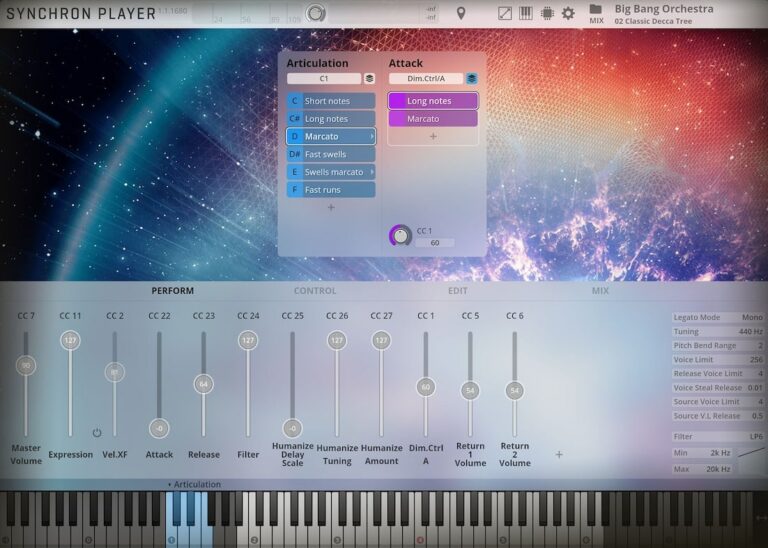
OS: Windows Win Mac Mac Bit Version: 64-bit Developer: Vienna Symphonic Library Size: 485 MB Rating: 91/100
Big Bang Orchestra offers the sound of a full orchestra playing together, recorded at Vienna’s famous Synchron Stage. It gives you instant access to bold, cinematic tones with articulations like staccatos, sustains, and swells—ideal for powerful themes or quick musical sketches.
The plugin includes multiple mic positions and ready-made mixer presets, making it easy to shape everything from close, punchy tones to wide, atmospheric mixes. It’s a fast way to add orchestral layers, dramatic accents, or grand textures to your music projects.
Features
- Full Tutti Orchestra Sound
- 1.4 GB Of Free Samples
- Multiple Microphone Positions
- Stereo And Surround Output
- Articulations Like Staccato And Sustain
- Includes Mixer And Room Presets
- Supports NKS Format Compatibility
- User-Friendly Synchron Player Interface
- Built-In Reverb And Panning Controls
- Low CPU And Fast Loading
Pros
- Free and high quality orchestral sounds
- Huge cinematic sound straight away
- Multiple mic positions for depth
- Epic hall ambience captured clearly
- Light on CPU for large sessions
- Instant big orchestra layering tool
- NKS compatible for smooth workflow
- Playable right out of the box
- Tight and punchy orchestral tone
- Professional sound for zero cost
Cons
- Limited detailed articulations
- Heavy on storage space
- Needs strong computer specs
- Less realistic than full libraries
- No deep expression control
- Few customization options
- Longer load times on HDD
- Less variety than paid plugins
- Cannot edit individual players
- Less natural tone than top horns
Testimonials
Tips
- I always layer the horns with other brass sounds to make the sound fuller and more exciting.
- I use the reverb control inside the plugin to place the orchestra in a big, wide room.
- I add dynamics with a modulation wheel to make the horns feel alive and emotional.
- Use automation to change volume and tone through a piece to add movement and realism.
- Experiment with different microphones and positions inside the plugin for unique tones.
- Use a light compressor to control volume peaks without losing the natural feel.
2. Trumpet Fields
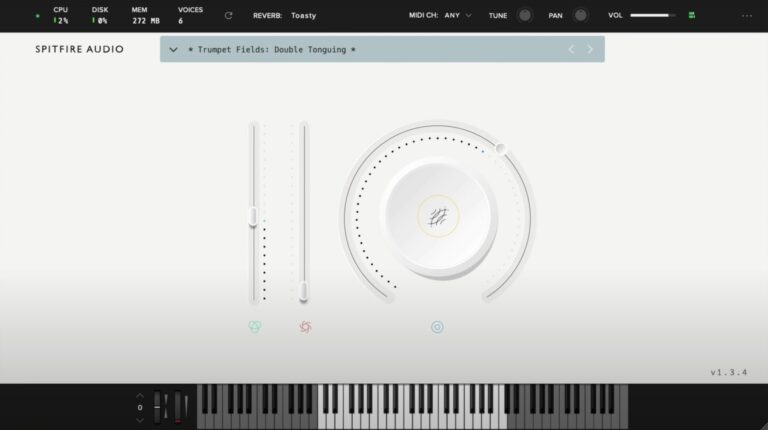
OS: Windows Win Mac Mac Bit Version: 64-bit Developer: Spitfire Audio Size: 693 MB Rating: 83/100
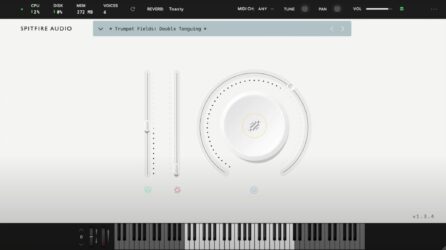
Trumpet Fields offers soft, evolving trumpet tones that bring warmth and gentle motion to your music. Recorded on a dry stage at Spitfire Studios, it captures two skilled players performing long, subtle notes with textures like slow bends and fluttering brass layers.
You can shape the sound with controls for tone, volume, and expression, then add depth using five reverb options. Trumpet Fields is ideal for creating atmospheric backgrounds, emotional builds, or ambient layers that blend easily with other instruments in your projects.
Features
- Recorded On A Dry Stage
- Swirling And Droning Brass Textures
- Features Two Professional Trumpet Players
- Includes Granular Elements And Bends
- Offers Five Reverb Options
- Supports VST2, VST3, AAX, AU Formats
- Includes Instrument And Expression Sliders
- Big Knob For Layer Blending
- Reverb Menu For Space Effects
- Keyboard Display For Playing Notes
Pros
- Warm and emotional brass tones
- Real trumpet players recorded professionally
- Creative blend of brass and synth
- Highly expressive performance layers
- Unique trumpet sound not generic
- High-quality dry stage recordings
- Dynamic controls for expressive play
- Perfect for cinematic soundscapes
- Rich atmospheric tones with depth
- Free and accessible to all users
Cons
- High CPU use during playback
- Few articulation options available
- No real-time expression control
- Can cause DAW freezing issues
- Slow loading times on older PCs
- Needs strong computer to run smooth
- No adjustable microphone positions
- Limited tweak options for sound design
- Less flexible than other free horns
- Not suited for pop or jazz
Testimonials
Tips
- I use the dynamics slider to make the trumpet sound louder or softer, depending on the emotion I want.
- I like to use automation on the mod wheel for more expression in long notes.
- Try using the expression and dynamics controls together to add life to trumpet melodies.
- Use legato mode when playing smooth melodies to make transitions sound natural.
- Stacking different articulations can make a trumpet line sound more human and rich.
- Experiment with velocity sensitivity to make performances sound more dynamic and expressive.
3. The Free Orchestra
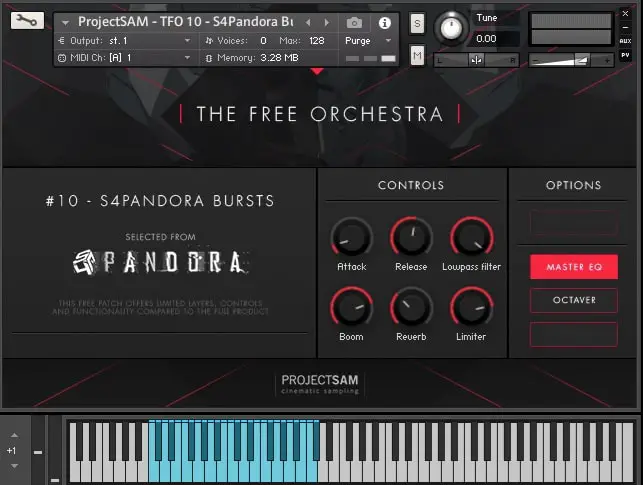
OS: Windows Win Mac Mac Bit Version: 64-bit Developer: ProjectSAM B.V Size: 920 MB Rating: 82/100
The Free Orchestra offers a range of cinematic sounds drawn from ProjectSAM’s well-known libraries. It includes strings, brass, choirs, and sound effects recorded in a concert hall, giving users an authentic orchestral feel. The library includes 16 free instruments and 10 multi setups.
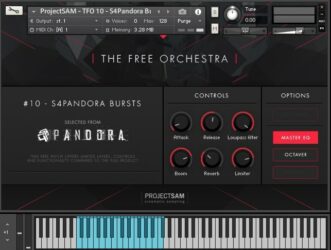
This collection is suited for film scoring, trailer music, or adding dramatic layers to any track. Each preset is ready to use with expressive controls such as reverb, EQ, and dynamics. The Free Orchestra runs in Kontakt Player and works on both Windows and macOS systems.
Features
- Includes 16 Free Orchestral Instruments
- Works With Free Kontakt Player
- Recorded In A Concert Hall
- Offers Cinematic String And Brass Sounds
- Completely Free With No Hidden Costs
- Simple And Clear Control Interface
- Built-In Reverb And Limiter Tools
- Has Octaver And Master EQ Options
- Usable In Commercial Music Projects
- Ideal For Cinematic And Trailer Music
Pros
- Completely free with no limits
- High quality cinematic sound design
- Works with free Kontakt Player
- Recorded in real concert hall
- Includes 16 free instruments
- Has 10 creative multis
- Compact library with big sound
- Built-in reverb and EQ
- Quick setup through Native Access
- Great gateway to ProjectSAM sound
Cons
- Requires full Kontakt installation
- Limited control over articulations
- No deep sound customization tools
- Interface feels dated and small
- Few microphone positions available
- Lacks round-robin sample variation
- Smaller library than paid suites
- Some patches sound too similar
- Heavy CPU use on some systems
- No standalone version available
Testimonials
Audio Demo
Tips
- I use the mod wheel to control dynamics for a more emotional and real-sounding performance.
- I try layering The Free Orchestra cello with another string plugin to make the sound fuller and richer.
- I always adjust the reverb and volume to match my mix so the cello doesn’t sound too far away or too strong.
- Use automation on volume and expression to make cello parts feel more human and less robotic.
- Adjust velocity in your MIDI notes to control how soft or strong each bow stroke sounds.
- I often use EQ to remove extra low-end rumble and make space for other instruments in the mix.
- Try using an external convolution reverb to make the cello sound like it’s in a real concert hall.
4. Aspen Trumpet 1
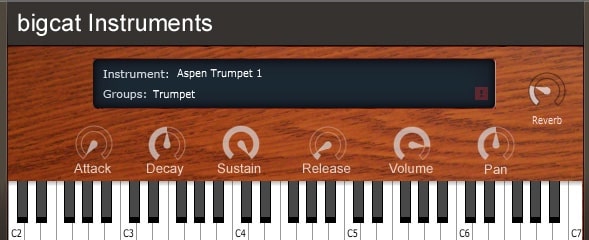
OS: Windows Win Mac Mac Bit Version: 32-bit, 64-bit Developer: Bigcat Instruments Size: 34 MB Rating: 75/100
Aspen Trumpet 1 offers natural trumpet tones in an easy-to-use plugin for Windows and Mac. Made by Bigcat Instruments, it features controls for attack, decay, sustain, and release, letting you shape how each note begins, holds, and fades. Pan and reverb add depth and space to your sound.
This free plugin suits many musical styles, from soft solos to bright brass parts. The built-in keyboard helps test sounds quickly, while simple controls make sound shaping clear and direct. Aspen Trumpet 1 gives music creators a straightforward way to add realistic trumpet character to their tracks.
Features
- Adjustable Attack, Decay, Sustain, Release
- Built-In Reverb Effect
- Pan Control For Stereo Balance
- Volume Control For Sound Level
- Free Trumpet Sound Library
- Supports VST And AU Formats
- Works On Windows And Mac
- Available In 32-Bit And 64-Bit
- On-Screen Keyboard For Playing
- Instrument Display With Name
Pros
- Very realistic trumpet sound
- Free for Windows and Mac
- Competes with paid libraries
- Clean and expressive samples
- Low CPU usage
- Responds to velocity and modwheel
- Includes reverb for depth
- Fast loading sample library
- Works well in orchestral mixes
- Easy to use controls
Cons
- No built-in mute articulations
- Limited dynamic range control
- No multiple microphone positions
- Slower response for fast notes
- Lacks ensemble trumpet layers
- No built-in EQ or compressor
- Needs Kontakt to fully run
- Does not include legato mode
- Slight tuning issues on some notes
- Limited velocity sensitivity control
Testimonials
Tips
- I use a little reverb to make the trumpet sound like it’s in a real room or stage.
- I change the velocity settings to make soft and loud notes sound more natural.
- I use MIDI automation to control vibrato or expression for more emotion in my music.
- I layer the trumpet with other brass sounds to create a fuller horn section.
- Try blending the Aspen Trumpet 1 with other brass VSTs to build a realistic ensemble.
- Adjust the attack and release in the plugin to control how quickly the trumpet sound starts and ends.
- Listen to real trumpet players to understand how to phrase musical lines with expression.
5. VSCO2 Trumpet
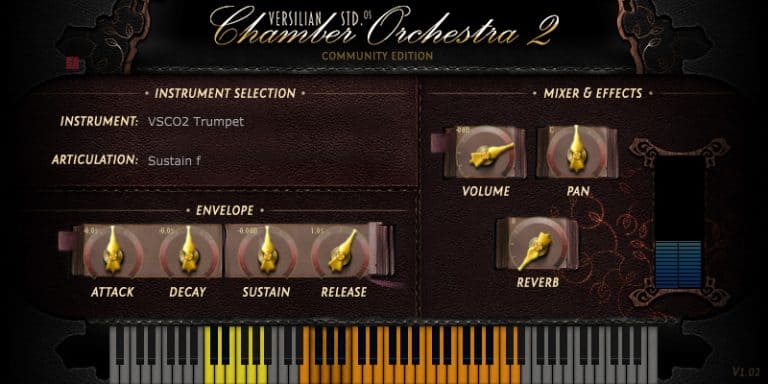
OS: Windows Win Mac Mac Bit Version: 32-bit, 64-bit Developer: Bigcat Instruments Size: 109 MB Rating: 65/100
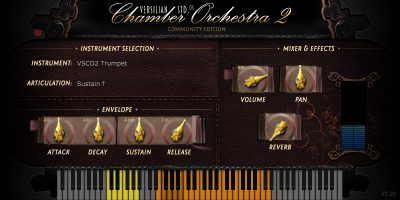
VSCO2 Trumpet offers a realistic trumpet sound designed to add life to your tracks. Recorded by Versilian Studios and Sam Gossner, it includes seven sound groups such as sustain, vibrato, and muted tones. This helps create expressive brass parts suitable for many music styles.
You can shape your sound using controls for articulation, attack, decay, and reverb. The plugin’s simple interface makes adjusting tone, volume, and space quick and clear. VSCO2 Trumpet works on both Windows and Mac, giving music creators an easy way to add trumpet sounds to their projects.
Features
- Realistic Sampled Trumpet Sounds
- Seven Selectable Sound Groups
- Includes Sustain And Vibrato Styles
- Two Mute Sound Options
- Attack, Decay, Sustain, Release Controls
- Adjustable Volume And Panning
- Built-In Reverb Effect
- Keyboard Display For Note Range
- 32-Bit And 64-Bit Support
- Available In VST And AU Formats
Pros
- Real trumpet sound feels natural
- Low CPU use for smooth play
- Has seven sound groups
- Includes mute and staccato modes
- Adjustable attack and decay control
- Customizable reverb for big spaces
- Recorded by skilled professionals
- Retro sampled sound adds charm
- Works well in layered mixes
- Free and fully functional software
Cons
- Sound can feel too static
- No true legato option
- Limited expression range
- Few articulation choices
- Less realistic than paid plugins
- Weak dynamics compared to others
- Sounds dated for modern music
- Harsh highs in some notes
- No velocity curve control
- No custom mic positions
Testimonials
Tips
- I like to use the mod wheel to add volume changes. It makes the trumpet sound more alive.
- I use reverb to give the trumpet sound more space, like it’s in a hall.
- I always check my MIDI velocity because it changes how hard the trumpet sounds.
- I like to EQ out a little bit of the high mids when it sounds too harsh.
- I use expression automation to make phrases feel more natural and alive.
- Adding a bit of saturation can make the trumpet sound warmer and more human.
- Stack a few different horn instruments for a big band-style sound.
6. Virtual Playing Orchestra

OS: Windows Win Mac Mac Bit Version: 64-bit Developer: Paul Battersby Size: 356 KB Rating: 65/100
Virtual Playing Orchestra is a free SFZ orchestral sample library with solo and section strings, brass, and woodwinds. It includes sustain, staccato, accented, pizzicato, and tremolo articulations, plus keyswitch patches and full section sounds.
Samples are checked for tuning, volume, and panning, with instruments set to suitable note ranges. Round-robin strings, velocity layers, and mod-wheel control add variation. An SFZ player is required, and reverb can help blend the different instruments.
Features
- Free SFZ Orchestral Sample Library
- Solo And Section Instruments
- Multiple String Articulations
- Multiple Brass Articulations
- Multiple Woodwind Articulations
- Keyswitch Articulation Patches
- Round-Robin Staccato Strings
- Randomized Repeated Note Playback
- Adjustable Volume And Pan
- Pitch Tuning And Transpose Controls
Pros
- Includes solo and section instruments
- Offers many playing styles
- Includes pizzicato for every string
- Offers tremolo string sounds
- Uses realistic round-robin strings
- Includes two brass velocity layers
- Supports keyswitch articulation changes
- Uses a flexible SFZ format
- Works with several SFZ players
Cons
- Requires a separate SFZ player
- Not a true standalone VST
- Mixed sample sources sound uneven
- Limited dynamic layers for instruments
- Few detailed performance controls
- No built-in reverb included
- Older SFZ format may limit compatibility
Testimonials
Tips
- I load Virtual Playing Orchestra into an SFZ player such as Sforzando before opening an instrument patch. The library uses SFZ files, so it needs a compatible player inside the DAW.
- I keep the SFZ files and WAV sample files in the same main folder. This helps the player find the sounds it needs.
- I use the Standard Orchestra patches when I want to change sounds with key switches. Sustain, staccato, accent, and pizzicato sounds can be selected from the keyboard.
- I use the Performance Orchestra when I want more live control. Key velocity selects the playing style, while the mod wheel controls volume.
- I draw mod-wheel moves into my MIDI track for smoother volume changes. This makes long notes sound less flat and more alive.
- I add reverb to my orchestra tracks. Reverb helps instruments from different sample sources sound like they are playing in the same room.
- Choose the correct instrument range before writing a part. Virtual Playing Orchestra limits instruments to useful playing ranges, so very high or low notes may not play.
7. Serpo
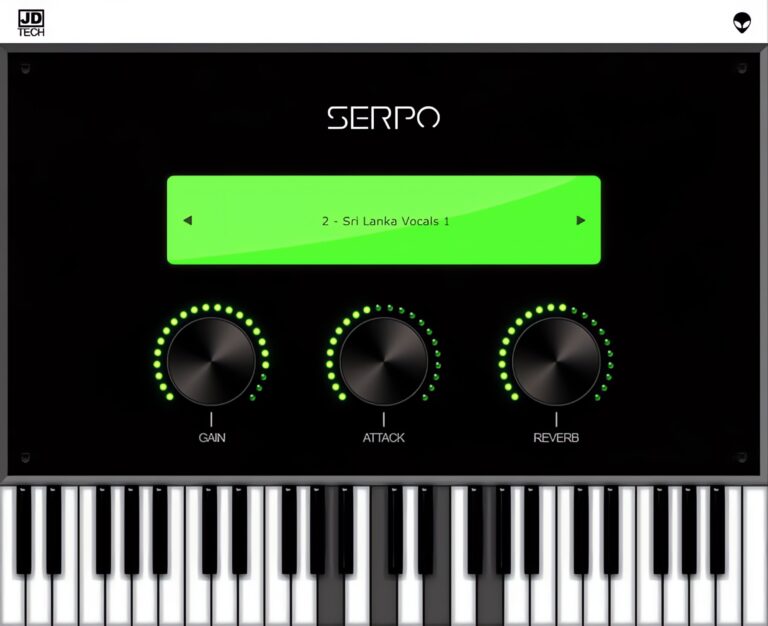
OS: Windows Win Mac Mac Bit Version: 32-bit, 64-bit Developer: JD TECH Size: 30 MB Rating: 63/100
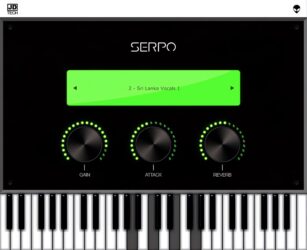
Serpo offers a free and simple way to explore a wide range of sounds for music creation. Developed by JD TECH, it includes instruments such as piano, violin, guitar, trumpet, and drums, along with male and female vocals. Each sound is sampled from artists around the world.
The plugin includes basic controls like gain, attack, and reverb to shape tone and depth. Its built-in preset selector allows quick sound changes for different styles. Serpo works on both Windows and Mac, making it a practical tool for producers seeking fresh, ready-to-use sounds.
Features
- Free Rompler VST Plugin
- Original Sounds From Artists
- User-Friendly Interface Design
- Reverb Effect For Depth
- Preset Selector For Quick Access
- Built-In Virtual Keyboard
- Light On CPU Usage
- Works On Windows And Mac
- Supports VST And AU Formats
- Includes Leads, Pads, And Basses
Pros
- Free to download and use
- Works on Windows and Mac
- Wide mix of real instruments
- Includes horns and brass sounds
- Low CPU use during play
- Fast loading with no extras
- Includes reverb for space depth
- Attack control for sound shaping
- Better variety than most free horns
- Lightweight but good sound quality
Cons
- Sound quality below pro standards
- Missing detailed horn articulations
- Lacks multilayer instrument sampling
- No modulation or LFO options
- Does not support MIDI learn
- No velocity sensitivity options
- Limited to basic sound shaping
- Few updates since initial release
- Bugs and crashes sometimes reported
- Not optimized for big projects
Testimonials
Tips
- I like to play with the attack and release knobs to make the horn sound smoother or punchier.
- I often use a MIDI keyboard to control Serpo because it helps me get more natural-sounding notes.
- I use a small amount of reverb to make the horn sound like it’s in a real room.
- I like to use EQ to cut some low frequencies so the horn doesn’t clash with the bass.
- Automate the expression or modulation wheel in your DAW for more lifelike horn phrasing.
- Layer Serpo with another horn plugin to get a fuller, more realistic brass section sound.
- Adding light compression can help control horn dynamics and keep the volume steady.
8. Brassinematic

OS: Windows Win Bit Version: 64-bit Developer: Fanan Team Size: 20 MB Rating: 62/100
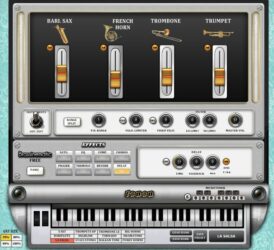
Brassinematic is a cinematic brass synthesizer from Fanan Team. It combines four waveform oscillators modeled on baritone saxophone, French horn, trombone, and trumpet. Mix them into layered brass sounds, chords, and textures, with two MIDI velocity levels for added performance control.
Each instrument includes synthesis controls, while saturation, EQ, compression, chorus, phaser, tremolo, reverb, and delay shape the output. A microtuner supports alternate scales, and Range Split assigns instruments to frequency zones. It runs as a 64-bit VST plug-in on Windows.
Features
- 4 Cinematic Brass Instruments
- Mixable Brass Oscillators
- Two MIDI Velocity Levels
- High-Pass And Low-Pass Filter
- Built-In Microtuner
- Four-Zone Range Split Filter
- Adjustable Pitch Bend Range
- Built-In Saturation And EQ
- Compressor For Even Dynamics
- Reverb And Delay Effects
Pros
- Includes trumpet and French horn
- Also includes trombone and baritone sax
- Mix instruments into custom brass sounds
- Two velocity levels add expression
- Built-in effects save extra plugins
- Includes saturation for warmer tones
- Microtuner supports unusual musical scales
- Range Split creates layered brass parts
- Presets make sound picking easy
Cons
- Sounds synthetic, not realistic
- Limited to two velocity levels
- No true trumpet articulations
- Lacks sampled player performances
- No breath control support
- Only Windows users are supported
- No staccato or sustain controls
Testimonials
Tips
- I start with one brass sound, such as trumpet or French horn, before adding more layers. This helps me hear what each part adds.
- I use the MIDI velocity settings to control how hard each note sounds. I play softly for gentle parts and harder for strong hits.
- I draw or play notes with different lengths. Short notes can sound sharp and bold, while longer notes can feel wide and smooth.
- I move the filter slowly while a note is playing. This can create a rising sound for fills, builds, and endings.
- I use the high-pass filter to remove low rumble. I use the low-pass filter to make a bright brass sound softer.
- Use EQ to cut muddy low-mid sounds when several brass parts play together. A small cut can make room for bass, drums, and vocals.
- I automate the mod wheel, filter, or effects during a song. Small changes can make a simple trumpet part feel more alive.
9. Aspen Trumpet 2
OS: Windows Win Mac Mac Bit Version: 32-bit, 64-bit Developer: Bigcat Instruments Size: 31 MB Rating: 59/100
Aspen Trumpet 2 is a free virtual trumpet instrument for Windows and Mac. It offers sustained and staccato playing styles, with a piano keyboard and labeled range from C2 to C7.
Sound controls include attack, decay, sustain, release, volume, pan, and reverb. The plugin is available in VST and AU formats, with both 32-bit and 64-bit versions.
Features
- Virtual Trumpet Instrument
- Sustained Playing Style
- Staccato Playing Style
- Attack Control
- Decay Control
- Release Control
- Reverb Control
- On-Screen Piano Keyboard
- VST And AU Formats
- 32-Bit And 64-Bit Versions
Pros
- Includes sustained trumpet playing style
- Includes staccato trumpet playing style
- Covers a wide C2-C7 range
- Adjustable attack for note starts
- Adjustable decay for smooth fades
- Adjustable sustain for held notes
- Adjustable release for natural endings
- Built-in reverb adds room sound
- Piano keyboard makes notes easy
Cons
- Only two playing styles
- No vibrato control
- No breath controller support
- No pitch bend controls
- No growl or shake effects
- No smooth legato transitions
- May sound less natural than rivals
Tips
- I start with a simple melody so I can hear the trumpet sound clearly before adding other tracks.
- I use the sustain style for long notes and smooth parts. Aspen Trumpet 2 also includes a staccato style for short notes.
- I lower the volume first, then raise it slowly to avoid a loud surprise in my speakers.
- I adjust the attack to control how fast each note begins. A faster attack can make the trumpet sound sharper.
- I use the release control to make notes end quickly or fade out more gently.
- I add a small amount of reverb to help the trumpet fit into the song. Too much reverb can make the sound unclear.
- I change note timing by a tiny amount to avoid a stiff, machine-like performance.
10. Solina2k

OS: Windows Win Bit Version: 32-bit, 64-bit Developer: Fanan Team Size: 80 MB Rating: 59/100
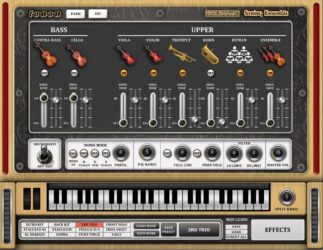
Solina2k is a physical modeling instrument inspired by the classic Solina string ensemble. Its eight independent oscillators have separate synthesis sections, covering bass, strings, voices, and other parts for vintage pads and electronic textures.
It includes velocity controls, mono mode, portamento, keyboard splits, drawbars, and full MIDI automation. Effects include saturation, chorus, phaser, tremolo, reverb, and delay, with separate routing for each section. It runs as a Windows VST plugin in 32-bit and 64-bit versions.
Features
- Physical Modeling String Emulation
- Eight Independent Oscillators
- Individual Synthesis Per Oscillator
- Global High-Pass And Low-Pass Filter
- Separate Effect Routing
- Advanced Mono Playing Mode
- Keyboard Split For Sound Sections
- Portamento And Pitch Bend Controls
- Preset And Sound Bank Saving
- Full Parameter Automation Support
Pros
- Organic physical modeling tone
- Eight independent oscillators
- Each oscillator has synthesis controls
- Builds wide layered sounds
- Includes trumpet and horn parts
- Offers bass and upper sections
- Separate effects routing available
- Drawbar system adds control
- Advanced mono mode included
- Flexible keyboard split zones
Cons
- Not a true trumpet instrument
- Trumpet sounds may feel synthetic
- Limited realistic trumpet playing
- No sampled staccato trumpet notes
- No muted trumpet sound choices
- No realistic breath or lip controls
- Windows-only support limits users
Testimonials
Tips
- I start with the factory sound and change only one control at a time. This helps me hear what each setting does.
- I use the high-pass filter to remove extra low-end rumble. This gives the bass and drums more room in the mix.
- I try the built-in reverb for a large room sound. I use less reverb on busy songs so the mix does not become muddy.
- I test both MIDI velocity modes to see which one feels better. One mode may give me more control when I play softly or loudly.
- Start with low effect levels, then raise them slowly. This keeps the main instrument sound easy to hear.
- Automate the filter during a song to create movement. Slowly opening the filter can make a section feel like it is growing.
- Keep the instrument level below clipping. Leave space on the mixer so other instruments can play clearly.
11. Iowa Trumpet

OS: Windows Win Mac Mac Bit Version: 32-bit, 64-bit Developer: bigcat Instruments Size: 41 MB Rating: 54/100
Iowa Trumpet is a free sampled trumpet plugin from the University of Iowa Electronic Music Studios. It creates a brass sound for production across many genres. Use a MIDI keyboard to play notes and shape parts with volume, pan, and ADSR controls.
Its attack, decay, sustain, and release settings adjust how notes start, hold, and fade. Iowa Trumpet works on Windows and Mac in VST and AU formats, with 32-bit and 64-bit versions.
Features
- Free Trumpet Sound Plugin
- Sampled University Of Iowa Trumpet
- Works With MIDI Keyboards
- Three Velocity Sample Layers
- Nearly Every Note Sampled
- Volume And Pan Controls
- ADSR Envelope Controls
- Clickable Piano Keyboard
- VST And AU Formats
- 32-Bit And 64-Bit Support
Pros
- Runs on Windows and Mac
- Supports VST and AU formats
- Available in 32-bit and 64-bit
- Uses public domain recordings
- Made from University of Iowa samples
- Multisampled across almost every note
- Includes three velocity layers
- Built-in keyboard plays every note
Cons
- Sound can feel cheesy
- Controls stay very basic
- No alternate trumpet sounds
- No articulation switching
- No legato control
- Only three velocity layers
- No expression or dynamics sliders
Testimonials
Tips
- I start with a simple melody so I can learn how the Iowa Trumpet responds to my keyboard.
- I use a light touch for soft notes and press harder for louder notes. This helps the part sound more natural.
- I leave small spaces between notes so the trumpet part does not sound too busy.
- I use the pitch-bend wheel for small slides between notes. Gentle moves usually sound better than large ones.
- I use the piano-roll editor to adjust note lengths, timing, and velocity after recording.
- Look for low keyboard notes that may work as keyswitches. These notes can change articulations or playing styles on some bigcat Instruments plugins.
- Compare the virtual trumpet with a real trumpet recording. This helps guide note length, volume, timing, and expression.
12. DSK Brass
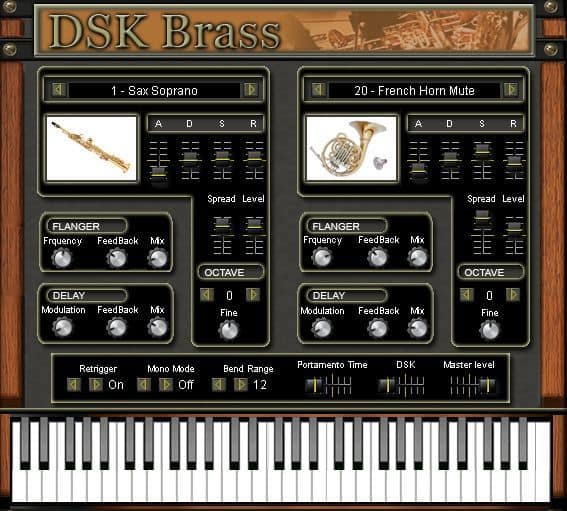
OS: Windows Win Bit Version: 32-bit Developer: DSK Music Size: 34 MB Rating: 52/100
DSK Brass offers a collection of virtual brass instruments for music creators looking to add horn sounds to their tracks. It includes 23 instruments such as trumpets, trombones, tubas, and saxophones, each with adjustable layers, octave control, and tuning options for flexible sound design.
The plugin features delay and flanger effects, along with basic controls for attack, sustain, and stereo width. While it may not sound fully realistic, DSK Brass is useful for quick sketches, lo-fi styles, or adding simple brass accents without needing paid libraries.
Features
- Two Sound Layers With 23 Presets
- Includes Various Brass Instruments
- Built-In Delay And Flanger Effects
- MIDI Automation Support
- ADSR Envelope Control Section
- Stereo Spread Level Adjustment
- Pitch Bend Range Setting
- Portamento Time Control
- Mono And Retrigger Options
- Lightweight And CPU Friendly
Pros
- Free and easy to download
- Includes 23 brass instruments
- Has delay and flanger effects
- ADSR controls for shaping sounds
- Octave and micro-detune options
- MIDI automation support included
- Adjustable pitch bend and portamento
- Mono and retrigger modes available
- Light on computer resources
- Simple and clear interface
Cons
- Only works on Windows systems
- Sounds very synthetic and fake
- Needs extra effects to sound good
- Limited control over sound realism
- Crashes in newer DAWs sometimes
- Very basic built-in effects
- No macOS or Linux support
- Limited dynamic and velocity range
- No round-robin or key switching
- Poor realism compared to other VSTs
Testimonials
Tips
- I often use the attack and release knobs to make the brass sound more natural.
- I add a little reverb to give the trombone a bigger, room-like sound.
- I like to use a MIDI keyboard to play smoother notes and control how hard I press each note.
- I record a few takes and mix them together for a real brass section feel.
- Try adjusting the velocity settings to control how bright or soft the trombone sounds.
- Use compression lightly to keep brass dynamics even and smooth.
- EQ out unnecessary low frequencies when mixing brass with bass or drums.
13. Xoxos Aerophone

OS: Windows Win Bit Version: 32-bit Developer: Xoxos Size: 2 MB Rating: 52/100
Xoxos Aerophone is a Windows 32-bit VST that models lip-valve instruments with cylindrical bores, such as trumpets and trombones. Its oversampled third-order mass-spring model recreates changes in lip pressure for expressive, synthetic brass tones.
Controls cover pressure, pitch, envelopes, noise, damping, gain, and filters. It also includes glide, tuning, octave shift, blend, and expression wah. Curves and graphs shape sound over time, though detailed modulation may be needed for realistic results.
Features
- Cylindrical Bore Instrument Modeling
- Third-Order Mass-Spring Lip Valve
- Oversampled Acoustic Performance Model
- Pressure-Based Sound Changes
- Expression-Controlled Wah Effect
- Envelope Shape Controls
- Beat-Synced Modulation
- Modulation Routing Table
- Smooth Pitch Glide
- Dual Sound Source Blend
Pros
- Expressive lip-valve modeling
- Trumpet and trombone sounds
- Oversampled sound engine
- Real-time pressure control
- Flexible pitch shifting
- Smooth glide control
- Detailed envelope shaping
- Built-in noise control
- Useful damping controls
- Beat-synced modulation
Cons
- Windows-only, 32-bit support limits compatibility
- VST2 format feels outdated today
- Studio One support may fail
- Blue-screen reports raise serious concerns
- Does not use recorded trumpet samples
- Preset sounds can feel synthetic
- Less realistic than sampled alternatives
Testimonials
Tips
- I start with a simple trumpet preset before changing many controls. This helps me hear what each setting does.
- I use the pitch-bend wheel for small bends instead of large jumps. Small bends often sound more like a real trumpet.
- I slowly raise the breath, pressure, or gain controls. Too much can make the sound harsh or noisy.
- I use MIDI volume or expression to shape each phrase. Louder and softer notes make the part feel more alive.
- I draw small pitch changes in the MIDI editor. Perfectly straight notes can sound stiff.
- Keep vibrato gentle and add it near the end of a note. Too much vibrato can make the part sound unnatural.
- Humanize the MIDI by changing note timing and volume a little. Small changes can make repeated phrases sound less robotic.
14. Sonatina Trumpet

OS: Windows Win Mac Mac Bit Version: 32-bit, 64-bit Developer: bigcat Instruments Size: 36 MB Rating: 50/100
Sonatina Trumpet is a sampled trumpet plugin based on sounds from the Sonatina Symphonic Orchestra library. It includes Solo Trumpet, Trumpets Sustain, Trumpets Sustain 2, and Trumpets Staccato sounds for adding brass parts to music.
The plugin includes volume, pan, instrument, and sound controls, plus attack, decay, sustain, and release settings. It works on Windows and Mac in VST and AU formats, with 32-bit and 64-bit support.
Features
- Sampled Trumpet Instrument
- Solo Trumpet Sound
- Sustained Trumpet Sounds
- Staccato Trumpet Sound
- Sound Selection Menu
- Volume And Pan Controls
- Attack Decay Sustain Release
- Playable Piano Keyboard
- VST And AU Support
- 32-Bit And 64-Bit Support
Pros
- Uses sampled trumpet recordings
- Includes solo trumpet sounds
- Offers sustained trumpet notes
- Includes staccato trumpet sounds
- Supports smooth sustained parts
- Supports short sharp notes
- Has simple volume control
- Offers easy stereo panning
- Includes attack control
- Has a built-in keyboard
Cons
- Only four playing groups
- No muted trumpet sounds
- No falls, shakes, or rips
- Limited sound shaping controls
- No VST3 plugin support
- Mac users report setup problems
- Trumpet tone may sound unrealistic
Testimonials
Tips
- I start with the sustain sound to play long notes and simple melodies. Sonatina Trumpet includes solo, sustain, and staccato sounds, so I choose the sound that fits the part.
- I play with different MIDI note velocities instead of making every note the same volume. This helps the trumpet line sound more natural.
- I keep my melody within a comfortable range. Very high or very low notes may sound less natural on some trumpet VST plugins.
- I add small changes to note length and volume. Perfectly even MIDI notes can make a trumpet part sound stiff.
- I use short rests between phrases so the virtual player has time to “breathe.” This makes the music feel more like a real performance.
- I use light reverb to place the trumpet in the same room as the other instruments. I keep the reverb low so the sound stays clear.
- Many trumpet plugins work well with a breath or expression controller. Mapping a MIDI knob to volume can help shape swells and fades.
15. DSK Overture
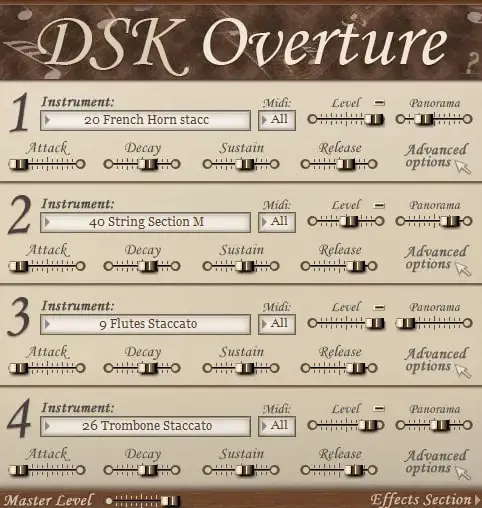
OS: Windows Win Bit Version: 32-bit Developer: DSK Music Size: 85 MB Rating: 47/100
DSK Overture is a free orchestral plugin that brings a range of classic instruments into one simple tool. It includes strings, brass, woodwinds, and percussion, letting you mix up to four layers for rich and varied sounds. Each section can be shaped with volume, pan, and filter controls.
It offers built-in effects like reverb, delay, and chorus to add depth and space to your tracks. With MIDI control for each layer, you can create quick orchestral sketches or experiment with layered textures in your music projects.
Features
- Four Instrument Layers Available
- Adjustable Amp Envelope Controls
- Advanced Multimode Filter Options
- Built-In Reverb, Delay, Chorus
- Supports MIDI Automation
- Velocity Sensitive Sound Response
- Attack, Decay, Sustain, Release Settings
- Simple Instrument Selector Interface
- MIDI Channel Selection Feature
- Master Volume Level Adjustment
Pros
- Four instrument layers per instance
- Offers both solo and section presets
- Includes built-in reverb and delay
- Customizable envelope controls
- Advanced filter options available
- Supports MIDI automation control
- Can use four MIDI channels
- Lightweight compared to some libraries
- Simple interface for quick setup
- Free and easy to download
Cons
- Only works on Windows systems
- No 64-bit plugin version
- Heavy CPU use on laptops
- Can crash during big projects
- Strings lack real warmth
- Some samples are out of tune
- Few updates or bug fixes
- Noise and crackles on playback
- Very limited sound customization
- Sample quality lower than rivals
Testimonials
Tips
- I try changing the attack and release settings to make notes sound smoother.
- I use EQ to remove any muddiness from the cello low tones.
- I use reverb to make the cello sound like it’s playing in a big room.
- Apply light compression to the cello to keep the sound steady and clear.
- Experiment with note dynamics for expressive cello performances.
- Use automation to make the cello volume rise and fall naturally over time.
- Blending cello plugins with other strings can create a realistic symphonic sound.
Trumpet SoundFonts

Another excellent option for trumpet sounds is to use trumpet sound fonts. You can install a free SoundFont player and load the trumpet Soundfonts into the player.
Free Trumpet SoundFonts:
- Musical Artifacts – Musical Artifacts is the one-stop shop for musicians looking to find, share, and preserve the artifacts they use for music. By making it easy to connect with other musicians and access a wealth of resources, Musical Artifacts helps you take your music to the next level.
- Zander Jaz– Zanderjaz is the ultimate music streaming and downloading experience. With over 300 tracks and 12 different music playlists dating back to 2010. There are tons of great tracks to choose from in every genre. Whether you’re looking for a new song to add to your playlist or an old classic to reminisce about, Zanderjaz has covered you.
- Polyphone – Polyphone is the perfect audio tool for creative musicians. It allows you to import your sounds, save and export recordings, and create your instruments. You can also gather your most delicate audio samples and configure them however you like. With its easy-to-use interface and wide range of features, you can create the music you want.
Best Trumpet Plugins Compared
This table compares the top Trumpet plugins by features, controls, effects, formats, and more.
| Details | Big Bang Orchestra | Trumpet Fields | The Free Orchestra | Aspen Trumpet 1 | VSCO2 Trumpet | Virtual Playing Orchestra | Serpo | Brassinematic | Aspen Trumpet 2 | Solina2k |
|---|---|---|---|---|---|---|---|---|---|---|
| Image | 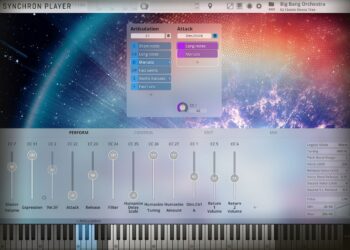 |
 |
 |
|
 |
 |
 |
 |
|
 |
| Rating | ||||||||||
| OS | Windows, Mac | Windows, Mac | Windows, Mac | Windows, Mac | Windows, Mac | Windows, Mac | Windows, Mac | Windows | Windows, Mac | Windows |
| Formats | VST, VST3, AU, AAX | VST, AU | Kontakt | VST, AU | VST, AU | SFZ | VST, AU | VST | VST, AU | VST |
| Bit Version | 64-bit | 64-bit | 64-bit | 32-bit, 64-bit | 32-bit, 64-bit | 64-bit | 32-bit, 64-bit | 64-bit | 32-bit, 64-bit | 32-bit, 64-bit |
| Developer | Vienna Symphonic Library | Spitfire Audio | ProjectSAM B.V | Bigcat Instruments | Bigcat Instruments | Paul Battersby | JD TECH | Fanan Team | Bigcat Instruments | Fanan Team |
| License | Commercial | Commercial | Freeware | Freeware | Freeware | Freeware | Freeware | Freeware | Freeware | Freeware |
| Sample-Based | Yes | Yes | Yes | Yes | Yes | Yes | Select | No | Yes | No |
| Download Size | 485 MB | 693 MB | 920 MB | 34 MB | 109 MB | 356 KB | 30 MB | 20 MB | 31 MB | 80 MB |
| CPU Load | Low | Medium | Low | Low | Low | Low | Low | Low | Low | Low |
| Polyphony | 128 | 64 | 64 | 16 | 32 | N/A | 8 | 4 | 32 | 8 |
| Features | Massive tutti orchestra, Quick orchestration, Multiple microphones, Dynamic articulations, Mixer presets, NKS integration, Cinematic sound | Swirling brass, Granular textures, Dual trumpets, Atmospheric reverbs, Evolving tones, Expressive dynamics, Sound layering | Free library, Cinematic instruments, Orchestral sounds, Concert hall recording, Kontakt Player compatible, Creative multis, User-friendly interface | Attack Control, Decay Control, Sustain Control, Release Control, Reverb Effect, Pan Positioning, On-Screen Keyboard | Realistic trumpet sounds, Seven sound groups, Mute variations, Articulation control, Dynamic shaping, Reverb effect, Easy usability | Orchestral Instruments, Multiple Articulations, Solo Sections, Keyswitch Patches, Round-Robin Strings, Velocity Layers, General-Purpose Sections | Original sounds, Gain control, Attack control, Reverb effect, Preset selector, User-friendly interface, Versatile library | Four Brass Instruments, Velocity Levels, Built-In Effects, Telescopic Microtuner, Range-Split Filter, Advanced Synthesis, Preset Management | Trumpet Emulation, Sustained Playing, Staccato Playing, Envelope Controls, Reverb Control, Piano Keyboard, Note Labels | Physical Modeling, Eight Oscillators, Global Filter, Built-in Effects, Drawbar System, Advanced Mono Mode, Keyboard Split |
| Controls | Articulation Menu, Attack Control, Preset Menu, Mixer Faders, Reverb Control, Pan Knobs, Keyboard Display | Instrument Menu, Main Slider, Expression Slider, Big Circular Knob, Reverb Menu, Top Info Bar, Keyboard Display | Attack, Release, Lowpass Filter, Boom, Reverb, Limiter, Master EQ | Attack, Decay, Sustain, Release, Volume, Pan, Reverb | Instrument, Articulation, Attack, Decay, Sustain, Release, Volume | On, Mode Menu, File, K-Switch, Volume (CC7), Pan (CC10), Tune | Display Screen, Arrow Buttons, Gain Knob, Attack Knob, Reverb Knob, Preset Selector, Keyboard | Bari Sax, French Horn, Trombone, Trumpet, Instruments, Advanced Edit, Range Split | Attack, Decay, Sustain, Release, Volume, Pan, Reverb | Panic, GUI, Instruments / Adv. Edit, Contra-Bass, Cello, Viola, Violin |
| Effects Included | Compressors, power panning, delays, additional reverb, phasers | Reverb | Lowpass Filter, Boom, Reverb, Limiter, Master EQ, Octaver | Reverb | Reverb | Unknown | Reverb, Filter, Glide | High-pass/low-pass filter, saturation, EQ, compression, chorus, phaser, tremolo, reverb, delay | Reverb | Saturation, chorus, phaser, tremolo, reverb, delay, gleam effect |
| MIDI Learn | Yes | Unknown | Yes | Unknown | Unknown | No | Unknown | Yes | Select | Yes |
| Presets | N/A | 48 | 1 | N/A | N/A | N/A | 100 | N/A | 1 | N/A |
| Standalone | No | No | No | No | No | No | Yes | No | No | No |
| Last Updated | 07/03/2024 | 01/25/2024 | 05/09/2023 | 03/12/2017 | 04/17/2017 | 12/02/2022 | 06/01/2024 | 02/07/2020 | 12/21/2024 | 11/01/2026 |
Best Trumpet VST Plugin
Our top pick for the best free Trumpet VST plugin is Trumpet Fields by Spitfire Audio. It offers the most realistic trumpet sounds, it has an easy to use interface, and it’s available for Windows and Mac.
| Details | Trumpet Fields |
|---|---|
| Image |
|
| Rating | |
| OS | Windows, Mac |
| Formats | VST, AU |
| Bit Version | 64-bit |
| Developer | Spitfire Audio |
| License | Commercial |
| Sample-Based | Yes |
| Download Size | 693 MB |
| CPU Load | Medium |
| Polyphony | 64 |
| Features | Swirling brass, Granular textures, Dual trumpets, Atmospheric reverbs, Evolving tones, Expressive dynamics, Sound layering |
| Controls | Instrument Menu, Main Slider, Expression Slider, Big Circular Knob, Reverb Menu, Top Info Bar, Keyboard Display |
| Effects Included | Reverb |
| Download | Download Trumpet Fields |
Trumpet VST FAQs
How to Install Trumpet VST Plugins
To install trumpet VST plugins on Windows or Mac, extract the files from the Zip or Rar. Move the files (.dll for Windows or .component for Mac) into your DAW’s plugin folder. Then restart your software and rescan the directory to complete the process. Tutorial: How to Install VST Plugins
Windows:
Extract the downloaded zip file and copy the .dll file into the VST plugins folder scanned by your DAW. Restart your music software and rescan your plugin directory to begin using the new VST.
Mac OS X:
Extract the downloaded archive and move the .component or .VST file to the plugin folder. It is usually /Library/Audio/Plug-Ins/Components or /Library/Audio/Plug-Ins/VST. Restart your DAW and rescan your plugins to complete the installation.
What Is A Trumpet VST Plugin?
A Trumpet VST plugin allows you to reproduce the sound of a trumpet in VST-supported software without owning a physical trumpet. Many of these plugins play back pre-recorded trumpet samples.
What Is The Best Brass VST?
The best paid brass VST plugins are “Cinematic Studio Brass” by “Cinematic Studio Series, “FORZO” by Heavyocity, “Spitfire Studio Brass”, “Spitfire Symphonic Brass” by Spitfire Audio, and the “Eastwest Hollywood Brass” by EastWest Sounds. These plugins offer premium brass sounds.
What Are the Best Free Trumpet VST Plugins?
The best trumpet VST plugins are “Trumpet Fields” by Spitfire Audio, “VSCO2 Trumpet”, “DSK Brass”, “Iowa Trumpet” by Bigcat Instruments, and the “Sonatina Trumpet” plugin. These are the best free trumpet plugins online to download.
I hope you enjoy this list of the best trumpet VST plugins.
You May Also Like:


Nice work but this really needs updated, because Norrland blows all of these away and some of these are just plain flat not good, like DSK Brass…
Trumpetuba and Norrland will NOT play in Kontakt Player as stated. They both require the FULL version of Kontakt.