

Here are the best free vinyl VST plugins to add vinyl and record effects to audio for Windows and Mac. We have included video demos, feature lists, pros, cons, and plugin ratings.
How we rate plugins: We rate each vinyl VST plugin based on sound quality, design, performance, features, usability, and compatibility. We rate plugins on a scale of 1 to 100.
Table of Contents
I have spent over 15 years testing and comparing hundreds of free and paid VST plugins, supported by hands-on demos on our YouTube channel, which has 11,000+ subscribers.
Related: Free Vinyl Drum Kits
Free Vinyl VST Plugins
This table compares vinyl VST plugins by operating system, bit version, format, and rating.
| # | Plugin | OS | Formats | Bit Version | Ratings |
|---|---|---|---|---|---|
| 1 | Origin | Windows Mac | VST, AU, AAX | 64-bit | |
| 2 | Vinyl | Windows Mac | VST2, VST3, AU, AAX | 64-bit | |
| 3 | Vinyl Simulator | Windows | VST | 32-bit | |
| 4 | SL473 | Windows | VST | 32-bit | |
| 5 | Milli Vinylli Vinyl Effects | Windows | VST | 32-bit | |
| 6 | Vinyl Dreams | Windows | VST | 32-bit | |
| 7 | Tapestop | Windows | VST | 32-bit | |
| 8 | Vinyl Plugin | Windows | VST | 32-bit | |
| 9 | Scratch it | Windows | VST | 32-bit | |
| 10 | Audio Impurities | Windows | VST | 32-bit | |
| 11 | Vinylusion | Windows | VST | 32-bit | |
| 12 | Vinylizer | Windows | VST | 32-bit | |
| 13 | Sxratch | Windows | VST | 32-bit |
1. Origin
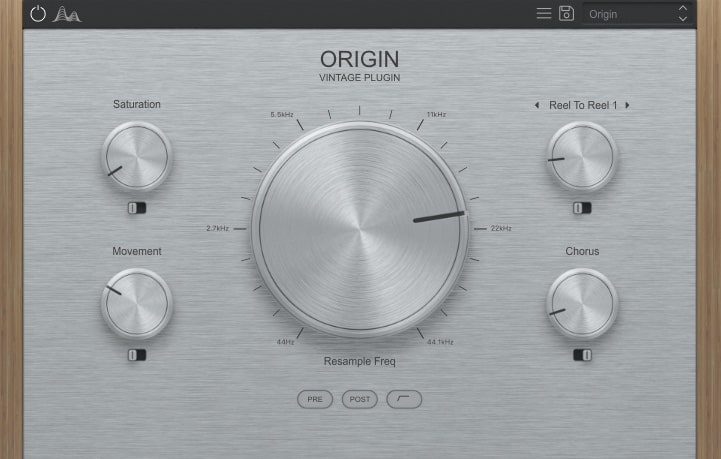
OS: Windows Win Mac Mac Bit Version: 64-bit Developer: Cymatics Size: 61 MB Rating: 80/100
Origin offers an easy way to turn clean digital sounds into warm, vintage tones. Its main resampler and bitcrusher can make your audio feel like it came from an old tape, and the “underwater” filters add a unique texture often heard in modern lofi tracks.
With Tape Saturation, Noise, Movement, and Chorus controls, Origin gives you flexible tools to shape sound character. You can add warmth, tape wobble, and soft modulation to make samples feel aged and full of personality, perfect for bringing nostalgic color to your music.
Features
- Simulates Classic Tape Machine Sound
- Main Knob For Resampling Control
- Bitcrusher Adds Retro Audio Texture
- Tape Saturation Adds Warmth And Grit
- Noise Control Adds Vintage Hiss
- Movement Knob Adds Tape Wobble
- Chorus Adds Width And Depth
- Reel To Reel Selects Tape Style
- Pre Or Post Effect Routing Option
- Creates Instant Lofi And Vintage Tone
Pros
- Instant vintage tape style sound
- Adds warmth with tape saturation
- Creative resample and bitcrush control
- Underwater filter adds cool tone
- Chorus makes sounds wide and dreamy
- Movement adds gentle tape wobble
- Unique sound-degrading character control
- Better warmth than Izotope Vinyl
- Low system use compared to others
Cons
- Limited noise type options
- Missing wow and flutter controls
- Lacks stereo width adjustment
- No dry or wet mix knob
- CPU usage can be high
- Sound shaping feels limited
- No sidechain or modulation input
- Cannot sync movement to tempo
- GUI size not resizable
- More basic than RC-20 or iZotope Vinyl
Video Demo
What Users Say
Origin Tips
- I play around with the wow and flutter controls to give my melodies a wobbly tape feel.
- I blend the dry and wet knob carefully to keep a mix of clean and vintage tones.
- Adjust the Mechanical Noise or Dust to bring a sense of realism to any vintage track.
- Combine a Vinyl VST with tape saturation plugins for deep texture and warmth.
- Less is often more—too much crackle or wow can take focus away from the music.
- Vinyl plugins work great on samples, vocals, and synths for giving retro character.
- Try automating the wow or flutter to make the sound move over time naturally.
2. Vinyl
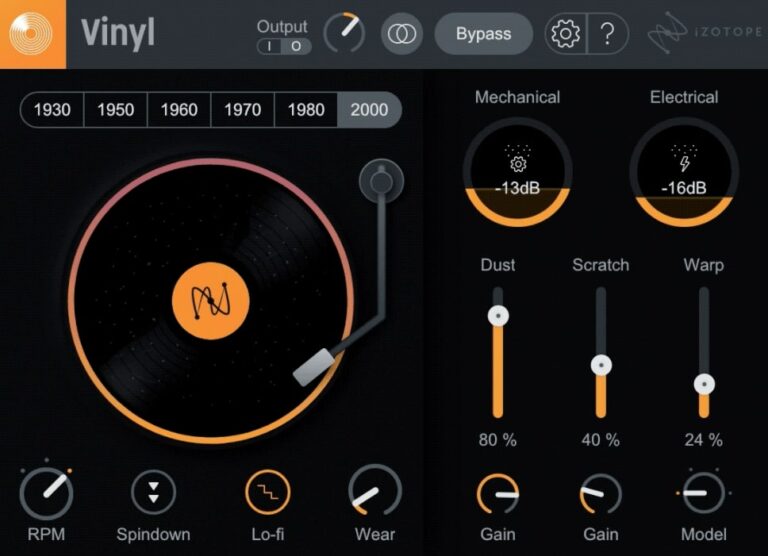
OS: Windows Win Mac Mac Bit Version: 64-bit Developer: iZotope Size: 40MB Rating: 75/100
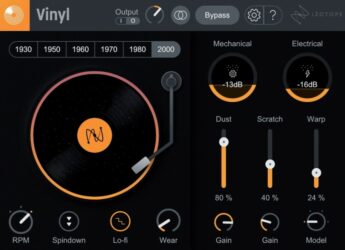
Vinyl offers a simple way to give your music the warmth and charm of old records. It adds dust, scratches, warp, and noise to make your track sound aged and nostalgic. The updated Lo-fi feature instantly brings the tone of classic hip-hop and vintage gear.
You can adjust every detail, from record wear to player noise, with easy knobs and sliders. The plugin works in most major music programs on Mac and Windows. It’s free to download, quick to set up, and great for adding retro color to any sound.
Features
- Adds Vintage Vinyl Character
- Simulates Dust And Scratches
- Warp Slider For Record Bending
- RPM Control For Pitch Changes
- Spindown Effect For Power-Off Sound
- Low CPU Usage
- Works With Most DAWs
- Supports VST2, VST3, AU, AAX
- Available For Windows And Mac
- Includes New Lo-Fi Effect
Pros
- Authentic lo-fi vinyl sound
- Year selector for tone changes
- Multiple noise control sliders
- Customizable record wear settings
- New Lo-fi mode adds warmth
- Spin-down effect sounds realistic
- Seamless integration with Native Instruments
- More flexible than other free plugins
- Very light on CPU
- Perfect for nostalgic sound design
Cons
- No built-in mix knob
- Interface too small on 4K screens
- Noise not reactive to audio
- Few customization options
- Lacks modulation features
- No MIDI mapping
- Can sound repetitive
- Lacks dynamic response
- Outdated GUI design
- Less expressive than rivals
Video Demo
What Users Say
Vinyl Tips
- Tape stop plugins can freeze your audio and slow it down like a record stopping — perfect for transitions.
- Setting a short release time on a tape stop gives a quick, snappy fall effect.
- Layering Vinyl with a tape stop effect can make breakdowns more dramatic.
- Using Vinyl and tape stop together works best when they are automated to match song tempo.
- It helps to place Vinyl at the end of your effect chain so the whole mix shares the same vintage feel.
3. Vinyl Simulator
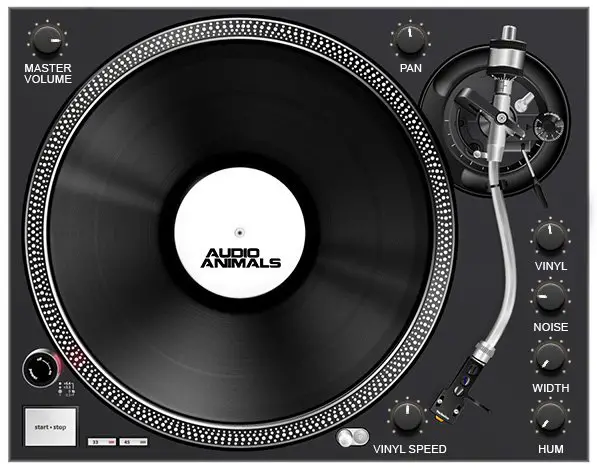
OS: Windows Win Bit Version: 32-bit Developer: ToneBytes Size: 3.8 MB Rating: 67/100
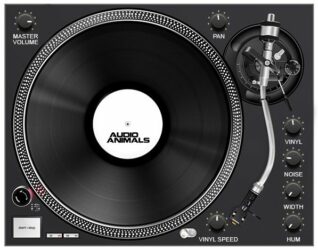
Vinyl Simulator offers the classic warmth and crackle of old records, letting music creators add real vintage charm to modern sounds. It recreates dust, hum, and gentle distortion from vinyl playback, with controls for noise, width, and speed to shape how aged the sound feels.
This plugin lets users choose record “age” and adjust how intense the vinyl effects are. With support for automation and MIDI learning, it fits smoothly into any workflow. It’s a simple way to add nostalgic texture and character to digital tracks or samples.
Features
- Emulates Classic Vinyl Record Sound
- Adjustable Dust And Noise Levels
- Adjustable Vinyl Speed And Pitch
- Hum Control Adds Realistic Buzz
- Includes Gentle Distortion Effect
- Frequency Response Emulation
- Width Control For Stereo Image
- Creates Authentic Lo-Fi Texture
- Supports VST Automation
- Low CPU Usage Performance
Pros
- Realistic vintage vinyl sound
- Adjustable dust and noise
- Authentic crackle and pop
- True vinyl speed effect
- Warm lo-fi tone control
- Gentle vintage-style distortion
- Adds old record warmth
- Completely free to download
- Low CPU usage
- VST automation ready
Cons
- No native 64-bit support
- Interface looks old
- Few sound-shaping options
- No tape wear emulation
- Crackle sounds repetitive
- No wet/dry control
- Automation unreliable
- No preset management
- Can’t sync to tempo
- Not available as AU
What Users Say
Vinyl Simulator Tips
- I like to start by turning the noise level down, so I can slowly add just the right amount of vinyl crackle.
- I experiment with different record ages in the Vinyl Simulator to find how “old” I want the sound to feel.
- Too much crackle can distract from the music, so it’s best to keep the noise gentle and steady.
- Pair the plugin with a tape saturation VST to make digital tracks sound even more authentic.
- Use Vinyl Simulator on samples to make them blend smoothly with older recordings.
- Combining Vinyl Simulator with EQ can help remove harsh highs while keeping a cozy, warm tone.
- Automate the wobble or flutter for a more dynamic, old record experience.
4. SL473
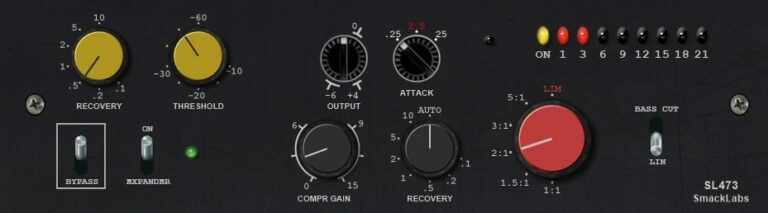
OS: Windows Win Bit Version: 32-bit Developer: smacklabs Size: 5.7 MB Rating: 66/100
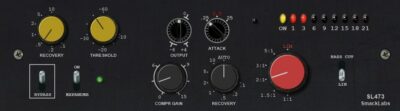
SL473 offers the classic character of a late-1970s vinyl disc cutting compressor in plugin form. It delivers clean, transparent dynamics control with compressor, limiter, and expander modes. Designed around a VCA model, it adds punch and smoothness to drums, vocals, and mix buses.
Its simple controls—yellow for expansion and black for compression—make it easy to shape your sound. The red ratio knob and adjustable recovery times allow precise response tuning. SL473 brings vintage mastering tone and musical glue to modern tracks inside your DAW.
Features
- Vintage Vinyl Disc Cutting Compressor
- Based On Classic VCA Design
- Compressor, Limiter, And Expander Modes
- Transparent Clean Dynamic Control
- Auto Mode For Attack And Recovery
- Bass Cut Switch For Low Control
- LED Meter For Level Monitoring
- Bypass Switch For Quick Comparison
- Smooth Response Under Heavy Compression
- Adds Punch And Cohesion To Tracks
Pros
- Emulates true vintage vinyl warmth
- Authentic analog-style tone shaping
- Thickens sound without extra EQ
- Adds glue and presence naturally
- Expander reduces background noise easily
- Auto mode adjusts timing smartly
- Low-end bass cut stops muddiness
- Gives drums strong classic punch
- Simple knobs for quick control
- Presets help get started quickly
Cons
- No Mac version available
- Only 32-bit plugin format
- Limited to VST format only
- Uses more CPU than expected
- Outdated user interface design
- No oversampling or quality settings
- Cannot resize plugin window
- No A/B comparison feature
- Lacks parallel compression mix knob
- Fewer features than free rivals
Video Demo
What Users Say
SL473 Tips
- Vinyl VST plugins sound best when used gently—too much crackle can make a track sound cheap.
- Add vinyl hum and noise only in quiet sections to make them sound realistic.
- When layering vinyl effects, keep the noise and dust levels lower so they don’t fight the main sound.
- Try placing vinyl plugins after a compressor like SL473 for more natural-sounding dirt and warmth.
- Automation can make vinyl plugins more interesting—turning up crackle or hiss slowly adds real-life variation.
- Always check how vinyl and compression plugins sound in both headphones and speakers to keep the mix balanced.
5. Milli Vinylli Vinyl Effects
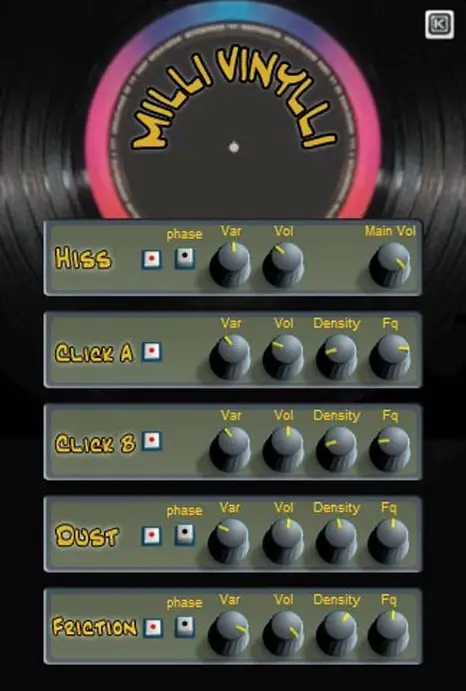
OS: Windows Win Bit Version: 32-bit Developer: Klanglabs Size: 1 MB Rating: 64/100
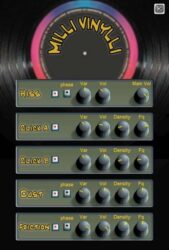
Milli Vinylli Vinyl Effects offers classic vinyl-style noise and texture for your sounds. It recreates hiss, crackle, dust, and record friction to bring warmth and character to digital tracks. Each effect includes controls for volume, density, variation, and frequency to fine-tune the vintage vibe.
This plugin helps producers add the nostalgic sound of old records to modern mixes. Phase buttons provide different timing feels, and adjustable settings make it easy to create subtle background noise or stronger lo-fi effects. Milli Vinylli runs on Windows as a 32-bit VST plugin.
Features
- Generates Realistic Vinyl Record Sounds
- Includes Hiss, Click, Dust, Friction
- Adjustable Volume For Each Effect
- Noise Density Control Options
- Frequency And Pitch Adjustments
- Phase Buttons For Sound Variation
- Variation Level Adjustment Knob
- Main Volume Mix Control
- Simple And Easy Interface
- Free 32-Bit VST Plugin
Pros
- Authentic analog vinyl simulation
- Adds real vintage record feel
- Includes adjustable crackle levels
- Custom hiss and dust sounds
- Adjustable frequency for each noise
- Volume knobs for each effect
- Phase buttons add sound variety
- Light on CPU usage
- Simple layout, quick workflow
- Completely free and reliable
Cons
- Only works on Windows systems
- Limited to 32-bit version
- Old interface looks outdated
- No built-in presets included
- Lacks wow and flutter controls
- No AU or AAX plugin type
- No wet or dry mix control
- Can’t sync with project tempo
- Doesn’t emulate vinyl warble well
- No support or recent updates
What Users Say
Milli Vinylli Vinyl Effects Tips
- I blend the wet and dry mix to find the right balance between clean and vintage tones.
- I like to automate the pitch drift to make it sound like a record slowing down.
- Use the mechanical noise sparingly so it adds character but not distraction.
- Experiment with small amounts of pitch modulation to make a realistic vinyl feel.
- Use automation to increase noise and crackle during quiet breakdowns for texture.
- Try printing the vinyl effect onto audio to save processing power once it sounds right.
6. Vinyl Dreams
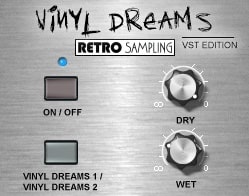
OS: Windows Win Bit Version: 32-bit Developer: Retro Sampling Size: 1.4 MB Rating: 64/100
Vinyl Dreams offers an easy way to add the character of vinyl records to your music. It recreates the warmth, crackle, and subtle imperfections of old records using two distinct vinyl sound modes. You can adjust how much of the original or effected signal you want with simple Dry and Wet controls.
Designed for Windows in VST 32-bit format, Vinyl Dreams helps bring life and nostalgia to clean digital sounds. It works well on drums, synths, or vocals to create an old-school or lo-fi mood. The effect can be gentle or more pronounced, depending on your style.
Features
- Simulates Authentic Vinyl Record Sound
- Two Selectable Vinyl Modes
- Dry Control For Original Signal
- Wet Control For Vinyl Effect
- Low CPU Usage Performance
- Simple And Clear Interface
- Adds Noise, Crackle, And Warmth
- Creates Realistic Vinyl Randomization
- Enhances Lo-Fi And Retro Style
- Works Well On Drum Loops
Pros
- Warm and realistic vinyl texture
- Two selectable vinyl sound modes
- Subtle and musical noise options
- Smooth wow and flutter effect
- Natural crackle randomization
- Easy to blend dry and wet signal
- Low CPU usage and efficient
- Small file size and lightweight
- Free and high quality plugin
- Adds nostalgic vintage character
Cons
- No Mac support
- Only 32-bit version
- Not compatible with 64-bit DAWs
- No AU or AAX support
- Limited sound controls
- No preset save feature
- Unresizable small GUI
- Few sound parameters
- Cannot automate all controls
- Less realistic vinyl sound
Video Demo
What Users Say
Vinyl Dreams Tips
- I like to start with small vinyl crackle levels, then slowly increase until it feels warm but not too noisy.
- When I use the wow and flutter effect, I keep it subtle so the pitch changes sound real, not broken.
- I blend the plugin mix knob halfway so I can still hear the clean sound under the vinyl texture.
- I like to pair Vinyl Dreams with a gentle tape saturation plugin for extra warmth.
- Use the plugin on drum loops to make them sound older and sampled from vinyl.
- Adjust the tone control to match the age of the record sound you want to create.
- Combine Vinyl Dreams with reverb to make it sound like an old record playing in a room.
7. Tapestop
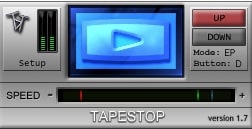
OS: Windows Win Bit Version: 32-bit Developer: TbT Size: 1MB Rating: 62/100
Tapestop is a free Windows VST plugin by TbT that recreates the classic tape slowdown effect. It simulates the sound of a tape machine starting or stopping, giving your tracks a smooth pitch drop or speed-up. With simple playback controls, you can shape natural or dramatic slowdown moments easily.
Tapestop offers live and offline modes, adjustable fade times, and visual indicators for clear feedback. Its speed and direction controls let you perform tape or turntable-style effects during recording or automation. This plugin adds a vintage, expressive feel to drums, vocals, or full mixes.
Features
- Simulates Tape Stop Sound Effect
- Time-Stretch Audio Processing
- Adjustable Fade Time Setting
- Crossfade Time Re-Entry Control
- Toggle And Direct Button Modes
- Live Or Offline Use Modes
- MIDI Trigger Support For Performance
- Speed Slider For Speed Change
- VU Meters Show Audio Levels
- Light On CPU Resources
Pros
- Creates real vintage tape sound
- Low CPU use for smooth play
- Custom speed control slider
- Fade time options for control
- Toggle or direct mode choices
- Allows smooth tape re-entry
- Can be triggered with MIDI
- Stable performance with no crashes
- Still works with bridged 64-bit
- Authentic retro sound effect
Cons
- Only works on Windows systems
- No 64-bit version available
- Not supported on macOS
- Very limited sound customization
- Outdated interface design style
- GUI glitches in some DAWs
- No modern VST3 format support
- Can’t save custom effect presets
- Limited automation flexibility options
- Not updated or maintained regularly
Video Demo
What Users Say
Tapestop Tips
- I adjust the “speed” knob until the drop sounds smooth and natural.
- I use automation in my DAW to control when the tape effect starts and stops.
- I use Tapestop on a single track instead of the whole mix to keep things clean.
- Small adjustments to the slowdown time can make a big difference in the sound.
- Using Tapestop sparingly keeps it exciting and prevents listener fatigue.
- Applying Tapestop during transitions helps signal a big change in the track.
- The plugin can create a classic “vinyl stop” effect that adds drama to your music.
8. Vinyl Plugin
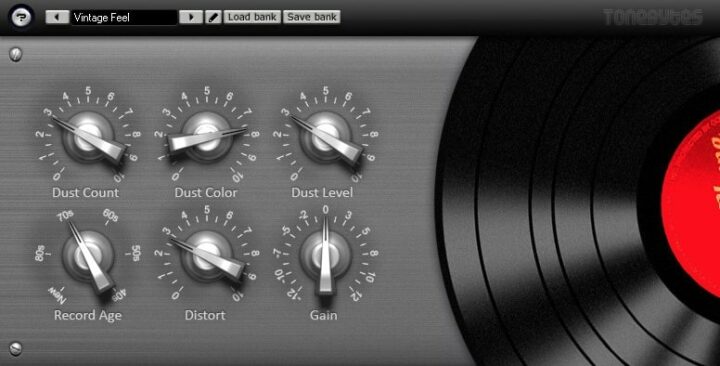
OS: Windows Win Bit Version: 32-bit Developer: ToneBytes Size: 3.8 MB Rating: 60/100
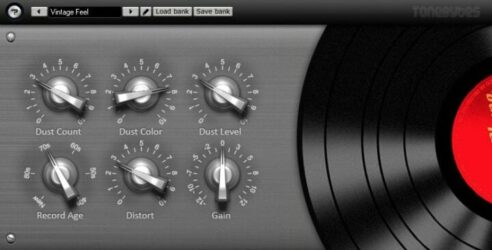
Vinyl Plugin offers the classic warmth and character of vintage records by recreating the sound of aged vinyl playback. It simulates realistic dust, scratches, and gentle distortion, letting you shape how worn or clean your track sounds. Each control fine-tunes tone, noise, and output level.
This plugin helps bring old-school charm to modern mixes, from soft retro touches to heavy lo-fi textures. You can pick the “age” of the record, adjust how much dust and crackle you want, and shape the tone to match your creative style or nostalgic sound goal.
Features
- Simulates Vintage Vinyl Record Sound
- Adjustable Dust And Crackle Noise
- Selectable Record Age Control
- Warm Gentle Distortion Effect
- Wow And Flutter Simulation
- Noise Color And Level Controls
- Independent Control Of Artifacts
- Supports VST Automation
- Light On CPU Usage
- Simple And Clear Interface
Pros
- Authentic vintage vinyl sound
- Adjustable dust and crackle
- Customizable record age setting
- Independent control of each effect
- Realistic wow and flutter effect
- Low CPU usage performance
- Fully automatable for creativity
- Great free alternative to iZotope Vinyl
- Helps samples sound aged naturally
- Produces convincing radio-like warmth
Cons
- No Mac or Linux support
- Limited to 32-bit version
- Needs bridging for 64-bit DAWs
- Crashes when changing presets
- No built-in presets
- No resizable window
- Interface too small
- Sound too noisy
- Outdated visual design
- May cause CPU spikes
What Users Say
Vinyl Plugin Tips
- I often use the wow and flutter settings to make my track sound less perfect and more real.
- I like to mix the dry and wet signals to keep some of the modern sound in my track.
- Sometimes I use two instances of Vinyl — one on instruments and one lightly on the full mix — for depth.
- When I make lo-fi beats, I always start with Vinyl to build the classic worn-out sound.
- The plugin can be placed on the master channel to give the whole song a vintage record vibe.
- Layering other tape or saturation plugins with Vinyl can create a deeper retro effect.
9. Scratch it
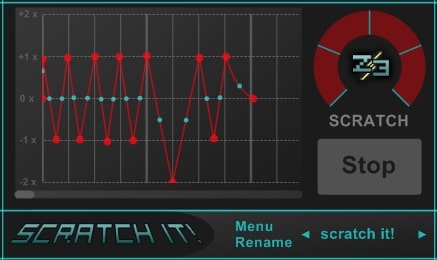
OS: Windows Win Bit Version: 32-bit Developer: Z3 Audiolabs Size: 2 MB Rating: 59/100
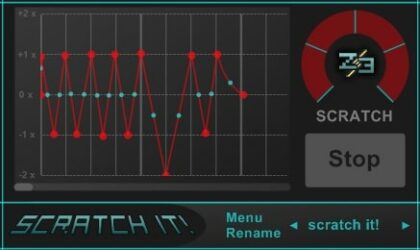
Scratch It offers a simple way to bring vinyl-style movement and tape stop effects to your tracks. It lets you shape scratch patterns using up to 16 points on a beat grid, giving you control over speed and rhythm for creative, time-based sound changes.
With clear visual feedback and easy controls, Scratch It helps you create classic DJ breaks or modern glitch effects in seconds. You can trigger scratches through MIDI, sync to your project tempo, and use automation to make loops or vocals sound more dynamic and rhythmic.
Features
- Tape Stop Style Effects
- Vinyl Scratch Sound Simulation
- Envelope Control Function
- Beat Grid Synchronization
- Trigger Via MIDI Notes
- Host Tempo Synchronization
- Randomize Scratch Patterns
- Interactive Graph Display
- Light CPU Resource Usage
- Works For Live Performance
Pros
- Real-time tape stop control
- Syncs well with host tempo
- Custom beat grid control
- 16 edit points for precision
- Works great with MIDI control
- Light on CPU usage
- Stable and crash free
- Randomize feature sparks ideas
- Fun vinyl-style scratch effects
- Completely free to download
Cons
- Only works on Windows
- Only 32-bit support
- No VST3 support
- No Mac or Linux version
- Limited effect options
- Interface looks dated
- No MIDI learn
- No presets
- No recording function
- Scratches sound too digital
Video Demo
What Users Say
Scratch it Tips
- When I use the Tape Stop effect, I try to match the stop time with the beat so it feels natural.
- I always automate the effect so it doesn’t play the same way twice.
- I like to adjust the “Start/Stop” speed to match the groove of my song.
- Try applying a Tape Stop effect on vocals or pads to give them an old-school, tape slowdown feel.
- Layer the effect with a filter sweep for a more dramatic transition.
- Use automation to trigger the scratch effect only where it makes the most impact.
- Use Tape Stop plugins sparingly so they stand out as special moments.
10. Audio Impurities
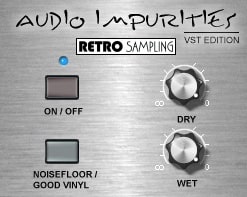
OS: Windows Win Bit Version: 32-bit Developer: Retro Sampling Size: 1.5 MB Rating: 58/100
Audio Impurities offers an easy way to add the warmth and imperfections of old vinyl or worn tape to your music. It recreates crackles, hiss, and subtle noise that bring a nostalgic, lived-in sound to clean recordings, giving them extra character and depth.
You can choose between a rougher or cleaner vinyl tone and control how much of the effect mixes with your original audio. With simple switches and dials, Audio Impurities helps producers and beatmakers shape lo-fi textures that sound organic and naturally aged.
Features
- Adds Real Vinyl Crackle Sounds
- Simulates Old Record Player Noise
- Offers Two Noise Types
- Provides Dry And Wet Mix
- Creates Vintage Audio Texture
- Enhances Tracks With Analog Feel
- Light On CPU Usage
- Works Well On Multiple Tracks
- Simple On Or Off Switch
- Available In 32-Bit VST Format
Pros
- Adds warm vintage vinyl feel
- Creates old record player sound
- Switchable clean or noisy modes
- Perfect for retro lo-fi style
- Fun random features for creativity
- Brings subtle grit or full chaos
- Dry and wet mix controls
- Low CPU usage for sessions
- Turns clean synths into vintage pads
- Instant warmth on any track
Cons
- No Mac or Linux support
- Only 32-bit plugin version
- No VST3 or AU format
- Not resizable on large screens
- Few controls for sound shaping
- No preset browser or library
- Lacks advanced noise controls
- No stereo width adjustment
- Doesn’t sync with song tempo
- Interface looks outdated
What Users Say
Audio Impurities Tips
- I like to start with a preset in Audio Impurities and then tweak the noise level to fit my track’s mood.
- I like to automate the dust or crackle amounts to make the texture change over time.
- I always try different vinyl wear settings to find a balance between clean and old-school tone.
- Vinyl VST plugins sound best when used carefully; a subtle touch often works better than heavy noise.
- Using the wow and flutter controls can give static sounds a gentle movement and warmth.
- Running soft synths through Audio Impurities can make them blend better with sampled instruments.
- Applying Audio Impurities on background pads can help create a cozy, nostalgic atmosphere.
11. Vinylusion
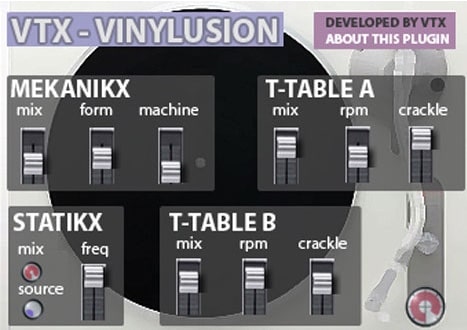
OS: Windows Win Bit Version: 32-bit Developer: Vetrix Size: 8.8 MB Rating: 57/100
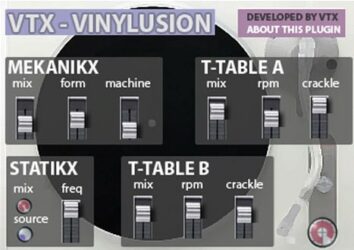
Vinylusion offers a detailed emulation of vinyl record sounds, bringing the charm of turntable playback into digital music. It recreates crackles, pops, hisses, and static to add warmth and nostalgic texture, letting creators shape the tone of any track with vintage-style noise layers.
The plugin includes sections like MEKANIKX for mechanical noise, T-TABLE A and B for crackles and record speed, and STATIKX for static effects. Each control blends these layers to create anything from gentle record wear to experimental, gritty sound textures suited for creative production.
Features
- Emulates Vintage Vinyl Record Sound
- Simulates Crackles Pops And Hiss
- Includes Mechanical Noise Controls
- Adjustable Record Speed Settings
- Blend Mechanical And Static Noise
- Customizable Noise Tone And Pitch
- Random Static Noise Generator
- Independent Noise Routing Options
- Offers Presets For Quick Use
- Allows Creative Sound Design Effects
Pros
- Adds warm vintage record sound
- Unique dual turntable simulation
- Flexible control over crackle noise
- Adjustable machine and wear sounds
- Independent noise routing options
- Realistic vinyl speed control (RPM)
- Interesting randomize sound function
- Rich variety of noise textures
- More tweakable than iZotope Vinyl
- Completely free to download and use
Cons
- Only works on Windows systems
- No 64-bit version available
- Not compatible with Mac users
- Interface looks cluttered and busy
- Uses too much CPU power
- Sluggish GUI when adjusting knobs
- No built-in preset browser
- Missing modern plugin standards
- Can sound too harsh or noisy
- No automation smoothing or response
What Users Say
Vinylusion Tips
- I find it helps to start with gentle noise and crackle settings, then add more until it sounds right.
- I like to mix a little dry signal with the vinyl effect so the sound still stays clear.
- I always listen on headphones to make sure the vinyl noise isn’t too loud compared to the rest of the mix.
- I like matching the vinyl age control to the song style—older for vintage tracks and newer for modern beats.
- Always balance the vinyl noise with the music so it sounds natural, not distracting.
- Use subtle wow and flutter for gentle imperfections that make the mix warm and human.
12. Vinylizer

OS: Windows Win Bit Version: 32-bit Developer: Plektron Size: 2.5 MB Rating: 55/100
Vinylizer is a plugin by Plektron that recreates the worn and dusty sound of old vinyl records. It lets you add crackles, pops, and pitch wobble, adjust record speed, and control how the turntable stops. This gives your tracks a warm, vintage character.
Vinylizer offers simple tools to shape how aged or broken the sound feels. With controls for dust noise, high-end damage, and rotation speed, it can make clean audio feel weathered and nostalgic. It’s ideal for adding lo-fi charm or an analog touch to modern mixes.
Features
- Simulates Old Vinyl Record Sound
- Adds Crackles And Dust Noise
- Controls Record Wobble Effect
- Adjustable Stop Time Control
- 33 And 45 Speed Switch
- Start And Stop Playback Button
- Creates High-Frequency Wear Effect
- Simple And Easy-To-Use Interface
- Works As 32-Bit VST Plugin
- Runs Smoothly On Windows Systems
Pros
- Gives tracks warm vintage feel
- Authentic vinyl crackle and pop
- Adjustable wobble for realism
- Switch between 33 and 45 speed
- Unique compressor adds punch
- Stop time control feels realistic
- Gives aged analog-style tone
- More flexible than most free vinyl FX
- Lightweight and fast to load
- Fun creative tool for sound design
Cons
- Only works on Windows systems
- Limited to 32-bit format
- Outdated interface design
- Can use high CPU power
- Few controls for fine tuning
- Can crash in some DAWs
- Not realistic vinyl sound
- No resizable GUI option
- Not updated very often
- Installer changes system files
Video Demo
What Users Say
Vinylizer Tips
- When I use a tape stop effect, I time it to match the beat drop for extra impact.
- I use automation on the tape stop to control how fast the sound slows down.
- Layer the Tape Stop plugin on vocals for cool, modern transitions.
- Use short Tape Stop effects at the end of phrases to create movement in a static mix.
- Keep an eye on output levels; vintage effects can easily raise noise and distort the sound.
- Balance the hum and noise frequencies so they don’t clash with important parts of the music.
13. Sxratch
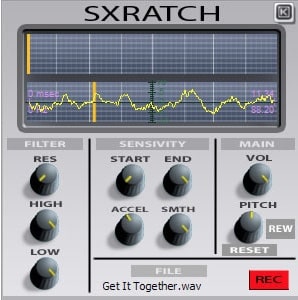
OS: Windows Win Bit Version: 32-bit Developer: KlangLabs Size: 2.7 MB Rating: 55/100
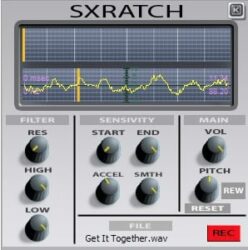
Sxratch is a free virtual scratcher plugin from KlangLabs that lets you create vinyl-style effects on any audio. It responds to your mouse or MIDI controller movements for hands-on control. You can adjust pitch, volume, and playback direction to shape your sound.
Sxratch offers filter, sensitivity, and playback controls to fine-tune your results. Load short WAV files, record input, or play sounds backward for creative effects. It’s useful for adding tape-stop moves, chopped textures, or glitchy motion to tracks in experimental or remix projects.
Features
- Simulates Real-Time Vinyl Scratching
- Loads WAV Audio Files
- Filter Control For High And Low
- Pitch Control With Reset Option
- Reverse Playback Function
- Works With MIDI Controllers
- Creates Tape-Stop And Glitch Effects
- Displays Waveform During Playback
- Low Latency For Live Use
- Free Plugin For Creative Effects
Pros
- Real-time scratching with MIDI
- Instant reverse playback option
- Adjustable pitch for fun effects
- Accurate start and end control
- Low CPU use for live play
- Responds fast to controller moves
- Gives loops a fresh vinyl feel
- Works better than DAW automation
- Can scratch any audio source
- Totally free with no limits
Cons
- Only works on Windows systems
- No 64-bit plugin version
- No Mac or Linux support
- Interface looks old and simple
- Short file limit of 10 seconds
- Lacks vinyl crackle or noise
- No tempo sync with DAW
- Can sound harsh or digital
- No built-in presets to start
- Not as flexible as iZotope Vinyl
What Users Say
Sxratch Tips
- I keep the wet/dry mix low when I want just a light vinyl texture.
- I love automating the pitch setting to make more realistic turntable sounds.
- Start with subtle noise and crackle to avoid overpowering the main mix.
- Use automation to make the vinyl effect sound like it moves naturally.
- Try placing the plugin only on certain instruments for a vintage flavor.
- Adjust the record wear setting to make your mix sound older or newer.
Vinyl VST Plugins Compared
This table compares the Vinyl VST plugins by operating system, bit version, format, and rating.
| Details | Origin | Vinyl | Vinyl Simulator | SL473 | Milli Vinylli Vinyl Effects | Vinyl Dreams | Tapestop | Vinyl Plugin | Scratch it | Audio Impurities | Vinylusion | Vinylizer | Sxratch |
|---|---|---|---|---|---|---|---|---|---|---|---|---|---|
| Image | 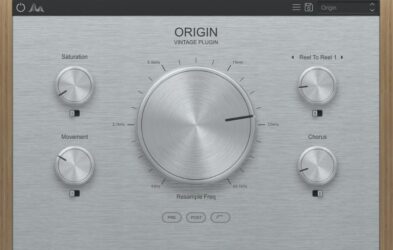 |
 |
 |
 |
 |
|
|
 |
 |
|
 |
 |
 |
| Rating | |||||||||||||
| OS | Windows, Mac | Windows, Mac | Windows | Windows | Windows | Windows | Windows | Windows | Windows | Windows | Windows | Windows | Windows |
| Formats | VST, AU, AAX | VST2, VST3, AU, AAX | VST | VST | VST | VST | VST | VST | VST | VST | VST | VST | VST |
| Bit Version | 64-bit | 64-bit | 32-bit | 32-bit | 32-bit | 32-bit | 32-bit | 32-bit | 32-bit | 32-bit | 32-bit | 32-bit | 32-bit |
| Developer | Cymatics | iZotope | ToneBytes | smacklabs | Klanglabs | Retro Sampling | TbT | ToneBytes | Z3 Audiolabs | Retro Sampling | Vetrix | Plektron | KlangLabs |
| License | Freeware | Freeware | Freeware | Freeware | Freeware | Freeware | Freeware | Freeware | Freeware | Freeware | Freeware | Freeware | Freeware |
| Sample-Based | Yes | No | No | No | No | Yes | No | No | Yes | Yes | Select | No | Yes |
| Download Size | 61 MB | 40MB | 3.8 MB | 5.7 MB | 1 MB | 1.4 MB | 1MB | 3.8 MB | 2 MB | 1.5 MB | 8.8 MB | 2.5 MB | 2.7 MB |
| CPU Load | Low | Low | Low | Low | Low | Low | Low | Low | Low | Low | Low | Low | Low |
| Polyphony | 8 | 1 | 8 | 64 | 8 | 8 | 8 | 32 | N/A | 8 | 8 | N/A | 8 |
| Features | Resampler Bitcrusher, Underwater Filters, Tape Saturation, Noise, Movement, Chorus, Vintage Texture | Lo-fi effect, Vintage simulation, Year selector, Mechanical noise, Dust control, Warp modulation, Spin-down feature | Dust emulation, Frequency response, Gentle distortion, VST automation, MIDI learning, Vinyl crackle, Vintage warmth | Vintage VCA compression, Expander control, Limiter function, Musical dynamics, Analog character, Bass cut filter, LED metering | Vinyl sound generation, Phase variation, Adjustable variations, Noise density control, Frequency adjustment, Hiss and crackle effects, Main volume control | Vinyl emulation, Dual sound modes, Dry/Wet control, Noise and crackle, Wow & flutter, Tone shaping, Filter section | Time-Stretch Audio, Process Modes, Speed Fade, Full Speed Mute, Speed Box, Button Modes, Fade Time Adjustment | Dust emulation, Frequency response, Gentle distortion, Vinyl age, Noise control, VST automation, MIDI learning | Vinyl Scratch Simulation, Tape Stop Effects, Envelope Control, Beat Grid Sync, 16 Point Editing, MIDI Triggering, Randomize Function | Vintage warmth, Vinyl crackle, Noise floor, Dry/Wet control, Mode switching, Subtle grit, Analog character | Mechanical noise control, Turntable simulation, Crackle adjustment, Record speed control, Static noise generator, Noise shaping, Randomization effects | Decenter, Dust, High Damage, Stop Time, Start/Stop Button, 33/45 Switch, Saturation | Vinyl scratching, Real-time control, Reverse playback, Filter controls, Pitch adjustment, Recording, Wave display |
| Controls | Saturation, Movement, Resample Freq, Reel To Reel, Chorus, Pre/Post Buttons, Power Button | Output Knob, Year Buttons, Mechanical Knob, Dust Slider, Scratch Slider, Warp Slider, Lo-Fi Button | Master Volume, Pan, Vinyl, Noise, Width, Hum, Vinyl Speed | Recovery, Threshold, Ratio, Compr Gain, Attack, Output, Bypass Switch | Hiss, Click A, Click B, Dust, Friction, Phase, Main Volume | On/Off, Vinyl Type Switch, Dry, Wet, Noise, Wow & Flutter, Saturation | Setup, Play Button, Up/Down Buttons, Speed Slider, Mode Indicator, VU Meters, Mode Display | Dust Count, Dust Color, Dust Level, Record Age, Distort, Gain, Noise Type | Graph Display, Scratch Knob, Stop Button, Menu, Rename, Scratch It Button, Beat Grid | On/Off, Noisefloor, Good Vinyl, Dry, Wet, Mode Switch, Randomization | Mekanikx, T-Table A, T-Table B, Statikx, Mix, RPM, Crackle | Decenter, Dust, High Damage, Stop Time, Start/Stop Button, 33/45 Switch, Drive | Filter Res, Filter High, Filter Low, Start, End, Accel, Smth |
| Effects Included | Resampler, Bitcrusher, Filter, Tape Saturation, Noise, Movement, Chorus | Lo-fi, Mechanical noise, Electrical noise, Dust, Scratch, Warp, Spindown, Wear | Dust noise emulation, Frequency response emulation, Gentle distortion, Vinyl crackle, Background noise, Hum, Pitch fluctuation | Compressor, Limiter, Expander, Analog Filtering, Feedback, Bass Cut | Hiss, Click A, Click B, Dust, Friction, Phase, Var, Vol, Density, Fq, Main Vol | Vinyl noise, wow & flutter, saturation, filter (high cut) | Time-Stretch Audio, Speed Fade Control, Full Speed Mute Feature | Dust noise, Frequency response emulation, Distortion, Scratches, Crackle, Dropouts, Noise, Mechanical noise, Pitch instability, Wow and flutter | Vinyl Scratch Simulation, Tape Stop Effects | Noise, Vinyl Crackle, Hiss, Wobble | Mechanical noise, machine hum, crackle, static noise | Noise, Decenter (wobble), High-frequency damage, Stop effect, Saturation, Filter, Compressor | Filter (High Freqs, Low Freqs, Resonance), Reverse playback (Rew) |
| MIDI Learn | Unknown | No | Unknown | Yes | Unknown | Unknown | Yes | Unknown | Yes | Select | Unknown | Yes | Unknown |
| Presets | 40 | N/A | 32 | N/A | 5 | 40 | N/A | 55 | N/A | 50 | 40 | N/A | N/A |
| Standalone | Select | No | No | Yes | Yes | Yes | No | No | No | No | Yes | Yes | Yes |
| Last Updated | 07/14/2023 | 09/20/2019 | 08/06/2013 | 04/12/2024 | 08/16/2004 | 01/30/2024 | 06/25/2021 | 07/07/2012 | 03/24/2024 | 03/11/2024 | 03/30/2024 | 02/15/2016 | 06/25/2004 |
Favorite Vinyl VST Plugin
Our top pick for the best free Vinyl VST plugin is Vinyl by iZotope. It offers great vinyl simulator controls, effects, and it’s available for both Windows and Mac.
| Details | Vinyl |
|---|---|
| Image |
|
| Rating | |
| OS | Windows, Mac |
| Formats | VST2, VST3, AU, AAX |
| Bit Version | 64-bit |
| Developer | iZotope |
| License | Freeware |
| Sample-Based | No |
| Download Size | 40MB |
| CPU Load | Low |
| Polyphony | 1 |
| Features | Lo-fi effect, Vintage simulation, Year selector, Mechanical noise, Dust control, Warp modulation, Spin-down feature |
| Controls | Output Knob, Year Buttons, Mechanical Knob, Dust Slider, Scratch Slider, Warp Slider, Lo-Fi Button |
| Effects Included | Lo-fi, Mechanical noise, Electrical noise, Dust, Scratch, Warp, Spindown, Wear |
| Download | Download Vinyl |
Vinyl VST FAQs
How to Install Vinyl VST Plugins
To install vinyl VST plugins on Windows or Mac, extract the files from the Zip or Rar. Move the files (.dll for Windows or .component for Mac) into your DAW’s plugin folder. Then restart your software and rescan the directory to complete the process. Tutorial: How to Install VST Plugins
Windows:
Extract the downloaded zip file and copy the .dll file into the VST plugins folder scanned by your DAW. Restart your music software and rescan your plugin directory to begin using the new VST.Mac OS X:
Extract the downloaded archive and move the .component or .VST file to the plugin folder. It is usually /Library/Audio/Plug-Ins/Components or /Library/Audio/Plug-Ins/VST. Restart your DAW and rescan your plugins to complete the installation.
What is a Vinyl VST Plugin?
Vinyl VST Plugins emulate the sound of vinyl records and the many effects that happen while playing a record. The use of these plugins can help to create a song that sounds like it was recorded decades ago, which is why they are popularly used in hip-hop and rap songs.
These types of plugins can be used to create lo-fi music, which is usually characterized by the use of distortion and noise. Vinyl VST plugins are a creative way to add a vintage feel to your music.
These plugins offer a variety of ways to bring those elements into your music without sacrificing the quality of your production. I hope you find these free vinyl VST plugins helpful.
You May Also Like:





