Here are the best free Flanger VST plugins for Windows and Mac. We have included videos, reviews, features, pros, cons, and plugin ratings.
Table of Contents

How we rate flanger plugins: We rate each flanger plugin based on sound quality, design, performance, features, usability, and compatibility. We rate plugins on a scale of 1 to 100.
| # | Plugins | Ratings | OS | Formats |
|---|---|---|---|---|
| 1 | Valhalla Space Modulator | Windows Mac | VST, VST3, AU | |
| 2 | MFlanger | Windows Mac | VST, AU | |
| 3 | Blue Cat's Flanger | Windows Mac | VST, AU, AAX | |
| 4 | TheChorus | Windows Mac | VST, AU | |
| 5 | TAL-Flanger | Windows Mac | VST, AU | |
| 6 | Flanger | Windows Mac | VST, AU | |
| 7 | DD Flanger | Windows | VST | |
| 8 | PhatNoise Delay | Windows | VST | |
| 9 | T-Force Delay | Windows | VST, VST2, VST3 | |
| 10 | Flanger Box | Windows | VST |
I have spent over 15 years testing and comparing hundreds of free and paid VST plugins, supported by hands-on demos on our YouTube channel, which has 12,000+ subscribers.
Best Free Flanger VST Plugins
1. Valhalla Space Modulator

OS: Windows Win Mac Mac Bit Version: 32-bit, 64-bit Developer: VALHALLA DSP Size: 8.5 MB Rating: 90/100
Valhalla Space Modulator is a free modulation plugin for Windows and Mac. It uses 11 algorithms to create through-zero and barberpole flanging, chorus, doubling, detuning, echoes, reverb, and pitch-shifting effects.
Its Mix, Rate, Depth, Feedback, and Manual controls shape the sound. Four LFO shapes, tempo sync, and phase offset provide control over movement. It is available in VST, AU, and VST3 formats, with 32-bit and 64-bit support.
Features
- Free Flanger Plugin
- Eleven Modulation Algorithms
- Through-Zero Flanging Effects
- Barberpole Flanging Effects
- Detuning And Doubling Effects
- Strange Echoes And Reverbs
- Four LFO Shapes
- Tempo-Synced LFO Modulation
- Variable LFO Phase Offset
- Low CPU Usage
Video
Pros
- Eleven creative effect algorithms
- Handles through-zero flanging
- Creates barberpole movement effects
- Makes strong doubling effects
- Adds useful detuning sounds
- Delivers strange echo textures
- Can create reverb-like effects
- Includes four LFO shapes
- Supports tempo-synced movement
- Provides variable phase control
Cons
- No stereo spread control
- Only four LFO shapes
- No custom LFO drawing
- No envelope follower controls
- No sidechain modulation options
- No automatic gain compensation
- No AAX plugin format
Testimonials
2. MFlanger

OS: Windows Win Mac Mac Bit Version: 32-bit, 64-bit Developer: MeldaProduction Size: 15 MB Rating: 85/100
MFlanger is a flexible flanger effect for creating moving sweeps and wide stereo motion. It offers several modes, adjustable depth, feedback, delay, rate, and range controls, plus variable LFO shapes and tube saturation for added warmth.
Tempo sync and MIDI reset help match movement to a track. The editable LFO section supports custom curves, steps, smoothing, and harmonic motion. MFlanger works with guitars, synths, vocals, and other audio on Windows and Mac in VST and AU formats.
Features
- Analog-Style Sound
- Three Flanger Modes
- Integrated Tube Saturation
- Variable LFO Wave Shapes
- Tempo-Synced Effect Movement
- MIDI Note Reset
- Custom LFO Shape Mixing
- Random LFO Shape Creation
- Visual LFO Graph
- Adjustable Stereo Width
Video
Pros
- Built-in tube warmth
- Three useful flanger modes
- Custom LFO shape drawing
- Step-based movement control
- Smooths sharp LFO changes
- Tempo-synced effect movement
- MIDI note retrigger support
- Adjustable stereo width
- Manual LFO override control
- Random LFO shapes included
Cons
- Interface may feel crowded for beginners
- No dedicated dry wet mix knob
- No built-in EQ for tone shaping
- No visible input output meters listed
- No MIDI Learn feature listed
- No VST3 support listed
- No AAX support listed
Testimonials
3. Blue Cat's Flanger

OS: Windows Win Mac Mac Bit Version: 32-bit, 64-bit Developer: Blue Cat Audio Size: 26 MB Rating: 83/100
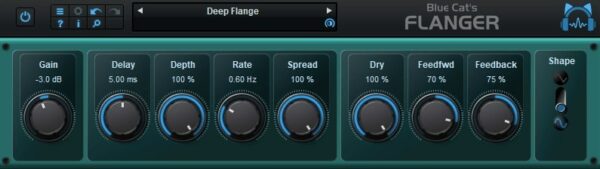
Blue Cat’s Flanger is a free classic flanging effect for drums, vocals, guitars, synthesizers, and other tracks. It ranges from gentle movement to deep, metallic sounds, with controls for delay, depth, rate, feedback, dry signal, and sine or triangle modulation.
The stereo version adds Spread control for wider motion across the stereo field. It supports MIDI control, automation, presets, and smooth bypass, and runs as VST, VST3, Audio Unit, or AAX plug-in on Mac and Windows.
Features
- Classic Vintage Flanger Effect
- Creates Subtle Or Deep Effects
- Offers Smooth And Metallic Sounds
- Includes Stereo Spread Control
- Supports Sine And Triangle LFOs
- Provides Feedforward And Feedback Paths
- Includes Full MIDI Control
- Supports Automation Control
- Stops Processing During Silence
- Includes Factory And User Presets
Pros
- Free vintage flanger sound
- Creates soft or harsh tones
- Stereo spread adds width
- Sine and triangle LFO shapes
- Phase options expand sound choices
- Full MIDI control support
- MIDI Learn speeds controller setup
- Detailed automation control options
- Low CPU use during silence
- Smooth bypass avoids clicks
Cons
- No standalone version
- Only two LFO shapes
- No custom LFO drawing
- No host tempo sync
- No advanced modulation system
- No multiband processing mode
- High feedback can cause clipping
Testimonials
4. TheChorus

OS: Windows Win Mac Mac Bit Version: 64-bit Developer: TheZhe Size: 0.9 MB Rating: 78/100
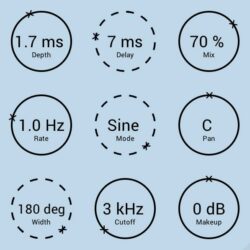
TheChorus is a virtual analog chorus effect with a hybrid BBD and ladder filter stage. Rate, Depth, Width, and Delay shape the movement, while Normal and Ensemble modes range from subtle doubling to a stronger, swirling sound.
Cutoff adds warmth and grit as it lowers the high-frequency range. Mix, Pan, and Makeup control the output. It can also create flanger, vibrato, stereo widening, and doubling effects, with VST3 and AU support for 64-bit Windows and Mac.
Features
- Chorus, Flanger, Vibrato, And Doubler
- Hybrid BBD And Ladder Filter
- Normal And Ensemble Modes
- Rate, Depth, And Width Controls
- Delay And Cutoff Controls
- Mix, Pan, And Makeup Controls
- Warm Grit At Lower Cutoffs
- Optimized Anti-Aliasing For Clean Sound
- Modulate-Able Control Knobs
- VST3 And AU Compatibility
Pros
- Versatile chorus, flanger, vibrato effect
- Ensemble mode adds stronger movement
- Cutoff adds warm, gritty color
- BBD-style tone feels natural
- Lower cutoff adds rich harmonics
- Delay control shapes chorus texture
- Wide stereo field sounds immersive
- Pan control moves effected sound
- Built-in anti-aliasing keeps sound clean
- Modulatable knobs enable creative motion
Cons
- No feedback control for flanging
- No phase offset control
- No separate motion control
- No true flanger mode
- No phase-based stereo width control
- No AAX support listed
- Only supports up to 96kHz
Testimonials
5. TAL-Flanger

OS: Windows Win Mac Mac Bit Version: 32-bit, 64-bit Developer: TAL Software Size: 401 KB Rating: 70/100
TAL-Flanger is a stereo flanger effect with an analog-like feedback section and an individual sound. It can create gentle movement, wide stereo effects, or strong, sharp modulation for instruments, vocals, and other audio tracks.
Controls include speed, depth, delay, width, feedback, dry/wet mix, and output volume. Sync mode follows the song tempo, while manual mode gives direct speed control. The plugin supports VST and AU formats on Windows and Mac.
Features
- Stereo Flanger Effect
- Analog Like Feedback Character
- Subtle To Extreme Effects
- Adjustable Flanger Speed
- Adjustable Effect Depth
- Variable Delay Time
- Adjustable Delay Movement Range
- Dry And Wet Mix Control
- Tempo Synced Flanger Speed
- Manual Speed Control Mode
Video
Pros
- Special analog-like feedback sound
- Wide range of effects
- Subtle or extreme sounds
- Clear stereo flanger design
- Delay time shapes tone
- Width adds stereo movement
- Feedback creates sharper sounds
- Tempo sync fits songs
- Manual mode allows free timing
- Supports older Windows computers
Cons
- Very old macOS support only
- Mac version is 32-bit only
- No modern VST3 format
- No AAX support for Pro Tools
- No native Apple Silicon support
- Custom settings may not save
- Preset changes can return unexpectedly
Testimonials
6. Flanger

OS: Windows Win Mac Mac Bit Version: 64-bit Developer: Recluse-Audio Size: 2.3 MB Rating: 68/100
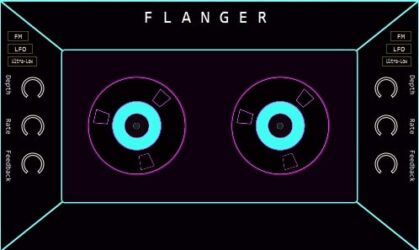
Flanger is a modulation effect for Windows and Mac in VST and AU formats. It adds moving, swirling tones to drums, synths, vocals, and other tracks. Adjust depth, rate, feedback, and delay timing for subtle flange or stronger, changing sounds.
Separate left and right controls shape the stereo effect. FM, LFO, and ultra-low modes offer different modulation speeds, while visual displays show the motion. Use it for vintage touch effects, shimmering synth leads, or unusual vocal textures.
Features
- Precise Effect Timing Control
- Classic Touch Flange Effects
- Modulated Synth Lead Sounds
- Frequency Rate Delay Modulation
- Left And Right Channel Controls
- FM And LFO On Or Off
- Ultra Low Modulation Mode
- Adjustable Depth, Rate, And Feedback
- Visual Displays Show Effect Motion
- Shimmering Warble For Audio Tracks
Video
Pros
- Offers precise timing control
- Creates classic touch flange sounds
- Builds wild synth lead effects
- Creates rich analog-style warble
- Includes frequency rate modulation
- Provides ultra-low modulation speeds
- Offers adjustable effect depth
- Provides strong feedback control
- Shows movement with visual displays
- Supports separate left-right controls
Cons
- No VST3 format listed
- No AAX support listed
- Host tempo sync is not listed
- No MIDI learn controls
- No dry-wet mix control
- No adjustable delay control
- No selectable LFO shapes
Testimonials
7. DD Flanger

OS: Windows Win Bit Version: 32-bit, 64-bit Developer: Dead Duck Software Size: 0.5 MB Rating: 67/100
DD Flanger is a multi-stage flanger effect for Windows VST hosts. Its classic rack-style design supports subtle tone changes, moving modulation, and strong vintage effects for vocals, instruments, and sound design.
Controls include tempo sync, rate, delay, range, feedback, and depth. Use bypass to compare settings or disable the effect. The plugin is available in 32-bit and 64-bit formats.
Features
- Multi-Stage Flanger Effect
- Classic Hardware Sound
- Vintage Sound Effects
- Tempo-Synced Flanger Rate
- Adjustable Flanger Rate
- Adjustable Starting Delay
- Adjustable Delay Sweep Range
- Adjustable Feedback Control
- Adjustable Effect Depth
- Effect Bypass Control
Video
Pros
- Free multi-stage flanger effect
- Classic rack-style look and feel
- Creates vintage flanger sounds
- Tempo sync keeps movement musical
- Adjustable rate controls sound motion
- Range shapes the sweep size
- Stereo design creates wide movement
- Supports both 32-bit and 64-bit
- Works with Windows VST hosts
- Focused layout avoids confusing menus
Cons
- Windows only, no Mac version
- VST format support is limited
- No AU or AAX support
- No stereo width knob
- No LFO shape choices
- No dry-wet mix control
- GUI may sometimes get stuck
Testimonials
8. PhatNoise Delay
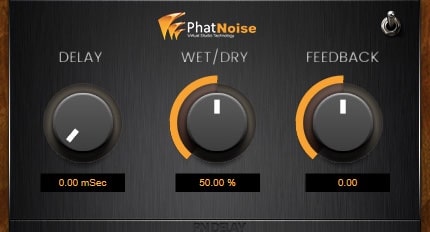
OS: Windows Win Bit Version: 32-bit, 64-bit Developer: BurghRecords Size: 12 MB Rating: 65/100
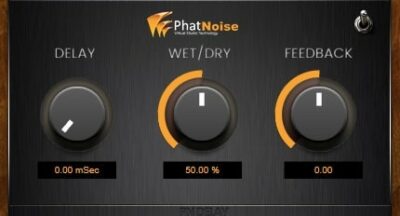
PhatNoise Delay offers the warm, vintage sound of classic 70s tape echo units, giving tracks a smooth and rich delay effect. Its simple design makes shaping echoes and adding analog-style warmth easy, helping producers get that thick, retro tone in just a few adjustments.
With controls for delay time, feedback, and wet/dry mix, it gives quick creative control without clutter. The added saturation brings character and grit to synths, guitars, or vocals, making it a handy tool for adding space and texture to any mix.
Features
- Emulates Classic Tape Echo Sound
- Creates Warm And Lush Delays
- Adds Subtle Or Heavy Saturation
- Simple One-Knob-Per-Function Design
- Low CPU Usage For Projects
- Supports 32-Bit And 64-Bit
- Includes Delay, Feedback, Wet/Dry Controls
- Provides Retro Analog Feel
- User-Friendly And Intuitive Interface
- Features On/Off Power Switch
Video
Pros
- Warm vintage tape echo sound
- Adds natural tape-style warmth
- Gritty tone similar to vintage gear
- Free plugin with pro-level sound
- Low CPU use for smooth play
- Easy one knob per function design
- Creates rich and thick delays
- Balanced wet and dry blend control
- Works great for synth and vocals
- Quick to get great results
Cons
- Only works on Windows systems
- No AU or AAX plugin format
- Interface looks old and plain
- Cannot sync delay to tempo
- Few creative sound design tools
- Lacks tape noise customization
- No wow and flutter control
- Can sound harsh when pushed
- No built-in oversampling option
- Less features than Chow Tape Model
Testimonials
9. T-Force Delay

OS: Windows Win Bit Version: 32-bit, 64-bit Developer: Mastrcode Music Size: 4.7 MB Rating: 64/100
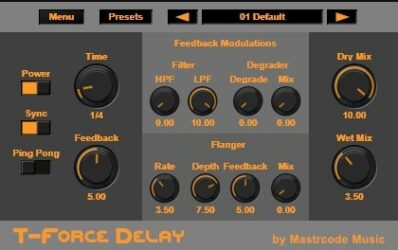
T-Force Delay is a free dual-mode delay effect for Windows. It works as an insert or send effect and offers stereo or ping-pong echoes, delay times up to two seconds, tempo sync, feedback, and separate dry and wet controls.
Its feedback path includes high- and low-pass filters, a degrader for lo-fi texture, and a flanger with rate, depth, feedback, and mix controls. The plugin supports automated controls and comes in 32-bit VST2 and 64-bit VST2/VST3 formats.
Features
- Dual Mode Delay Effect
- Insert And Send Operation
- Six Delay Modes
- Host Tempo Synchronization
- Left To Right Ping Pong
- High Pass And Low Pass Filters
- Lo Fi Degrader Effect
- Dedicated Flanger Section
- Adjustable Flanger Rate
- Adjustable Flanger Depth
Pros
- Offers six delay modes
- Delays reach two seconds
- Syncs with song tempo
- Creates wide ping-pong echoes
- Separate dry and wet controls
- High-pass filter removes low rumble
- Low-pass filter softens bright repeats
- Degrader adds lo-fi grit
- Flanger feedback creates metal tones
- Combines delay, filters, lo-fi, flanger
Cons
- Windows only, no Mac support
- No AU or AAX format
- Only two seconds of delay
- No stereo spread control listed
- No selectable LFO shapes
- Reported crashes in Vegas Pro
- Interface may fail loading sometimes
Testimonials
10. Flanger Box

OS: Windows Win Bit Version: 32-bit Developer: Synthescience Size: 1.4 MB Rating: 60/100
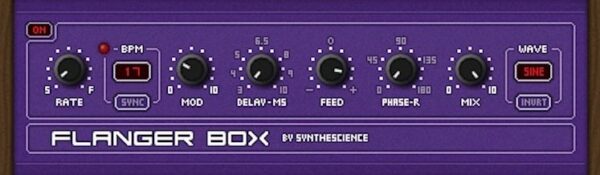
Flanger Box is a Windows 32-bit VST effect that creates classic flanger sounds, as well as chorus and comb filter effects. It includes five modulation waveforms, tempo sync, rate, depth, delay, feedback, mix, phase, and wave invert controls.
The phase control can widen the stereo image, while different waveforms support smooth or rhythmic modulation. Flanger Box offers up to 64 presets, includes factory sounds, and supports automation for changing effects during a track.
Features
- Classic Flanger Sound
- Chorus And Comb Effects
- Five Modulation Waveforms
- Beat-Synced Modulation Control
- Adjustable Modulation Rate
- Adjustable Delay And Feedback
- Stereo Phase Adjustment
- Wave Invert Function
- Dry And Wet Mix Control
- Fully Automatable Effect Controls
Video
Pros
- Also makes chorus effects
- Can create comb filter sounds
- Offers five modulation waveforms
- Offers random modulation movement
- Provides adjustable stereo phase
- Creates wide stereo sounds
- Includes wave invert control
- Supports tempo-synced modulation
- Fully supports parameter automation
- Runs with low CPU use
Cons
- Limited to Windows systems
- Only supports 32-bit VST
- No modern VST3 format
- No Mac or Linux support
- No AU or AAX versions
- Lacks MIDI learn controls
- No resizable user interface
Testimonials
Best Flanger Plugins Compared
This table compares the top flanger plugins by features, controls, effects, formats, and more.
| Details | Valhalla Space Modulator | MFlanger | Blue Cat's Flanger | TheChorus | TAL-Flanger | Flanger | DD Flanger | PhatNoise Delay | T-Force Delay | Flanger Box |
|---|---|---|---|---|---|---|---|---|---|---|
| Image | 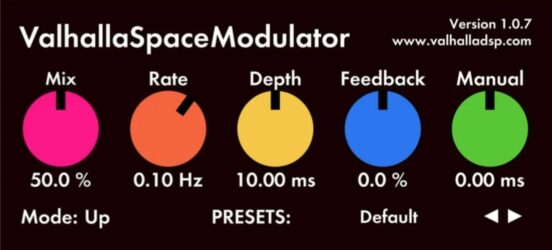 |
 |
 |
 |
|
 |
 |
 |
 |
 |
| Rating | ||||||||||
| OS | Windows, Mac | Windows, Mac | Windows, Mac | Windows, Mac | Windows, Mac | Windows, Mac | Windows | Windows | Windows | Windows |
| Formats | VST, VST3, AU | VST, AU | VST, AU, AAX | VST, AU | VST, AU | VST, AU | VST | VST | VST, VST2, VST3 | VST |
| Bit Version | 32-bit, 64-bit | 32-bit, 64-bit | 32-bit, 64-bit | 64-bit | 32-bit, 64-bit | 64-bit | 32-bit, 64-bit | 32-bit, 64-bit | 32-bit, 64-bit | 32-bit |
| Developer | VALHALLA DSP | MeldaProduction | Blue Cat Audio | TheZhe | TAL Software | Recluse-Audio | Dead Duck Software | BurghRecords | Mastrcode Music | Synthescience |
| License | Freeware | Freeware | Freeware | Donationware | Freeware | Freeware | Freeware | Freeware | Freeware | Freeware |
| Sample-Based | No | No | No | No | No | No | No | Select | No | No |
| Download Size | 8.5 MB | 15 MB | 26 MB | 0.9 MB | 401 KB | 2.3 MB | 0.5 MB | 12 MB | 4.7 MB | 1.4 MB |
| CPU Load | Low | Low | Low | Low | Low | Low | Low | Low | Low | Low |
| Polyphony | N/A | N/A | N/A | N/A | N/A | N/A | N/A | 8 | N/A | N/A |
| Features | Infinite Flanging, Doubling, Through-Zero Flanging, Barberpole Flanging, Detuning, Strange Echoes, Tempo Sync | Versatile Flanger, Variable LFO Shapes, Tube Saturation, Multiple Flanger Modes, Tempo Sync, MIDI Reset, Stereo Width | Vintage Flanger, Stereo Spread, Dual LFO Shapes, Feedforward/Feedback Paths, MIDI Control, Customizable Interface, Preset Manager | Chorus, Flanger, Vibrato, Stereo Widener, Doubler, Ensemble Mode, Cutoff Control | Stereo Flanger, Analog Feedback, Speed Control, Depth Control, Delay Control, Tempo Sync, Dry/Wet Mix | Precise Timing Control, Classic Touch Flange, Shimmering Warble, Frequency Modulation, Ultra-Low Modulation, Adjustable Depth, Adjustable Feedback | Multi-Stage Flanger, Vintage Sound Effects, Old-School Design, Tempo Sync, Rate Control, Delay Sweep, Feedback Control | Tape emulation, Warm delay, Retro saturation, Intuitive interface, One-knob control, Quick results, Musical character | Dual-Mode Delay, Ping-Pong Echoes, Host Sync, Feedback Filtering, Lo-Fi Degrader, Flanger Section, Dry/Wet Mix | Flanger Effects, Chorus Effects, Comb Filtering, Five Waveforms, Stereo Widening, Tempo Sync, 64 Presets |
| Controls | Mix, Rate, Depth, Feedback, Manual, Mode, Presets | Preset Name, Preset Arrows, Random, Bypass, Settings, Home, Help | Power, Preset Name, Preset Arrows, Menu, Help, Gain, Delay | Rate, Depth, Width, Delay, Mode, Cutoff, Mix | Speed, Depth, Delay, Width, Feedback, Dry/Wet, Volume | FM Button, LFO Button, Ultra-Low Button, Depth Knob, Rate Knob, Feedback Knob, Left Channel Controls | Sync, Rate, Delay, Range, Feedback, Depth, Bypass | Delay, Wet/Dry, Feedback, Power Switch, Saturation, Mix, Output Level | Menu, Presets, Power, Time, Sync, Ping Pong, Feedback | On, Rate, BPM Display, Sync, Mod, Delay-Ms, Feed |
| Effects Included | Flanging, barberpole flanging, detuning, doubling, strange echoes, reverb, chorus, phaser, pitch shifting | Flanger, tube saturation | Flanger, chorus, short delay, stereo widening | chorus, flanger, vibrato, stereo widener, doubler | Flanger | Flanger | Flanger | Delay, Saturation | Delay, high-pass filter, low-pass filter, degrader, flanger | Flanger, chorus, comb filter |
| MIDI Learn | No | Yes | Yes | No | No | Select | Yes | Unknown | Select | No |
| Presets | 110 | N/A | 10 | N/A | 8 | N/A | N/A | N/A | N/A | 64 |
| Standalone | No | No | No | No | No | No | No | Select | No | No |
| Last Updated | N/A | 09/09/2026 | 02/10/2026 | 09/04/2022 | 11/24/2026 | N/A | 11/24/2026 | 06/30/2024 | N/A | 05/21/2024 |
Best Flanger VST Plugins
Our top picks for the best free Flanger VST plugins are Valhalla Space Modulator by VALHALLA DSP, MFlanger by MeldaProduction, and Blue Cat’s Flanger by Blue Cat Audio.
| Details | Valhalla Space Modulator | MFlanger | Blue Cat's Flanger |
|---|---|---|---|
| Image | | | |
| Rating | |||
| OS | Windows, Mac | Windows, Mac | Windows, Mac |
| Formats | VST, VST3, AU | VST, AU | VST, AU, AAX |
| Bit Version | 32-bit, 64-bit | 32-bit, 64-bit | 32-bit, 64-bit |
| Developer | VALHALLA DSP | MeldaProduction | Blue Cat Audio |
| Download Size | 8.5 MB | 15 MB | 26 MB |
| Download | Visit Valhalla Space Modulator | Visit MFlanger | Visit Blue Cat's Flanger |
Flanger VST FAQs
How to Install Flanger VST Plugins
To install flanger VST plugins on Windows or Mac, extract the files from the Zip or Rar. Move the files (.dll for Windows or .component for Mac) into your DAW’s plugin folder. Then restart your software and rescan the directory to complete the process. Tutorial: How to Install VST Plugins
Windows:
Extract the downloaded zip file and copy the .dll file into the VST plugins folder scanned by your DAW. Restart your music software and rescan your plugin directory to begin using the new VST.
Mac OS X:
Extract the downloaded archive and move the .component or .VST file to the plugin folder. It is usually /Library/Audio/Plug-Ins/Components or /Library/Audio/Plug-Ins/VST. Restart your DAW and rescan your plugins to complete the installation.
What Is A Flanger VST Plugin?
A Flanger plugin is a modulation effect that creates a “swooshing” sound. It is often used to produce the illusion of passing through an obstacle or traveling through space.
The plugin can be programmed to produce a variety of effects, from subtle to dramatic. The most common settings are:
– Delay time: how long the sound will take to reach full volume after it is generated
– Rate: how quickly the delay time will change
– Depth: how much the original signal will modulate the delayed sound
– Feedback: how much of the delayed signal will be fed back into itself
Flangers are often used on guitars, vocals, and synths. They are also used in some modern musical genres, such as Dubstep, Drum and Bass, Grime, Glitch-Hop, Industrial Metal, and Trance.
I hope you enjoy these free flanger VST plugins.