Here are the best free Compressor VST plugins for Windows and Mac. We have included videos, reviews, features, pros, cons, and plugin ratings.
Table of Contents

How we rate compressor plugins: We rate each compressor based on sound quality, design, performance, features, usability, and compatibility. We rate plugins on a scale of 1 to 100.
| # | Plugins | Ratings | OS | Formats |
|---|---|---|---|---|
| 1 | TDR Kotelnikov | Windows Mac | VST2, VST3, AU, AAX | |
| 2 | TDR Molotok | Windows Mac | VST2, VST3, AU, AAX | |
| 3 | Squeezer | Windows Mac Linux | VST, AU | |
| 4 | DC1A | Windows Mac | VST, VST3, AU, AAX | |
| 5 | Frontier | Windows Mac | VST2, VST3, AU, AAX | |
| 6 | LALA | Windows Mac | VST3, AU, AAX | |
| 7 | fircomp | Windows Mac Linux | VST, AU | |
| 8 | Xfer Records OTT | Windows Mac | VST3, AAX | |
| 9 | dBComp | Windows Mac | VST, AU | |
| 10 | TheExpressor | Windows Mac | VST, AudioSuite | |
| 11 | BUSTERse | Windows Mac | VST, AU | |
| 12 | FETISH | Windows Mac | VST, AU | |
| 13 | TLS 1295 LEA | Windows Linux | VST, AU | |
| 14 | Density Compressor | Windows | VST | |
| 15 | SAFECompressor | Windows Mac Linux | VST, AU | |
| 16 | BLOCKFISH | Windows | VST | |
| 17 | CamelCrusher | Windows Mac | VST, AU, RTAS | |
| 18 | FETISH | Windows Mac | VST, AU | |
| 19 | GComp2 | Windows Mac Linux | VST, AU | |
| 20 | StupidCompressor | Windows | VST |
I have spent over 15 years testing and comparing hundreds of free and paid VST plugins, supported by hands-on demos on our YouTube channel, which has 12,000+ subscribers.
Best Free Compressor VST Plugins
1. TDR Kotelnikov
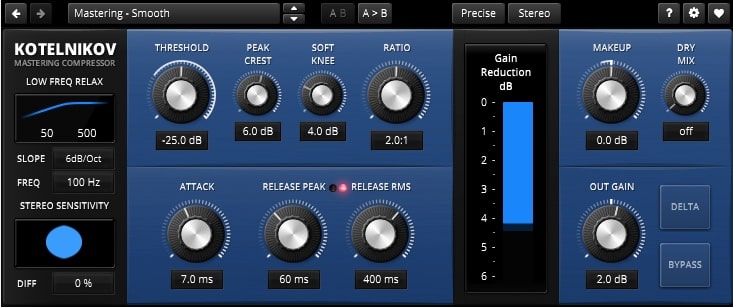
OS: Windows Win Mac Mac Bit Version: 64-bit Developer: Tokyo Dawn Records Size: 7 MB Rating: 89/100
TDR Kotelnikov is a wideband compressor designed for mastering, stereo buses, and other detailed audio work. It controls dynamics while preserving the original tone, punch, and overall character.
Its 64-bit processing, peak and RMS release controls, sidechain high-pass filter, and stereo linking options provide precise control. Delta mode lets you hear the compressed signal, and it supports Windows and Mac in VST2, VST3, AU, and AAX formats.
Features
- Wideband Dynamic Range Control
- 64-Bit Multirate Processing
- Delta Oversampled Signal Path
- Independent Peak And RMS Release
- Flexible Sidechain High-Pass Filter
- Advanced Stereo Linking Options
- Delta Preview Listening Mode
- Click-Free Bypass Switching
- Resizable User Interface
- Preset Menu And A/B Comparison
Video
Pros
- Uses precise 64-bit processing
- Oversampling reduces digital errors
- Separate peak and RMS release
- Flexible low-cut sidechain filter
- Strong stereo linking controls
- Delta mode reveals compression changes
- Dry mix adds parallel control
- Click-free bypass for easy checks
- Latency compensation protects timing
- Resizable interface fits many screens
Cons
- It is not an EQ plugin
- No frequency curve display
- No spectrum analyzer included
- No dynamic EQ bands
- No high-pass EQ control
- No low-pass EQ control
- Less flexible than free EQs
Testimonials
2. TDR Molotok

OS: Windows Win Mac Mac Bit Version: 32-bit, 64-bit Developer: Tokyo Dawn Records Size: 7 MB Rating: 83/100
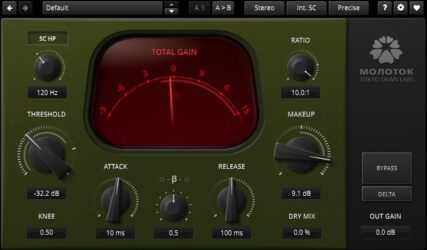
TDR Molotok is a characterful compressor for shaping drums, vocals, guitars, bass, and other tracks. It offers eleven compression flavors, from gentle level control to punchy, heavy effects, with adjustable attack, release, knee, ratio, and makeup gain.
The plugin includes dry/wet mixing, sidechain high-pass filtering, delta monitoring, stereo operation, and zero-latency mode. It runs on Windows and macOS in VST2, VST3, AU, and AAX formats, with 32-bit and 64-bit support.
Features
- Eleven Compression Flavor Options
- Zero-Latency Quality Mode
- Subtle Or Heavy Compression
- Adjustable Threshold And Ratio
- Adjustable Attack And Release
- Soft Knee Compression Control
- Dry And Compressed Mix
- Sidechain High-Pass Filter
- Delta Signal Monitoring
- A/B Setting Comparison
Video
Pros
- Offers eleven compression flavor options
- Provides rich musical sound colors
- Includes precise attack and release controls
- Includes helpful sidechain high-pass filtering
- Supports parallel compression with Dry Mix
- Includes zero-latency quality operation
- Keeps unwanted distortion under control
- Provides clear gain reduction metering
- Includes useful A/B comparison controls
- Offers unlimited undo and redo
Cons
- Eleven flavors may overwhelm beginners
- Crunchy tone limits clean compression
- Less transparent than TDR Kotelnikov
- No separate peak-RMS release controls
- No mid-side compression controls
- No multiband compression mode
- No external sidechain input
Testimonials
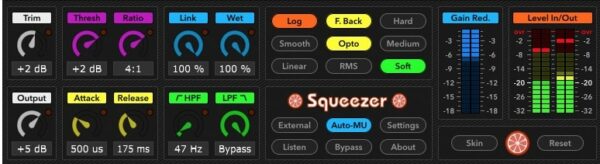
3. Squeezer
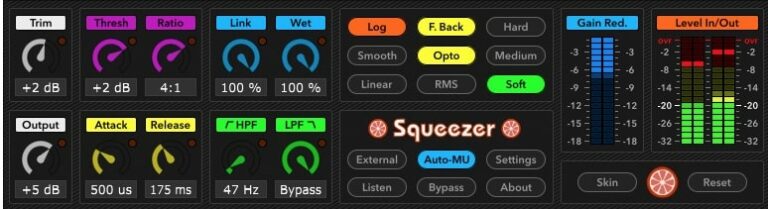
OS: Windows Win Mac Mac Linux Linux Bit Version: 64-bit Developer: mzuther Size: 6.1 MB Rating: 82/100
Squeezer offers precise and flexible compression for shaping sound dynamics. It includes side?chain and parallel options, letting you control how the compressor reacts to different signals. With stepped or continuous knobs, you can quickly find good settings and fine?tune as needed.
It provides many styles like optical or FET detection, peak or RMS sensing, and soft or hard knee curves. Feed?forward or feedback designs let you choose how the compression responds, making Squeezer useful for drums, vocals, and full mixes across Windows, Mac, and Linux.
Features
- Feed-Forward And Feedback Modes
- Optical And FET Detection Types
- Peak And RMS Level Sensing
- Parallel And Side-Chain Compression
- High-Pass And Low-Pass Filters
- Auto Makeup Gain Option
- Gain Reduction And Level Meters
- External Side-Chain Input Support
- Low CPU Usage Performance
- Supports VST And AU Formats
Video
Pros
- Choice of optical or FET modes
- Feed-forward and feedback options
- Offers peak or RMS detection
- Includes built-in sidechain support
- Allows parallel compression options
- Built-in high-pass and low-pass filters
- Includes auto-makeup gain feature
- Low CPU usage on most systems
- Customizable plugin look with skins
- Flexible attack and release control
Cons
- Interface may confuse new users
- Higher CPU use in Studio One
- No MIDI control mapping options
- Only 64-bit, no 32-bit support
- Does not include oversampling mode
- No built-in limiter section
- Auto makeup gain not always accurate
- Can sound harsh on vocals
- No built-in preset browser search
- Requires SSE2 processor support
Testimonials
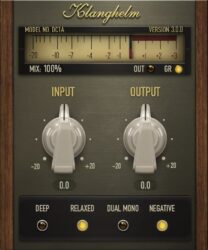
4. DC1A

OS: Windows Win Mac Mac Bit Version: 64-bit Developer: Klanghelm Audio Plugin Size: 9.8 MB Rating: 82/100
DC1A is a free compressor from Klanghelm with Input and Output controls for quick level shaping. It can provide smooth leveling, punchy drum compression, or strong pumping with crunchy saturation across vocals, bass, guitars, and mix buses.
Its extra modes include parallel compression, negative ratios, stereo unlinking, gentler Relaxed operation, and a side-chain high-pass filter. DC1A3 supports Windows and macOS in VST, VST3, AU, and AAX formats, with 32-bit and 64-bit versions.
Features
- Free Compressor With Simple Controls
- Input And Output Gain Controls
- Negative Ratio Compression Mode
- Parallel Compression Mix Control
- Independent Left And Right Processing
- Peak And RMS Compression
- Sidechain High-Pass Filter
- Gentler Relaxed Compression Mode
- Stereo Link Disable Option
- Output And Gain Reduction Metering
Video
Pros
- Free to use
- Simple two-knob control
- Provides smooth, gentle leveling
- Adds punch to drums
- Creates strong pumping effects
- Adds useful crunchy saturation
- Includes parallel compression mixing
- Protects bass with Deep mode
- Offers powerful negative compression
- Supports independent stereo channels
Cons
- Only two main control knobs
- No separate threshold control
- No adjustable compression ratio
- No attack control for transients
- No release control for timing
- Can sound too colored sometimes
- May add unwanted crunchy saturation
Testimonials
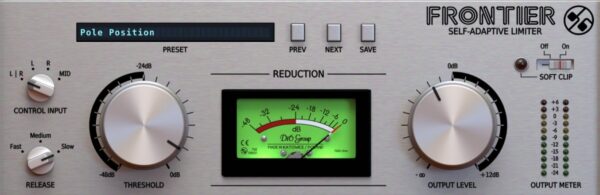
5. Frontier

OS: Windows Win Mac Mac Bit Version: 32-bit, 64-bit Developer: D16 Group HQ Size: 144 MB Rating: 82/100
Frontier is a free limiter and sound shaper from D16 Group for tracks, buses, and master outputs. It can control peaks for mixing or mastering, or create stronger effects with extreme settings. Automatic gain makeup and optional soft clipping help manage level and character.
Controls include threshold, release, output level, and a selectable left, right, mid, or stereo control input. The plugin supports Windows and macOS in VST2, VST3, AU, and AAX formats. It is free for registered D16 users who have bought a D16 product.
Features
- Transparent Mixing And Mastering Limiter
- Creative Audio Shaping Tool
- Automatic Gain Makeup
- Adjustable Control Input
- Left, Right, Or Mid Control
- Optional Soft Clipping
- Fast, Medium, And Slow Release
- Threshold And Output Controls
- Input And Output Meters
- Self-Adaptive Limiting Response
Video
Pros
- Adds warm soft clipping
- Automatic gain makeup saves time
- Choose left, right, mid control
- Fast, medium, slow release modes
- Handles peaks without harsh distortion
- Sounds clean at light settings
- Shows gain reduction clearly
- MIDI Learn makes setup easy
- Fits small screens with resizing
- Supports HiDPI displays
Cons
- Requires D16 purchase history
- No true peak control
- No oversampling option shown
- Only three release choices
- No adjustable attack control
- No detailed loudness metering
- High latency may hurt live use
Testimonials
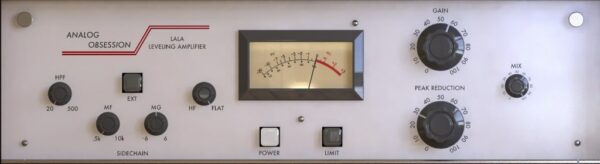
6. LALA

OS: Windows Win Mac Mac Bit Version: 64-bit Developer: Analog Obsession Size: 5 MB Rating: 82/100
LALA is a compressor, limiter, and peak reducer with a smooth analog-style response. Peak Reduction controls compression, while Gain sets output level. Limit adds stronger peak control, and Mix blends processed and dry signals.
Its sidechain includes an HPF, midrange and high-frequency controls, plus external triggering. A VU meter shows signal level and gain reduction. LALA supports AU, VST3, and AAX on 64-bit Windows and macOS systems.
Features
- Compressor And Limiter Modes
- Peak Reduction Controls Compression
- Makeup Gain Control
- External Sidechain Support
- High-Pass Sidechain Filtering
- Midrange Sensitivity Controls
- High-Frequency Sensitivity Control
- Dry And Wet Mix Control
- VU Meter Shows Gain Reduction
- Four Times Oversampling Mode
Video
Pros
- Smooth LA-2A-style compression character
- Works as compressor or limiter
- Peak reduction controls compression strength
- External sidechain adds control
- Sidechain high-pass filter reduces pumping
- Midrange sidechain shaping adds focus
- High-frequency sidechain control adds polish
- Mix control enables parallel compression
- VU meter shows gain reduction
- Four-times oversampling improves clarity
Cons
- Limited attack and release control
- No adjustable compression ratio
- No separate peak or RMS modes
- No stereo-link options listed
- No expansion or gate functions
- No multiband compression mode
- Fixed LA-2A style limits versatility
Testimonials
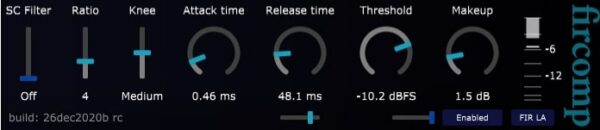
7. fircomp
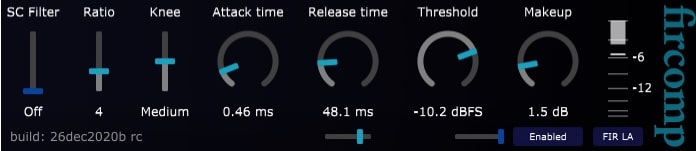
OS: Windows Win Mac Mac Linux Linux Bit Version: 64-bit Developer: Jon V Audio Size: 1.9 MB Rating: 80/100
fircomp offers clean, precise compression with a punchy attack and smooth musical release. Its fast controls make it easy to shape dynamics on individual tracks or full mixes. The lookahead mode provides accurate timing and clear gain control without adding unwanted distortion.
This plugin includes flexible sidechain filtering, soft or hard knee options, and adjustable attack and release for detailed control. At extreme settings, it can add gentle warmth while keeping transients sharp. fircomp’s simple layout helps producers manage dynamics quickly and maintain clarity across instruments and vocals.
Features
- Clean And Punchy Compression
- Musical Dual Release Stage
- Optional Lookahead Gain Smoothing
- Zero Or Low Latency
- Low CPU Usage
- True Zero Attack Option
- Warm Distortion At Extreme Settings
- Adjustable Sidechain Filter
- Mix Knob For Parallel Compression
- Auto Or Manual Makeup Gain
Video
Pros
- Super clean and clear sound
- Very low CPU usage
- Zero latency with lookahead off
- Optional lookahead for perfect timing
- Easy sidechain filter control
- Adjustable knee for smooth blending
- Highly efficient C++ DSP engine
- Stable on Windows, Mac, and Linux
- Transparent tone keeps details clear
- Free, pro-level quality compressor
Cons
- No built-in presets for beginners
- No visual waveform display
- Lacks advanced multiband control
- No built-in limiter option
- No auto-gain compensation feature
- Interface looks too plain
- Doesn’t include saturation modes
- No MIDI learn or automation extras
- Fewer features than OTT or TDR Kotelnikov
- Not updated very often
Testimonials
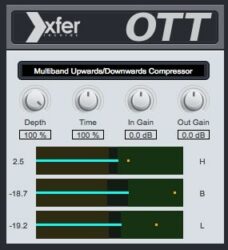
8. Xfer Records OTT

OS: Windows Win Mac Mac Bit Version: 64-bit Developer: Xfer Size: 8 MB Rating: 80/100
Xfer Records OTT is a multiband compressor for Windows and Mac that uses upward and downward compression across low, mid, and high frequency bands. It can bring out quiet details, add punch, and create a stronger, more aggressive sound.
The Depth control sets the compression amount, while Time adjusts the response speed. Input and output gain controls help manage levels, and band meters show sound activity and gain reduction. OTT supports VST3 and AAX formats.
Features
- Adjustable Compression Depth Control
- Adjustable Compressor Time Control
- Input Gain Level Control
- Output Gain Level Control
- Upward And Downward Compression
- Low, Mid, And High Bands
- Visual Input Level Display
- Visual Gain Reduction Display
- High, Mid, And Low Meters
- VST3 And AAX Formats
Video
Pros
- Free on Windows and Mac
- Supports VST3 and AAX hosts
- Native ARM support on Mac
- Uses three useful frequency bands
- Handles upward and downward compression
- Depth knob makes setup simple
- Time knob changes response speed
- Displays gain reduction by band
- More colorful than transparent compressors
- Great for bass-heavy electronic music
Cons
- Only three frequency bands available
- Cannot set crossover points
- No separate attack control
- Release control is not separate
- Limited control over compression ratio
- No sidechain high-pass filter
- Can sound harsh on highs
Testimonials
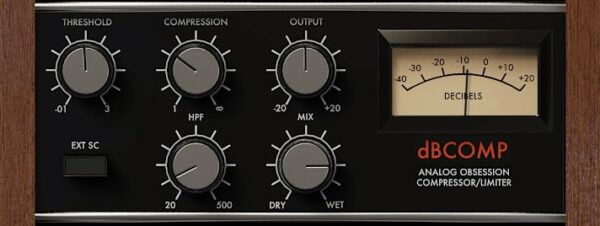
9. dBComp

OS: Windows Win Mac Mac Bit Version: 64-bit Developer: Analog Obsession Size: 3.5 MB Rating: 80/100
dBComp is a drum compressor and limiter for studio or live use. It can add snap to drums, control loud hits, or help prevent clipping. You can also use it on acoustic or electric guitar and bass.
Set the threshold, compression, and output to shape the sound. The high-pass filter can reduce low-frequency pumping, while Mix blends the dry and compressed signals. Use an external side-chain input and check levels on the decibel meter.
Features
- Drum Compression And Limiting
- Adjustable Compression Threshold
- Compression Ratio Control
- Output Volume Control
- High-Pass Sidechain Filter
- Dry And Wet Signal Blend
- External Sidechain Input
- Decibel Level Meter
- For Drums, Guitar, And Bass
- Helps Prevent Clipping
Video
Pros
- Made for drums and live sound
- Also works on guitars and bass
- Can add snap to sounds
- Program-based attack reacts to sound
- Program-based release follows the signal
- Set how much compression you hear
- Choose how strong compression feels
- Cut bass from compressor control
- Blend dry and compressed sound
- Use an outside sidechain signal
Cons
- Attack and release times are fixed
- No true-peak protection is listed
- No oversampling option is listed
- No adjustable output ceiling is listed
- No input-gain control is listed
- No gain-reduction meter is listed
- Few controls limit sound shaping
Testimonials
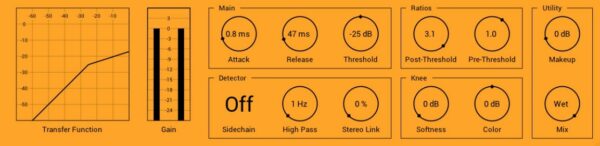
10. TheExpressor

OS: Windows Win Mac Mac Bit Version: 64-bit Developer: TheZhe Size: 1 MB Rating: 79/100
TheExpressor is a zero-delay dynamics plugin for compression and upward or downward expansion. Low distortion, anti-aliasing, and modulation-ready controls help shape levels cleanly, while Color adds warmth or sharper emphasis with up to 24 dB of adjustment.
Its transfer function display and gain meter show how processing changes the signal. Attack, release, threshold, ratios, sidechain filtering, stereo linking, softness, makeup, and Mix controls support detailed shaping. It runs on 64-bit Windows and Mac in VST3 and AU hosts.
Features
- Upward And Downward Dynamics Control
- Zero Delay Operation
- Low Distortion Audio Processing
- Built In Anti Aliasing
- Modulation Friendly Control Knobs
- Adjustable Compression Color Control
- Transfer Function Display
- Adjustable Attack And Release
- High Pass Detector Filtering
- Dry Wet Mix Control
Video
Pros
- Handles upward and downward dynamics
- Zero-delay processing for live work
- Built-in anti-aliasing reduces harsh artifacts
- Color control shapes soft or bold compression
- Supports modulation-friendly parameter control
- Controls before-threshold dynamics too
- Shows changes with transfer graph
- Sidechain high-pass reduces bass pumping
- Bounded output helps prevent level jumps
- Works from gentle to extreme shaping
Cons
- No external sidechain input listed
- No sidechain filter slope control
- No AAX format support listed
- No native Linux version included
- Requires SSE3-supported computer hardware
- Supports only 44.1–96 kHz
- No adjustable oversampling choices listed
Testimonials
11. BUSTERse

OS: Windows Win Mac Mac Bit Version: 64-bit Developer: Analog Obsession Size: 30 MB Rating: 79/100
BUSTERse is a console-style compressor for shaping full mixes, drum buses, and other signals. It includes threshold, attack, release, ratio, make-up, and dry/wet mix controls, plus Main, Turbo, and Xformer modes for different compression responses and tonal character.
Its sidechain section offers high-pass, mid, and high-frequency filters, transient boost, tilt, and external input control. Stereo processing and transient mix help manage peaks while preserving detail. BUSTERse is available in 64-bit VST and AU formats for Windows and Mac.
Features
- Classic Console-Style Compression
- Adjustable Threshold Control
- Six Attack Time Settings
- Auto Release Mode
- Six Compression Ratios
- Dry And Wet Mixing
- Sidechain High-Pass Filter
- Transient Boost Control
- Three Compressor Sound Modes
- Transformer-Style Tone Option
Video
Pros
- Flexible attack settings
- Wide range of ratios
- Useful auto release option
- Built-in dry wet mixing
- Sidechain filter protects bass balance
- Mid and high filtering included
- Transient control shapes attack response
- External sidechain adds control
- Turbo mode adds full-range control
- Transformer mode adds rich color
Cons
- Limited to VST and AU
- Attack choices feel quite limited
- Release choices feel quite limited
- No separate peak and RMS control
- No dual-mono processing option
- No mid-side processing option
- Strong console color limits clean compression
Testimonials
12. FETISH

OS: Windows Win Mac Mac Bit Version: 64-bit Developer: Analog Obsession Size: 6 MB Rating: 78/100
FETISH is a FET-style compressor and limiter for shaping vocals, drums, instruments, and mixes. It offers four ratios, adjustable attack and release, input and output gain, plus a high-pass sidechain filter that helps preserve low-end detail during compression.
A midrange control changes how selected frequencies drive compression, while HF, Mix, Slam, and external sidechain options support tone shaping, parallel processing, and fast limiting. Oversampling, a VU meter, and a resizable interface are included for Windows and Mac in VST and AU formats.
Features
- Classic FET Compressor And Limiter
- Extended Input Gain Control
- Adjustable Output Makeup Gain
- Fast And Slow Attack Times
- Adjustable Release Times
- Four Selectable Compression Ratios
- High-Pass Sidechain Filter
- Midrange Frequency And Gain Controls
- Adjustable High-Frequency Compression
- Dry And Compressed Signal Mixing
Video
Pros
- Classic FET compressor and limiter
- Adds color beyond clean limiting
- Fast Slam mode handles sharp peaks
- Offers more control than simple limiters
- Four useful compression ratio choices
- High-pass sidechain protects low frequencies
- Midrange control shapes compression behavior
- High-frequency mode adds extra control
- Mix knob enables parallel compression
- External sidechain adds creative options
Cons
- No true-peak limiting control
- No look-ahead peak protection
- No dedicated output ceiling
- No clean transparent mode
- Color can become overly aggressive
- Can make vocals sound sibilant
- Slam may damage sharp transients
Testimonials
13. TLS 1295 LEA

OS: Windows Win Linux Linux Bit Version: 32-bit, 64-bit Developer: TbT Size: 6 MB Rating: 75/100
TLS 1295 LEA offers a vintage-style compression experience inspired by the classic Teletronix LA-2A unit. It provides controls for attack, peak reduction, and gain, along with a Clean/Driven switch for tonal variation. The plugin brings smooth, warm compression that can tighten or color any sound source.
It includes a sidechain high-pass option, adjustable time constants, and visual feedback with a VU meter and clip indicator. TLS 1295 LEA works on Windows, Mac, and Linux, making it a flexible choice for shaping drums, vocals, or full mixes with classic analog character.
Features
- Free Vintage Compressor Plugin
- Inspired By Teletronix LA-2A
- Adjustable Attack Control
- Peak Reduction Knob
- SC Hipass Function
- Clean Or Driven Sound Switch
- Variable Output Gain Control
- VU Meter Level Display
- User-Friendly Interface Design
- Works On Windows, Mac, Linux
Video
Pros
- Free vintage-style compressor plugin
- Warm and punchy sound character
- Inspired by classic LA-2A design
- Offers both clean and driven tones
- Low-frequency bypass for clarity
- Close in tone to high-end hardware
- Strong character compared to other freebies
- Excellent for parallel compression setups
- Works on Windows, Mac, and Linux
- Simple and easy-to-use controls
Cons
- Can sound too harsh on vocals
- Interface looks old and plain
- Heavy CPU use in big projects
- Too colored for master bus
- Lacks advanced sidechain controls
- No automatic gain compensation
- Limited visual feedback options
- No oversampling or quality toggle
- Can clip faster than expected
- May crash in newer DAWs
Testimonials
14. Density Compressor
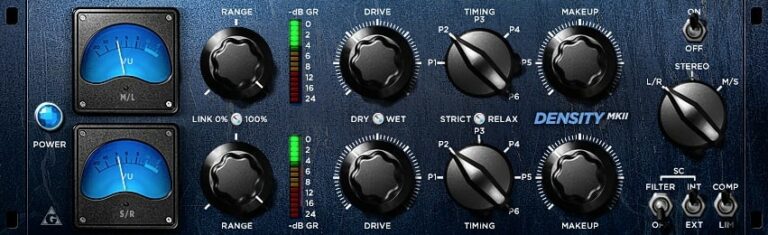
OS: Windows Win Bit Version: 32-bit, 64-bit Developer: Variety Of Sound Size: 6 MB Rating: 72/100
Density Compressor is a stereo bus compressor for gently gluing tracks and summing groups. It adds controlled color and manages challenging dynamics without using a brickwall limiter design.
Its compressor and limiter modes offer different levels of dynamic control. Stereo and mid/side operation, channel Range controls, sidechain filtering, six timing settings, Drive, Link, and Dry/Wet controls provide flexible shaping options.
Features
- Track Gluing Control
- Compressor And Limiter Modes
- Mid-Side Processing Support
- Adjustable Compression Range
- Six Timing Settings
- Adjustable Channel Linking
- Input Drive And Color
- Dry And Wet Mix
- Internal Or External Sidechain
- Sidechain Filter Control
Video
Pros
- Offers compressor and limiter modes
- Supports left-right stereo processing
- Adds useful mid-side control
- Adds color with Drive control
- Blends clean and processed sound
- Offers six timing choices
- Supports external sidechain signals
- Filters the sidechain signal
- Works well for parallel processing
- Free with strong sound quality
Cons
- Windows only
- VST format only
- No true peak limiting
- No brickwall protection
- No oversampling options
- Limited loudness boosting control
- Reported crashes in some hosts
Testimonials
15. SAFECompressor
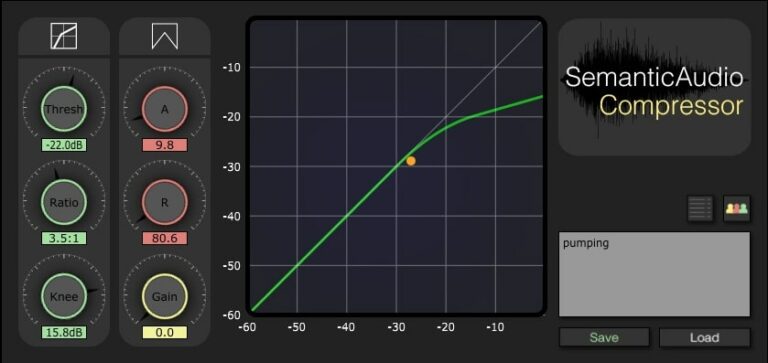
OS: Windows Win Mac Mac Linux Linux Bit Version: 32-bit, 64-bit Developer: Semantic Audio Size: 1 MB Rating: 70/100
SAFECompressor offers a smart way to shape your sound using simple descriptive words. Instead of adjusting only technical controls, you can type terms like “punchy” or “smooth” to guide the plugin’s response. It also includes classic compressor tools such as threshold, attack, release, ratio, and knee.
This free plugin works on Windows, Mac, and Linux in VST and AU formats. You can view compression changes through a graph, fine-tune levels with post-gain control, and save or load settings. SAFECompressor blends research-driven design with practical features for shaping sound dynamics quickly.
Features
- Free Semantic Audio Compressor Plugin
- Loads Settings Using Descriptive Words
- Supports Threshold, Attack, Release, Ratio, Knee
- Includes Post-Compression Gain Control
- Displays Compression Graph Visualization
- Allows Save And Load Presets
- Uses Community-Based Descriptor Uploads
- Accepts Typed Descriptions For Control
- Works On Windows, Mac, And Linux
- Available In VST And AU Formats
Video
Pros
- Lets you type sound words
- Creates custom compression automatically
- Uses smart sound descriptions
- Fast response to typed input
- Shows visual graph feedback
- Community-shared sound settings
- Creative and research-inspired design
- Fun way to shape your mix
- Can run light on CPU
- Cross-platform and 64-bit ready
Cons
- No sidechain compression option
- No multiband compression support
- Can crash in some DAWs
- Sometimes unstable under load
- Requires internet for features
- Limited visual feedback detail
- Few preset options
- No built-in limiter
- Interface looks old
- Limited interface customization
Testimonials
16. BLOCKFISH
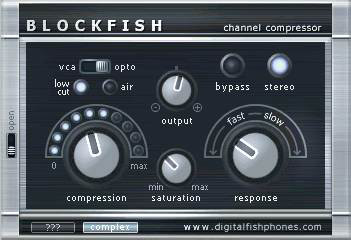
OS: Windows Win Bit Version: 32-bit Developer: Digitalfishphones Size: 0.6 MB Rating: 69/100
BLOCKFISH is a versatile compressor with countless ways to shape incoming audio. It likes to bite, but it can be tamed easily once you’ve learned how to use its potential. Its removable panel reveals extra circuit controls for transparent, punchy, smooth, or saturated results.
VCA and Opto modes provide firm or smooth compression, with separate attack and release controls, sidechain Low Cut and Air settings, stereo processing, output, and saturation. Its flexible sound also makes it useful as a de-esser for vocals.
Features
- Independent Attack And Release
- Two Compressor Modes
- VCA And Opto Types
- Low Cut Sidechain Control
- Air Sidechain Enhancement
- Adjustable Stereo Processing
- Compression Amount Control
- Compression Level Meter
- Adjustable Saturation Amount
- Analog Modeled Compression
Video
Pros
- Versatile compressor and de-esser
- Independent attack and release controls
- Two modes add more flexibility
- VCA mode provides firm control
- Opto mode offers smoother compression
- Low Cut prevents bass overcompression
- Air adds extra high-end detail
- Saturation adds warm, gritty color
- Adjustable stereo signal processing
- Compression meter shows gain reduction
Cons
- Windows platform only
- 32-bit VST only
- No VST3 format
- Needs bridging on modern hosts
- Not a true dedicated de-esser
- No frequency tuning control
- No oversampling for cleaner processing
Testimonials
17. CamelCrusher

OS: Windows Win Mac Mac Bit Version: 64-bit Developer: Camel Audio Size: 6.7 MB Rating: 69/100
CamelCrusher is a free multi-effect plugin from Camel Audio with two distortion modes, a resonant low-pass filter, and a compressor. Use its controls to add grit, warmth, punch, or color to drums, bass, synths, and other tracks.
It includes presets, a randomizer for quick sound ideas, MIDI Learn for control mapping, and a mix control for blending processed and clean signals. CamelCrusher supports VST, AU, and RTAS formats on Windows and Mac.
Features
- Free Multi-Effect Plugin
- Two Distortion Types
- Warm Resonant Low-Pass Filter
- Easy-To-Use Compressor
- Built-In Random Sound Generator
- MIDI Learn Function
- Useful Preset Patches
- Phat Mode Adds Fullness
- Wet And Dry Mix Control
- Individual Effect On Controls
Video
Pros
- Distortion, filter, compression together
- Adds warm tube color
- Creates rough mechanical grit
- Resonant filter adds movement
- Phat Mode boosts fullness
- Mix knob blends clean sound
- Randomizer sparks fresh ideas
- Includes useful starting presets
- MIDI Learn supports hands-on control
- Supports major plugin formats
Cons
- No built-in synth engine
- No wavetable sound design
- No oscillators for bass creation
- No LFO modulation controls
- No envelope shaping tools
- Old plugin may fail on Macs
- No modern VST3 format listed
Testimonials
18. FETISH
OS: Windows Win Mac Mac Bit Version: 64-bit Developer: Analog Obsession Size: 7.8 MB Rating: 68/100
FETISH is a discrete FET compressor and limiter designed for fast, assertive dynamics control. It offers selectable ratios, very fast attack, input and output stage distortion, improved input control, and support for sample rates up to 192 kHz.
Controls include input, output, attack, release, ratio, mix, and Slam modes. An optional tone section provides high-pass filtering plus adjustable high, mid-frequency, and mid-gain controls. FETISH runs on 64-bit Windows and Mac systems in VST and AU formats.
Features
- Discrete FET Compressor Design
- Selectable Compression Ratios
- Super-Fast Attack Time
- Input And Output Distortion
- High-Pass Filter From 20 Hz
- Adjustable High-Frequency Tone
- Selectable Midrange Frequency
- Adjustable Attack And Release
- Dry And Wet Mix Control
- VU Meter Shows Signal Level
Video
Pros
- Classic FET compression character
- Fast attack captures drum peaks
- Selectable ratios fit many sounds
- Built-in tone controls add flexibility
- High-pass filter reduces low-end pumping
- Input distortion adds useful grit
- Output distortion adds extra color
- SLAM mode creates strong compression
- Mix knob enables parallel compression
- Supports sample rates up to 192 kHz
Cons
- No external sidechain input
- No stereo linking controls
- No oversampling control or modes
- Distortion can sound too harsh
- Limited ratio choices
- No adjustable threshold knob
- Can fall apart under heavy input
Testimonials
19. GComp2

OS: Windows Win Mac Mac Linux Linux Bit Version: 32-bit, 64-bit Developer: GVST Size: 379.1 kb Rating: 67/100
GComp2 is a free audio plug-in that combines compression, expansion, a gate, and low- and high-cut filters. Use its controls to shape input level, compression speed, and output gain.
A live waveform display compares the original and processed sound, while meters show signal levels and gain reduction. GComp2 is available for Windows, Mac, and Linux.
Features
- Combines Compression And Expansion
- Includes Low And High-Cut Filters
- Gate Reduces Signals Below Threshold
- Adjustable Attack And Release Controls
- Input And Output Gain Controls
- Real-Time Waveform Display
- Shows Original And Processed Signals
- Includes Input And Output Meters
- Displays Gain Reduction
Video
Pros
- Compression and gating work together
- Built-in gate lowers quiet sounds
- Low-cut filter removes deep rumble
- High-cut filter trims bright sounds
- Input gain shapes compression strength
- Separate attack and release controls
- Live waveform shows sound changes
- Compare processed and original waveforms
- Gain display shows compression amount
- Editable readouts help set exact values
Cons
- Compress knob hides key settings
- Threshold and ratio cannot be set separately
- No adjustable knee control is listed
- No peak or RMS mode is listed
- No sidechain filter control is listed
- No external sidechain is listed
- No dry and wet mix control is listed
Testimonials
20. StupidCompressor

OS: Windows Win Bit Version: 64-bit Developer: SNFK Music Size: 0.6 MB Rating: 62/100
StupidCompressor is a stereo compressor that controls loud sounds with adjustable ratio, attack, release, and input and output gain. On-screen displays show levels, threshold, and gain reduction as you shape the sound.
It also includes a bandpass compressor for targeting a frequency range, a transient shaper, a limiter, and soft and hard clippers. The Windows 64-bit VST can help manage audio levels or add distortion.
Features
- Stereo Compressor With Adjustable Controls
- Adjustable Ratio, Attack, And Release
- Compression For Specific Frequency Ranges
- Transient Shaper Adjusts Sound Attacks
- Limiter Offers Two Limiting Modes
- Soft And Hard Clipping Distortion
- Visual Displays Show Levels And Gain Reduction
- Designed For Low CPU Usage
Video
Pros
- Combines compression with transient shaping
- Targets chosen frequency bands
- Offers soft and hard clipping
- Includes two limiter styles
- Shows gain reduction clearly
- Visual graphs make changes clear
- Offers stereo compression controls
- Provides attack and release control
- Adds input and output gain controls
- Designed to use little CPU power
Cons
- Windows-only support limits your choices
- Plugin format support is quite narrow
- No external sidechain input is listed
- No sidechain high-pass filter is listed
- No parallel mix knob is listed
- Low-end distortion was reported by users
- Some users report unwanted sound artifacts
Testimonials
Best Compressor Plugins Compared
This table compares compressor plugins by features, controls, effects, formats, and more.
| Details | TDR Kotelnikov | TDR Molotok | Squeezer | DC1A | Frontier | LALA | fircomp | Xfer Records OTT | dBComp | TheExpressor |
|---|---|---|---|---|---|---|---|---|---|---|
| Image | 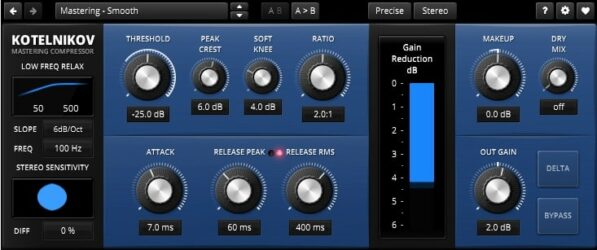 |
 |
 |
 |
 |
 |
 |
 |
 |
 |
| Rating | ||||||||||
| OS | Windows, Mac | Windows, Mac | Windows, Mac, Linux | Windows, Mac | Windows, Mac | Windows, Mac | Windows, Mac, Linux | Windows, Mac | Windows, Mac | Windows, Mac |
| Formats | VST2, VST3, AU, AAX | VST2, VST3, AU, AAX | VST, AU | VST, VST3, AU, AAX | VST2, VST3, AU, AAX | VST3, AU, AAX | VST, AU | VST3, AAX | VST, AU | VST, AudioSuite |
| Bit Version | 64-bit | 32-bit, 64-bit | 64-bit | 64-bit | 32-bit, 64-bit | 64-bit | 64-bit | 64-bit | 64-bit | 64-bit |
| Developer | Tokyo Dawn Records | Tokyo Dawn Records | mzuther | Klanghelm Audio Plugin | D16 Group HQ | Analog Obsession | Jon V Audio | Xfer | Analog Obsession | TheZhe |
| License | Freeware | Freeware | GPL | Freeware | Freeware | Donationware | Freeware | Freeware | Donationware | Donationware |
| Sample-Based | No | No | No | No | No | No | No | No | No | No |
| Download Size | 7 MB | 7 MB | 6.1 MB | 9.8 MB | 144 MB | 5 MB | 1.9 MB | 8 MB | 3.5 MB | 1 MB |
| CPU Load | High | High | Low | Low | Low | Low | Low | Low | Low | Low |
| Polyphony | N/A | N/A | 8 | N/A | N/A | N/A | 8 | N/A | N/A | N/A |
| Features | Wideband Compression, Transparent Processing, Independent Release Controls, Sidechain High-Pass Filter, Advanced Stereo Linking, Delta Preview, Click-Free Bypass | Dynamics Compression, Eleven Compression Flavors, Quality Modes, Zero-Latency Operation, High-Quality Processing, Sidechain Filtering, Dry/Wet Mix | Parallel compression, Sidechain control, Optical/FET modes, Feed-forward/feedback, Auto makeup gain, Stepped knobs, RMS/Peak sensing | Two-control design, Negative compression, Parallel compression, Dual mono, Peak/RMS modes, Sidechain high-pass, Gain reduction metering | Transparent Limiter, Audio Shaper, Soft Clipping, Automatic Gain Makeup, Configurable Control Input, Self-Adaptive Limiting, MIDI Learn | Compressor, Limiter, Peak Reduction, External Sidechain, High-Pass Filter, Makeup Gain, Analog Modeling | Punchy attack, Musical release, Lookahead smoothing, Warm distortion, Sidechain filtering, Simple interface, Transparent compression | Multiband Compression, Depth Control, Time Control, Input Gain, Output Gain, Band Meters, Upward/Downward Compression | Drum Compression, Limiting, Program-Dependent Timing, High-Pass Sidechain Filter, Dry/Wet Mix, External Sidechain, Decibel Meter | Zero-Latency Processing, Low Distortion, Built-In Anti-Aliasing, Modulation-Friendly Controls, Adjustable Color, Bounded Output, Stereo Linking |
| Controls | Preset Menu, Undo/Redo, A/B, A To B, Precise, Stereo, Threshold | Preset Menu, A/B, Stereo, Threshold, Ratio, Attack, Release | Trim, Thresh, Ratio, Attack, Release, Wet, Output | Output, Negative, Mix, Input, Deep, VU Meter Mode, Relaxed | Control Input, Release, Threshold, Reduction Meter, Output Level, Soft Clip, Output Meter | Peak Reduction, Gain, Limit, External Sidechain, High-Pass Filter, Midrange Control, High-Frequency Control | Threshold, Ratio, Attack, Release, Knee, Makeup, SC Filter | Depth, Time, In Gain, Out Gain, H Band, B Band, L Band | Threshold, Compression, Output, HPF, Mix, Ext SC, Decibel Meter | Transfer Function, Gain Meter, Attack, Release, Threshold, Post-Threshold Ratio, Pre-Threshold Ratio |
| Effects Included | Compressor, sidechain high-pass filter | Compressor, saturation | Compression, Side-chain compression, Parallel compression, High-pass filtering, Low-pass filtering, Limiting | Compressor, saturation, high-pass filter | Limiter, soft clipper, audio shaper | Compressor, limiter, peak reducer, high-pass filter | Compression, Limiting, Distortion | Compression | Compression, limiting, high-pass filtering | Upward expander, downward expander, compressor |
| MIDI Learn | No | No | Unknown | No | Yes | No | Unknown | No | No | No |
| Presets | 1 | 13 | N/A | N/A | N/A | N/A | N/A | N/A | N/A | N/A |
| Standalone | No | No | No | No | No | No | Yes | No | No | No |
| Last Updated | N/A | N/A | 01/30/2018 | 11/09/2026 | 11/09/2026 | 01/02/2023 | 05/19/2023 | 11/18/2026 | 10/08/2026 | 08/04/2022 |
Best Compressor VST Plugins
Our top picks for the best free Compressor VST plugins are TDR Kotelnikov by Tokyo Dawn Records, TDR Molotok by Tokyo Dawn Records, and Frontier by D16 Group HQ.
| Details | TDR Kotelnikov | TDR Molotok | Frontier |
|---|---|---|---|
| Image | | | |
| Rating | |||
| OS | Windows, Mac | Windows, Mac | Windows, Mac |
| Formats | VST2, VST3, AU, AAX | VST2, VST3, AU, AAX | VST2, VST3, AU, AAX |
| Bit Version | 64-bit | 32-bit, 64-bit | 32-bit, 64-bit |
| Developer | Tokyo Dawn Records | Tokyo Dawn Records | D16 Group HQ |
| Download Size | 7 MB | 7 MB | 144 MB |
| Download | Visit TDR Kotelnikov | Visit TDR Molotok | Visit Frontier |
FAQs
How to Install Compressor VST Plugins
To install compressor VST plugins on Windows or Mac, extract the files from the Zip or Rar. Move the files (.dll for Windows or .component for Mac) into your DAW’s plugin folder. Then restart your software and rescan the directory to complete the process. Tutorial: How to Install VST Plugins
Windows:
Extract the downloaded zip file and copy the .dll file into the VST plugins folder scanned by your DAW. Restart your music software and rescan your plugin directory to begin using the new VST.
Mac OS X:
Extract the downloaded archive and move the .component or .VST file to the plugin folder. It is usually /Library/Audio/Plug-Ins/Components or /Library/Audio/Plug-Ins/VST. Restart your DAW and rescan your plugins to complete the installation.
What Is A Compressor VST Plugin?
Compressors are used to reduce the volume of loud sounds or increase the volume of soft sounds by reducing or preventing large variations in amplitude. Compressors have many uses in sound engineering, such as leveling out signal peaks and controlling audio dynamics.
Compressors control the dynamics of a signal by reducing the volume of loud sounds and amplifying softer sounds. Compressors are used in mastering live sound, instrument recording, and vocal production. They can be applied to a single track or an entire mix.
I hope you enjoy these free compressor VST plugins.
You May Also Like:
- Free Limiter VST Plugin – If you are interested in more audio plugins to help improve your audio, a limiter VST plugin may help.
- Free Equalizer VST Plugins
- Best Free Mastering VST Plugins