Here are the best free Roland VST Emulator plugins for Windows and Mac. We have included videos, reviews, features, pros, cons, and plugin ratings.
Table of Contents

How we rate Roland VST emulator plugins: We rate each plugin based on sound quality, design, performance, features, usability, and compatibility. We rate plugins on a scale of 1 to 100.
| # | Plugins | Ratings | OS | Formats |
|---|---|---|---|---|
| 1 | PG-8X | Windows | VST, AU | |
| 2 | BL-303 | Windows Mac | VST, AU | |
| 3 | VR-08 Free | Windows | VST | |
| 4 | T-Rex 606 | Windows Mac | VST, AU | |
| 5 | RT-7070 | Windows Mac | VST, VST3, AU | |
| 6 | Sixth Month June | Windows | VST | |
| 7 | Juno 6 | Windows | VST | |
| 8 | June-21 | Windows Mac Linux | VST, AU | |
| 9 | Tromine8 | Windows | VST | |
| 10 | Yonu60 | Windows | VST | |
| 11 | DR-910 | Windows | VST | |
| 12 | reTromine | Windows | VST | |
| 13 | Pterosaur | Windows | VST | |
| 14 | Roland TR707 | Windows | N/A | |
| 15 | SUPER-7 | Windows | VST | |
| 16 | Rolend PG-238 | Windows | VST |
I have spent over 15 years testing and comparing hundreds of free and paid VST plugins, supported by hands-on demos on our YouTube channel, which has 12,000+ subscribers.
Best Free Roland VST Emulator Plugins
1. PG-8X

OS: Windows Win Bit Version: 32-bit, 64-bit Developer: Martin Lüders' VST Size: 1.6 MB Rating: 78/100
PG-8X is a virtual analog synthesizer based on the Roland JX-8P and PG-800. It uses two digitally controlled oscillators, resonant filters, envelopes, chorus, and up to 12 voices. Sync, ring modulation, noise, and six play modes support basses, leads, pads, and effects.
PG-8X reads and writes JX-8P SysEx data and includes 128 preset slots across four banks. MIDI Learn maps hardware controls to parameters, while aftertouch, portamento, pitch bend, tempo-synced LFO, and voice modes provide control. It runs on Windows in VST and AU formats.
Features
- JX-8P Compatible Virtual Synthesizer
- Up To Twelve Voices
- Two Digital Oscillators
- Saw, Square, Pulse, And Noise
- Hard Sync And Ring Modulation
- Resonant Low-Pass Filter
- Two Envelope Generators
- Shared LFO With Delay
- Velocity And Aftertouch Control
- 128 Preset Memory Slots
Pros
- Delivers classic JX-8P-style sounds
- Works with JX-8P SysEx patches
- Offers twelve voices for big chords
- Includes six flexible play modes
- Creates wide, powerful unison sounds
- Includes hard sync and ring modulation
- Adds stereo chorus for wider sounds
- Offers tempo-synced LFO control
- Responds to polyphonic aftertouch
- Includes random patch creation
Cons
- Older subtractive synthesis only
- No wavetable synthesis engine
- No FM synthesis options
- Limited built-in effects section
- Shared LFO limits voice movement
- Envelopes do not fully retrigger
- No Linux support listed
Testimonials
2. BL-303

OS: Windows Win Mac Mac Bit Version: 32-bit Developer: Yooz Music Size: 10 MB Rating: 77/100
BL-303 is a free bass synthesizer inspired by the Roland TB-303. It creates deep, squelchy acid bass sounds with saw or square waves. Controls include tuning, cutoff, emphasis, envelope modulation, decay, and accent. Version 3.0 adds a resizable interface and refined filter.
MIDI note velocity controls note behavior: low values trigger glide, middle values play regular notes, and high values add accent, with maximum velocity adding both. It is available in VST and AU formats for Windows and macOS, with Intel and Apple Silicon support.
Features
- TB-303 Style Bass Synthesizer
- Deep And Squelchy Bass Sounds
- Improved Resizable User Interface
- Saw And Square Waveforms
- Fine-Tuned Resonant Filter
- Adjustable Filter Cutoff Frequency
- Adjustable Filter Emphasis Control
- Envelope Filter Modulation Control
- Velocity-Based Slide And Accent
- VST And AU Formats
Pros
- Free download for everyone
- Classic TB-303 acid sound
- Deep, squelchy bass tones
- Saw and square wave choices
- Tune across two octaves
- Hands-on cutoff filter control
- Strong emphasis adds bite
- Accent adds power and brightness
- Velocity triggers glide effects
- Slide and accent feel natural
Cons
- Limited to TB-303 style sounds
- Only saw and square waves
- No onboard pattern sequencer
- No built-in effects section
- No polyphonic playing options
- 32-bit format may limit compatibility
- No VST3 or CLAP formats listed
Testimonials
3. VR-08 Free

OS: Windows Win Bit Version: 32-bit, 64-bit Developer: Alipapa Size: 492 MB Rating: 73/100
VR-08 Free is a free Windows VST instrument that recreates the Roland TR-808 using 2,134 samples recorded from an original drum machine. It includes bass drum, snare, toms, congas, handclaps, hi-hats, and other classic drum sounds.
Shape each sound with level, accent, pan, tuning, decay, and tone controls. Shift, Scatter, Random, and Groove Control let you adjust timing and rhythm. The plugin is available in 32-bit and 64-bit versions.
Features
- TR-808 Drum Machine Emulation
- 2,134 Samples From An Original Unit
- Bass Drum, Snare, And Toms
- Congas, Rim Shots, And Claves
- Handclaps, Maracas, Cowbell, And Cymbals
- Open And Closed Hi-Hats
- Level, Accent, And Pan Controls
- Pitch, Tone, And Decay Controls
- Shift, Scatter, And Random Controls
- Groove Control And Timing Adjustments
Pros
- A classic 808 sound for beats
- 2,134 samples from an original machine
- Extra sounds like claps and congas
- Change each drum sound separately
- Shape pitch, tone, and decay
- Move hits earlier or later
- Add loose timing with Scatter
- Make beats less predictable with Random
- Adjust the feel with Groove Control
- Add analog-style sound to select drums
Cons
- Mostly classic 808 and 909 sounds
- No natural acoustic drum kit
- No ready-made drum grooves
- Only Windows VST is listed
- No VST3 format is listed
- Few kit choices for other styles
- Less suited to natural rock drums
Testimonials
4. T-Rex 606
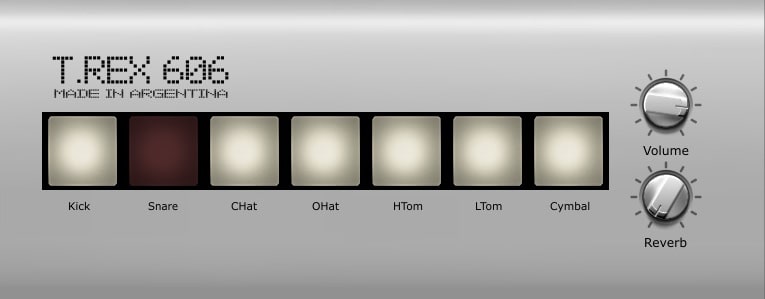
OS: Windows Win Mac Mac Bit Version: 32-bit, 64-bit Developer: Max Project Size: 2 MB Rating: 72/100
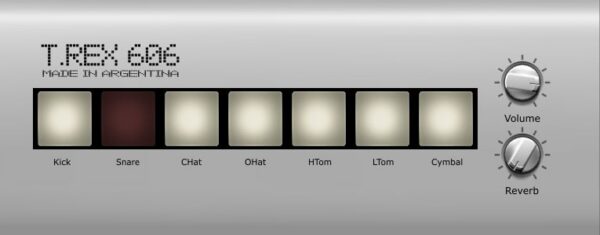
T-Rex 606 is a drum plugin based on the classic Roland TR-606. It offers seven classic drum sounds, including kick, snare, toms, and cymbals, with controls for volume and reverb. Its retro look mirrors the feel of vintage hardware.
T-Rex 606 runs on Windows and Mac in VST and AU formats. It delivers punchy, clean tones that fit styles from electronic to rock. Simple controls let music makers shape their beats quickly while keeping the classic character of the original drum machine.
Features
- Seven Classic Drum Samples
- Authentic TR-606 Sound Emulation
- Adjustable Reverb Effect
- Lightweight On CPU
- Vintage Style Interface
- Individual Sound Buttons
- Works With Many DAWs
- Available In VST And AU
- Supports 32-Bit And 64-Bit
- Runs On Windows And Mac
Pros
- Authentic vintage 606 drum sound
- Light on computer resources
- Works on Windows and Mac
- Includes seven classic drum sounds
- Adjustable reverb for depth
- Faithful TR-606 analog feel
- Ideal for retro and acid beats
- Customizable sound mix options
- Stable and bug-free performance
- One of the best free 606s
Cons
- Only seven drum sounds available
- No built-in step sequencer
- Limited sound shaping controls
- Cannot load custom drum samples
- No tuning or pitch adjustment
- No velocity sensitivity support
- Lacks multiple output routing
- No MIDI mapping flexibility
- No pattern-saving feature included
- Very basic interface design
Testimonials
5. RT-7070
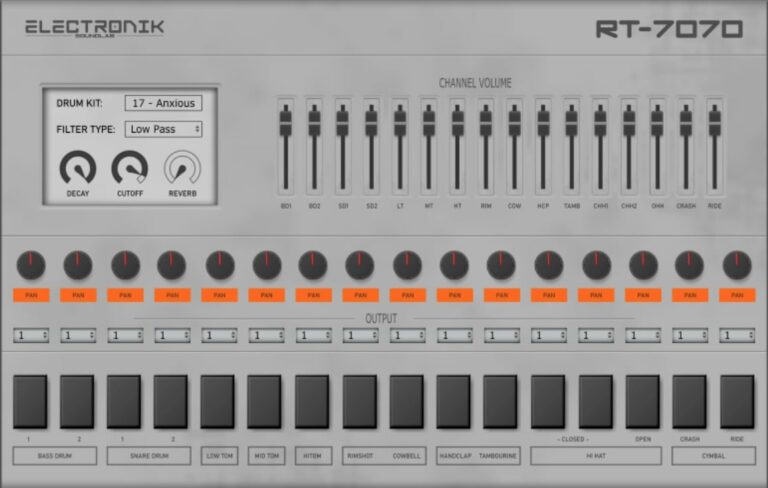
OS: Windows Win Mac Mac Bit Version: 32-bit, 64-bit Developer: Electronik Sound Lab Size: 39 MB Rating: 72/100
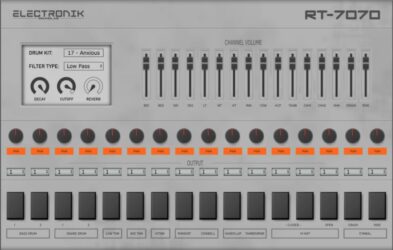
RT-7070 offers the classic TR-707 sound with a modern twist. It comes with 20 drum kits, including the original 707 and versions processed through different effects for more tone options. Each sound can be shaped using filters, decay, reverb, and simple mixing controls.
This plugin lets you adjust volume, pan, and routing for each drum, giving more control in your DAW. It supports VST, VST3, and AU on Windows and Mac. RT-7070 is ideal for anyone wanting punchy, retro-style drums with simple sound-shaping tools.
Features
- Inspired By The Classic TR-707
- Includes 20 Unique Drum Kits
- Low And High Pass Filters
- Built-In Reverb Effect
- Channel Volume Mixer
- Assignable Audio Outputs
- Supports VST, VST3, And AU
- Works On Windows And Mac
- Low CPU Usage Performance
- Simple And Easy Interface
Pros
- Authentic classic 707 drum sound
- Includes 20 diverse drum kits
- Low CPU use on most systems
- Filter controls shape drum tone
- Assignable outputs for mixing ease
- Royalty-free samples for all projects
- Supports VST, VST3, and AU formats
- Modern and vintage kit variety
- Better sound control than typical 808s
- Solid alternative to paid drum plugins
Cons
- May crash in some DAWs
- Not fully stable on macOS
- Small, non-resizable interface
- Limited sound editing options
- Higher CPU use on old PCs
- Cannot import custom samples
- Doesn’t emulate 808 sub-bass
- Some sounds lack punchiness
- No pitch control per drum
- Too simple for advanced producers
Testimonials
6. Sixth Month June
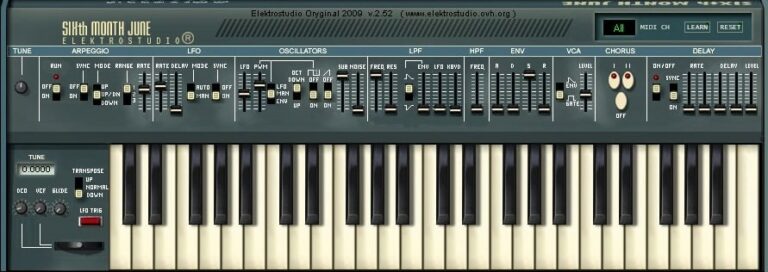
OS: Windows Win Bit Version: 32-bit Developer: Elektrostudio Size: 1 MB Rating: 70/100
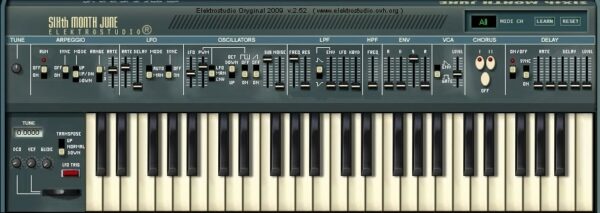
Sixth Month June offers a classic analog synth sound inspired by vintage keyboards like the Roland Juno 6. It includes sawtooth and pulse wave oscillators, a noise generator, and a smooth low-pass filter for shaping tone. The built-in arpeggiator helps create rhythmic note sequences automatically.
This plugin also features chorus and delay effects that add depth and space to your sounds. With envelope and LFO controls for movement and tone shaping, Sixth Month June gives producers tools to craft warm pads, bright leads, and retro-inspired textures on Windows systems.
Features
- Emulates Classic Roland Juno 6 Synth
- VCO With Sawtooth And Pulse Waves
- Lowpass Filter With Cutoff And Resonance
- LFO With Adjustable Rate Control
- Automatic Arpeggio Sequence Generator
- Built-In Chorus And Delay Effects
- Unison Mode For Thicker Sound
- Portamento For Smooth Note Slides
- Mix Blends Different Waveforms
- Envelope With Invert Option
Pros
- Warm and classic analog sound
- Authentic Roland Juno 6 feel
- Rich chorus for wide tones
- Powerful automatic arpeggiator
- Unison mode adds thick layers
- Low CPU use on newer PCs
- Free and high quality plugin
- Noise generator for added texture
- Smooth low pass filter sound
- Great for 80s style music
Cons
- Only works on Windows systems
- No native 64-bit support
- Not available for macOS users
- Outdated interface for modern screens
- No resizable plugin window
- High CPU use on older PCs
- Occasional stability or crash issues
- Lacks advanced modulation options
- No MIDI learn functionality
- Limited preset library included
Testimonials
7. Juno 6
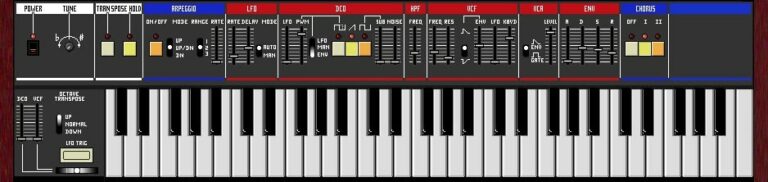
OS: Windows Win Bit Version: 32-bit Developer: Open Source VSTi Size: 1 MB Rating: 68/100
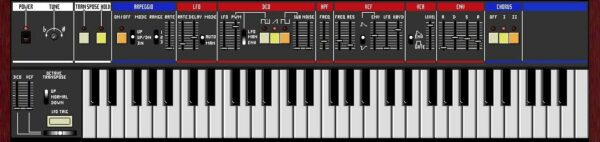
Juno 6 is a free analog-style synthesizer plugin for Windows that recreates the sound of the classic Roland Juno 6/60. It includes features like a chorus effect, arpeggiator, adjustable tuning, and filters that let you shape warm pads, bright leads, or deep bass tones.
Juno 6 offers simple controls such as DCO, LFO, VCF, and ENV to adjust sound movement, tone, and dynamics. Its built-in keyboard and hold function make it easy to experiment with vintage-style sounds that fit well in retro, pop, or electronic tracks.
Features
- Emulates Classic Roland Juno Sound
- Built-In Arpeggio Pattern Player
- Lfo For Sound Modulation
- Vcf Shapes Tone And Resonance
- Env Adjusts Sound Envelope
- Chorus Adds Richer Sound
- Hold Function For Sustained Notes
- Dco For Waveform Control
- Simple Easy-To-Use Interface
- Low Cpu Usage Performance
Pros
- Authentic vintage Juno sound
- Rich and warm analog tone
- Great chorus for thick sound
- Low CPU load and fast
- Perfect for 80s style music
- Free and lightweight plugin
- Easy sound shaping with DCO
- LFO adds nice motion effect
- Makes bright pads and solid basses
- Captures real hardware Juno vibe
Cons
- Only works on Windows systems
- No 64-bit version support
- Small GUI not resizable
- Limited preset collection
- Lacks advanced modulation options
- No modern automation controls
- Cannot load user samples
- No built-in MIDI learn support
- No built-in reverb or delay
- Lacks modern sound design depth
Testimonials
8. June-21
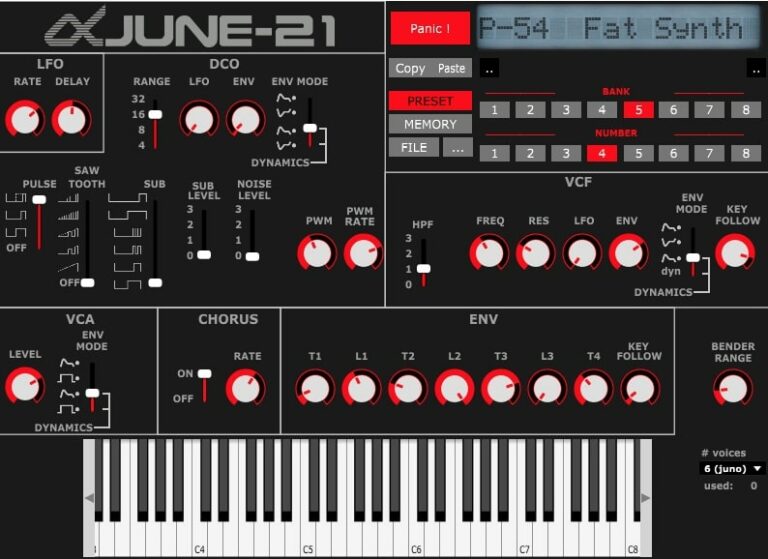
OS: Windows Win Mac Mac Linux Linux Bit Version: 64-bit Developer: Mike Rodd Size: 16 MB Rating: 65/100
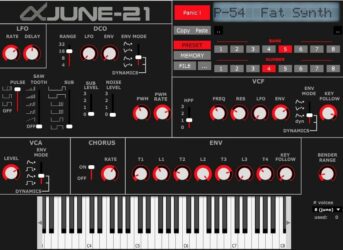
June-21 offers the warm, classic sound of the Roland Juno and MKS-50 in a free, open-source plugin. It includes over 50 presets and tools such as LFO rate, pulse wave, and delay controls, helping producers shape tones ranging from soft pads to bright leads.
With controls for chorus, filters, and envelopes, June-21 gives users room to adjust their sound for any style. Its clear layout and faithful emulation make it a strong choice for those seeking vintage character with flexible sound design options.
Features
- Emulates Roland Juno And MKS-50
- Includes Over 50 Sound Presets
- Built-In Chorus Effect Option
- Features Pulse And Saw Waves
- Supports Polyphonic Voice Selection
- Includes Envelope Timing Controls
- Contains VCF Frequency Control
- Includes Resonance And HPF Options
- Runs On Windows, Mac, Linux
- Free And Open Source Plugin
Pros
- Free and open-source plugin
- Classic Roland Juno sound
- Faithful Juno and MKS-50 emulation
- Beautiful chorus effect built in
- Warm and nostalgic tones
- Real analog-style filter section
- Very low CPU usage
- Works on Windows, Mac, Linux
- Great for synthwave and retro
- Over 50 free presets included
Cons
- Limited modern sound design options
- Lacks modulation matrix control
- No built-in arpeggiator feature
- Few effects compared to others
- Limited number of sound presets
- No MIDI learn or mapping
- Missing advanced routing options
- Lacks built-in sequencer tool
- No resizable plugin window
- User interface looks quite plain
Testimonials
9. Tromine8
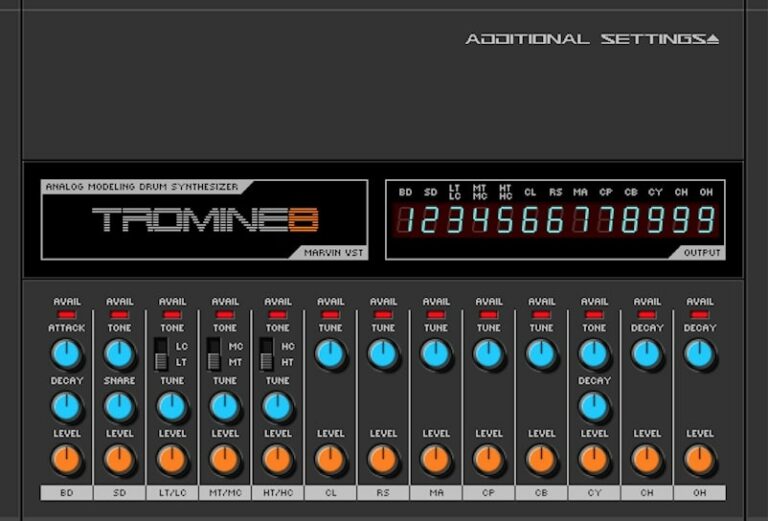
OS: Windows Win Bit Version: 32-bit Developer: Marvin Pavilion Size: 2.2 MB Rating: 64/100
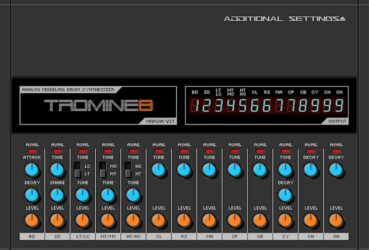
Tromine8 is an analog-modeled drum synthesizer inspired by the classic TR-808. It offers 17 drum sounds, including kicks, snares, toms, hi-hats, and percussion. Each sound can be shaped using controls like tune, decay, tone, and level for detailed tone shaping.
Tromine8 features nine outputs, MIDI CC support, and automation options for flexible mixing and control. Its step sequencer allows pattern creation within the plugin, making it useful for quick groove building or layering authentic 808-style drums in any track.
Features
- Analog Modeling Drum Synthesizer
- Seventeen Distinct Drum Sounds
- Nine Separate Audio Outputs
- Step Sequencer With Sixteen Steps
- MIDI CC Control Support
- Automation Support Included
- Dedicated Controls For Each Drum
- Adjustable Tune, Attack, And Decay
- Realistic 808-Style Drum Emulation
- Low To Moderate CPU Usage
Pros
- Great free 808-style drum sounds
- Warm analog-style sound engine
- Includes 17 unique drum voices
- Has built-in step sequencer
- Multi-output support for mixing
- Adjustable tuning and decay controls
- Low CPU use for smooth play
- MIDI CC and automation ready
- Customizable drum sound shaping
- Lightweight and small file size
Cons
- Only works on Windows systems
- No 64-bit plugin version
- Can crash when using sequencer
- CPU use is high
- No multi-output mixing version
- Not fully stable in all DAWs
- No built-in reverb or effects
- Limited sound customization
- Interface can freeze sometimes
- Limited support or updates
Testimonials
10. Yonu60
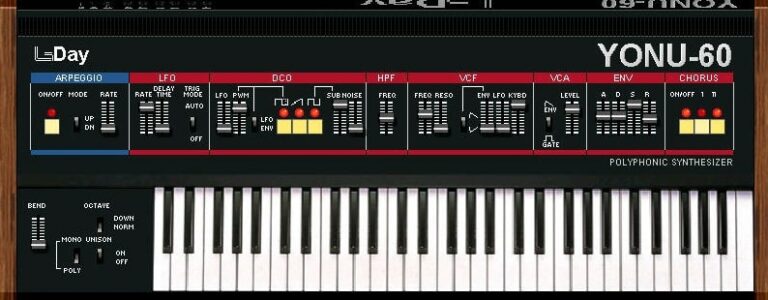
OS: Windows Win Bit Version: 32-bit Developer: L-Day Size: 0.9 MB Rating: 64/100
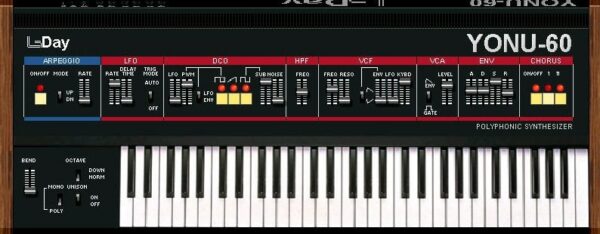
Yonu60 offers the sound and spirit of the classic Roland Juno in a modern VST plugin. It brings rich, vintage tones through its single DCO, sub oscillator, and flexible filters. With adjustable envelope controls, LFO modulation, and a smooth chorus, it recreates timeless analog warmth.
Designed for music creators who enjoy synth-driven styles, Yonu60 includes arpeggiator functions, unison mode, and pitch or octave control for deeper expression. Its poly and mono options make it suitable for both layered pads and punchy leads, fitting naturally into retro and modern tracks alike.
Features
- Emulates Classic Roland Juno Synth
- One DCO With LFO And PWM
- Includes Sub Oscillator And Noise
- ADSR And VCF Filter Envelopes
- Built-In Chorus Effect
- Selectable Unison Mode
- Arpeggiator With Rate Control
- Mono And Poly Play Modes
- Light On CPU Usage
- Retro And Vintage Sound Character
Pros
- Authentic vintage Roland Juno sound
- Includes classic chorus effect
- Captures true analog character
- Realistic analog-style filters
- Sub oscillator adds rich depth
- Light on CPU usage
- Offers flexible sound shaping
- Easy-to-use interface design
- Free and beginner-friendly plugin
- Ideal for synthwave and techno
Cons
- Only works on Windows
- Limited to 32-bit
- No built-in reverb
- Lacks advanced modulation
- No preset browser
- Few factory presets
- No MIDI learn
- Cannot resize window
- Lacks visual feedback
- Missing modern features
Testimonials
11. DR-910
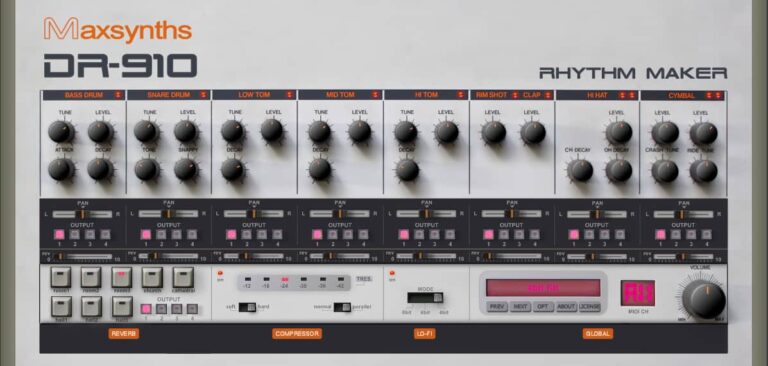
OS: Windows Win Bit Version: 32-bit Developer: MaxSynths Size: 8 MB Rating: 64/100
DR-910 is a free 32-bit VST drum machine for Windows that recreates the Roland TR-909 sound. It provides controls for tuning, level, tone, decay, attack, and stereo panning across bass drum, snare, toms, hats, cymbals, rim shot, and clap sounds.
Four stereo outputs allow separate mixing in a DAW, while built-in reverb, compression, and Lo-Fi processing add sound-shaping options. MIDI support, kit selection, presets, and selectable bit modes are included. The plugin uses older 32-bit VST format and may need a bridge in setups.
Features
- TR-909 Drum Machine Emulation
- Individual Drum Output Routing
- Per-Sound Pan Controls
- Individual Pitch Controls
- Built-In Reverb Effects
- Built-In Drum Compressor
- Lo-Fi Effects Processor
- Adjustable Drum Decay Times
- Selectable Drum Kits
- Full MIDI Support
Pros
- Classic Roland TR-909 sound
- Four separate stereo outputs
- Built-in reverb with sends
- Built-in drum compression
- Lo-Fi vintage sound shaping
- Detailed pitch controls
- Adjustable bass drum attack
- Multiple reverb sound choices
- Selectable drum kits
- Adjustable bit quality modes
Cons
- Windows computers only
- Uses outdated 32-bit technology
- No VST3 support
- May fail in newer DAWs
- May require a bridge tool
- No user sample loading
- Has not received recent updates
Testimonials
12. reTromine
OS: Windows Win Bit Version: 32-bit Developer: Marvin Pavilion Size: 1 MB Rating: 64/100
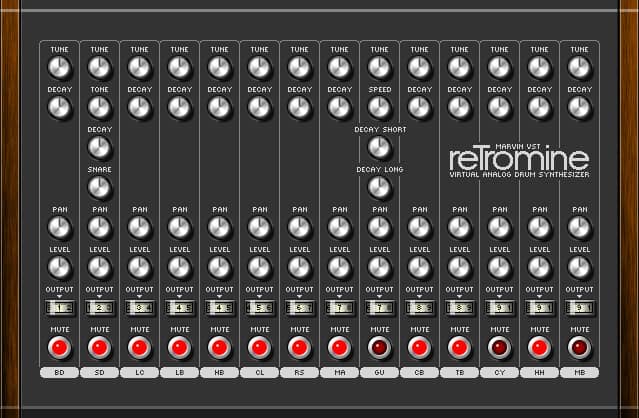
reTromine is a free 32-bit VST drum synth for Windows, inspired by the Roland CR-78. It uses virtual analog synthesis to make 15 sounds, including bass drum, snare, toms, hi-hats, cymbal, cowbell, and tambourine.
Adjust pitch, tone, decay, speed, pan, and volume, or mute individual sounds. Short and long decay options, nine separate outputs, MIDI CC, and automation support give you control over its drum parts.
Features
- Free 32-Bit Drum Synthesizer
- 15 Virtual Analog Drum Sounds
- Inspired By Roland CR-78
- Nine Separate Audio Outputs
- MIDI CC And Automation Support
- Adjustable Pitch, Tone, And Decay
- Control Speed, Panning, And Volume
- Choose Outputs And Mute Sounds
- Includes Bass Drum, Snare, And Toms
- Includes Hi-Hats, Cymbal, And Cowbell
Pros
- Vintage CR-78 drum-machine style
- Fifteen built-in drum sounds
- Makes drum sounds with a synth
- Create sounds without loading samples
- Nine separate audio outputs
- Shape each drum’s pitch
- Adjust each drum’s tone
- Set short or long decay
- Change drum playback speed
- Use MIDI CC controls
Cons
- 32-bit Windows only limits modern use
- Only 15 built-in drum sounds
- CR-78 style narrows its sound range
- Soft sound may lack punch
- No realistic acoustic drum samples
- No custom sample loading is listed
- Few sound-shaping controls are offered
Testimonials
13. Pterosaur

OS: Windows Win Bit Version: 32-bit Developer: Contralogic Productions Size: 2.2 MB Rating: 61/100
Pterosaur is a 16-oscillator supersaw synthesizer for Windows in 32-bit VST format. Inspired by the Roland JP-8000, it lets you detune and pan each oscillator. Saw waves can shift toward a saw-pulse sound, with PCM waves, sync, and a sub-oscillator.
Four oscillator groups shape the tone, while dual LFOs, pitch and filter modulation, envelopes, and glide add movement. Filter and echo controls support sound shaping, and mono or polyphonic play modes suit basses, leads, pads, and wide electronic sounds.
Features
- Sixteen Oscillator Supersaw Synthesizer
- Independent Oscillator Detune And Pan
- Saw And Pulse Wave Morphing
- PCM Waves And Sync
- Sub Oscillator Included
- Four Oscillator Sound Groups
- Filter Type And Slope Controls
- Velocity Sensitive Filter Envelope
- Tempo Synced LFOs
- Mono And Polyphonic Modes
Pros
- Rich 16-oscillator supersaw sound
- Each oscillator tunes independently
- Each oscillator pans independently
- Four oscillator groups add depth
- Pulse-width shaping adds more color
- PCM waves expand sound choices
- PCM sync adds sharper textures
- Sub-oscillator adds extra weight
- Two LFOs create moving tones
- Tempo sync keeps movement tight
Cons
- Windows only, no Mac support
- 32-bit only limits compatibility
- Old VST format limits compatibility
- No VST3, AU, or CLAP
- High CPU use hurts workflows
- Mostly built for supersaw sounds
- No wavetable editing tools
Testimonials
14. Roland TR707
OS: Windows Win Bit Version: 32-bit Developer: Pianovintage Size: 6 MB Rating: 58/100
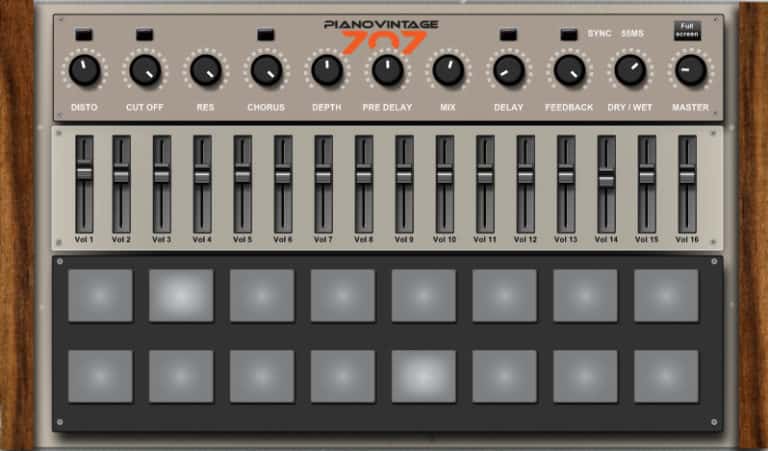
Roland TR707 offers a classic drum machine experience that brings the vintage sound of the 1980s into today’s studios. Created by Pianovintage, this free Windows plugin includes 16 sampled drum sounds with controls for LP filter, distortion, chorus, and sync delay.
It lets you shape your drums using simple controls for tone, depth, delay, and mix. Each sound can be adjusted with sliders and pads for quick changes. Perfect for adding retro rhythm to tracks, the TR707 plugin delivers reliable electronic drum tones without extra setup.
Features
- 16 Sample Drum Kit
- LP Filter With Cutoff Control
- Built-In Distortion Effect
- Chorus Effect For Depth
- Sync Delay Function
- Volume Sliders For Each Sound
- Trigger Pads For Drum Sounds
- Master And Dry/Wet Controls
- Low CPU Usage Performance
- Free To Download And Use
Pros
- Free to download and use
- Faithful classic 707 drum sounds
- Built-in distortion adds crunch
- Chorus makes sounds feel bigger
- Sync delay keeps timing tight
- Low latency for real-time play
- Very light on computer CPU
- Sounds close to real hardware
- Perfect for layering drum tracks
- No registration or login needed
Cons
- Only works on Windows
- No macOS support
- Outdated 32-bit format
- No built-in sequencer
- Limited sound editing
- No individual routing
- GUI looks outdated
- May crash on newer DAWs
- Samples lack dynamics
- Effects sound dated
Testimonials
15. SUPER-7

OS: Windows Win Bit Version: 32-bit Developer: CFA-Sound Size: 3.5 MB Rating: 58/100
SUPER-7 is a free Windows VST synthesizer built around a modeled supersaw oscillator inspired by the Roland JP-8000 and JP-8080. It provides 32-voice polyphony, a four-pole low-pass filter, adjustable envelopes, stereo pan, detune, and 20 presets.
Its controls shape pitch, width, volume, filter movement, and note dynamics for EDM and dance sounds. SUPER-7 includes normal and high-quality modes, but it is available only as a 32-bit VST 2.3 plugin for older Windows systems.
Features
- Emulates Classic Supersaw Oscillator
- Provides Polyphonic Virtual Analog Synthesis
- Supports Up To 32 Voices
- Includes Four-Pole Low-Pass Filter
- Offers Shapeable Amp And Filter Envelopes
- Includes Twenty Built-In Presets
- Provides Octave Pitch Range Control
- Adds Detune And Stereo Panning
- Provides Filter Frequency And Resonance
- Uses Moderate Computer Processing Power
Pros
- Authentic JP-style supersaw tone
- Focused EDM sound design
- Low CPU usage
- 32-voice polyphonic play
- Shapeable amp envelopes
- Shapeable filter envelopes
- Built-in four-pole filter
- Wide stereo detune control
- Normal and high quality modes
- Twenty included presets
Cons
- Windows-only support limits users
- 32-bit VST format feels outdated
- No modern VST3 support
- Future updates are not planned
- Only one main oscillator sound
- No wavetable or sample import
- No modulation matrix or LFOs
Testimonials
16. Rolend PG-238

OS: Windows Win Bit Version: 32-bit Developer: KBplugs Size: 2 MB Rating: 55/100
Rolend PG-238 is a free 32-bit VST synthesizer for Windows from KBplugs. Inspired by the Roland JX-8P, JX-3P, and Alpha Juno, it combines two digital oscillators, polyphony up to 16 notes, pulse-width modulation, a sub-oscillator, noise, and adjustable tuning.
Its filters, two LFOs, ADSR envelopes, VCA, chorus, and step LFO provide control over tone, movement, and volume. Pitch bend, portamento, aftertouch, and modulation settings add expression. It has no presets, so sounds are built from the available controls.
Features
- Free Juno-Inspired Synth Plugin
- Up To 16-Voice Polyphony
- Two Digital Oscillators
- Pulse-Width Modulation Controls
- Oscillator Cross Modulation
- Two Adjustable LFOs
- Selectable LFO Destinations
- High-Pass And Low-Pass Filters
- Two ADSR Envelopes
- Built-In Chorus Effect
Pros
- Two oscillators build rich tones
- Up to sixteen-note polyphony
- Pulse width adds moving color
- Sub-oscillators strengthen bass sounds
- Dual LFOs create deep motion
- Step LFO makes rhythmic patterns
- Aftertouch brings expressive control
- Built-in chorus widens sounds
- Distinct character beyond exact emulation
Cons
- Only Windows users can run it
- Uses an old 32-bit format
- May need bridge software in modern DAWs
- No VST3, AU, or CLAP support
- Polyphony stops at sixteen notes
- No sample or granular sound engine
- Limited effects compared with newer synths
Testimonials
Best Roland Emulator Plugins Compared
This table compares the top emulator plugins by features, controls, effects, formats, and more.
| Details | PG-8X | BL-303 | VR-08 Free | T-Rex 606 | RT-7070 | Sixth Month June | Juno 6 | June-21 | Tromine8 | Yonu60 |
|---|---|---|---|---|---|---|---|---|---|---|
| Image |  |
|
 |
 |
 |
 |
 |
 |
 |
 |
| Rating | ||||||||||
| OS | Windows | Windows, Mac | Windows | Windows, Mac | Windows, Mac | Windows | Windows | Windows, Mac, Linux | Windows | Windows |
| Formats | VST, AU | VST, AU | VST | VST, AU | VST, VST3, AU | VST | VST | VST, AU | VST | VST |
| Bit Version | 32-bit, 64-bit | 32-bit | 32-bit, 64-bit | 32-bit, 64-bit | 32-bit, 64-bit | 32-bit | 32-bit | 64-bit | 32-bit | 32-bit |
| Developer | Martin Lüders' VST | Yooz Music | Alipapa | Max Project | Electronik Sound Lab | Elektrostudio | Open Source VSTi | Mike Rodd | Marvin Pavilion | L-Day |
| License | Donationware | Donationware | Freeware | Freeware | Freeware | Freeware | Freeware | Freeware | Freeware | Freeware |
| Sample-Based | No | No | Yes | Yes | Yes | Select | No | Select | Select | Select |
| Download Size | 1.6 MB | 10 MB | 492 MB | 2 MB | 39 MB | 1 MB | 1 MB | 16 MB | 2.2 MB | 0.9 MB |
| CPU Load | Low | Low | Low | Low | Low | Low | Low | Low | Low | Low |
| Polyphony | 12 | 1 | N/A | 6 | 32 | 6 | 6 | 8 | 8 | 64 |
| Features | Virtual Analog Synthesis, JX-8P Compatibility, 12-Voice Polyphony, Cross Modulation, Resonant Low-Pass Filter, Stereo Chorus, MIDI Learn | TB-303 Emulation, Squelchy Bass Sounds, Resizable Interface, Saw/Square Waveforms, Filter Controls, Velocity Sequencing, Slide and Accent | TR-808 emulation, Drum samples, Groove control, Rhythm randomization, Timing controls, Per-drum shaping, Trigger pads | Classic drum samples, Volume control, Reverb effects, Vintage design, Individual sound buttons, TR-606 emulation, Easy installation | 20 Drum Kits, LP/HP Filter, Reverb, Main Decay, Pan Controls, Volume Mixer, Assignable Outputs | Juno-6 Emulation, Arpeggiator, LFO Control, Low-Pass Filter, Envelope Modulation, Chorus Effect, Noise Generator | Analog Emulation, Arpeggio, Chorus Effect, LFO Modulation, DCO Sound Shaping, VCF Filtering, Envelope Control | Juno Emulation, Vintage Sounds, Open Source, LFO Control, Chorus Effect, Pulse Wave, 50 Presets | Analog modeling, 17 drum sounds, Multi-output, MIDI CC, Automation, Step sequencer, Tone shaping | Chorus Effect, ADSR Envelope, VCF Filters, Pitch Bend, Unison Mode, LFO Rate, Arpeggio Control |
| Controls | Program Display, Poly Mode, Mono Mode, Write, Load, Save, Random | Tune, Waveform, Cutoff, Emphasis, Env Mod, Decay, Accent | Master Volume, Shift, Scatter, Random, Groove Control, Level, Accent | Kick, Snare, CHat, OHat, HTom, LTom, Cymbal | Drum Kit Selector, Filter Type, Decay Knob, Cutoff Knob, Reverb Knob, Channel Volume Faders, Pan Knobs | Arpeggio, LFO Rate, Oscillators, Low Pass Filter, Envelope, Chorus, Tune | Power, Tune, Transpose, Arpeggio, LFO, DCO, Chorus | LFO Rate, Delay, Pulse Wave, Saw Wave, Sub Level, VCF Frequency, Chorus | BD Control, SD Control, LT Control, MT Control, HT Control, Step Sequencer Display, Additional Settings Button | Arpeggio, LFO, DCO, HPF, VCF, ENV, Chorus |
| Effects Included | Chorus | Unknown | Unknown | Reverb | LP/HP Filter, Reverb, Compressor | Chorus, Delay | Chorus | Delay, Chorus | Overdrive | Chorus, ADSR Envelope, VCF Filters Envelope, Delay Time |
| MIDI Learn | Yes | No | Select | Unknown | Unknown | Unknown | Unknown | Unknown | Unknown | Unknown |
| Presets | N/A | N/A | N/A | 15 | 20 | 30 | N/A | 50 | N/A | 60 |
| Standalone | Yes | No | No | Yes | Yes | Yes | Yes | Select | Select | Select |
| Last Updated | 12/07/2016 | 03/12/2024 | 11/12/2026 | 06/11/2020 | 06/25/2023 | N/A | N/A | N/A | N/A | N/A |
Best Roland VST Emulator Plugins
Our top picks for the best free Roland VST Emulator plugins are PG-8X by Martin Lüders’ VST, June-21 by Mike Rodd, and DR-910 by MaxSynths.
| Details | PG-8X | June-21 | DR-910 |
|---|---|---|---|
| Image | | | 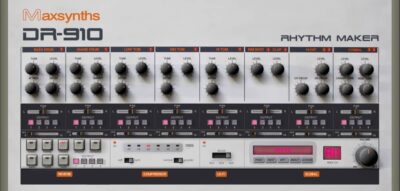 |
| Rating | |||
| OS | Windows | Windows, Mac, Linux | Windows |
| Formats | VST, AU | VST, AU | VST |
| Bit Version | 32-bit, 64-bit | 64-bit | 32-bit |
| Developer | Martin Lüders' VST | Mike Rodd | MaxSynths |
| Download Size | 1.6 MB | 16 MB | 8 MB |
| Download | Visit PG-8X | Visit June-21 | Visit DR-910 |
FAQs
How to Install Roland VST Emulator Plugins
To install roland VST emulator plugins on Windows or Mac, extract the files from the Zip or Rar. Move the files (.dll for Windows or .component for Mac) into your DAW’s plugin folder. Then restart your software and rescan the directory to complete the process. Tutorial: How to Install VST Plugins
Windows:
Extract the downloaded zip file and copy the .dll file into the VST plugins folder scanned by your DAW. Restart your music software and rescan your plugin directory to begin using the new VST.
Mac OS X:
Extract the downloaded archive and move the .component or .VST file to the plugin folder. It is usually /Library/Audio/Plug-Ins/Components or /Library/Audio/Plug-Ins/VST. Restart your DAW and rescan your plugins to complete the installation.
Is Roland Cloud a VST?
The Roland membership is a cloud subscription service that gives you access to over 50 VST instruments created by the Roland Corporation. By installing the Cloud Manager software, you will get access to VST plugins for both Windows and Mac.
These plugins are excellent free alternatives to the paid Roland Cloud plugins, such as the Roland Juno-60, Sound Canvas VA, ZEN-Core Model Expansions, Roland JD-800 Model Expansion, and the Roland D-50 plugin.
I hope you found this list of free Roland VST emulators helpful.
You May Also Like: