

Here are the best free Korg VST emulator plugins for Windows and Mac that get close to replicating the classic Korg keyboards. We have included video demos, feature lists, pros, cons, and plugin ratings.
In the 1990s, Korg released a popular collection of keyboards, such as the Korg Triton, Korg M3, and Korg Trinity. These keyboards were very popular with producers and composers.
Korg has released VST plugins for these popular keyboards, but each Korg keyboard VST plugin starts at $99. If you don’t have the money to spend on these popular Korg VST plugins, the next best thing is these free Korg emulator VST plugins.
How we rate plugins: We rate each korg VST emulator plugin based on sound quality, design, performance, features, usability, and compatibility. We rate plugins on a scale of 1 to 100.
Table of Contents
I have spent over 15 years testing and comparing hundreds of free and paid VST plugins, supported by hands-on demos on our YouTube channel, which has 11,000+ subscribers.
Free Korg VST Emulator Plugins
This table compares Korg emulator plugins by operating system, bit version, format, and rating.
| # | Plugin | OS | Formats | Bit Version | Ratings |
|---|---|---|---|---|---|
| 1 | Odin 2 | Windows Mac Linux | VST, AU | 64-bit | |
| 2 | FB-3300 | Windows Mac | VST, VST2, VST3, AU, AAX, CLAP | 64-bit | |
| 3 | Fury-800 | Windows Mac | VST, VST2, VST3, AU, AAX | 64-bit | |
| 4 | FB-7999 | Windows Mac | VST, VST2, VST3, AU, AAX, CLAP | 64-bit | |
| 5 | Tricent mk III | Windows Mac | VST, VST2, VST3, AU, AAX, CLAP | 64-bit | |
| 6 | Mono/Fury | Windows Mac | VST, VST2, VST3, AU, AAX, CLAP | 64-bit | |
| 7 | FB-3100 | Windows Mac | VST, AU | 32-bit, 64-bit | |
| 8 | Nabla | Windows Mac | VST, AU | 32-bit, 64-bit | |
| 9 | FB-3200 | Windows Mac | VST, AU | 32-bit, 64-bit | |
| 10 | Stigma | Windows Mac | VST, AU | 32-bit, 64-bit | |
| 11 | Chorg 870 | Windows | VST | 32-bit | |
| 12 | Poly-LD8D | Windows | VST | 32-bit | |
| 13 | Chorg 770 DV | Windows | VST | 32-bit | |
| 14 | Chorg PS-20 | Windows | N/A | 32-bit | |
| 15 | Chorg DS-600 | Windows | VST | 32-bit |
1. Odin 2
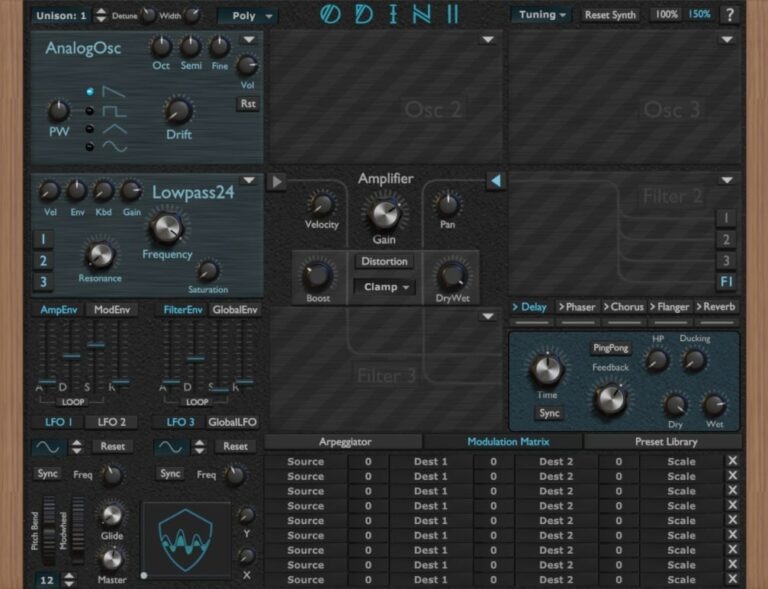
OS: Windows Win Mac Mac Linux Linux Bit Version: 64-bit Developer: Wave Warden Size: 87 MB Rating: 91/100
Odin 2 is a free virtual synth created by The Wave Warden for Windows, Mac, and Linux. It offers three oscillators, three filters, and a range of analog-style waveforms for creating powerful leads, basses, and effects. The plugin includes modulation options, distortion control, and built-in sound effects.
Odin 2 provides 24-voice polyphony, flexible modulation tools, and customizable filters modeled after classic analog gear. With features like an arpeggiator, ADSR envelopes, LFOs, and an XY pad, it gives music creators deep control over tone shaping for modern or vintage-style sounds.
Features
- 24-Voice Polyphonic Synth Engine
- Three Oscillator Slots
- Comprehensive Modulation Matrix
- Analog And Digital Waveforms
- Distortion And Saturation Modules
- Built-In Arpeggiator
- XY Pad For Control
- Delay, Chorus, Flanger, Reverb Effects
- Preset Library For Sound Storage
- Runs On Windows, Mac, Linux
Pros
- Warm and rich analog sound
- Realistic hardware-style interface
- Powerful 24-voice polyphony
- High-quality filter emulations
- Modulation matrix for creative sounds
- Built-in effects like reverb and delay
- Works well with MPE controls
- Low CPU use for smooth play
- Deep sound design options
- Comparable to top Korg synths
Cons
- Interface can feel confusing
- Can be heavy on CPU
- Preset browser looks outdated
- Slow loading on older PCs
- Not beginner friendly
- No onboard sampler option
- Needs better preset organization
- Lacks modern visual meters
- Doesn’t support quick drag-drop
- No mobile or tablet version
Video Demo
What Users Say
Odin 2 Tips
- I try using the modulation matrix to make sounds move and feel more alive.
- I enjoy turning up a little bit of unison to make the synth sound bigger and wider.
- I use a limiter on my master when testing heavy bass sounds to protect my ears and speakers.
- Experiment with Odin 2’s waveform blending to create evolving, textured sounds.
- Use the effects section in Odin 2 to quickly add space with delay or reverb.
- Combine Odin 2 with a Korg synth VST for a blend of old-school and modern tones.
- Layer Korg pads under Odin 2 leads to make songs sound fuller.
2. FB-3300
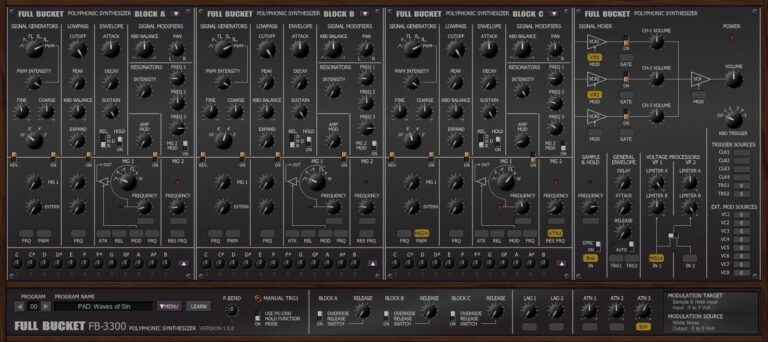
OS: Windows Win Mac Mac Bit Version: 64-bit Developer: Full Bucket Music Size: 17 MB Rating: 91/100
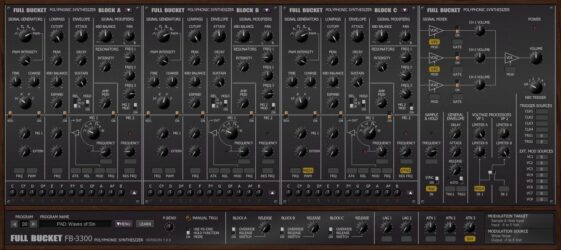
FB-3300 offers an authentic recreation of the classic KORG PS-3300 polyphonic synthesizer from 1977. It features three separate synth blocks with oscillators, filters, and modulation tools that let you build deep, evolving sounds. Its semi-modular setup encourages creative routing and tone shaping.
With options like resonators, sample and hold, and micro-tuning, FB-3300 gives music creators a wide range of vintage-style tones. Each control can be mapped through MIDI, making it flexible for detailed sound design or live performance across Windows and macOS systems.
Features
- Emulates Classic Korg PS-3300 Synth
- Three Independent Polyphonic Synth Blocks
- Band-Limited Oscillators For Clean Sound
- Classic Two-Pole Lowpass Filters
- Includes Resonators Section
- Semi-Modular Signal Routing
- Micro-Tuning Options Available
- MIDI Learn For All Parameters
- Low CPU Usage Performance
- Supports VST, AU, AAX, And CLAP Formats
Pros
- Very close to original Korg sound
- Free and professional quality synth
- Rich warm vintage style tones
- Offers three full synth blocks
- Accurate analog filter emulation
- Deep modulation and routing power
- Micro-tuning for creative sound play
- Runs smoothly with low CPU use
- Resizable interface for easy view
- Comparable or better than other free Korg VSTs
Cons
- Interface looks old and crowded
- Missing modern preset browser
- Hard for beginners to learn
- Small knobs hard to adjust
- Non-resizable older version
- Poor documentation for beginners
- Limited sound shaping depth
- No built-in reverb effects
- No built-in delay section
- MIDIs sometimes tricky to map
Video Demo
What Users Say
FB-3300 Tips
- I use the “Init Patch” to build my sounds from scratch when I want something new.
- I blend the oscillators carefully so the sound doesn’t get muddy.
- I map my MIDI knobs to filter and LFO controls for easier live tweaking.
- Use the built-in chorus and ensemble effects to add depth and texture to sounds.
- Try syncing the LFO to the tempo for rhythmic filter movement.
- Experiment with stereo spread settings for a bigger, more open sound.
- Combine subtle reverb with the synth’s own chorus for a dreamy vintage feel.
3. Fury-800
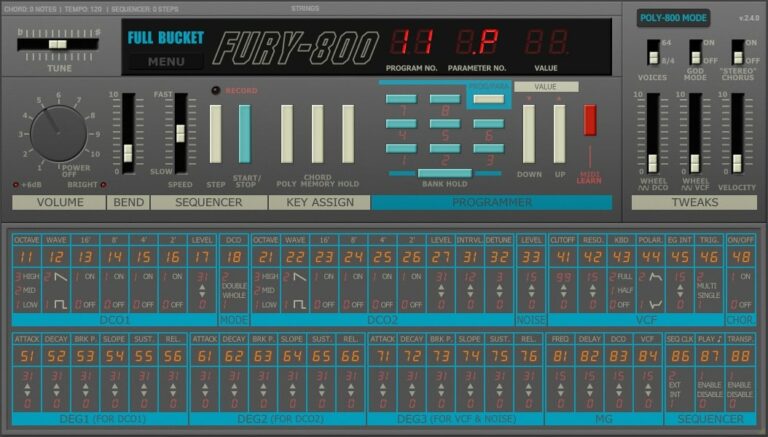
OS: Windows Win Mac Mac Bit Version: 64-bit Developer: Full Bucket Music Size: 14 MB Rating: 88/100
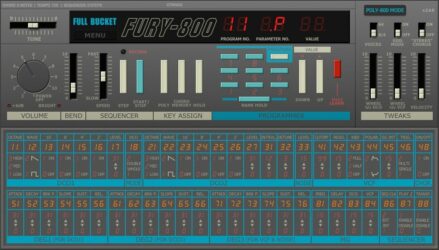
Fury-800 offers the sound and character of the classic 1983 KORG Poly-800 in a modern software form. It features two DCOs with multiple harmonic settings, a single lowpass filter, onboard sequencer, and Chord Memory for creating layered synth sounds with vintage warmth.
It includes a pseudo-stereo Chorus for added width and supports up to 64 voices with Velocity. The plugin provides easy control through MIDI Learn and a resizable interface. With reliable performance on Windows and macOS, Fury-800 delivers classic tones with flexible modern tools.
Features
- Two Band-Limited DCOs
- Two Waveforms With Additive Harmonics
- Onboard Sequencer For Patterns
- Chord Memory Function
- Pseudo-Stereo Chorus Effect
- Up To 64-Voice Polyphony
- Supports Dynamic Micro-Tuning
- Full MIDI Learn Support
- Faithful Recreation Of Classic Synth
- Light CPU Usage
Pros
- Faithful recreation of Korg Poly-800
- Rich and warm vintage tone
- High polyphony with God Mode
- Dynamic micro-tuning support added
- Sequencer makes creative patterns easy
- Chord Memory saves favorite chords
- Supports MIDI Learn control setup
- Resizable interface for any screen
- Very light on computer CPU
- Excellent for 80s synth sounds
Cons
- Only two waveforms available
- Single filter limits sound shaping
- No built-in reverb effect
- No delay or echo options
- Few modulation sources offered
- Lacks advanced LFO controls
- Cannot import external samples
- Interface looks plain and old
- Preset browser feels clunky
- Weak bass tones compared to others
Video Demo
What Users Say
Fury-800 Tips
- I always turn off my effects first so I can hear the raw tone from Fury-800 before shaping it.
- I use the Poly mode when I want chords and the Unison mode when I want thick leads.
- I often tweak the VCF cutoff and resonance together to find the sweet spot.
- I experiment with detuning the oscillators just a little for warm vintage feel.
- Use external effects, like reverb or delay, to make Fury-800 sounds blend better in a mix.
- Assign MIDI controllers to the main parameters for a hands-on playing experience.
- Use automation in your DAW to move Fury-800 filters and envelopes for dynamic sound changes.
4. FB-7999
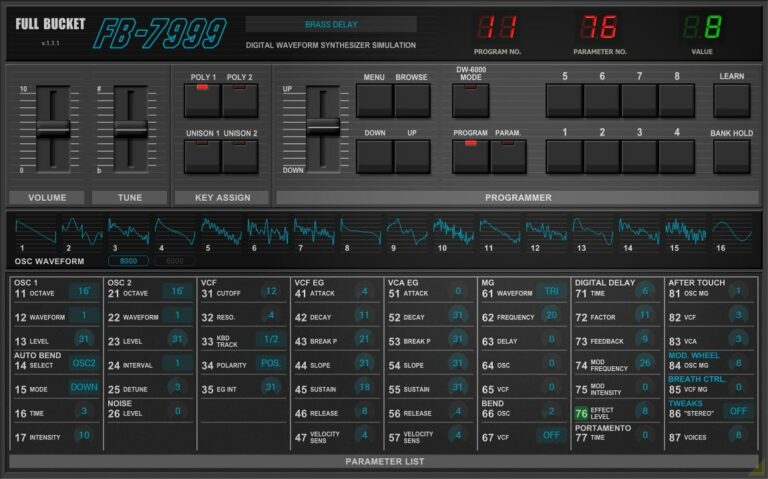
OS: Windows Win Mac Mac Bit Version: 64-bit Developer: Full Bucket Music Size: 12 MB Rating: 88/100
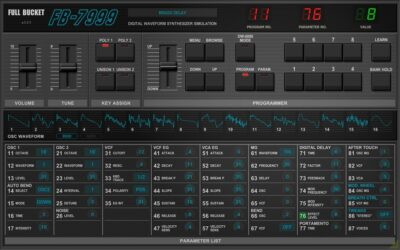
FB-7999 offers a faithful software version of the classic KORG DW-6000 and DW-8000 synthesizers from the 1980s. It features two digital oscillators with 32 total waveforms, poly and unison modes, and a built-in chorus and delay for adding space and warmth.
The plugin supports MIDI Learn for easy control, patch import from original DW synths, and resizable graphics for better workflow. With up to 64-note polyphony and support for modern formats on Windows and macOS, FB-7999 brings vintage hybrid synth tones to today’s studios.
Features
- Emulates Korg DW-6000 And DW-8000
- Two Digital Oscillators With 32 Waveforms
- Supports Poly And Unison Modes
- Built-In Stereo Delay Effect
- Includes Chorus For Rich Sound
- Supports SysEx Import And Export
- Extended Polyphony Up To 64 Voices
- Resizable User Interface Option
- MIDI Learn For All Parameters
- Free Plugin Without Registration
Pros
- Free to download and use
- True emulation of vintage Korg sound
- Includes 32 unique waveforms
- Supports old DW patch files
- Very low CPU usage
- Resizable interface for any screen
- Has built-in chorus and delay
- MIDI Learn for quick control
- Poly and Unison modes included
- Works on Windows and Mac
Cons
- Interface looks old and plain
- No built-in reverb effect
- Too few modern presets
- No step sequencer built in
- Limited waveform editing options
- Can sound thin or cold
- Limited modulation depth range
- Preset browser feels basic
- Sound lacks true analog warmth
- Learning curve for beginners
Video Demo
What Users Say
FB-7999 Tips
- I like to start by loading a preset and then changing small things to learn what each knob does.
- Experiment with detuning the two oscillators slightly for a thick, analog-style sound.
- I like to use automation to move the filter or pitch to make sounds that change over time.
- I often layer two different patches to make a thicker, fuller sound.
- Use the built-in delay for vintage echo effects that fit the synth’s warm tone.
- Save custom presets often so you don’t lose a great sound during work.
5. Tricent mk III
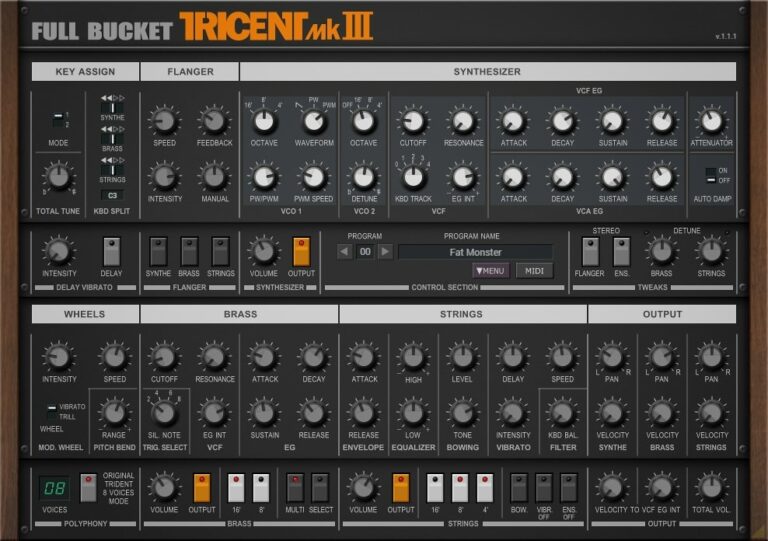
OS: Windows Win Mac Mac Bit Version: 64-bit Developer: Full Bucket Music Size: 15 MB Rating: 87/100
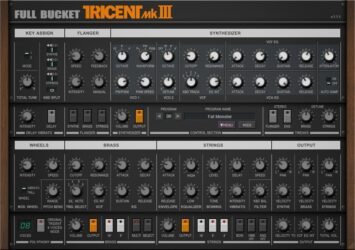
Tricent mk III offers a modern take on a classic 1980s analog synth, the KORG Trident mk II. It features three sound sections—Synthesizer, Brass, and Strings—each with its own stereo output for flexible layering and mixing. A built-in flanger adds extra movement and depth to your tones.
The plugin supports dynamic micro-tuning, MIDI control, and multiple formats for both Windows and macOS. Its resizable interface lets you adjust your workspace easily. With up to 64 voices of polyphony, Tricent mk III is designed to deliver warm, expressive sounds suited for both vintage and modern music production.
Features
- Simulates Classic Korg Trident Synth
- Three Sound Sections Included
- Up To 64 Voice Polyphony
- Built-In Flanger Sound Effect
- Individual Stereo Outputs Per Section
- Supports Dynamic Micro-Tuning System
- Resizable User Interface Option
- Full MIDI Controller Support
- Low CPU Usage Performance
- Compatible With Windows And macOS
Pros
- Authentic Korg Trident sound
- Three sound sections in one
- Warm, rich vintage analog tone
- Smooth, musical filter design
- Dynamic micro-tuning support
- Individual stereo outputs included
- Full MIDI control support
- Resizable GUI for comfort
- Very low CPU usage
- Completely free and updated often
Cons
- No built-in reverb effect
- Limited sound design flexibility
- No delay or echo options
- No built-in arpeggiator tool
- Interface looks plain and basic
- Strings section lacks realism
- Preset browser feels old-fashioned
- Limited modulation routing choices
- Non-resizable version is restrictive
- Lacks built-in re-synthesis features
Video Demo
What Users Say
Tricent mk III Tips
- I like to start by loading a preset and then slowly move each knob to hear what it does before making big changes.
- I save my favorite custom sounds often so I don’t lose them by accident.
- When I use the Tricent mk III, I adjust the Detune knob to make the sound feel wider and richer.
- Using automation in a DAW can bring the Tricent mk III to life with dynamic movement.
- Combining this plugin with reverb or delay plugins makes more space and depth in the mix.
- Starting from an initialized patch helps create custom sounds without unwanted preset settings.
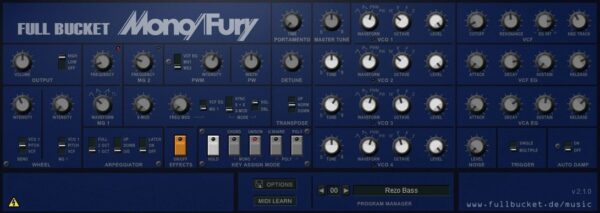
6. Mono/Fury
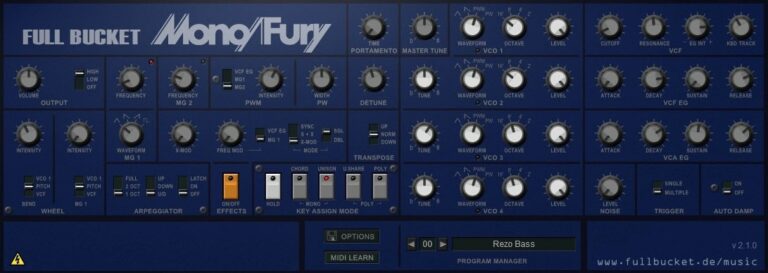
OS: Windows Win Mac Mac Bit Version: 64-bit Developer: Full Bucket Music Size: 14 MB Rating: 87/100
Mono/Fury offers a faithful recreation of the classic Korg Mono/Poly synthesizer from the early 1980s. It delivers rich analog-style tones through four band-limited oscillators, a self-oscillating lowpass filter, and flexible keyboard modes for both mono and quad setups.
The plugin includes cross modulation, hard sync, and an arpeggiator that syncs to your host tempo. With MIDI Learn, micro-tuning support, and a resizable interface, Mono/Fury gives music creators an authentic vintage sound suited for modern production workflows.
Features
- Emulates Classic Korg Mono/Poly Synth
- Four Band-Limited Oscillators
- Four-Pole Lowpass Filter With Self-Oscillation
- Cross Modulation And Hard Sync
- Arpeggiator With Sync-To-Host Option
- Dynamic Micro-Tuning Support (MTS-ESP)
- Resizable User Interface
- Full MIDI CC Control
- Supports VST, AU, VST3, AAX, CLAP Formats
- High Performance Native C++ Code
Pros
- Very close to Korg MonoPoly sound
- Authentic vintage synth character
- Four oscillators for thick sounds
- Cross modulation adds creative depth
- Rich filter with self-oscillation
- Arpeggiator syncs with your DAW
- Micro-tuning support for precision
- Quadrophonic mode feels powerful
- Runs fast on low CPU power
- Free to download and use
Cons
- No built-in reverb or delay
- Interface looks old and plain
- No modern preset browser
- Limited sound design options
- Lacks wavetable or FM synthesis
- No drag and drop modulation
- Few visual feedback elements
- Limited polyphony choices
- Does not support MPE control
- Less flexible than other Korg VSTs
Video Demo
What Users Say
Mono/Fury Tips
- I like to start with the init patch so I can build my sound from scratch.
- I like to stack two detuned oscillators for a stronger, wider sound.
- Adjust the ADSR envelope to shape how the sound starts and ends.
- Use automation in your DAW to bring filters or pitch controls to life.
- Run the output through a delay effect to create dreamy soundscapes.
- I use my MIDI keyboard to change filter cutoff in real time for cool effects.
- I often record the Mono/Fury through a reverb plugin to give it space.
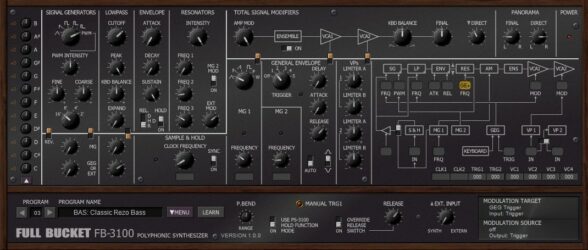
7. FB-3100
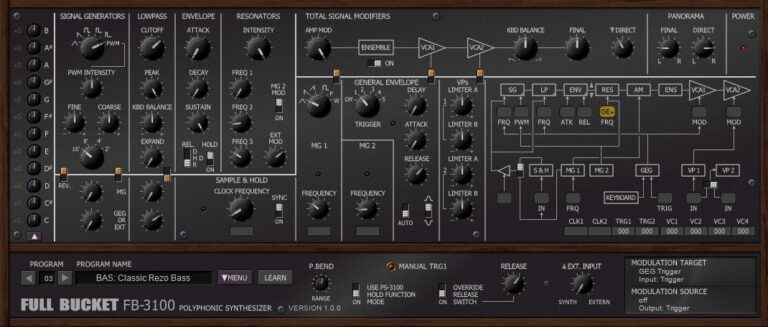
OS: Windows Win Mac Mac Bit Version: 32-bit, 64-bit Developer: Full Bucket Music Size: 10 MB Rating: 85/100
FB-3100 is a virtual synthesizer that recreates the sound and layout of the classic Korg PS-3100 from 1977. It features band-limited oscillators, a classic lowpass filter, and a resonator section that helps shape rich, layered tones suited for pads, strings, and experimental textures.
It includes two modulation generators, a paraphonic envelope, and a semi-modular patch panel for deeper sound shaping. With micro-tuning, MIDI Learn support, and flexible routing options, FB-3100 provides a wide range of tonal control for producers exploring vintage-style synthesis.
Features
- Emulates Classic Korg PS-3100 Synth
- Band-Limited Oscillators For Clarity
- Classic Two-Pole Lowpass Filters
- Dual Modulation Generators Included
- Semi-Modular Patch Panel Control
- Resonators For Tone And Depth
- Paraphonic Envelope Generator Added
- Micro-Tuning For Custom Scales
- VST And AU Plugin Formats
- Low CPU And Stable Performance
Pros
- Accurate emulation of 1977 hardware
- Rich analog tone and warmth
- Powerful resonator section
- Micro-tuning for custom scales
- Fun and simple patch panel
- Many modulation options available
- Fast and stable C++ code
- Fully polyphonic for layered sounds
- Great mix of vintage and modern
- Low CPU use for smooth play
Cons
- No built-in reverb or delay
- Lacks modern visual interface
- No onboard presets browser
- No built-in effects section
- No built-in arpeggiator tool
- Interface not resizable or scalable
- Patch panel can be confusing
- Steep learning curve for beginners
- No real-time waveform display
- Limited waveform selections available
Video Demo
What Users Say
FB-3100 Tips
- I experiment with detuning the oscillators to make the sound warmer and more analog.
- Use automation to bring the filter or LFO movement to life in your tracks.
- Pair the FB-3100 with a reverb plugin to give your pads a dreamy, atmospheric sound.
- Try routing the FB-3100 through an external effects chain to discover new textures.
- Keep an eye on your output level, as analog-style plugins like the FB-3100 can clip if pushed too hard.
- Save your custom presets often so you don’t lose your sound design work.
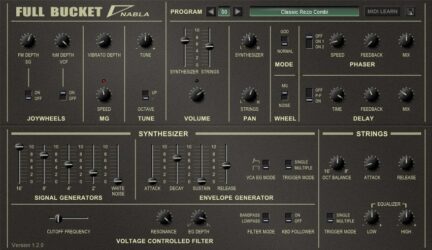
8. Nabla
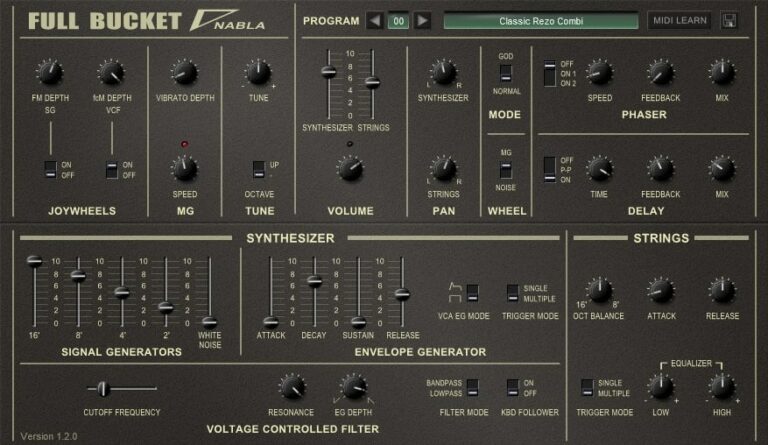
OS: Windows Win Mac Mac Bit Version: 32-bit, 64-bit Developer: Full Bucket Music Size: 4.9 MB Rating: 85/100
Nabla offers an authentic recreation of the 1979 KORG Delta String DL-50, capturing the charm of classic paraphonic synths. It combines synthesizer and string sections with up to 64 voices, plus modern touches like panning, delay, and “GOD Mode” for full polyphony.
The plugin includes filters, modulation controls, and onboard effects that shape wide, vintage tones with ease. Its phaser, ensemble, and EQ features make it simple to build lush pads or warm leads while keeping the retro sound character of the original hardware.
Features
- Simulates 1979 Korg Delta Synth
- Paraphonic Synth And Strings Sections
- Four-Pole Bandpass Or Lowpass Filter
- Built-In Phaser And Delay Effects
- Modulation By LFO Or Noise
- God Mode For True Polyphony
- Two-Band Equalizer And Ensemble Effect
- MIDI Controller Parameter Support
- Program Preset Load And Save
- Low CPU Usage Performance
Pros
- Sounds just like classic Korg gear
- Has both synth and strings
- Offers true polyphonic playing
- Includes cool phaser effect
- Built-in delay for rich echoes
- Very close to real Delta sound
- Flexible tone shaping and filters
- Gorgeous wide ensemble texture
- Free yet feels like a paid plugin
- Perfect for vintage string pads
Cons
- Lacks modern sound design options
- GUI looks plain and outdated
- Limited preset library
- Few modulation routing choices
- No built-in reverb effect
- No step sequencer available
- No built-in arpeggiator
- Filter options feel limited
- Interface not resizable
- Needs external effects for depth
Video Demo
What Users Say
Nabla Tips
- I often use the chorus and ensemble effects to give my sounds a wider, richer feel.
- I adjust the filter cutoff and resonance by ear until the tone fits nicely in my mix.
- I layer Nabla with another synth to make thicker and more powerful leads.
- I play with the modulation settings to add motion and life to my sounds.
- Experimentation with both Nabla and Korg VST plugins often leads to unique and inspiring results.
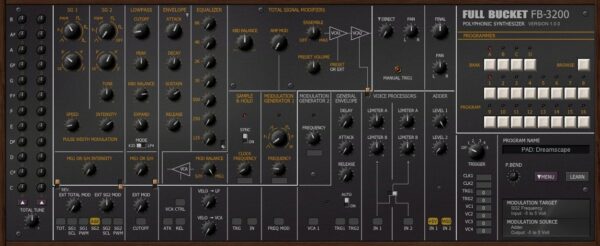
9. FB-3200
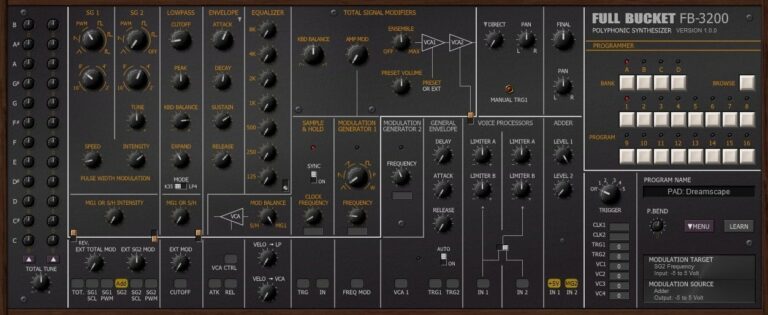
OS: Windows Win Mac Mac Bit Version: 32-bit, 64-bit Developer: Full Bucket Music Size: 11 MB Rating: 84/100
FB-3200 offers a faithful software recreation of the classic 1978 KORG PS-3200 synthesizer. It delivers warm analog-style tones using band-limited oscillators and vintage lowpass filters. With its modulation tools, equalizer, and envelope features, users can shape a wide range of classic sounds.
The plugin supports polyphonic and paraphonic modes, micro-tuning, and MIDI control for flexible sound design. Extra features like resonators and velocity response expand creative options. FB-3200 runs on Windows and Mac in VST and AU formats, making it a dependable tool for modern studios.
Features
- Emulates Vintage Korg PS-3200 Synth
- High Performance With Low CPU Use
- Band-Limited Oscillators And Filters
- Semi-Modular Signal Routing Design
- Micro-Tuning Control For Precision
- MIDI Learn For All Parameters
- External Signal Processor Supported
- Classic Analog Tone Reproduction
- Available In VST And AU Formats
- 32-Bit And 64-Bit Compatibility
Pros
- Accurate Korg PS-3200 emulation
- Authentic analog tone character
- Warm vintage synth sound
- Flexible modulation options
- Includes Sample and Hold feature
- Classic lowpass filter sounds
- Polyphonic for rich chords
- Micro-tuning for fine pitch setup
- Low CPU usage performance
- Light install and stable build
Cons
- No built-in effects section
- Interface looks dated
- Limited modern sound tools
- No arpeggiator
- Few presets
- GUI not resizable
- Missing modulation matrix
- Limited waveform choices
- Less flexible routing
- Minimal documentation
Video Demo
What Users Say
FB-3200 Tips
- I like to start with the basic patch on the FB-3200 and slowly change one knob at a time to learn what each one does.
- Use automation in your DAW to change filter or pitch values over time for dynamic, evolving sounds.
- Try blending the FB-3200 with Korg VSTs like the Polysix or Mono/Poly for a wider sound palette.
- Adjust the envelope attack and release to control how each note starts and ends for smoother transitions.
- Use chorus or reverb effects to give the FB-3200 more space and depth in a track.
- Balance the oscillator mix levels to craft unique tones and avoid unwanted noise.
- Turn down the cutoff frequency to create warm, mellow tones for pads or background sounds.
10. Stigma
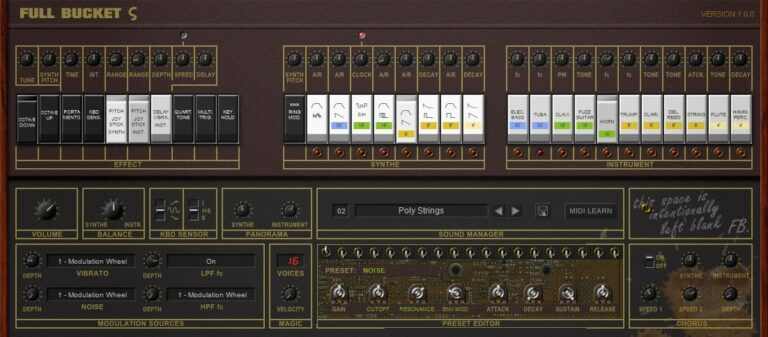
OS: Windows Win Mac Mac Bit Version: 32-bit, 64-bit Developer: Full Bucket Music Size: 10 MB Rating: 82/100
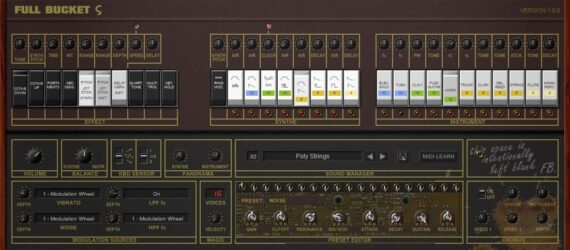
Stigma offers a detailed recreation of the classic Korg Sigma KP-30 synthesizer from 1979, bringing vintage tones into modern setups. It features dual oscillators, layered presets, and expressive controls such as vibrato, portamento, and aftertouch for deeper performance options.
With filters, chorus, and adjustable envelopes, Stigma can shape sounds ranging from smooth strings to sharp leads. The preset editor and MIDI learn functions make it simple to tweak every parameter, while its retro character suits synthwave, electronic, and experimental music styles.
Features
- Emulates Classic Korg Sigma Synth
- Low CPU Usage Performance
- Two Band-Limited Oscillators
- Individual Lowpass And Highpass Filters
- Includes Chorus And Ensemble Effects
- Portamento And Aftertouch Support
- Full MIDI CC Control
- Resizable And Clear Interface
- Preset Editor And Manager
- Organ And Poly String Sections
Pros
- Authentic Korg Sigma sound feel
- Warm vintage tone character
- Fun joystick-style performance feel
- Built-in chorus and ensemble
- Lightweight compared to other Korg VSTs
- Low CPU use and fast
- Tons of ready-to-play presets
- MIDI learn for easy mapping
- Resizable screen for clear view
- Free and no registration needed
Cons
- Only runs well on Windows 10
- No built-in reverb effect
- Lacks modern modulation options
- Limited preset variety
- Interface looks old-fashioned
- No built-in EQ section
- Can sound dated or thin
- No native Mac installer package
- No built-in step sequencer
- No oversampling or advanced DSP
Video Demo
What Users Say
Stigma Tips
- I use the arpeggiator to make fun, moving bass lines that feel alive.
- I turn on a little chorus effect to make my pads sound bigger and wider.
- I use automation to change filter settings over time for more movement in a track.
- Experimenting with Stigma’s modulation options can create interesting motion in a sound.
- Pairing Stigma with Korg VSTs can create classic synth combinations that sound vintage and warm.
- Layering multiple Korg VST instruments can build a thick, rich sound texture.
- Bouncing Stigma tracks to audio can help free CPU space when working on larger projects.
11. Chorg 870
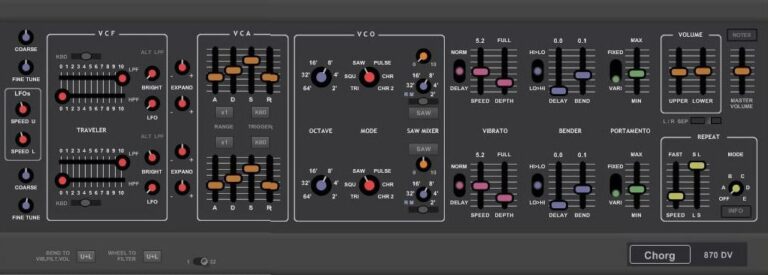
OS: Windows Win Bit Version: 32-bit Developer: KBplugs Size: 7.7 MB Rating: 70/100
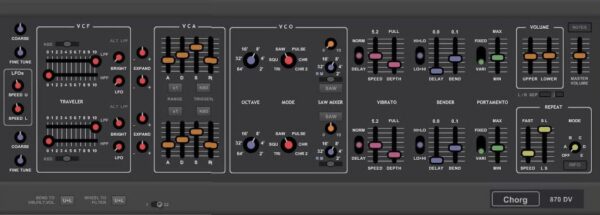
Chorg 870 is a software emulation of the classic Korg 800DV synthesizer. It captures the spirit of the original while offering its own digital twist. Designed for PC users, this 32-bit VST lets you create deep, vintage sounds without relying on presets.
The plugin includes hands-on controls for tuning, filtering, modulation, and envelope shaping. With sliders and knobs for tone shaping, pitch bending, and effects like vibrato and portamento, Chorg 870 gives music creators room to craft warm pads, bright leads, or textured retro tones.
Features
- Korg 800DV Style Emulation
- VCF Filter For Tone Shaping
- Traveler Sliders Adjust Tone Balance
- VCO Generates Raw Waveforms
- Waveform Selector For Sound Variety
- PWM Adds Rich Modulation Movement
- Portamento Slides Between Notes
- Repeat Function Adds Rhythmic Effects
- Clear And Readable Interface
- Freeware Plugin With Stable Operation
Pros
- Rich classic Korg-inspired sound
- Authentic vintage string machine vibe
- Warm and wide ensemble effect
- Low CPU usage on old PCs
- Free yet very polished plugin
- Built-in reverb for quick use
- Smooth parameter automation support
- Playable and expressive response
- Immediate sweet spot for sound
- Comparable quality to paid plugins
Cons
- Only works on Windows systems
- No 64-bit plugin version
- Not available for Mac users
- Sound not true to hardware
- No built-in preset library
- No built-in effects options
- No patch saving system included
- No resizable graphical interface
- No MIDI learn functionality
- No update or support promise
Video Demo
What Users Say
Chorg 870 Tips
- I use the filter cutoff knob a lot to shape the brightness of my sound.
- When I want a wide sound, I add a bit of stereo chorus from the Chorg 870’s effects section.
- I often layer the Chorg 870 with another synth to make the sound fuller.
- I use automation on the filter and resonance to make my music feel more alive.
- Experiment with the oscillator mix to get brighter or darker sounds.
- Use EQ and compression after the Chorg 870 to help it fit better in a mix.
12. Poly-LD8D
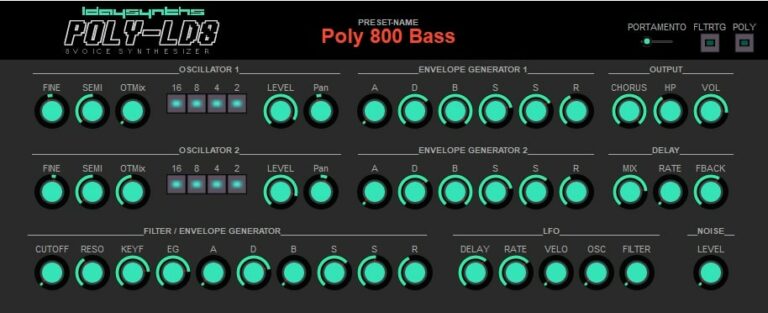
OS: Windows Win Bit Version: 32-bit Developer: L-Day Size: 0.9 MB Rating: 70/100
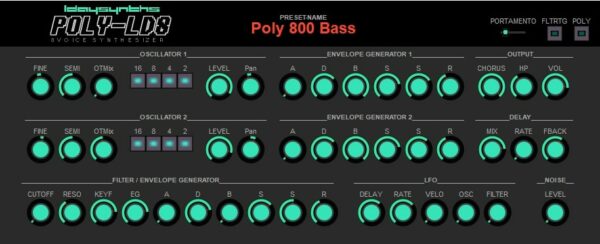
Poly-LD8D offers an analog-style polyphonic synth experience inspired by the classic Korg Poly 800. It has two oscillators, a noise generator, and flexible envelopes for shaping tone and dynamics. The low-pass filter and LFO add motion and warmth that respond naturally to your playing.
This plugin includes chorus and host-synced ping-pong delay for depth and space. With eight-voice polyphony, it can produce evolving pads, gritty textures, and sharp leads. Poly-LD8D fits styles that range from ambient to experimental, giving creators plenty of room to explore sound.
Features
- 8 Voice Polyphonic Synth Engine
- 2 Poly 800 Style Oscillators
- Dual ADBSSR Envelope Generators
- Low Pass Resonance Filter
- LFO With Sinewave Modulation
- Host Synced Ping Pong Delay
- Chorus Effect With HP Filter
- Portamento For Smooth Note Slides
- Poly And Mono Mode Switching
- Low CPU Usage Performance
Pros
- Rich vintage Korg-inspired tones
- Warm analog-style sound engine
- Eight-voice polyphonic power
- Two flexible oscillators included
- Chorus adds lush stereo width
- Ping-pong delay syncs to tempo
- Low CPU usage performance
- Capable of experimental sound design
- Free alternative to paid Korg synths
- Lightweight and easy to install
Cons
- No support for macOS users
- Only available in 32-bit format
- Outdated compared to newer VSTs
- Limited preset library included
- Lacks modern GUI scaling options
- No MIDI learn or mapping support
- No patch browser for quick access
- Can be hard to program patches
- Filter lacks deep modulation controls
- No built-in reverb effect
Video Demo
What Users Say
Poly-LD8D Tips
- I like to start by picking a preset on the Poly-LD8D, then slowly tweak the knobs to make my own sound.
- I use the filter cutoff knob to shape how bright or dark the sound feels.
- I experiment with adding some reverb or delay for a bigger, more dreamy sound.
- Try adjusting the Poly-LD8D’s envelopes to make the notes start or fade more smoothly.
- Explore modulation options like LFOs to make your sound move in fun ways.
- Save custom patches to create your own unique sound library.
13. Chorg 770 DV
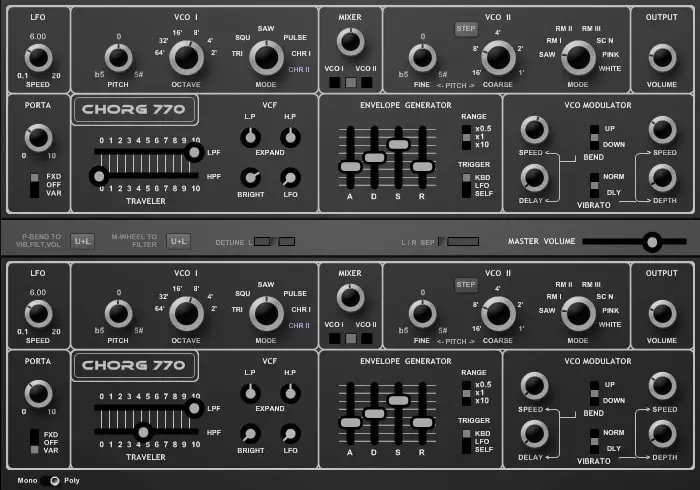
OS: Windows Win Bit Version: 32-bit Developer: KBplugs Size: 1.8 MB Rating: 66/100
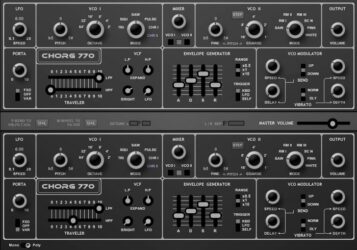
Chorg 770 DV offers a digital recreation of the classic Korg 770 synthesizer, bringing its raw and vintage tone to modern Windows studios. It captures the character of the original while adding a few extras, giving you direct control over every part of the sound.
This plugin features dual oscillators, an expressive filter, LFO, and envelope controls that shape each note with detail. With no presets included, it encourages hands-on sound design, letting music creators craft unique analog-style tones for leads, basses, or experimental textures.
Features
- Emulates The Classic Korg 770 Synth
- Dual Voice Sound Generation
- Two VCOs For Tone Variety
- VCF Filter With Slider Control
- Envelope Generator For Sound Shaping
- LFO For Slow Pitch Movement
- Portamento Control For Smooth Slides
- VCO Modulator For Special Effects
- Mixer For Blending Oscillators
- No Presets For Hands-On Tweaking
Pros
- Rich warm analog-style sound
- Classic Korg 770 vibe
- Dual voice for thick tone
- Expressive filter control sliders
- Unique analog drift personality
- Highly creative modulation options
- Authentic gritty character feel
- Great for vintage bass lines
- Awesome for retro sound effects
- Free and easy to install
Cons
- No Mac or Linux support
- Runs only in 32-bit mode
- No built-in sound presets
- Not fully true to hardware sound
- No built-in effects like reverb
- Outdated interface compared to others
- No resizable or modern GUI
- No MIDI learn or automation help
- No support or updates promised
- May not load in new DAWs
Video Demo
What Users Say
Chorg 770 DV Tips
- I like to map my MIDI keyboard knobs to the Chorg 770 DV for faster control.
- I try blending the Chorg 770 DV with another Korg VST for thicker sound layers.
- I often use the delay or reverb inside my DAW to make the Chorg 770 DV sound bigger.
- Layering two slightly detuned Chorg 770 DV patches can create a warm analog feel.
- Experimenting with low-frequency oscillators (LFOs) can add motion to simple sounds.
- Using MIDI velocity to control filter or volume makes playing more expressive.
- Applying EQ after the Chorg 770 DV can help the sound fit better in the final mix.
14. Chorg PS-20
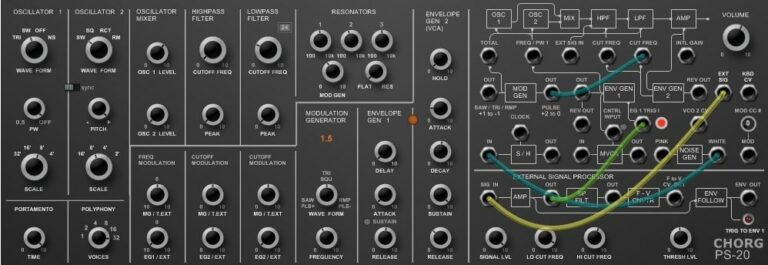
OS: Windows Win Bit Version: 32-bit Developer: KBplugs Size: 5.5 MB Rating: 64/100
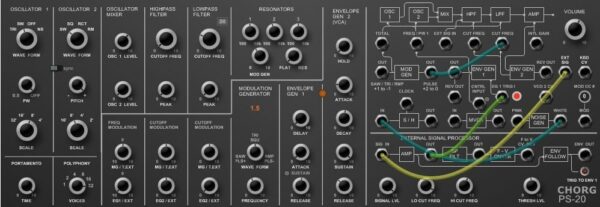
Chorg PS-20 offers a software take on the classic Korg MS-20, built for music makers who enjoy shaping sounds by hand. Inspired by the original circuits, it focuses on creative flexibility rather than exact hardware accuracy, giving users full control of every tone and texture.
With two oscillators, filters, modulation, and patch cable routing, Chorg PS-20 lets you explore deep sound design within your DAW. It doesn’t include presets, encouraging you to craft unique tones from scratch. The plugin runs on Windows in 32-bit VST format.
Features
- Korg MS-20 Style Emulation
- Two Adjustable Oscillators
- Highpass And Lowpass Filters
- Resonators For Tone Shaping
- Envelope Follower Controls Dynamics
- Modulation Generator Adds Movement
- Envelope Generator Shapes Sound
- External Signal Processor Support
- Patch Cables For Routing
- VST Plugin Format
Pros
- Warm classic analog-style sound
- Authentic MS-20 filter behavior
- External signal processing included
- Powerful dual oscillator setup
- Fun hands-on patching system
- Faithful to original hardware layout
- Unique tone not found in others
- Very low CPU usage
- Realistic envelope and decay control
- Great for learning analog synthesis
Cons
- Only works on Windows computers
- Does not support 64-bit systems
- No VST3 format support
- Not available for Mac users
- Not very CPU efficient
- Can cause DAW crashes sometimes
- No built-in presets for sounds
- Interface looks plain and dated
- Limited modulation options provided
- No help or tutorial section
Video Demo
What Users Say
Chorg PS-20 Tips
- I like to start with a simple patch on the Chorg PS-20 so I can learn what each knob does before making complex sounds.
- Experiment with the patch cables; they can create new sounds and effects instantly.
- Use automation in your DAW to make the filter or resonance change through your song.
- Try syncing the LFO speed to the tempo of your project for rhythmic movement.
- Keep the Chorg PS-20’s envelope short for punchy bass and longer for soft, smooth pads.
- Layer the plugin with Korg’s own VSTs to get rich, modern synth textures.
- Save custom presets in organized folders to make them easier to find later.
15. Chorg DS-600
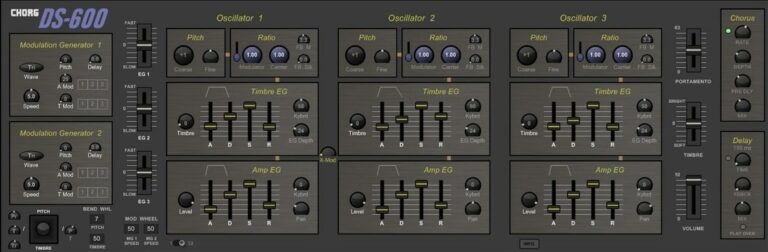
OS: Windows Win Bit Version: 32-bit Developer: KBplugs Size: 2. MB Rating: 64/100
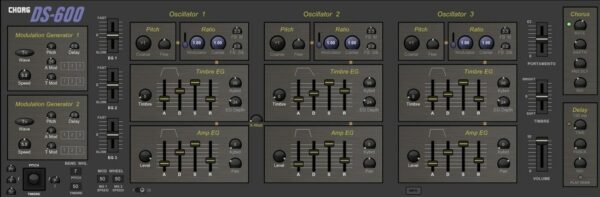
Chorg DS-600 is a software version of the classic Korg DS-8 synth, made for creating vintage digital tones. It keeps the spirit of the original hardware while allowing modern control and flexibility. With no built-in presets, it encourages hands-on sound design from scratch.
The plugin features multiple oscillators, modulation generators, and sliders for shaping tone, volume, and movement. Chorus and delay effects add width and depth, while simple knobs make editing fast. It’s built for Windows in 32-bit VST format, focusing on smooth playability and creative sound shaping.
Features
- Korg DS-8 Synth Emulation
- Multiple Oscillators For Sound Design
- Two Modulation Generators Included
- Wave Selector For Modulation Shapes
- Pitch And Ratio Adjustment Knobs
- Portamento Slider For Smooth Transitions
- Chorus Effect For Fuller Sound
- Delay Section For Echo Effects
- Light On CPU Usage
- Simple And Clean Interface
Pros
- Faithful design to original hardware
- Authentic 80’s digital synth vibe
- Works great for retro sounds
- Warm and glassy tones possible
- Rich chorus adds depth
- Versatile modulation options
- Light on CPU usage
- Fast loading on older computers
- Simple, uncluttered interface layout
- Free to download and use
Cons
- Not available for Mac users
- Only 32-bit format supported
- No built-in preset library
- No patch saving inside plugin
- No resizable user interface
- Lacks advanced modulation options
- No MIDI learn function
- No built-in reverb effect
- Limited sound shaping controls
- Less realistic than rival emulations
Video Demo
What Users Say
Chorg DS-600 Tips
- Users should start by browsing factory presets to get familiar with the Chorg DS-600’s sound range.
- I adjust the filter cutoff slowly to find the sweet spot that fits my mix.
- I sync the LFO rate to the project’s tempo to keep the movement in time with the beat.
- Adjusting the envelope attack and decay helps shape whether a sound feels punchy or smooth.
- Layering Korg VSTs can give a mix more depth and fullness.
- Using EQ after the DS-600 can help carve space for other instruments.
- I like to save custom presets often so I don’t lose my favorite sounds while experimenting.
16. minitron
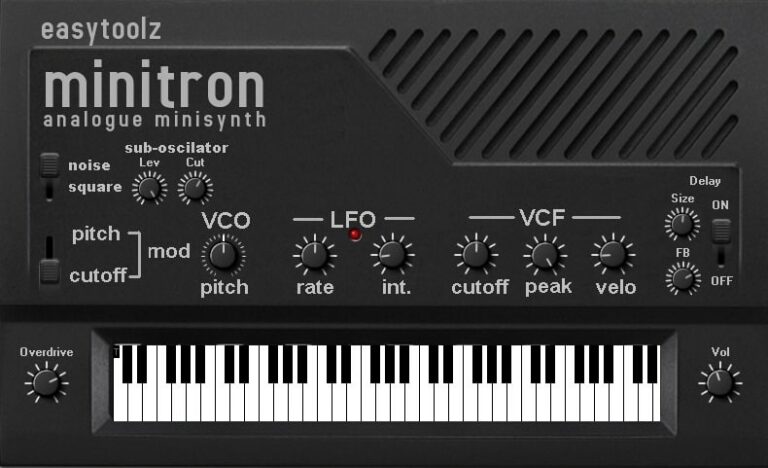
OS: Windows Win Bit Version: 32-bit Developer: easytoolz Size: 4.4 MB Rating: 57/100
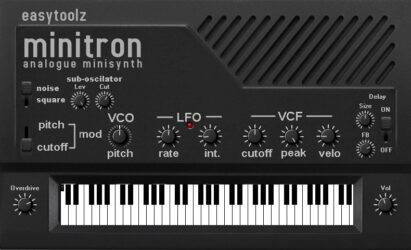
minitron offers a simple take on the classic Korg Monotron, bringing vintage analog flavor into a digital format. It includes a saw oscillator, pulse LFO, and a warm low-pass filter for shaping tones. The sub-oscillator, delay, and overdrive add more depth and grit to the sound.
With 16 editable patches, minitron gives producers quick access to classic synth textures. The clear layout makes it easy to adjust pitch, tone, and effects. It’s a compact synth that can add warmth, edge, or retro charm to tracks without feeling complicated.
Features
- Single Saw Wave Oscillator
- Noise Or Square Sub Oscillator
- Moogy-Style Low-Pass Filter
- Overdrive Control For Warmth
- Built-In Delay Effect
- Pulse LFO For Modulation
- VCF Cutoff, Peak, And Velocity
- Sixteen User Patches
- Retro-Style User Interface
- 32-Bit VST Plugin Format
Pros
- Warm and vintage sound tone
- Captures analog synth character
- Includes delay and overdrive
- Sub-oscillator adds sound depth
- Filter offers nice tone shaping
- LFO adds smooth sound motion
- Rich tones rival paid synths
- Retro-style interface looks cool
- Lightweight install and startup
- Creative results with simple tweaks
Cons
- High CPU use on chords
- No 64-bit version support
- No Mac compatibility offered
- Can crash during automation
- No standalone version available
- Polyphony is very limited
- Sound options are too narrow
- Lacks modern modulation tools
- GUI looks outdated and small
- No MIDI learn or mapping
Video Demo
What Users Say
minitron Tips
- I like to start by picking a simple preset on the Minitron to understand how each knob changes the sound.
- I make small tweaks to the cutoff and resonance to see how the tone gets brighter or darker.
- I use the arpeggiator to add fun patterns to my bass and lead sounds.
- I layer two patches to make my sound fuller and more powerful.
- I try adjusting the filter envelope to make sounds more punchy or smooth.
- I use automation in my DAW to change the filter or volume during songs for cool movement.
- Keeping effects like reverb and delay subtle helps sounds sit better in a mix.
17. KRM61
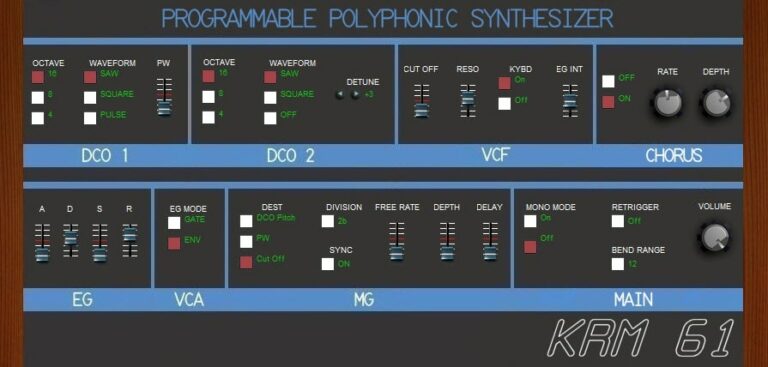
OS: Windows Win Bit Version: 32-bit Developer: Kriminal Size: 1.1 MB Rating: 55/100
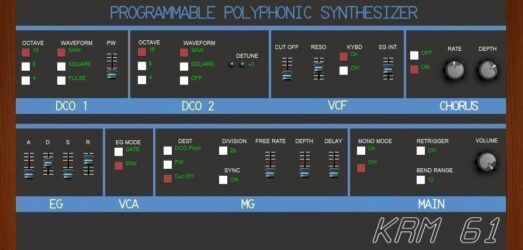
KRM61 offers a software recreation of the 1982 Korg Poly61, bringing its vintage tone into a modern setup. It uses two digital-controlled oscillators, a 4-pole low-pass filter, and a shared envelope to deliver warm, classic synth sounds with smooth modulation options.
Instead of the original unison mode, KRM61 includes a chorus effect for a fuller sound. It’s built for creating rich pads, leads, and basses with an authentic analog touch. The clear layout lets producers shape tone, movement, and depth quickly within their digital studio.
Features
- Emulates The 1982 Korg Poly61
- Two Digitally Controlled Oscillators
- Selectable Saw, Square, And Pulse Waves
- Four-Pole Low-Pass Filter Control
- Sine Wave LFO For Modulation
- Chorus Effect Replaces Unison Mode
- Adjustable Cutoff And Resonance
- Envelope With ADSR Controls
- Tempo-Synced Modulation Generator
- Authentic Analog-Style Sound Character
Pros
- Authentic vintage Korg Poly61 sound
- Warm and rich analog tone
- Two powerful digital oscillators
- Chorus adds deep texture
- Flexible tone shaping controls
- Accurate emulation of Poly61 character
- Low CPU load for smooth play
- Lightweight on computer resources
- Classic 1980s synth feel
- Free and easy to install
Cons
- Only works on Windows systems
- Limited to 32-bit format
- Interface looks dated
- No preset browser included
- No built-in reverb or delay
- Cannot load external samples
- No MIDI learn functionality
- Lacks polyphonic modulation
- Limited waveform variety
- Hard to fine-tune settings
Video Demo
KRM61 Tips
- I like to start by loading a preset on the KRM61, then slowly change each knob to hear how the sound changes.
- I use the filter cutoff to shape how bright or dark the sound feels.
- I use the LFO to make sounds move or wobble over time.
- I use automation in my DAW to make the KRM61 sound come alive in a song.
- Using EQ and compression after KRM61 in the chain can balance the sound better.
- Experimenting with modulation gives more depth and motion to any Korg VST sound.
18. Traveller
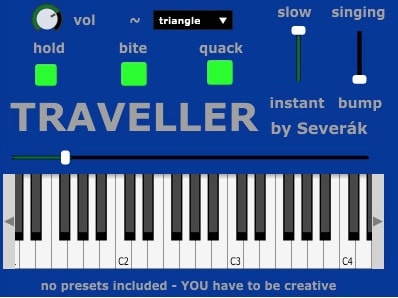
OS: Windows Win Bit Version: 32-bit Developer: Severák Size: 8.9 MV Rating: 51/100
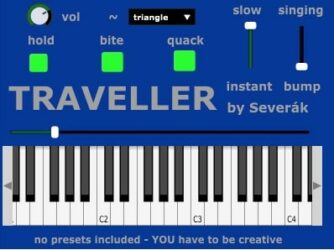
Traveller offers a simple monophonic synth experience inspired by the classic Korg Synthe-Bass. It includes one oscillator with six waveform options, sliders for shaping tone and envelope, and switches that add bite, sustain, and talking filter effects for flexible sound design.
The plugin’s unique monophony lets released notes subtly overlap with the next, adding warmth and motion. With no presets, users shape sounds freely, exploring creative limits. Its open-source design also allows anyone to study or adjust the code, encouraging learning and experimentation.
Features
- Monophonic Synth Inspired By Korg Synthe-Bass
- One Oscillator With Six Waveforms
- Includes PWM And Noise Options
- Traveller Slider Controls Filter Cutoff
- Unique Overlapping Note Release Effect
- No Presets Encourages Sound Creation
- Supports Pitch Bend Control
- Simple Interface With Clear Controls
- Low CPU Usage Performance
- Open Source Code Accessible
Pros
- Inspired by classic Korg sound
- Unique twist on monophony
- Warm and vintage tone feel
- Offers six waveform options
- Free and open-source access
- Filter options add character
- No preset limits boost creativity
- Easy to modify and explore code
- Creates smooth evolving textures
- Classic tone without hardware cost
Cons
- No built-in sound presets
- Only one oscillator available
- No polyphonic playback
- Lacks modern 64-bit support
- No built-in effects section
- Cannot store custom patches
- Only available for Windows
- No LFO or modulation matrix
- Limited sound design range
- Mono output limits layering
Video Demo
What Users Say
Traveller Tips
- I always map key controls, like filter cutoff, to my MIDI controller for easy tweaking.
- I use Traveller’s dual filters to shape the sound and find new tones that fit my mix.
- I turn off reverb and delay when first making a patch so I can hear the raw sound clearly.
- Traveller by Severák works best when placed before time-based effects like delay and reverb.
- Using automation with Traveller’s filter sweep can add excitement to a song build-up.
- Combining Traveller with Korg’s M1 or Polysix VST can produce interesting hybrid tones.
Korg VST Emulator Plugins Compared
This table compares the Korg VST Emulator plugins by operating system, bit version, format, and rating.
| Details | Odin 2 | FB-3300 | Fury-800 | FB-7999 | Tricent mk III | Mono/Fury | FB-3100 | Nabla | FB-3200 | Stigma | Chorg 870 | Poly-LD8D | Chorg 770 DV | Chorg PS-20 | Chorg DS-600 | minitron | KRM61 | Traveller |
|---|---|---|---|---|---|---|---|---|---|---|---|---|---|---|---|---|---|---|
| Image |  |
 |
 |
 |
 |
 |
 |
 |
 |
 |
 |
 |
 |
 |
 |
 |
 |
 |
| Rating | ||||||||||||||||||
| OS | Windows, Mac, Linux | Windows, Mac | Windows, Mac | Windows, Mac | Windows, Mac | Windows, Mac | Windows, Mac | Windows, Mac | Windows, Mac | Windows, Mac | Windows | Windows | Windows | Windows | Windows | Windows | Windows | Windows |
| Formats | VST, AU | VST, VST2, VST3, AU, AAX, CLAP | VST, VST2, VST3, AU, AAX | VST, VST2, VST3, AU, AAX, CLAP | VST, VST2, VST3, AU, AAX, CLAP | VST, VST2, VST3, AU, AAX, CLAP | VST, AU | VST, AU | VST, AU | VST, AU | VST | VST | VST | N/A | VST | N/A | VST | VST |
| Bit Version | 64-bit | 64-bit | 64-bit | 64-bit | 64-bit | 64-bit | 32-bit, 64-bit | 32-bit, 64-bit | 32-bit, 64-bit | 32-bit, 64-bit | 32-bit | 32-bit | 32-bit | 32-bit | 32-bit | 32-bit | 32-bit | 32-bit |
| Developer | Wave Warden | Full Bucket Music | Full Bucket Music | Full Bucket Music | Full Bucket Music | Full Bucket Music | Full Bucket Music | Full Bucket Music | Full Bucket Music | Full Bucket Music | KBplugs | L-Day | KBplugs | KBplugs | KBplugs | easytoolz | Kriminal | Severák |
| License | Freeware | Freeware | Freeware | Freeware | Freeware | Freeware | Freeware | Freeware | Freeware | Freeware | Freeware | Freeware | Freeware | Donationware | Freeware | Freeware | Freeware | GPL |
| Sample-Based | No | No | No | No | No | No | No | No | No | No | Yes | Select | Yes | Yes | Select | Yes | Yes | Select |
| Download Size | 87 MB | 17 MB | 14 MB | 12 MB | 15 MB | 14 MB | 10 MB | 4.9 MB | 11 MB | 10 MB | 7.7 MB | 0.9 MB | 1.8 MB | 5.5 MB | 2. MB | 4.4 MB | 1.1 MB | 8.9 MV |
| CPU Load | Low | Low | Low | Low | Low | Low | Low | Low | Low | Low | Low | Low | Low | Low | Low | Low | Low | Low |
| Polyphony | 24 | 64 | 64 | 64 | 64 | 64 | 64 | 64 | 64 | 64 | 8 | 8 | 2 | 2 | 6 | 8 | 8 | 8 |
| Features | Polyphonic Synthesis, Oscillator Slots, Filter Slots, Modulation Matrix, Arpeggiator, FX Section, Preset Library | Close hardware emulation, Three synth blocks, Band-limited oscillators, Resonators section, Semi-modular design, Micro-tuning, MIDI Learn | Dual DCOs, Additive Harmonics, Onboard Sequencer, Chord Memory, Pseudo-Stereo Chorus, God Mode Polyphony, Resizable Interface | Dual oscillators, Poly/Unison modes, Stereo delay, SysEx import/export, Extended polyphony, Micro-tuning support, MIDI Learn | Synth, Brass, Strings, Flanger, Stereo outputs, Micro-tuning, MIDI control, Resizable interface | Authentic emulation, Four oscillators, Self-oscillating filter, Cross modulation, Arpeggiator sync, Tweak section, MIDI Learn | Authentic emulation, Band-limited oscillators, Dual modulation generators, Paraphonic envelope, Semi-modular patch panel, Micro-tuning, MIDI Learn | Paraphonic synthesis, String ensemble, GOD Mode, Modulation options, Phaser effect, Delay effect, MIDI control | Analog emulation, Band-limited oscillators, Classic filters, Modulation generators, Paraphonic envelopes, Semi-modular design, MIDI Learn | Vintage emulation, Dual oscillators, Filter control, Chorus ensemble, Preset editor, MIDI learn, Resizable interface | Dual Oscillators, Analog Emulation, No Presets, Traveler Sliders, Ensemble Effect, PWM Control, Portamento Slide | Polyphonic synthesis, Dual oscillators, Envelope generators, Resonance filter, LFO modulation, Chorus effect, Ping-pong delay | Dual Voice, LFO, VCO1, VCO2, VCF Traveler, Envelope Generator, Mixer | Dual Oscillators, Filter Section, Resonators, Envelope Generators, Modulation Generator, External Signal Processor, Patch Cables | FM Emulation, Dual Modulators, Multi Oscillators, Envelope Controls, Portamento Glide, Chorus Effect, Delay Effect | Oscillator, LFO, Low-pass Filter, Sub-oscillator, Delay, Overdrive, Presets | Dual DCOs, Low-pass VCF, Shared Envelope, Chorus Effect, LFO Modulation, Analog Warmth, Poly61 Emulation | Twisted monophony, Traveller slider, Slow/instant slider, Bump/singing slider, Hold switch, Bite switch, Quack switch |
| Controls | Analog Osc, PW, Drift, Lowpass24, Amp Env, LFO, Modulation Matrix | VCO, VCF, VCA, Envelope Generator, LFO, Mixer Section, Patch Panel | Tune Knob, Power Switch, Speed Slider, Bright Switch, Start/Stop Button, Poly Button, Chord Memory Button | Volume, Tune, Key Assign, Programmer Display, Parameter Value Display, OSC Waveform, Digital Delay | Key Assign, Flanger, Synthesizer Section, Tune Knob, Brass Section, Strings Section, Mixer Section | Output, Master Tune, Portamento, VCO Tune, VCF Cutoff, Arpeggiator, Effects | Signal Generators, Lowpass Filter, Envelope Generator, Resonators, Sample & Hold, Modulation Controls, Patch Panel | Program, Tune, Volume, Joywheels, Mode, Phaser, Delay | Master Tune, VCO, VCF, VCA, Envelope Generator, LFO, Mixer | Organ Sections, Drawbars, Vibrato Section, Poly Strings Selector, Filter & Envelope, Chorus/Ensemble, Preset Area | Coarse Tune, Fine Tune, LFO Rate, VCF Filter, Traveler Sliders, VCA Amplifier, Waveform Selector | Oscillator Controls, Envelope Generators, Filter Controls, LFO Section, Delay Section, Chorus Module, Output Volume | LFO, Porta, VCO 1, VCO 2, Mixer, VCF (Traveler), Envelope Generator | Oscillator 1, Oscillator 2, Oscillator Mixer, Highpass Filter, Lowpass Filter, Envelope Generator, Patch Cables | Modulation Generator 1, Wave Selector, Modulation Generator 2, Oscillator Section, Pitch Knob, Timbre EG Sliders, Chorus Section | Noise/Square Switch, Sub-Oscillator (Lev/Cut), Pitch Knob, VCF (Cutoff/Peak/Velo), LFO (Rate/Int), Delay (Size/On-Off), Overdrive | DCO 1, DCO 2, VCF, CHORUS, EG, VCA, MG | Traveller Slider, Slow/Instant Slider, Bump/Singing Slider, Hold Switch, Bite Switch, Quack Switch, Volume Knob |
| Effects Included | Distortion, Delay, Chorus, Flanger, Reverb | Ring Modulator, Resonators, Sample & Hold, Envelope Generator, Lowpass Filter, Noise Generator, LFO | Chorus | Chorus, Digital Delay, Pseudo-stereo Delay | Flanger, Chorus | Cross modulation, Hard sync | Lowpass filter, Resonators, Level & Limiter, Pan & Balance | Ensemble, Phaser, Delay, Equalizer | Equalizer, Resonators | Noise, Ring Modulator, Delayed Vibrato, Chorus/Ensemble | Ensemble, Reverb, Chorus | Chorus, Ping-pong delay | Unknown | Delay | Chorus, Delay | Delay, Overdrive, Chorus, Ensemble | Chorus | Filter cutoff, resonance, envelope follower |
| MIDI Learn | Yes | Yes | Yes | Yes | Yes | Yes | Yes | Yes | Yes | Yes | Unknown | Unknown | Select | Unknown | Unknown | Yes | Yes | Unknown |
| Presets | 1250 | 64 | 64 | 84 | 200 | 64 | 64 | 64 | 64 | 64 | N/A | N/A | N/A | N/A | N/A | 128 | 64 | 8 |
| Standalone | Yes | Yes | Yes | Yes | Yes | Yes | Yes | Yes | Yes | Yes | Yes | Select | Yes | Yes | Yes | Yes | Yes | Yes |
| Last Updated | 12/01/2023 | 05/05/2024 | 05/12/2023 | 06/09/2024 | 04/09/2023 | 05/20/2023 | 08/23/2022 | 04/20/2024 | 05/25/2024 | 04/19/2024 | 04/12/2023 | N/A | 07/15/2023 | 09/18/2023 | 07/27/2023 | 03/07/2020 | 04/03/2024 | 04/11/2024 |
Favorite Korg VST Emulator Plugin
Our top pick for the best free Korg VST Emulator plugin is Odin 2 by The Wave Warden. It offers the most realistic sound, helpful controls, and it’s available for both Windows and Mac.
| Details | Odin 2 |
|---|---|
| Image |
|
| Rating | |
| OS | Windows, Mac, Linux |
| Formats | VST, AU |
| Bit Version | 64-bit |
| Developer | Wave Warden |
| License | Freeware |
| Sample-Based | No |
| Download Size | 87 MB |
| CPU Load | Low |
| Polyphony | 24 |
| Features | Polyphonic Synthesis, Oscillator Slots, Filter Slots, Modulation Matrix, Arpeggiator, FX Section, Preset Library |
| Controls | Analog Osc, PW, Drift, Lowpass24, Amp Env, LFO, Modulation Matrix |
| Effects Included | Distortion, Delay, Chorus, Flanger, Reverb |
| Download | Download Odin 2 |
These plugins are all great free alternatives to the legendary Korg synthesizer plugins, such as the Korg Legacy Collection Series, Korg Mono/Poly, ARP Odyssey Duophonic Synthesizer, miniKORG 700S, Korg Legacy Cell, Wavestation, Triton Extreme, and more.
I hope you found this list of free Korg VST emulator plugins useful and found this article helpful.
You May Also Like:





