

Here are the best free mellotron VST plugins for Windows and Mac. We have included video demos, feature lists, pros, cons, and plugin ratings.
How we rate plugins: We rate each mellotron VST plugin based on sound quality, design, performance, features, usability, and compatibility. We rate plugins on a scale of 1 to 100.
Table of Contents
I have spent over 15 years testing and comparing hundreds of free and paid VST plugins, supported by hands-on demos on our YouTube channel which has 11,000+ subscribers.
Free Mellotron VST Plugins
This table compares the mellotron plugins by operating system, bit version, format, and rating.
| # | Plugin | OS | Formats | Bit Version | Ratings |
|---|---|---|---|---|---|
| 1 | Tape Mello-Fi (Trial) | Windows Mac | VST, AU, AAX | 64-bit | |
| 2 | Mel-Lofi | Windows Mac | VST3, AU | 64-bit | |
| 3 | Redtron SE | Windows | VST | 32-bit | |
| 4 | MellowSound | Windows | VST | 32-bit | |
| 5 | Tapeotronic | Windows | VST | 32-bit | |
| 6 | Tapeworm | Windows | VST | 32-bit | |
| 7 | DVS Microtron | Windows | VST | 32-bit |
1. Tape Mello-Fi (Trial)
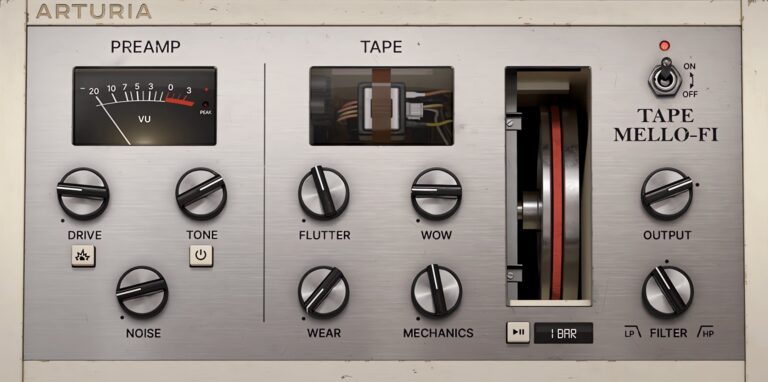
OS: Windows Win Mac Mac Bit Version: 64-bit Developer: Arturia Size: 330 MB Rating: 83/100
Tape MELLO-FI (Demo) offers a quick way to add classic tape warmth and lo-fi charm to any track. It recreates the sound of old tape machines with controls for noise, flutter, wow, and wear, giving beats and instruments a smooth, vintage edge.
This demo includes features like distortion, filters, and stereo width options to shape tone and depth. It runs for up to 20 minutes per session with saving turned off. Ideal for adding retro color, Tape MELLO-FI brings nostalgic texture to modern production.
Features
- Authentic Tape Emulator Effect
- Classic Noise, Flutter, And Wow Controls
- Adjustable Tape Wear And Mechanics
- Built-In Distortion And Boost
- 12dB Low-Pass And High-Pass Filters
- Stereo Width Control With Wow Offsets
- 25 Ready-To-Use Presets Included
- Resizable User Interface
- Full MIDI Mapping Support
- Compatible With Major DAWs
Pros
- Warm vintage tape sound
- Realistic wow and flutter effects
- Custom tape noise control
- Built-in distortion adds grit
- Includes 25 ready-made presets
- Low CPU use for smooth play
- Resizable interface for comfort
- Tape stop synced to tempo
- Apple M1 chip support
- Stereo width makes sound bigger
Cons
- Demo stops after 20 minutes
- No option to save settings
- Limited compared to full version
- No built-in reverb or delay
- Few presets for variety
- CPU use spikes on older PCs
- No velocity or dynamics
- Lacks sample import
- No onboard EQ tools
- Has fewer controls than rivals
Video Demo
What Users Say
Tape Mello-Fi (Trial) Tips
- I adjust the “Wow” and “Flutter” to make the sound wobble slightly, like an old tape machine would.
- I keep the “Drive” low when I want warmth, but turn it up for a gritty and punchy tone.
- I use the built-in filter to roll off high frequencies and give my sound a mellow vibe.
- I stack the MELLO-FI on top of a piano VST to make it sound older and more emotional.
- Using Tape MELLO-FI on drum loops can make them sound warmer and less digital.
- Blending a clean signal with the wet signal gives control over how strong the tape effect is.
- Combining the plugin with reverb and delay can make instruments sound far away and nostalgic.
2. Mel-Lofi
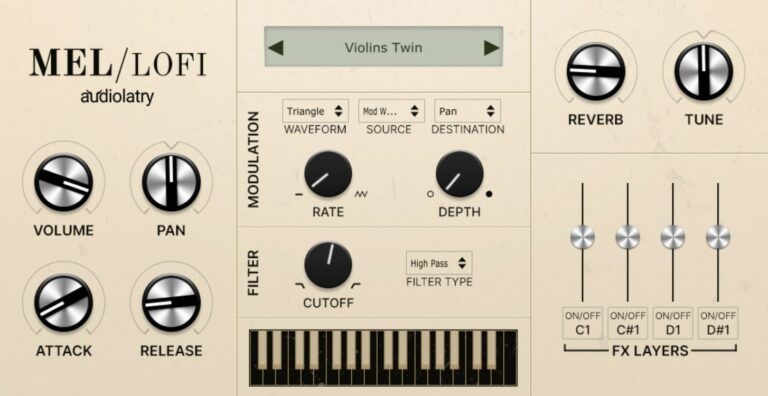
OS: Windows Win Mac Mac Bit Version: 64-bit Developer: Audiolatry Size: 694 MB Rating: 79/100
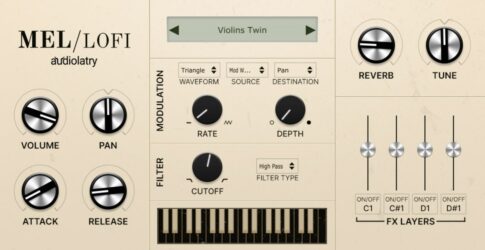
Mel-Lofi is a free Mellotron-style plugin by Audiolatry that brings the warm, vintage tone of classic tape-based instruments to modern music projects. It includes 24 multi-sampled presets across five instrument types, giving producers nostalgic textures with natural imperfections and a lo-fi character.
Mel-Lofi offers four ambient effect layers—vinyl crackle, radio noise, mechanical hum, and rain—for shaping mood and depth. With tools like envelope controls, filters, modulation, and built-in effects such as chorus, delay, and reverb, it helps musicians craft expressive, aged sounds in any creative style.
Features
- 24 Multi-Sampled Presets Included
- Four Original Texture Layers
- Cutoff Filter And Modulation Section
- Built-In Delay, Chorus, Distortion, Reverb
- Looped Samples For Smooth Playability
- Vintage Sound With Lo-Fi Character
- Supports VST3 And AU Formats
- Works With Most Major DAWs
- Light On CPU Usage
Pros
- Warm vintage mellotron-style tones
- Includes 24 multi-sampled presets
- Four noise effect layers
- Built-in reverb for added space
- Chorus, delay, and distortion effects
- Real vintage feel with imperfections
- Low CPU use and fast loading
- Authentic sound with modern tools
- Easy controls for sound shaping
- Modulation for expressive play
Cons
- No AAX support for Pro Tools
- Less realistic than true Mellotron
- No sample import or expansion
- Limited sound customization options
- No built-in EQ controls
- Few modulation options offered
- No resizable GUI window
- Lacks advanced automation controls
- No MIDI learn function built-in
- Smaller sample set than rivals
Video Demo
What Users Say
Mel-Lofi Tips
- I use the built-in reverb in Mel-Lofi to make the sound feel wider and more dreamy.
- When I want an old-tape sound, I turn up the noise and wow controls just a little.
- Layering different tape instruments can create a fuller, vintage mix.
- Use EQ to cut out some low mids if the Mellotron patch sounds too muddy.
- Adjust the pitch wobble to get a nostalgic, worn-out tape sound.
- Use the tone knob to balance brightness and warmth depending on your song.
3. Redtron SE
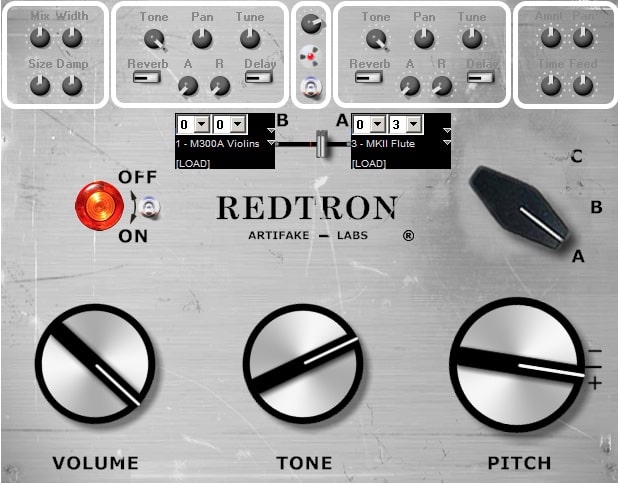
OS: Windows Win Bit Version: 32-bit Developer: Artifake Labs Size: 150 MB Rating: 66/100
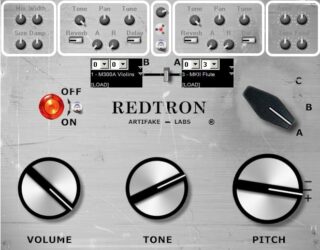
Redtron SE offers the classic sound of a 1973 Mellotron M400S, using carefully cleaned samples from the original instrument. It includes nine classic tape-based sounds like flutes, strings, brass, and choirs, each lasting eight seconds with natural, vintage-style endings.
Its special Mellotronic Click Switch adds random tape-start clicks for extra realism. You can layer or split two sounds, adjust tone and pitch, and shape reverb or delay for depth. Full MIDI control and simple controls make it a flexible tool for creating rich, nostalgic tones.
Features
- Uses 1973 Mellotron M400S Samples
- 9 Classic Mellotron Sound Types
- Authentic Eight Second Tape Length
- Exclusive Mellotronic Click Effect
- Layer And Split Sound Options
- Independent Controls For Sounds A And B
- Full MIDI Automation Support
- Adjustable Reverb And Delay Effects
- Global Volume, Tone, And Pitch Control
- Light On CPU Usage
Pros
- Warm vintage tape-like sound
- Very realistic instrument tones
- 2 Sound layers for blending
- Independent controls for each layer
- Authentic Mellotron click option
- No loops for classic feel
- Built-in reverb and delay effects
- Fine-tune and pan per layer
- Faithful to real Mellotron behavior
- Free and lightweight VST plugin
Cons
- Only available for Windows users
- Lacks macOS or Linux support
- No 64-bit plugin version
- Not officially available anymore
- Outdated user interface design
- Limited to Mellotron-style sounds
- Short eight-second sample limit
- No sample looping option
- No velocity layering or dynamics
- Less realistic than newer VSTs
Video Demo
What Users Say
Redtron SE Tips
- I use a small amount of reverb to give the Mellotron sound more space and depth.
- I try layering the string and choir sounds together for a bigger, fuller tone.
- Adjusting the tape flutter effect can make Redtron SE feel more like the original Mellotron hardware.
- Use chorus or tape saturation plugins with Redtron SE to add warmth and movement.
- Pan two different tape sounds left and right for a wide, nostalgic stereo field.
- Combine Redtron SE with ambient delay effects to make cinematic soundscapes.
4. MellowSound
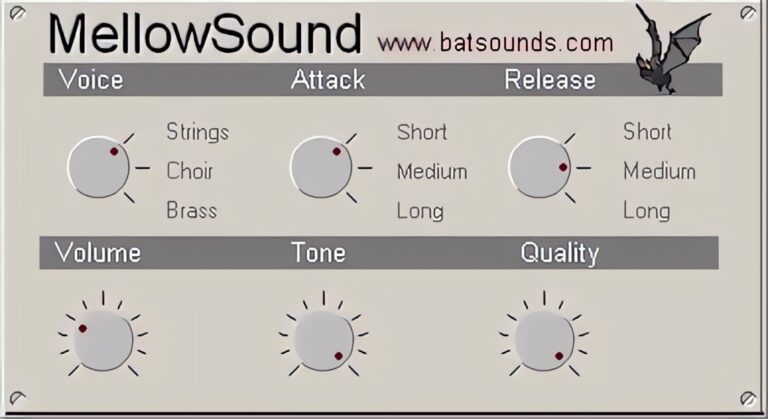
OS: Windows Win Bit Version: 32-bit Developer: BatSounds Size: 6 MB Rating: 63/100
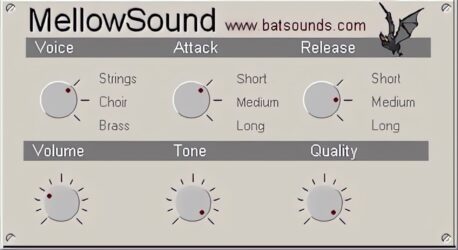
MellowSound offers classic tape-style tones inspired by the vintage Mellotron. It gives you control over voice type, attack, release, tone, volume, and quality, letting you shape warm and dreamy sounds suited for chill, ambient, or retro-style tracks.
This plugin runs on Windows and features a simple, clear layout that focuses on sound design without distractions. Its smooth tones and subtle textures help create soft layers or leads that fit easily into any mix, giving music a nostalgic yet rich feel.
Features
- Vintage Mellotron Sound Emulation
- Adjustable Attack And Release
- Selectable Voice Types
- Simple And Clear Interface
- Tone And Quality Adjustments
- Volume Control Slider
- Low CPU Usage
- Includes Warm Preset Sounds
- VST 32-Bit Format Support
- Windows Platform Compatible
Pros
- Warm and vintage sound quality
- Realistic old keyboard feel
- Included voices add sound variety
- Attack and release are adjustable
- Bright or dark tone control
- Low CPU use while playing
- Stable plugin with no crashes
- Sounds close to real Mellotron
- Works great with extra effects
- Free and quick to download
Cons
- Only works on Windows
- Not available in 64-bit
- Very limited sound controls
- Few presets available
- Cannot load external samples
- No built-in effects
- No velocity sensitivity
- Lacks modern sound engine
- Less realistic than competitors
- No tuning or pitch control
Video Demo
What Users Say
MellowSound Tips
- Start by choosing a tape bank that matches the project’s style, whether it’s strings, flutes, or choirs.
- Experiment with detune or wow-and-flutter settings to add real tape character.
- Layer two different tapes together to create a richer sound.
- Use EQ after the plugin to blend the Mellotron sound better in the mix.
- Use a slight chorus or delay after MellowSound to make the sound wider and more alive.
- Try automating volume and tone knobs throughout a track for movement.
5. Tapeotronic
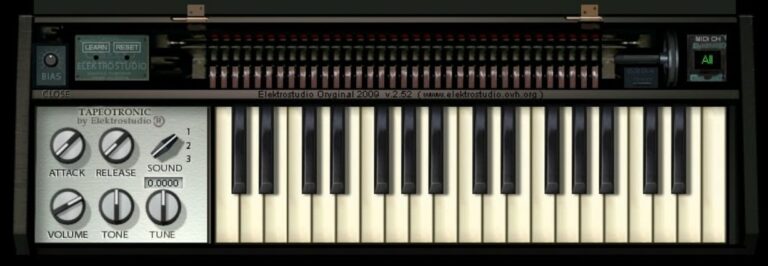
OS: Windows Win Bit Version: 32-bit Developer: Elektrostudio Size: 8 MB Rating: 62/100
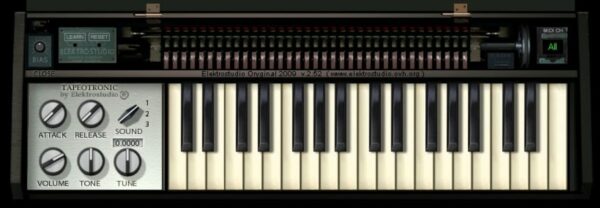
Tapeotronic is a free Mellotron-style tape keyboard plugin for Windows that recreates the classic sounds of flute, strings, and choir tapes. It includes 16 patches, along with controls for tone, tuning, and a bias knob that adds realistic tape warmth and character.
Tapeotronic offers quick control through attack, release, and volume knobs, letting you shape the vintage feel to fit your track. With MIDI learn and automation, it connects easily to your setup, providing a focused way to bring retro tape textures into modern productions.
Features
- Emulates Classic Mellotron Tape Keyboard
- Includes Flute String And Choir Sounds
- Features Sixteen Selectable Patches
- Adjustable Tape Bias Control Knob
- MIDI Learn And Automation Support
- Reverb And Vibrato Effects Included
- Authentic Retro Tape Sound Character
- Three Voice Mellotron M400 Modeling
- Attack And Release Envelopes
- Simple And Focused User Interface
Pros
- Authentic vintage Mellotron character
- Warm and nostalgic tape sound
- Includes classic flute and choir tones
- Built-in reverb and vibrato effects
- Adjustable tape bias for grit
- Useful tape hiss control
- Authentic uneven tape behavior
- Instant “lo-fi” texture maker
- Light on computer resources
- Free to download and use
Cons
- Only works on Windows
- No 64-bit version
- Not compatible with Mac
- Limited to VST format
- Very small sound library
- Lacks modern UI design
- Can sound noisy
- No velocity sensitivity
- High CPU usage
- Less realistic than rivals
Video Demo
What Users Say
Tapeotronic Tips
- I use the Tapeotronic’s pitch control to make the tape warble a little for a classic, aged feel.
- I add reverb and delay to the Tapeotronic to give it more space and echo.
- I sometimes stack two Tapeotronic tracks for a thicker, richer sound.
- Layer Tapeotronic strings with synth pads to get a warm, cinematic texture.
- Try adjusting the tape flutter for a more realistic vintage playback effect.
- Automation can make the Tapeotronic come alive—fade in or out filter and volume over time.
6. Tapeworm
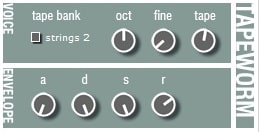
OS: Windows Win Bit Version: 32-bit Developer: Tweakbench Size: 14 MB Rating: 61/100
Tapeworm offers a vintage tape-style sound inspired by classic Mellotron instruments. It uses FM synthesis to capture the warm, warbly tone of old tape playback. With five voice types and controls for tuning, attack, release, and tape character, it adds nostalgic flavor to any track.
This free Windows VST gives music creators classic tape textures in a compact tool. Its simple knobs make it easy to shape sounds from soft strings to gritty, lo-fi pads. Perfect for adding retro layers or giving modern productions a slightly unstable, tape-worn feel.
Features
- Mellotron-Like FM Synth Engine
- Four Simulated Tape Banks
- Adjustable ADSR Controls
- Fine And Octave Pitch Control
- Variable Tape Sound Amount
- MIDI Automation Support
- Filter Cutoff And Resonance
- Six-Voice Polyphony
- Light On CPU Usage
- Lo-Fi Tape Character Sound
Pros
- Free to download and use
- Captures classic Mellotron vibe
- Unique lo-fi tape character
- Authentic tape flutter
- Adjustable tape speed for texture
- Includes multiple tape voice types
- Distinct tone unlike sample libraries
- Light on CPU usage
- Quick loading plugin
- Simple and easy interface
Cons
- No Mac or Linux support
- Only 32-bit version available
- Outdated user interface design
- Limited number of sound types
- No modern VST3 format support
- Lacks built-in reverb effects
- Less realistic than sample-based
- Requires bridging for 64-bit DAWs
- No built-in preset browser
- Competes poorly with newer plugins
Video Demo
What Users Say
Tapeworm Tips
- I often layer two Tapeworm patches together to make a fuller sound, like a real orchestra.
- I use a small bit of pitch wobble to make the notes sound like old tape recordings.
- I like to use Tapeworm with a simple reverb plugin to give it more space and depth.
- Turn up the tape wow and flutter settings for a more vintage, worn-out sound.
- Blend Tapeworm with string or choir samples to make lush background layers.
- Cut unwanted low or high frequencies using EQ to fit better in a mix.
- Use automation to fade in tape noises or detune slowly for creative sound changes.
7. DVS Microtron
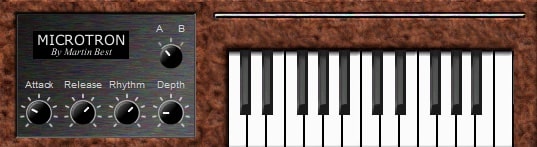
OS: Windows Win Bit Version: 32-bit Developer: Dream Vortex Studio Size: 8 MB Rating: 59/100
DVS Microtron offers a classic Mellotron-inspired sound with three main voices—choir, strings, and flute—recorded from a real Studer A80 tape machine. It gives producers an easy way to add vintage tones that feel warm and nostalgic to their tracks.
The plugin includes simple controls for sound shape and movement, such as Attack, Release, Rhythm, and Depth. Users can switch between sound banks and play directly from the built-in keyboard. It’s a compact tool for quickly creating that signature retro character in digital music projects.
Features
- Male And Female Choir Patch
- String Section Sound Option
- Flute Sound Patch Included
- Attack Control For Sound Start
- Release Control For Sound Fade
- A/B Switch For Sound Choice
- Light Cpu Usage Performance
- Simple And Easy Interface
- Recorded On Studer A80 Recorder
Pros
- Authentic vintage mellotron sound
- Very light on CPU use
- Classic flute, choir, and strings
- Warm analog-style recordings
- Depth knob gives rich texture
- Rhythm control adds nice movement
- Clear controls for attack and release
- Faithful recreation of original Mellotron
- Blends nicely in any music mix
- Still one of the best free options
Cons
- Only three sound options
- No built-in effects
- Not available for Mac
- Only supports 32-bit systems
- Outdated interface design
- Limited sound controls
- No velocity sensitivity
- Lacks sample quality
- Not as realistic as paid versions
- Few updates or support
Video Demo
What Users Say
DVS Microtron Tips
- I adjust the attack and release to make the notes blend smoothly when I play chords.
- I use the pitch wheel gently to give the sound a natural wobble like an old tape.
- I layer the Microtron with a soft pad to make the sound fuller and richer.
- I add a little reverb to give the Microtron sound more space and depth.
- Use EQ to cut out low rumble that can muddy your mix when using old tape-style samples.
- Apply light compression to smooth out the natural volume changes in Mellotron samples.
- Use a tape saturation plugin after the Microtron to add even more classic warmth and character.
Mellotron VST Plugins Compared
This table compares each Mellotron VST plugin by format, bit version, controls, features, effects, license, and more.
| Details | Tape Mello-Fi (Trial) | Mel-Lofi | Redtron SE | MellowSound | Tapeotronic | Tapeworm | DVS Microtron |
|---|---|---|---|---|---|---|---|
| Image | 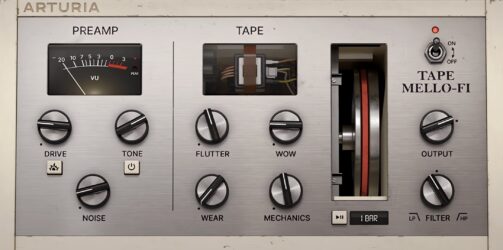 |
 |
 |
 |
 |
|
|
| Rating | |||||||
| OS | Windows, Mac | Windows, Mac | Windows | Windows | Windows | Windows | Windows |
| Formats | VST, AU, AAX | VST3, AU | VST | VST | VST | VST | VST |
| Bit Version | 64-bit | 64-bit | 32-bit | 32-bit | 32-bit | 32-bit | 32-bit |
| Developer | Arturia | Audiolatry | Artifake Labs | BatSounds | Elektrostudio | Tweakbench | Dream Vortex Studio |
| License | Freeware | Freeware | Freeware | Freeware | Freeware | Freeware | Freeware |
| Sample-Based | No | Yes | Yes | Select | Yes | No | Select |
| Download Size | 330 MB | 694 MB | 150 MB | 6 MB | 8 MB | 14 MB | 8 MB |
| CPU Load | Low | Low | Low | Low | Low | Low | Low |
| Polyphony | N/A | 32 | 60 | 64 | 8 | N/A | 8 |
| Features | Tape emulation, Lo-fi effects, Distortion boost, Tape stop, Dual filters, Stereo width, Curated presets | Vintage Mellotron, Multi-sampled Presets, Lo-fi Textures, Noise Layers, Sound Shaping, Built-in Effects, Modulation Control | Vintage Mellotron Samples, Nine Sound Types, No Loop Playback, Mellotronic Click Switch, Layer and Split, Independent Controls, Full MIDI Automation | Voice Selection, Attack Control, Release Control, Volume Adjustment, Tone Shaping, Quality Adjustment, Simple Interface | Mellotron emulation, Flute/String/Choir, Tape bias, Reverb, Vibrato, MIDI learn, Tape hiss control | Mellotron emulation, FM synthesis, Tape banks, ADSR controls, Filter resonance, Lo-fi character, MIDI automation | Attack control, Release control, Rhythm adjustment, Depth control, A/B switch, Keyboard playback, Vintage mellotron sounds |
| Controls | Drive, Tone, Noise, Flutter, Wow, Wear, Mechanics | Gain, Pan, Velocity, Attack, Release, Cutoff, Rate | Power Switch, Volume Knob, Tone Knob, Pitch Knob, A/B Sound Selector, Sound Load Buttons, Reverb Controls | Voice, Attack, Release, Volume, Tone, Quality, Presets | Attack, Release, Sound Selector, Volume, Tone, Tune, Bias | Tape Bank, Strings 2, Oct, Fine, Tape, Attack, Release | Attack, Release, Rhythm, Depth, A/B Switch, Keyboard, Voice Selector |
| Effects Included | Distortion, Boost, Noise, Flutter, Wow, Wear, Mechanics, Filter, Stereo Width, Tape Stop, Preamp Saturation | Vinyl, radio noise, mechanical belt noise, rain, delay, chorus, distortion, cabinet, reverb | Reverb, Delay | Unknown | Reverb, Vibrato | Filter cutoff, resonance, tape sound effect | Unknown |
| MIDI Learn | Yes | Yes | No | Unknown | Unknown | No | Unknown |
| Presets | 25 | 62 | 25 | 25 | 16 | 6 | 3 |
| Standalone | Yes | No | No | Select | No | No | No |
| Last Updated | 12/14/2021 | 02/03/2023 | 08/03/2014 | 06/20/2024 | N/A | 08/11/2006 | 04/22/2004 |
Our Favorite Mellotron VST Plugin
Our top pick for the best free Mellotron VST plugin is Mel-Lofi by Audiolatry. It is the only completely free Windows and Mac option. But it offers presets, filters, and other audio controls.
| Details | Mel-Lofi |
|---|---|
| Image |
|
| Rating | |
| OS | Windows, Mac |
| Formats | VST3, AU |
| Bit Version | 64-bit |
| Developer | Audiolatry |
| License | Freeware |
| Sample-Based | Yes |
| Download Size | 694 MB |
| CPU Load | Low |
| Polyphony | 32 |
| Features | Vintage Mellotron, Multi-sampled Presets, Lo-fi Textures, Noise Layers, Sound Shaping, Built-in Effects, Modulation Control |
| Controls | Gain, Pan, Velocity, Attack, Release, Cutoff, Rate |
| Effects Included | Vinyl, radio noise, mechanical belt noise, rain, delay, chorus, distortion, cabinet, reverb |
| Download | Download Mel-Lofi |
Free Mellotron SoundFonts
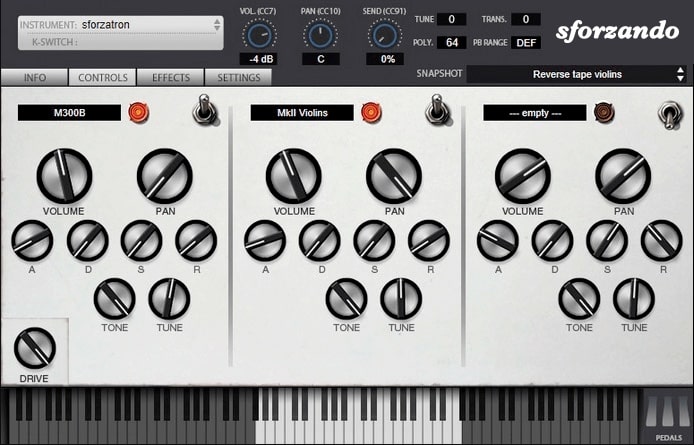
Another option for Mellotron sounds is to use Mellotron sound fonts. You can use a free SoundFont player and load the Mellotron sound fonts.
Free Mellotron SoundFonts
- Musical Artifacts – On this website, you can download one free Mellotron SoundFont file that is 100 MB.
Free Mellotron Samples
Here is a collection of free Mellotron Samples to download.
Sonic Bloom – The free Mellotron live pack bundle includes a Mellotron Cello, Mellotron M300 Brass, Mellotron String Section, and more.
Sonic Bloom ( 216 MB ) – These samples recreate the unique and vintage sound of the Mellotron by sampling woodwinds, flute, string sections, brass, and choirs, with each note individually sampled. It can be used with any DAW.
Sonic Bloom ( 176 MB ) – Samples of woodwinds, strings, string sections, brass, flute, and choir from various Mellotron versions are included in SB Mellotron Samples, each note sampled individually to recreate the unique Mellotron sound—a total of 10 individual instruments, all in separate Wav files.
Sinewave Lab – This free Mellotron Kontakt Library collection consists of 10 Kontakt patches with different Mellotron settings.
Mellotron Plugin FAQs
How to Install Mellotron VST Plugins
To install mellotron VST plugins on Windows or Mac, extract the files from the Zip or Rar. Move the files (.dll for Windows or .component for Mac) into your DAW’s plugin folder. Then restart your software and rescan the directory to complete the process. Tutorial: How to Install VST Plugins
Windows:
Extract the downloaded zip file and copy the .dll file into the VST plugins folder scanned by your DAW. Restart your music software and rescan your plugin directory to begin using the new VST.
Mac OS X:
Extract the downloaded archive and move the .component or .VST file to the plugin folder. It is usually /Library/Audio/Plug-Ins/Components or /Library/Audio/Plug-Ins/VST. Restart your DAW and rescan your plugins to complete the installation.
What Is A Mellotron VST Plugin?
A Mellotron VST plugin is a software emulation of the classic Mellotron tape-based keyboard instrument. Unlike other digital emulations, which attempt to recreate the sound of the Mellotron by synthesis, a Mellotron VST uses samples of the original instrument recorded directly from analog tapes.
How Do Mellotron Keyboards Work?
Mellotrons are keyboards that work by using a strip of tape to generate sounds. The strip of tape is read by a set of playback heads, similar to those used on reel-to-reel tape decks. Each head corresponds to a different note, and as the head moves across the tape, it picks up sound from the corresponding row of holes.
The Mellotron keyboard was first developed in the early 1960s and became popular with bands like The Beatles, King Crimson, and Yes. Today, several different companies make Mellotron keyboards, and they remain popular with musicians who appreciate their unique sound.
How Do You Use a Mellotron in Music?
A Mellotron is a keyboard instrument that uses tapes to create the sound of orchestral instruments. The tapes are housed in cartridges that are inserted into the Mellotron. Each cartridge contains a different set of recordings, which give the Mellotron its distinctive sound.
To play the Mellotron, you first need to select a desired “voice” by pressing one of the keys on the keyboard.
This will activate the corresponding tape, which will play the instrument’s mechanical keys. You can also control the volume and pitch of each voice by using the appropriate controls on the instrument.
Mellotrons were often used in rock and pop music, as well as in film scores. They have been used on iconic songs such as The Beatles’ “Strawberry Fields Forever” and Led Zeppelin’s “Kashmir.”
The Mellotron is a unique and interesting instrument that has been used by some of the biggest names in music. While it may be challenging to find a Mellotron for sale, there are a number of companies that make Mellotron keyboards, and there are also several free Mellotron VSTs available.
These Mellotron VSTs are great free alternatives to paid plugins like Gforce, M-Tron Pro, UVI Mello, Wavesfactory Newmello Collection, and EZkeys Mellotron.
I hope you find this list of free Mellotron virtual instrument plugins helpful.
You May Also Like





