

Here are the best free kick VST plugins for Windows and Mac. We have included video demos, feature lists, pros, cons, and plugin ratings.
How we rate plugins: We rate each kick VST plugin based on sound quality, design, performance, features, usability, and compatibility. We rate plugins on a scale of 1 to 100.
Table of Contents
I have spent over 15 years testing and comparing hundreds of free and paid VST plugins, supported by hands-on demos on our YouTube channel, which has 11,000+ subscribers.
Related: 900 Free Kick Drum Samples | 100 Free Drum VST Plugins
Best Free Kick VST Plugins
This table compares kick VST plugins by operating system, bit version, format, and rating.
| # | Plugin | OS | Formats | Bit Version | Ratings |
|---|---|---|---|---|---|
| 1 | KSHMR Essentials Kick | Windows Mac | VST, AU, AAX | 64-bit | |
| 2 | Chow Kick | Windows Mac Linux | VST, AU | 32-bit, 64-bit | |
| 3 | BD-909 | Windows Mac | VST, VST2, AU | 64-bit | |
| 4 | 808-ROMpler | Windows Mac | VST, AU | 64-bit | |
| 5 | Dark VX Kick | Windows Mac | VST, AU | 32-bit | |
| 6 | BD-808 | Windows Mac | VST2, AU | 64-bit | |
| 7 | QuirQuiQ | Windows | VST | 32-bit, 64-bit | |
| 8 | KickMe! Too | Windows | VST | 32-bit | |
| 9 | Analog Kick Sound | Mac | VST, AU | 64-bit | |
| 10 | Kick-n-Snare EX | Windows Mac | VST, AU | 64-bit | |
| 11 | GnomeKick | Windows | VST | 32-bit | |
| 12 | NoizeClick | Windows | N/A | 64-bit | |
| 13 | Korzenie Kick | Windows | VST | 32-bit | |
| 14 | Kick Machine | Windows | VST | 32-bit | |
| 15 | B-2 KICK Drums | Windows | VST | 32-bit, 64-bit | |
| 16 | Kicker | Windows | VST | 32-bit | |
| 17 | Kickboy 2 | Windows | VST | 32-bit | |
| 18 | EKD | Windows | VST | N/A |
1. KSHMR Essentials Kick
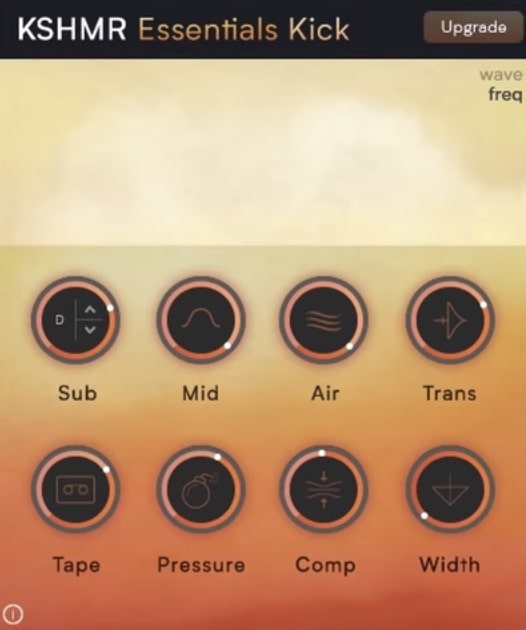
OS: Windows Win Mac Mac Bit Version: 64-bit Developer: KSHMR Essentials Size: 7 MB Rating: 87/100
KSHMR Essentials Kick offers a simple way to shape powerful and focused kick sounds. It brings together eight key effects—like bass tuning, compression, and transient control—on one clean page. Each section helps fine-tune your kick to sound tighter, fuller, and more polished.
Created by KSHMR and W. A. Production, this free plugin mirrors the kick module of the full KSHMR Essentials suite. It’s designed to help producers quickly get that solid punch and clarity common in professional EDM tracks, while staying flexible enough for other genres.
Features
- Eight Dedicated Kick Control Modules
- Sub Control For Deep Bass
- Transient Shaper For Extra Punch
- Tape Effect Adds Warm Saturation
- Pressure Control For Dynamic Power
- Width Control For Stereo Space
- Lightweight And CPU Friendly
- Single Page Easy Interface
- Supports VST, AU, And AAX
- Delivers Clear And Tight Kicks
Pros
- Free to download and use
- Eight powerful sound shaping tools
- Includes transient shaping power
- Adds deep and rich sub-bass
- Features warm tape saturation
- Brightens kicks with air control
- Width control for stereo depth
- Improves energy with pressure tool
- Trusted creators KSHMR and W.A.
- Outperforms many free kick plugins
Cons
- Only focuses on kick processing
- No EQ for full mix control
- Can easily overcompress sounds
- Lacks visual spectrum display
- No built-in sample playback
- Limited overall sound design tools
- No sidechain compression feature
- Cannot load external samples
- No MIDI learn or automation map
- Not updated as often as rivals
Video Demo
What Users Say
KSHMR Essentials Kick Tips
- I always use the “Sub” knob to make the low end stronger without making it muddy.
- When I want my kick to cut through the mix, I boost the “Transient” just a little bit.
- I find that small changes in the “Compression” section make a big difference in how the kick hits.
- Use EQ before KSHMR Essentials Kick to remove unwanted low rumbles under 30Hz.
- Keep an eye on the plugin’s gain levels to avoid distortion when boosting the low end.
- Remember to adjust the plugin depending on the genre—EDM kicks may need more sub, while pop kicks might need more attack.
2. Chow Kick
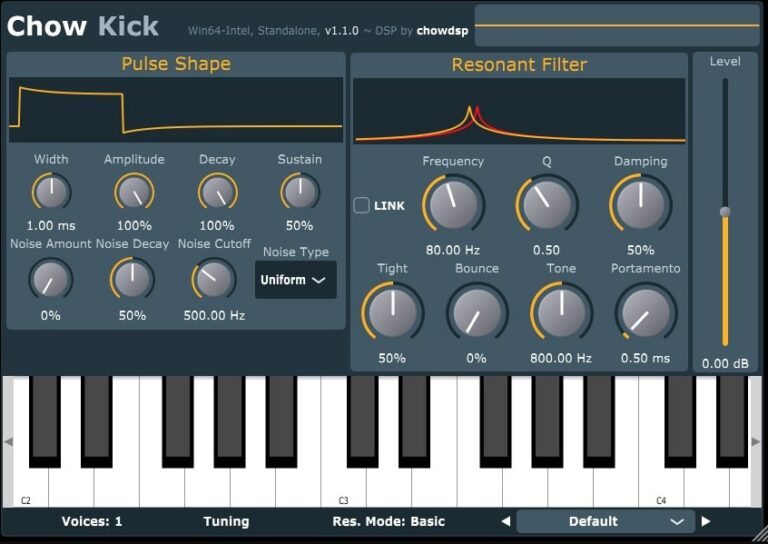
OS: Windows Win Mac Mac Linux Linux Bit Version: 32-bit, 64-bit Developer: Chowdhury DSP Size: 5.5 MB Rating: 85/100
Chow Kick offers a modern way to craft kick drum sounds using models of classic drum machine circuits. It features a pulse shaper, noise generator, and resonant filter that work together to shape the attack, tone, and depth of each hit for electronic or acoustic-style drums.
Its MIDI tuning and microtuning support make it easy to match your kicks to the key of your track. With adjustable controls for tone, decay, and resonance, Chow Kick gives music creators precise tools to design clean, heavy, or distorted kick sounds across any genre.
Features
- Kick Drum Synthesizer Engine
- Physical Modeling Circuit Design
- Pulse Shaper With Adjustable Width
- Noise Generator With Multiple Types
- Resonant Filter With Nonlinear Modes
- MIDI Note Tuning Support
- Microtuning With Scala Formats
- Factory And User Preset Support
- Cross-Platform Plugin Formats
- Low CPU Usage Performance
Pros
- Free and open-source
- Works on Windows, Mac, Linux
- Deep sound design controls
- Highly flexible tone shaping
- Realistic analog-style kicks
- Supports microtuning formats
- MIDI key tracking
- Built-in factory and user presets
- Wide pitch and decay range
- Active developer support
Cons
- Interface feels cramped and small
- Hard to learn for beginners
- No built-in reverb or FX
- Few factory presets to start
- No visual waveform display
- No drag and drop samples
- No built-in compressor or limiter
- No sidechain function built in
- Needs more modern GUI design
- Limited sound variety without tweaking
Video Demo
What Users Say
Chow Kick Tips
- Start by setting the base frequency close to the key of the song for a stronger low end.
- I use the pitch envelope to add a short, low drop at the start of the kick for extra power.
- I love using the transient controls to make my kick hit harder without turning it up too loud.
- Use the distortion section to add warmth or grit without making the kick sound muddy.
- Keep the decay short for faster, punchier tracks and longer for slower, deeper ones.
- Always check your kick on headphones and speakers to make sure the sub frequencies translate well.
3. BD-909
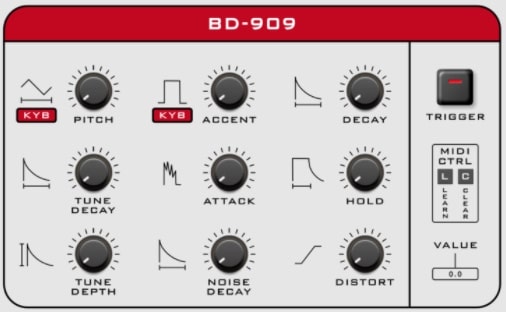
OS: Windows Win Mac Mac Bit Version: 64-bit Developer: Synsonic Instruments Size: 10 MB Rating: 83/100
BD-909 offers an authentic recreation of the classic TR-909 bass drum with added modern controls. It reproduces the punch and warmth of the original while giving users extra features like distortion, pitch control, and tune shaping for flexible sound design.
This plugin works as both a drum generator and a bass synth through MIDI control. With adjustable settings such as decay, attack, and hold, it lets music creators shape everything from tight electronic kicks to deep sub-bass tones. Factory presets make it easy to start producing right away.
Features
- Accurate 909 Bass Drum Emulation
- Adjustable Pitch And Tune Depth
- Distortion For Added Warmth
- Noise And Tone Shaping Controls
- MIDI Learn And Control Support
- Dynamic Velocity Accent Response
- Built-In Factory And User Presets
- Manual Trigger Pad And LED
- Low CPU Usage Performance
- Free 64-Bit Plugin
Pros
- Authentic 909 bass drum sound
- Accurate modeling of original circuit
- Rich distortion adds warm tone
- Low CPU use for smooth play
- Clean and simple interface
- MIDI learn for quick mapping
- Pitch control for deep bass
- Tune depth adds tonal movement
- Balances analog warmth and clarity
- Competes well with paid plugins
Cons
- Only makes one drum sound
- No built-in 808 tones
- No EQ or tone shaping
- Can’t import custom samples
- Preset library is very small
- No built-in compressor effect
- No sidechain or ducking control
- No visual waveform display
- Interface looks plain and old
- Less versatile than free 808 plugins
Video Demo
What Users Say
BD-909 Tips
- I often use a gentle EQ boost at 60Hz to make the BD-909 kick stronger in the mix.
- I find that adding a small touch of distortion gives the BD-909 more punch and warmth.
- I sometimes tune the BD-909 kick to match the song’s key—it helps everything blend better.
- Try sidechain compression with the bass to make the BD-909 kick stand out.
- Cut some low mids around 200Hz to keep the kick from sounding muddy in the mix.
- Keep the decay short when making tight electronic beats and longer for booming trap kicks.
- Layering the BD-909 with other 808 sounds can create a thick and powerful low end.
4. 808-ROMpler
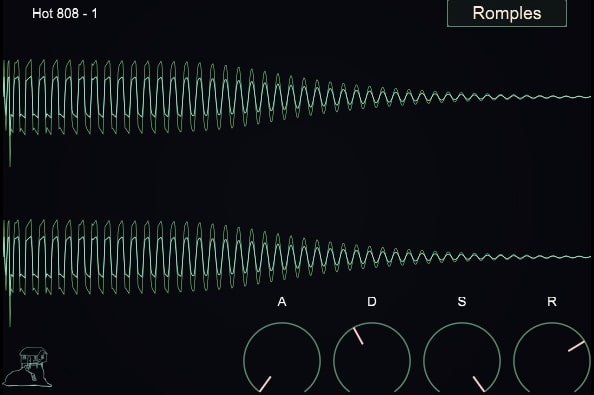
OS: Windows Win Mac Mac Bit Version: 64-bit Developer: Recluse-Audio Size: 88 MB Rating: 81/100
808-ROMpler is a free bass drum sampler designed by Recluse-Audio for quick and clean 808 sounds. It includes sixteen 808-style kicks and supports .wav, .aiff, and .mp3 files through simple drag-and-drop. ADSR envelope controls help shape the punch, length, and tone of each kick.
The plugin’s minimalist design keeps the focus on your sound. A visual waveform display gives instant feedback while adjusting attack, decay, sustain, and release. 808-ROMpler runs on Windows and Mac, offering a fast and reliable way to build solid low-end parts in any style.
Features
- Sixteen 808 Style Kicks
- Drag And Drop Loading
- ADSR Envelope Controls
- Visual Waveform Display
- Minimal And Clean Interface
- Low CPU Usage
- Supports WAV AIFF And MP3
- VST And AU Formats
- 64 Bit Compatible
- Sound Selection Menu
Pros
- Clean and easy-to-use interface
- Includes sixteen ready 808 kicks
- Custom sound shaping with ADSR
- Visual waveform helps sound design
- Lightweight and low CPU use
- Punchy sounds right out the box
- Free plugin with pro-level quality
- Makes stacking multiple sounds easy
- Ideal for trap and hip-hop
- Focuses purely on great 808 sounds
Cons
- No built-in effects or EQ
- Cannot layer multiple samples
- No velocity sensitivity support
- Lacks sample editing tools
- Limited to 808-style sounds
- No pitch or tune control
- No modulation or LFO options
- No save or load presets
- No MIDI learn or automation
- Limited sound design flexibility
Video Demo
What Users Say
808-ROMpler Tips
- I like to layer two 808 sounds—one for sub-bass and another for mid frequencies—to make the bass cut through better.
- I keep my 808s in tune by matching their root note with my song’s key—it makes the mix sound tight.
- I place sidechain compression with the kick drum so the 808 and kick don’t fight each other.
- Shortening the release time keeps the 808 from overlapping notes and getting muddy in the mix.
- Using parallel processing with saturation or compression can make the 808 punchier while keeping its deep tone.
5. Dark VX Kick
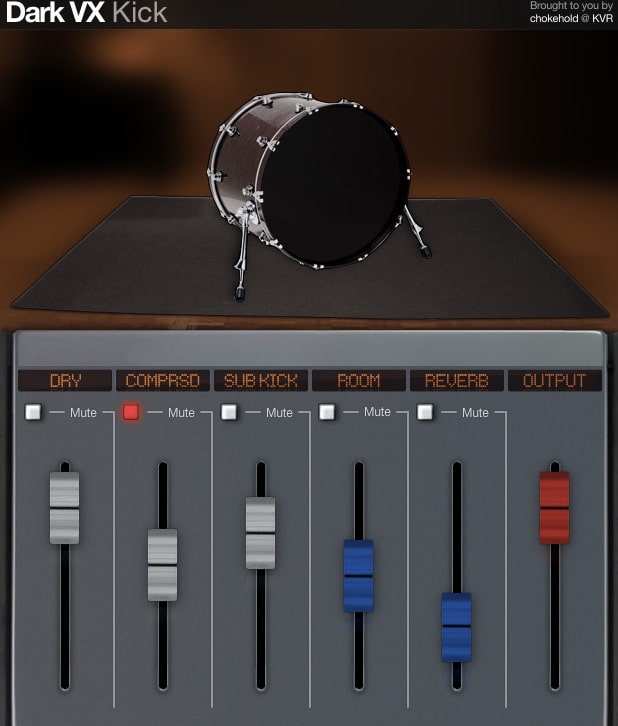
OS: Windows Win Mac Mac Bit Version: 32-bit Developer: Chokehold Size: 6 MB Rating: 78/100
Dark VX Kick offers a focused way to shape strong and deep kick drum sounds. It provides four velocity layers, round-robin sampling, and multiple mixer channels such as DRY, COMPRSD, SUB KICK, ROOM, and REVERB to control tone and depth with precision.
Each channel brings a unique touch—from analog-style warmth and compression to powerful sub-bass and room ambience. Simple sliders and mute buttons help adjust or isolate each part of the sound, making it easy to craft punchy kicks that blend smoothly in any mix.
Features
- Layered Sampled Kick Drum Sounds
- Four Adjustable Velocity Layers
- Round-Robin Sample Variation
- Analog Hardware Equalizer Processing
- Sub Kick Channel For Deep Bass
- Independent Mixer Channel Controls
- Octave Tuning Matches Song Key
- Noise Control Adds Subtle Grit
- Supports VST And AU Formats
- Works On Windows And Mac
Pros
- Rich analog hardware tone
- Deep and strong sub-bass
- OCTave tuning for key matching
- Light CPU use compared to others
- Free to use with no limits
- Instant punchy 808-style kicks
- Customizable attack and tone
- Four velocity layers for realism
- Independent mixer channels
- Useful noise knob for texture
Cons
- Only one basic kick sample
- No variety of drum kits
- Lacks built-in synth engine
- No multi-sample drum support
- No advanced EQ or filter tools
- Only 32-bit plugin format
- No visual waveform display
- Outdated user interface design
- Cannot load external samples
- Does not support side-chaining
Video Demo
What Users Say
Dark VX Kick Tips
- Experimenting with the pitch control can help the kick fit better with the bass line.
- Applying sidechain compression on the bass gives the kick more room to punch through.
- Balancing the attack and sustain controls helps shape the kick’s punch and body.
- Checking the phase alignment between layered kicks prevents thin or weak sounds.
- Testing the kick on different speakers ensures the low end translates well everywhere.
- I use EQ after Dark VX Kick to cut out unnecessary low frequencies below 30Hz.
- I always check the kick in both mono and stereo to make sure it feels centered.
6. BD-808
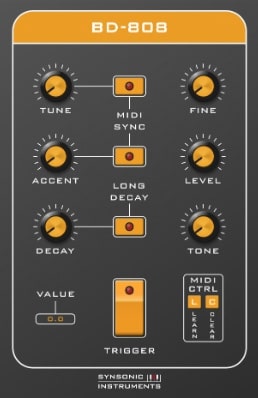
OS: Windows Win Mac Mac Bit Version: 64-bit Developer: Synsonic Instruments Size: 440 KB Rating: 76/100
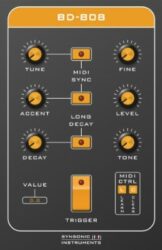
BD-808 offers an authentic recreation of the classic TR-808 bass drum in a digital format. It captures the warmth and punch of the original hardware using careful circuit modeling. With controls for Tune, Decay, Tone, and Accent, producers can shape tight kicks or deep sub-bass hits.
The plugin can respond to MIDI notes and velocity, allowing it to act as both a kick generator and a simple bass synth. BD-808 suits electronic styles like techno and hip-hop, giving artists a fast way to create that signature 808 thump right inside their DAW.
Features
- Authentic TR-808 Bass Drum Emulation
- Adjustable Tune And Fine Controls
- Decay And Tone Adjustment Options
- MIDI Note Controlled Pitch Mode
- MIDI Velocity Controlled Accent
- MIDI Learn And Clear Functions
- Available In VST2 And AU Formats
- 64-Bit Plugin Architecture
- Works In Popular DAWs
- Simple And User-Friendly Interface
Pros
- Authentic TR-808 bass drum sound
- Adjustable pitch and tone
- Playable as a bass synth
- MIDI control for easy mapping
- Low CPU use for smooth play
- Dynamic accent control option
- Long decay for deep sub sounds
- More punch than basic 808 samples
- Stable in major DAWs like Ableton
- Small file size, loads quickly
Cons
- Only one basic 808 sound
- No built-in distortion effects
- Missing volume envelope control
- Limited tone shaping options
- No preset browser included
- Can’t load user samples
- Limited modulation capabilities
- Only mono output support
- No drive or saturation knob
- Less flexible than newer 808 VSTs
Video Demo
What Users Say
BD-808 Tips
- I layer the BD-808 with a short click sound so it cuts through the mix better.
- I use light compression to make the 808 sit well with my drums.
- I like to use a tiny bit of saturation to make my 808 stand out more.
- Cut unnecessary low frequencies from other tracks to leave room for the 808.
- Using sidechain compression with the BD-808 can help make the kick and bass blend smoothly.
- Experiment with different tuning for the 808 to match your song’s key perfectly.
7. QuirQuiQ
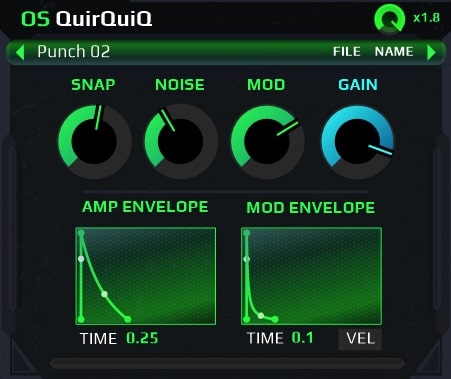
OS: Windows Win Bit Version: 32-bit, 64-bit Developer: Ocean Swift Synthesis Size: 4.2 MB Rating: 76/100
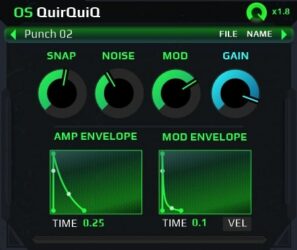
QuirQuiQ offers a compact kick synth designed for creating punchy and detailed drum sounds. It uses digital envelopes for precise control, and its resizable vector interface makes editing smooth and clear. You can easily shape everything from tight club kicks to soft, deep thumps.
Packed with varied presets, QuirQuiQ gives a solid base for sound design. Its controls for snap, noise, and modulation let you fine-tune attack, texture, and movement. Ideal for electronic and dance music, it delivers strong, clean kicks while keeping your creative flow fast.
Features
- Compact Kick Drum Synth
- Tiny CPU Usage
- Resizable Vector Interface
- Sharp And Deep Kick Presets
- Noise Layer Adjustment
- Three Sound Layers Available
- Multiple Filter Types
- Built-In 16-Pattern Sequencer
- Distortion And Bit-Crushing Effects
- Velocity Sensitive Sound Response
Pros
- Very low CPU use
- Resizable clear vector interface
- Precise digital envelope control
- Rich punchy and deep sound
- Great layering and tone shaping
- Useful modulation and noise control
- Fast sound design workflow
- Professional sound quality for free
- Stable performance in most DAWs
- Lots of built-in presets
Cons
- No sample import option
- Limited preset variety
- No built-in compressor
- Only focuses on kick drums
- Lacks visual waveform
- No drag and drop
- Not available for macOS
- Fewer modulation options
- No built-in sequencer
- No multi-out routing
Video Demo
What Users Say
QuirQuiQ Tips
- I like to start by tuning the kick so it matches the key of the song, which makes the whole track sound tighter.
- I use a small bit of drive or distortion to give the kick more warmth and energy.
- I like to layer two kicks — one for the low end and one for the click — to make a stronger sound.
- Use the plugin’s waveform controls to quickly shape the character of your kick.
- Apply EQ after QuirQuiQ to cut muddy frequencies and boost the punch around 100 Hz.
- Use sidechain compression with QuirQuiQ kicks to make space in the mix for the low end.
8. KickMe! Too
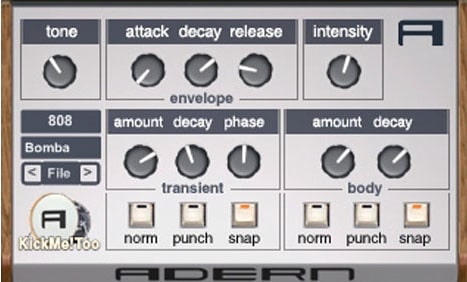
OS: Windows Win Bit Version: 32-bit Developer: Synth School Size: 1.4 MB Rating: 71/100
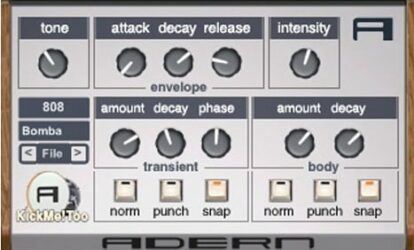
KickMe! Too offers a simple way to create strong, punchy bass drums with full control over tone, attack, and shape. Built by Adern and Synth School, it recreates the classic KickMe! synthesizer using custom-coded parts for a deep, responsive low-end sound.
With controls for transients, body, and tone, users can shape kicks from tight and snappy to long and heavy. Switch between Normal, Punch, or Snap modes and quickly load presets to match any track style, from house to techno and beyond.
Features
- Creates Punchy And Fat Kick Sounds
- Features Custom Coded Oscillators
- Includes Responsive Envelopes Control
- Supports MIDI Control For Precision
- Provides Tone, Attack, And Decay Knobs
- Has Transient And Body Control Sections
- Three Sound Styles: Norm, Punch, Snap
- 808 And Bomba Preset Display
- Low CPU Usage Performance
- Fast Kick Design Workflow
Pros
- Creates punchy and fat kicks
- Low CPU usage
- Clean and simple interface
- Good mix of synth and sample
- Powerful transient control section
- Focuses only on making kicks
- Easy tone and punch shaping
- Preset system speeds up work
- Reliable and stable performance
- Better control than free options
Cons
- No Mac version available
- Only 32-bit support
- Not compatible with modern DAWs
- No sample import support
- No EQ or filter section
- Lacks advanced modulation tools
- Outdated user interface design
- No built-in compressor
- Cannot layer multiple kicks
- No drag and drop samples
Video Demo
What Users Say
KickMe! Too Tips
- Use the pitch control to tune the kick to the song’s key for a more musical low end.
- I use the envelope controls to make the kick shorter if my track feels too muddy.
- If my kick sounds weak, I use the drive or saturation knob to add some grit and power.
- I like to sweep the EQ around 60–100 Hz to find the best thump for my mix.
- I sometimes use a sidechain compressor on bass so the kick can cut through more clearly.
- Make sure to high-pass other instruments to leave room for the kick frequencies.
- Keep the kick centered in the stereo field for the strongest and punchiest low end.
9. Analog Kick Sound
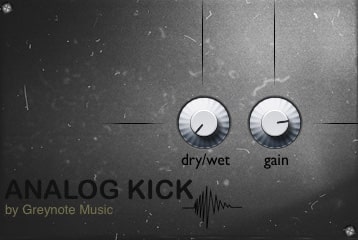
OS: Mac Mac Bit Version: 64-bit Developer: Greynote Music Size: 5 MB Rating: 70/100
Analog Kick Sound offers a flexible way to design powerful electronic kick drums. Built with three oscillators, a noise generator, and detailed envelopes, it lets you shape kicks that range from deep subs to sharp, punchy hits suited for modern electronic styles.
Its drive, saturation, and filter tools help fine-tune tone and impact, while velocity response adds more expression. With over 60 presets, it gives creators quick starting points for many genres. The clean layout allows fast sound design and easy adjustments during production.
Features
- Three Oscillator Kick Synth Engine
- Noise Generator For Added Texture
- Pitch And Amplitude Envelopes
- Distortion And Saturation Stages
- Filter With Cutoff And Resonance
- Transient Shaper Style Attack Control
- Over Sixty Factory Presets Included
- Velocity Sensitive MIDI Response
- Low CPU Usage Performance
- Simple And Clear Interface
Pros
- True analog sound for deep kicks
- Handcrafted samples give unique tone
- Low CPU usage for smooth play
- Three oscillators for rich tone
- Noise generator adds texture
- Custom envelopes for dynamic shape
- Distortion and saturation sound warm
- Velocity sensitivity adds real feel
- Presets help start creative ideas
- Stable performance in many DAWs
Cons
- Only works on Windows systems
- Lite version very limited
- Few customization options available
- No built-in effects variety
- No visual waveform display
- No layering or mixing tools
- Sound range feels narrow
- Lacks multi-genre flexibility
- No drag-and-drop feature
- Can sound too similar across kicks
Video Demo
What Users Say
Analog Kick Sound Tips
- I try tuning my kick drum to the key of the song for a more musical sound.
- I use sidechain compression to make sure my kick cuts through the bass line clearly.
- I like to adjust the drive control to add a bit of grit for a more analog feel.
- I boost around 60–80 Hz in the EQ to make my kick sound warmer and fuller.
- Layer the Analog Kick Sound with a sample kick to blend warmth and clarity.
- Check the kick in mono to make sure it still sounds strong when played on small speakers.
- Apply gentle compression to keep the kick levels even and controlled.
10. Kick-n-Snare EX
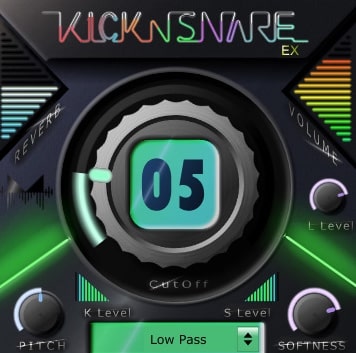
OS: Windows Win Mac Mac Bit Version: 64-bit Developer: Minimal Instruments Size: 18 MB Rating: 69/100
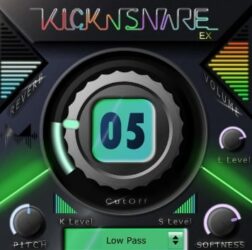
Kick-n-Snare EX offers a focused set of kick and snare sounds made for EDM styles like dubstep and future bass. It expands on the original Kick-n-Snare with new drum samples and controls, letting you shape each sound separately for more precise rhythmic effects.
The added harshness control helps bring out sharper snare tones, while sliders and knobs adjust pitch, volume, softness, and filter type. Designed for quick beat building, Kick-n-Snare EX gives producers a fast way to craft punchy, modern drum tracks.
Features
- Separate Kick And Snare Controls
- Harshness Control For Snare Detail
- Main Knob Adjusts Cutoff Filter
- Reverb Slider Adds Space And Echo
- Pitch Slider Changes Sound Pitch
- Softness Knob Adjusts Sound Sharpness
- Filter Type Box Selects Filter Mode
- Low CPU Use And Fast Loading
- Suitable For Dubstep And Future EDM
- Simple Interface For Quick Beat Making
Pros
- Low CPU use and fast loading
- Separate kick and snare controls
- Harshness knob adds snare detail
- Softness knob smooths drum tone
- Filter type box for tone shaping
- Fun randomize feature for surprises
- Reverb slider adds big space
- Inspires creative drum experiments
- 64-bit VST and AU compatible
- More features than most free snares
Cons
- Limited drum sound variety
- User interface feels outdated
- No layering or sample import
- Missing detailed mixing tools
- Cannot drag MIDI to DAW
- Few customization options for hits
- Less realistic snare sounds
- Sound harshness hard to control
- No full drum kit support
- Few presets compared to rivals
Video Demo
What Users Say
Kick-n-Snare EX Tips
- I often change the pitch of the snare to fit better with my song’s key and overall groove.
- I add a little bit of reverb on the snare inside the plugin for space but keep it short to stay tight.
- Use EQ to cut low frequencies from the snare so it does not clash with the kick’s bass frequencies.
- Experiment with the attack and release controls to adjust how snappy or smooth the snare sounds.
- Adding a gentle compressor to the snare track can make it pop without sounding harsh.
- Apply subtle saturation to both kick and snare to add warmth and help them sit better in the mix.
11. GnomeKick
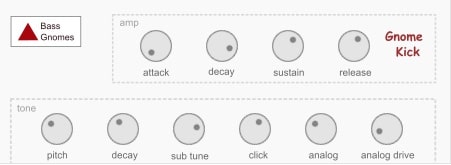
OS: Windows Win Bit Version: 32-bit Developer: Bass Gnomes Size: 1.6 MB Rating: 68/100
GnomeKick offers a simple way to build strong and punchy kick drums for any style of music. It lets you shape every part of the sound using controls for attack, decay, sustain, and release, giving you freedom to design everything from soft thumps to heavy, club-ready kicks.
The special “Analog” knob adds extra warmth and weight, while “Analog Drive” brings a rougher edge for more power. With tone, pitch, and sub-tuning options, GnomeKick makes it easy to layer or back up other kicks, helping your low end hit harder in the mix.
Features
- Kick Drum Sound Generator
- Designed For Drum Layering
- Analog Knob Adds Warm Modulation
- Adjustable Attack, Decay, Sustain, Release
- Pitch Control For Sound Height
- Sub Tune Adjusts Bass Depth
- Click Control Adds Sharp Attack
- Analog Drive Adds Distortion
- Low CPU Usage Performance
- Clean And Simple Interface
Pros
- Warm analog-style sound character
- Low CPU usage for smooth play
- Fast kick design from scratch
- Deep bass with sub tune knob
- Strong transient control for punch
- Creative analog modulation options
- Versatile pitch and tone shaping
- Free and competitive with paid plugins
- Sound sits well in the mix
- Usable presets right out the box
Cons
- Only works on Windows systems
- Only 32-bit version offered
- May not run on new DAWs
- No built-in reverb or effects
- Limited sound shaping tools
- No sample import option
- Few presets compared to others
- No visual waveform display
- User interface looks old-fashioned
- No support or update schedule
Video Demo
What Users Say
GnomeKick Tips
- I always use a spectrum analyzer to make sure my kick doesn’t clash with the bass frequencies.
- I adjust the attack setting in GnomeKick to get a punchy sound that cuts through the mix.
- I like to use the drive or distortion knob gently to add grit without making the kick too harsh.
- Adding sidechain compression between the kick and bass helps both sound clear.
- Setting the kick’s pitch to match the key of the song helps create a more musical low end.
- Regularly checking the kick in mono makes sure it still sounds strong on all speakers.
12. NoizeClick
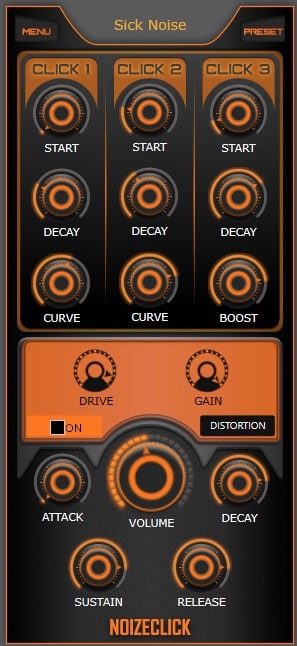
OS: Windows Win Bit Version: 64-bit Developer: Sick Noise Instruments Size: 3.6 MB Rating: 66/100
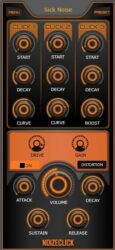
NoizeClick is a kick drum synthesizer designed to help music creators craft custom electronic kicks fast. It uses a single oscillator that produces a sine wave, letting you shape your sound with control over pitch, layers, and tone in its detailed click zone.
It includes a simple filter, distortion, and an ADSR envelope for full control of punch and character. With tools for drive, shape, and volume, NoizeClick gives you the flexibility to make clean, heavy, or distorted kicks for any electronic style.
Features
- Single Oscillator Sine Wave Generator
- Three Independent Click Layers
- Start, Decay, Curve Controls
- Low, High, Band, Notch Filters
- Drive And Shape Distortion
- ADSR Envelope For Amp Control
- Adjustable Attack, Sustain, Release
- Cutoff, Resonance, Gain Settings
- Main Output Volume Control
- Designed For Electronic Kick Creation
Pros
- Easy to make custom kicks
- Click zone gives deep control
- Three clicks for layered sound
- Powerful yet simple distortion
- Adjustable ADSR for full shape
- Fine pitch control accuracy
- Boost adds extra kick power
- Low CPU and stable use
- High sound quality output
- More flexible than most free VSTs
Cons
- Only works on Windows
- No macOS support
- No AU format
- Single oscillator limits sound
- No sample import
- No preset browser
- No waveform display
- No LFO or modulation
- Interface not resizable
- No built-in effects
Video Demo
What Users Say
NoizeClick Tips
- I always use the envelope control to shape how short or long the kick hits.
- I adjust the pitch section until the kick blends well with my bassline.
- I tune the kick to the key of the song to make everything sound tighter.
- Keep the sub frequencies clean by cutting low end from other instruments.
- Use EQ to carve out small spaces so the kick and bass don’t fight for room.
- Keep the output level in check to avoid clipping or distortion in the mix.
13. Korzenie Kick
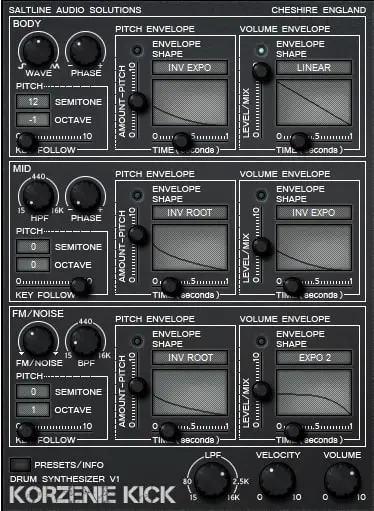
OS: Windows Win Bit Version: 32-bit Developer: Saltline Size: 3.5 MB Rating: 64/100
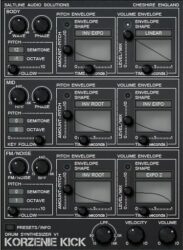
Korzenie Kick offers a focused way to shape and design kick drum sounds. It features three sound layers—body, mid, and FM/noise—each with envelopes for pitch and volume. This setup gives you detailed control over tone, punch, and decay for solid electronic or acoustic-style kicks.
You can choose different wave shapes, adjust pitch by semitone or octave, and filter frequencies for a clean mix. The mix and shape controls help balance layers and define sound behavior. Korzenie Kick is designed to help producers craft tight, powerful kicks that fit any music style.
Features
- Three Independent Sound Layers
- Dedicated Body, Mid, And FM/Noise Sections
- Pitch And Volume Envelopes Per Layer
- Adjustable Envelope Shapes And Curves
- Waveform Selection For Body Layer
- FM/Noise Knob For Added Texture
- Mix Control To Balance Layers
- Preset Browser For Quick Loading
- Low CPU Usage Performance
- Works With Multiple DAWs
Pros
- Very low CPU use
- Three separate sound layers
- Tuned kicks fit the song key
- Built-in EQ and distortion
- Flexible pitch and volume envelopes
- Strong punchy kick sounds
- Easy and clear interface
- Loads fast and runs stable
- Free and high-quality plugin
- Preset system saves time
Cons
- Only 32-bit, no 64-bit support
- Windows only, not for Mac
- No built-in reverb or delay
- Limited preset selection available
- Interface may glitch in some DAWs
- No drag and drop sample import
- Lacks visual waveform display
- Outdated design compared to newer VSTs
- No built-in distortion section
- No support for high-resolution screens
Video Demo
What Users Say
Korzenie Kick Tips
- I like to start by picking a preset that’s close to the sound I want, then tweak it to fit my song.
- I use EQ inside Korzenie Kick to cut low-end rumble that I don’t need.
- I often layer two kick sounds to make my drum beat stronger and more full.
- I use Korzenie Kick’s pitch control to match the kick with my song’s key.
- Use compression to give the kick a consistent punch and control its volume.
- When mixing, always leave space for the kick by cutting lows from other instruments.
- Use reference tracks to compare kick levels and tone to professional mixes.
14. Kick Machine
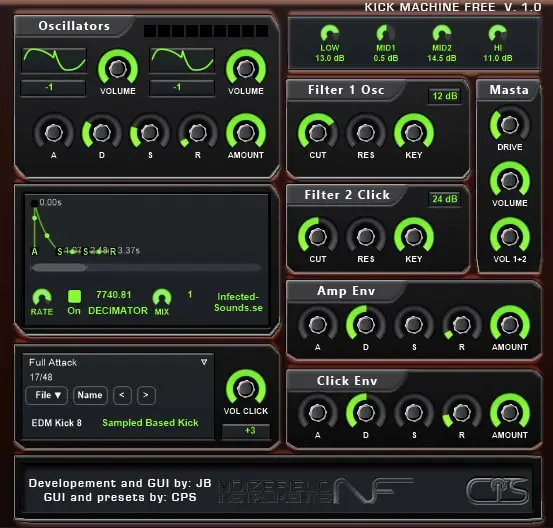
OS: Windows Win Bit Version: 32-bit Developer: Infected Sounds Size: 10 MB Rating: 63/100
Kick Machine is a free VST plugin by Infected Sounds that creates strong and punchy kick drums for modern music. It was developed with CPS, Noizefield, and the Guru-Project team. With two oscillators, pitch envelopes, and filters, it helps shape deep bass tones and sharp clicks.
Kick Machine offers built-in effects like EQ and Decimator to fine-tune your sound. It’s designed to produce powerful kicks for EDM styles such as House, Techno, and Hardstyle. The preset bank provides a quick start, while flexible controls let you craft custom kick sounds with ease.
Features
- Two Oscillators With Sixteen Waveforms
- Dedicated Pitch Envelope Control
- Filter Two For Click Sound
- Separate Amp And Click Envelopes
- Built-In Decimator Effect
- Four-Band Equalizer Section
- Drive Control For Added Warmth
- Compressor, Reverb, And Limiter Effects
- User-Friendly Visual Interface
- Low CPU Usage Performance
Pros
- Powerful and punchy sound quality
- Flexible kick shaping options
- Two strong oscillators for depth
- Click control adds extra snap
- Decimator adds gritty character
- Built-in EQ for easy mixing
- Low CPU use for smooth play
- Presets sound mix-ready instantly
- Strong output control with drive
- Free to download and use
Cons
- Only works on Windows
- No 64-bit version
- Not available for macOS
- Doesn’t support VST3 format
- Limited built-in effects
- User interface looks dated
- Small preset library
- Can’t import samples
- No velocity sensitivity
- Limited sound design flexibility
Video Demo
What Users Say
Kick Machine Tips
- I like to tune my kick sample to match the key of my song for a tighter sound.
- I often layer two kick sounds to make them punchier and more full.
- Set the decay or length of the kick so it doesn’t overlap with the bassline.
- Use the drive or saturation control to give the kick more warmth and power.
- Try sidechain compression between the kick and bass to make room for each sound.
- Check the kick sound in mono to make sure it still sounds strong.
- I always use the built-in EQ to clean up low-end rumble before adding more bass.
15. B-2 KICK Drums
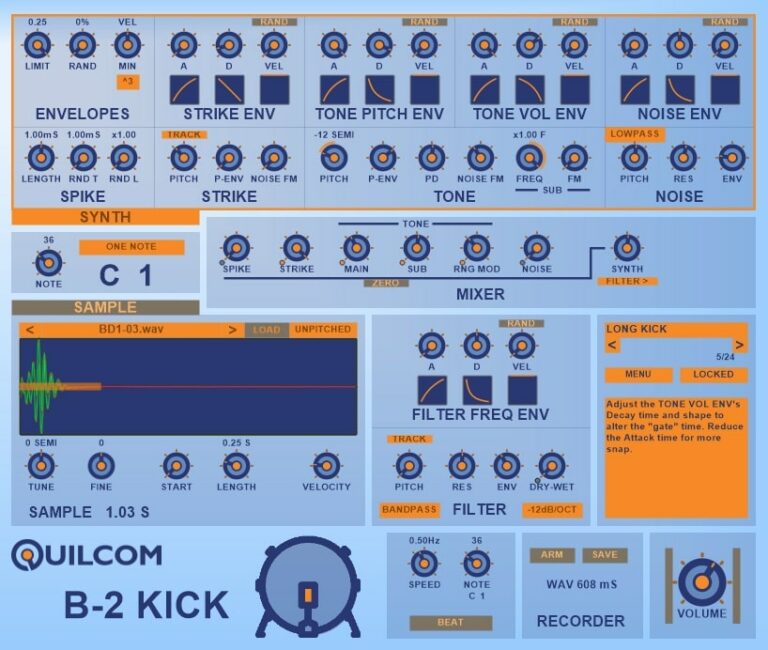
OS: Windows Win Bit Version: 32-bit, 64-bit Developer: Quilcom Size: 23 MB Rating: 62/100
B-2 KICK Drums is a free synthesizer by Quilcom made to design powerful and punchy kick drums. It lets you shape every part of the sound using controls for tone, pitch, and noise, giving flexibility for electronic and dance music production.
You can load samples, layer them with synthesized tones, and export your finished drum as a WAV file. With multiple envelopes, filters, and mixing tools, B-2 KICK Drums helps producers create anything from short, tight hits to deep 808-style kicks.
Features
- Creates Synthetic Kick Drum Sounds
- Supports Layering With Audio Samples
- Exports Sounds As WAV Files
- Offers Four Tunable Drum Generators
- Includes Multiple Envelope Controls
- Features Filter And Modulation Options
- Adjusts Pitch, Volume, And Tone
- Includes Mixer For Sound Balancing
- Provides Visual Feedback For Envelopes
- Runs As A Free VST Plugin
Pros
- Lets you make custom kick sounds
- Layers samples with synth tones
- Offers many envelope controls
- Includes sample editing tools
- Detailed control over pitch changes
- Fine-tune noise and tone balance
- High creative control over sound
- Visual feedback helps learning
- Makes strong electronic kick drums
- Competes well with paid plugins
Cons
- Only works on Windows
- Not compatible with AU
- Steep learning curve
- No built-in preset browser
- Needs bridging for 64-bit
- Lacks GUI scaling
- CPU-heavy when layering
- No built-in effects
- Only focused on kicks
- Missing MIDI learn
Video Demo
What Users Say
B-2 KICK Drums Tips
- Start by adjusting the pitch setting to match the key of the song for a more musical kick.
- I use the tone knobs to shape how deep or punchy my kick sounds in the mix.
- I try layering two B-2 KICK sounds together for more power and texture.
- I use the built-in envelope controls to make my kick shorter or longer depending on my song style.
- Try using sidechain compression between the kick and bass to create space in the mix.
- Use a spectrum analyzer to watch the low end and avoid overlapping too much with bass frequencies.
- Adding a small bit of saturation can make the kick sound fuller without overpowering other sounds.
16. Kicker
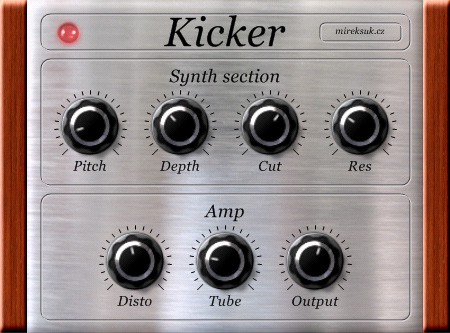
OS: Windows Win Bit Version: 32-bit Developer: Mirek Suk Size: 4 MB Rating: 58/100
Kicker offers a simple way to design powerful and deep kick drum sounds. Created by Mirek Suk, this free Windows VST plugin lets you shape your bass tones with controls for pitch, depth, cut, and resonance. It gives music creators precision over every low-end hit.
Additional features like Disto and Tube effects bring warmth and drive to the sound, making it versatile for everything from clean subs to heavy, distorted kicks. With its direct layout and focused controls, Kicker helps producers craft solid drum sounds that fit any mix style.
Features
- Bass Drum Synthesizer Plugin
- Adjustable Pitch Control
- Depth Intensity Adjustment
- Frequency Cut Filter
- Resonance Control Option
- Distortion Effect Feature
- Tube Warmth Effect
- Output Volume Control
- 32-Bit VST Format
- Free Download Version
Pros
- Creates deep punchy bass sounds
- Warm tube style tone option
- Strong low-end energy output
- Includes useful distortion effect
- Light on CPU and memory
- Unique analog-like tube warmth
- Customizable pitch and depth
- Quick sound shaping sliders
- Works great for kick design
- Great for sub bass layering
Cons
- Only works on Windows systems
- No 64-bit version available
- Not compatible with Mac computers
- No built-in presets included
- Old interface looks outdated
- No MIDI automation support
- Can cause phase problems
- No built-in EQ section
- Does not support sidechain
- Missing sample import feature
What Users Say
Kicker Tips
- I use the pitch and decay knobs to control how deep or short my kick sounds.
- I use an EQ to cut some low mids if the kick sounds too muddy.
- I use sidechain compression with my bass track to give the kick more punch.
- Using a tuner plugin helps ensure the kick matches the key of the song.
- Checking the low-end balance with a spectrum analyzer keeps the kick clean and strong.
- Using high-pass filters on other instruments leaves room for the kick to shine.
17. Kickboy 2
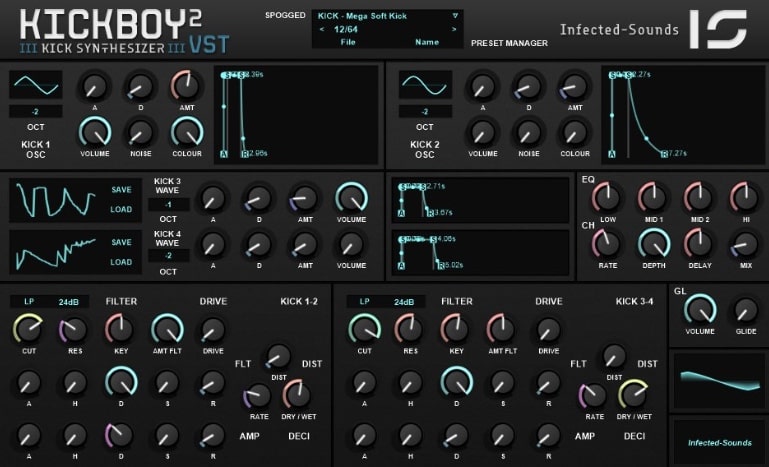
OS: Windows Win Bit Version: 32-bit Developer: Infected Sounds Size: 2 MB Rating: 54/100
Kickboy 2 is a free bass drum synth plugin for Windows that gives music creators control over punchy and deep kick sounds. It includes two oscillators with noise and color options, 32 waveforms, and layered envelopes to fine-tune attack, decay, and tone for every hit.
Kickboy 2 offers built-in effects like EQ, chorus, double overdrive, and distortion for shaping depth and power. Its preset manager and waveform display make it easy to explore sounds, while octave and glide controls help craft smooth, dynamic transitions between notes.
Features
- Two Oscillators With Noise And Color
- Thirty-Two Selectable Waveforms
- Four Kick Envelopes
- Built-In Equalizer
- Overdrive And Distortion Effects
- Filter Cutoff And Resonance Controls
- Pitch Glide Function
- Save And Load Presets
- Sixty-Four Included Presets
- Waveform Display Windows
Pros
- Two strong oscillators for kicks
- Supports 32 unique waveforms
- Built-in EQ for sound shaping
- Overdrive adds punchy warmth
- Decimator for rough vintage feel
- Glide makes smooth pitch slides
- Filter envelopes for freq tweaks
- Visual display helps sound design
- Preset manager for quick changes
- Free and lightweight for Windows
Cons
- Only works on Windows
- Limited to 32-bit format
- User interface looks outdated
- Preset selection feels small
- No drag and drop
- Lacks modern visual feedback
- No resizable window
- Not beginner-friendly
- Missing modulation options
- High CPU usage
Video Demo
What Users Say
Kickboy 2 Tips
- I always use the built-in distortion knob to add warmth and punch to my kicks.
- I layer two Kickboy 2 kicks sometimes—one for low end and one for attack—to make it stand out.
- I use an EQ after Kickboy 2 to shape the tone and cut muddy frequencies around 200 Hz.
- Use the pitch envelope to create a strong, punchy transient at the beginning of the kick.
- Adjust the decay time carefully—too short loses power, too long muddies the mix.
- Use Kickboy 2 in mono mode so the low frequencies stay focused in the center.
18. EKD
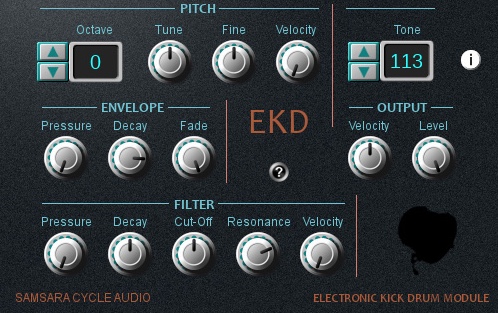
OS: Windows Win Bit Version: Developer: Samsara Cycle Audio Size: 6.8 MB Rating: 50/100
EKD is an electronic kick drum plugin by Samsara Cycle Audio designed for creative sound design and experimentation. It offers 128 tones and 128 patches built on FM/AM synthesis, giving producers a wide range of punchy, textured, and evolving drum sounds to explore.
EKD includes pitch, envelope, and filter sections that let you shape tone, texture, and dynamics with precision. The plugin also supports MIDI learn for quick control setup. It can move from deep, smooth kicks to gritty, experimental noise, making it useful for both rhythmic and ambient music styles.
Features
- FM And AM Synthesis Engine
- Pitch, Envelope, And Filter Sections
- MIDI Learn For Easy Control
- Velocity Sensitive Parameters
- Customizable Envelope Settings
- Cut-Off And Resonance Filters
- Detailed Pitch Adjustment Controls
- High Pass Filter Option
- Level Control For Output Volume
- 1280 Total Preset Variations
Pros
- FM and AM synthesis gives variety
- Unique kick textures hard to find
- Envelope control shapes sound length
- Compact and light on CPU
- Customizable tone and brightness control
- Responsive velocity controls for dynamics
- Flexible tuning and octave options
- High Pass Filter adds clarity
- Free alternative to paid kick plugins
- Huge range of preset variations
Cons
- Only works on Windows
- No 64-bit version support
- Not available for macOS
- May crash in some DAWs
- Interface can look crowded
- Hard for beginners to learn
- Cannot load external samples
- No built-in presets browser
- Less CPU efficient than rivals
- Sounds less punchy than others
Video Demo
What Users Say
EKD Tips
- I try layering two kick sounds and using EKD to blend them for a fuller tone.
- I use the EQ section to cut muddy frequencies around 200 Hz when my kick sounds too heavy.
- I like to adjust the saturation to give my kicks more punch without making them too loud.
- Adjust the output gain to avoid clipping after boosting with EQ or saturation.
- Use subtle compression to glue the kick together rather than squash it too hard.
- I always A/B test my kick sound with and without EKD to check if it’s really better.
- Blend a clean kick with a processed one using parallel processing for better balance.
Kick VST Plugins Compared
This table compares Kick VST plugins by features, controls, effects, formats, and more.
| Details | KSHMR Essentials Kick | Chow Kick | BD-909 | 808-ROMpler | Dark VX Kick | BD-808 | QuirQuiQ | KickMe! Too | Analog Kick Sound | Kick-n-Snare EX | GnomeKick | NoizeClick | Korzenie Kick |
|---|---|---|---|---|---|---|---|---|---|---|---|---|---|
| Image |  |
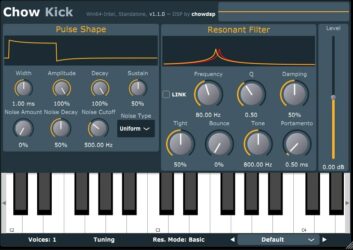 |
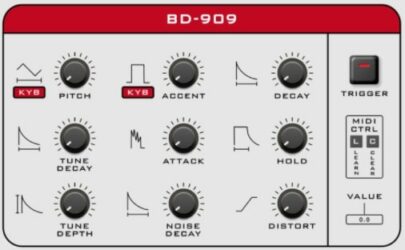 |
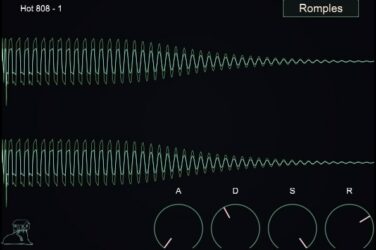 |
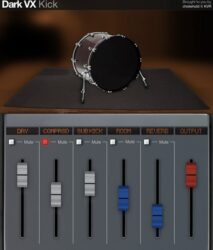 |
 |
 |
 |
|
 |
|
 |
 |
| Rating | |||||||||||||
| OS | Windows, Mac | Windows, Mac, Linux | Windows, Mac | Windows, Mac | Windows, Mac | Windows, Mac | Windows | Windows | Mac | Windows, Mac | Windows | Windows | Windows |
| Formats | VST, AU, AAX | VST, AU | VST, VST2, AU | VST, AU | VST, AU | VST2, AU | VST | VST | VST, AU | VST, AU | VST | N/A | VST |
| Bit Version | 64-bit | 32-bit, 64-bit | 64-bit | 64-bit | 32-bit | 64-bit | 32-bit, 64-bit | 32-bit | 64-bit | 64-bit | 32-bit | 64-bit | 32-bit |
| Developer | KSHMR Essentials | Chowdhury DSP | Synsonic Instruments | Recluse-Audio | Chokehold | Synsonic Instruments | Ocean Swift Synthesis | Synth School | Greynote Music | Minimal Instruments | Bass Gnomes | Sick Noise Instruments | Saltline |
| License | Commercial | Freeware | Freeware | Freeware | Freeware | Freeware | Freeware | Freeware | Freeware | Freeware | Freeware | Freeware | Freeware |
| Sample-Based | No | Select | Yes | Yes | Yes | No | No | Select | Select | Yes | Select | Yes | Yes |
| Download Size | 7 MB | 5.5 MB | 10 MB | 88 MB | 6 MB | 440 KB | 4.2 MB | 1.4 MB | 5 MB | 18 MB | 1.6 MB | 3.6 MB | 3.5 MB |
| CPU Load | Low | Low | Low | Low | Low | Low | Low | Low | Low | Low | Low | Low | Low |
| Polyphony | 1 | 1 | 1 | 8 | 1 | 1 | 8 | 8 | 1 | 32 | 8 | 32 | 1 |
| Features | Sub Enhancement, Mid Shaping, Air Clarity, Transient Control, Tape Saturation, Pressure Compression, Stereo Width | Physical modelling, Pulse shaper, Resonant filter, Noise generator, MIDI tuning, Microtuning support, Preset management | Authentic 909 Emulation, Distortion Control, MIDI Integration, Sound Shaping, Factory Presets, Pitch Modulation, Dynamic Accent | Drag-and-Drop, 16 808 Kicks, ADSR Controls, Waveform Display, Simple Design, Minimalist Interface, Sound Selection | Layered Kick Sounds, Velocity Layers, Analog Processing, Sub-Bass Channel, Room Ambience, Reverb Control, Independent Mixer Channels | Authentic 808 Emulation, Adjustable Parameters, MIDI Control, Long Decay, Trigger Pad, Value Display, MIDI Learn | Digital envelopes, Resizable interface, Preset library, Layering capability, Sound design flexibility, Filter and distortion, Built-in sequencer | Punchy kicks, Transient control, Body shaping, Tone adjustment, Preset browsing, Sound modes, Clean interface | Analog synthesis, Handcrafted samples, Three oscillators, Noise generator, Pitch envelope, Distortion shaping, Factory presets | Extra Drum Sounds, Separate Kick Controls, Separate Snare Controls, Harshness Control, Reverb Slider, Pitch Slider, Filter Selection | Kick generator, Analog modulation, Envelope control, Pitch adjustment, Tone shaping, Sub tuning, Analog drive | Click zone, Pitch modulation, Multi-click layers, Filter control, Distortion shaping, ADSR envelope, Volume control | Three sound layers, Pitch envelopes, Volume envelopes, FM/Noise layer, Low-pass filter, Key follow, Preset management |
| Controls | Sub, Mid, Air, Transient, Tape, Pressure, Compressor | Width, Amplitude, Decay, Noise Amount, Frequency, Tone, Preset Menu | Pitch, Accent, Decay, Tune Decay, Attack, Hold, Tune Depth | Waveform Display, Preset Name, Romples Button, Attack Knob, Decay Knob, Sustain Knob, Release Knob | Dry, Comprsd, Sub Kick, Room, Reverb, Output, Mute Buttons | Tune, Fine, Accent, Decay, Tone, Level, Long Decay | Snap, Noise, Mod, Gain, Amp Envelope, Mod Envelope, Velocity | Tone, Attack, Decay, Release, Intensity, Transient Amount, Norm/Punch/Snap Buttons | Dry/Wet, Gain, Oscillators, Noise Generator, Pitch Envelope, Distortion, Filter Section | Main Knob, Display Screen, Reverb Slider, Volume Slider, Pitch Slider, Softness Knob, Filter Type Box | Attack, Decay, Sustain, Release, Pitch, Sub Tune, Analog Drive | Click 1, Click 2, Click 3, Filter, Distortion, Amp Envelope, Volume | Wave Selector, Pitch Control, Pitch Envelope, Volume Envelope, FM/Noise Knob, Low-Pass Filter, Preset Browser |
| Effects Included | Bass Frequency Tuning, Mid Frequency Adjusting, High-Frequency Adjusting, Transient Shaping, Saturation, Distortion, Multiband Compression, Single Band Compression, Stereo Width Adjustment, Limiting | Resonant filter, Noise generator, Pulse shaper | Distortion | ADSR Envelope Controls | Reverb, Echo, Compression, Sub-Bass, Room Ambience, EQ, Noise | Unknown | Distortion, Bit-crushing | Unknown | Distortion, Saturation, Filtering, Transient Shaper | Filter, Reverb | Analog-like modulation, Distortion | Filter, Distortion, Compressor | Distortion, EQ, Low-pass filter |
| MIDI Learn | Unknown | Unknown | Yes | Unknown | Unknown | Yes | Yes | Unknown | Unknown | Unknown | Unknown | Yes | Yes |
| Presets | 10 | N/A | 24 | 15 | N/A | 10 | 128 | 128 | 40 | 66 | N/A | 100 | 32 |
| Standalone | No | Yes | Yes | Yes | Yes | Yes | Yes | Yes | Select | Yes | Select | Yes | Yes |
| Last Updated | N/A | N/A | 04/30/2018 | 06/07/2023 | 01/18/2021 | 06/27/2020 | 09/14/2018 | 06/11/2024 | 08/20/2023 | N/A | 08/06/2023 | 03/15/2023 | 06/16/2017 |
Favorite Kick VST Plugin
Our top pick for the best free Kick VST plugin is KSHMR Essentials Kick by KSHMR Essentials. It offers great sounds, helpful controls, and it’s available for both Windows and Mac.
| Details | KSHMR Essentials Kick |
|---|---|
| Image |
|
| Rating | |
| OS | Windows, Mac |
| Formats | VST, AU, AAX |
| Bit Version | 64-bit |
| Developer | KSHMR Essentials |
| License | Commercial |
| Sample-Based | No |
| Download Size | 7 MB |
| CPU Load | Low |
| Polyphony | 1 |
| Features | Sub Enhancement, Mid Shaping, Air Clarity, Transient Control, Tape Saturation, Pressure Compression, Stereo Width |
| Controls | Sub, Mid, Air, Transient, Tape, Pressure, Compressor |
| Effects Included | Bass Frequency Tuning, Mid Frequency Adjusting, High-Frequency Adjusting, Transient Shaping, Saturation, Distortion, Multiband Compression, Single Band Compression, Stereo Width Adjustment, Limiting |
| Download | Download KSHMR Essentials Kick |
Frequently Asked Questions
How to Install Kick VST Plugins
To install kick VST plugins on Windows or Mac, extract the files from the Zip or Rar. Move the files (.dll for Windows or .component for Mac) into your DAW’s plugin folder. Then restart your software and rescan the directory to complete the process. Tutorial: How to Install VST Plugins
Windows:
Extract the downloaded zip file and copy the .dll file into the VST plugins folder scanned by your DAW. Restart your music software and rescan your plugin directory to begin using the new VST.
Mac OS X:
Extract the downloaded archive and move the .component or .VST file to the plugin folder. It is usually /Library/Audio/Plug-Ins/Components or /Library/Audio/Plug-Ins/VST. Restart your DAW and rescan your plugins to complete the installation.
What Is A Kick VST Plugin?
A kick plugin or kick drum VST plugin is a single-instrument plugin that can be used to add kick drum sounds to your music projelocts. These kick drum plugins can include analog and synthesized kick drum sounds.
A kick drum is a percussion instrument that provides the main beat of a song. The term kick drum can also refer to the bass drum, which is the largest and lowest-pitched drum in a set of drums.
What Is the Difference Between Kick and Bass?
In music production, a kick typically refers to a percussive sound, usually a drum, while the bass is part of the music that provides the low-end rumble. The main difference between kicks and basses is that kicks are generally sharper and punchier, while basses tend to be deeper and more sustained.
There can also be some overlap between these two elements – sometimes, you might want your kick to have a bit of low-end on it or your bassline to have higher frequencies for added attitude. It depends on the overall sound you’re going for in your track.
Kick drum VST plugins are a great way to add bass sounds to your tracks. I hope you found this list of free kick VST plugins helpful.
You May Also Like:





