

Here are the best free bell VST plugins for Windows and Mac. We have included video demos, feature lists, pros, cons, and plugin ratings.
How we rate plugins: We rate each bell VST plugin based on sound quality, design, performance, features, usability, and compatibility. We rate plugins on a scale of 1 to 100.
Table of Contents
I have spent over 15 years testing and comparing hundreds of free and paid VST plugins, supported by hands-on demos on our YouTube channel which has 11,000+ subscribers.
Free Bell VST Plugins
This table compares bell plugins by operating system, bit version, format, and rating.
| # | Plugin | OS | Formats | Bit Version | Ratings |
|---|---|---|---|---|---|
| 1 | Desk Bell | Windows Mac | Kontakt | 32-bit, 64-bit | |
| 2 | Labs Christmas | Windows | VST | 64-bit | |
| 3 | Chamber Orchestra 2 | Windows Mac | VST, AU | 32-bit, 64-bit | |
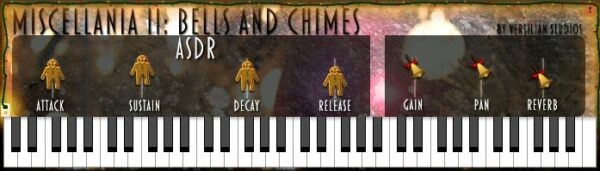
| 4 | Miscellania II: Holiday Bells | Windows | VST, AU | 32-bit, 64-bit | |
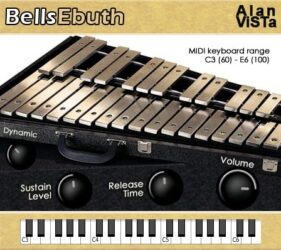
| 5 | BellsEbuth | Windows Mac | VST, AU | 32-bit, 64-bit | |
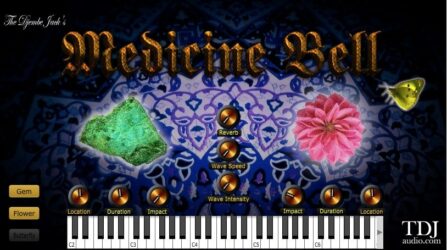
| 6 | Medicine Bell | Windows | VST, AU | 32-bit, 64-bit | |
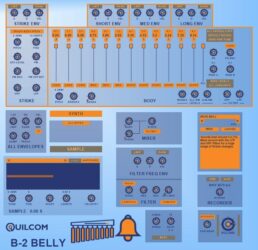
| 7 | B-2 BELLY | Windows | VST | 32-bit, 64-bit | |
| 8 | Labs Hand Bells | Windows | VST, AU | 64-bit | |
| 9 | Sonatina Chimes | Windows | VST, AU | 32-bit, 64-bit | |
| 10 | Christmas Belly | Windows | VST | 32-bit | |
| 11 | Carillon | Windows | VST | 32-bit | |
| 12 | IOTA MINI | Windows Mac | VST, AU | 64-bit |
1. Desk Bell
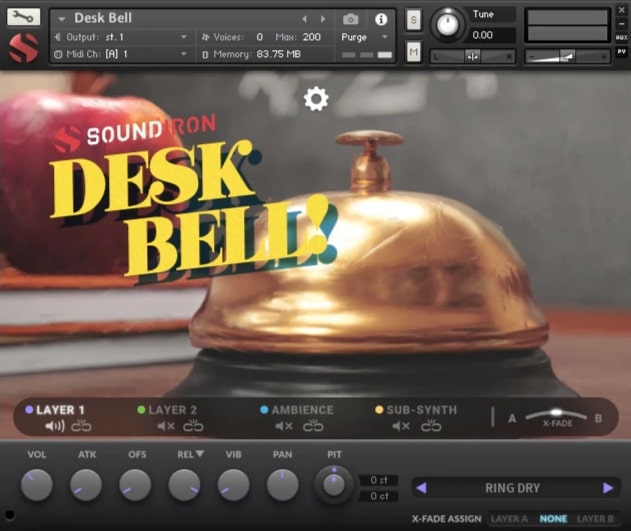
OS: Windows Win Mac Mac Bit Version: 32-bit, 64-bit Developer: Soundiron Size: 590 MB Rating: 88/100
Desk Bell offers a bright and character-rich sound built from a real 3-inch brass bell, recorded in both studio and church settings. It captures every subtle “ding” with multiple dynamic layers and variations, giving producers access to a surprisingly expressive tonal range.
Beyond the natural bell tones, Desk Bell includes 20 ambient pads, wavetables, and creative FX presets that stretch its sound far beyond its humble source. With flexible layering, shaping tools, and deep effects, it’s well-suited for creating rhythmic accents, soft melodies, or atmospheric textures.
Features
- Sampled 3-Inch Polished Brass Bell
- Close And Cathedral Recording Positions
- Multiple Velocity Layers For Dynamics
- Includes Muted And Clapper Sounds
- 20 Ambient Pads And Textures
- Four Independent Sound Layers
- Arpeggiator With Timing Controls
- 27 DSP Effects In Modular Rack
- 99 Convolution Reverbs Plus 40 FX
- Works In Free Kontakt Player
Pros
- Clean and clear bell tone
- High-quality studio and hall samples
- Dynamic layers for real expression
- Includes 20 ambient sound presets
- Arpeggiator adds rhythmic motion
- Custom FX rack with 27 effects
- 99 reverb options for deep space
- Layer blending for creative sounds
- Unique vintage bell character
- Light on CPU and memory use
Cons
- Requires Kontakt Player to run
- Not a true standalone plugin
- Limited to one main instrument
- Small sample size
- No built-in layering
- Lacks synth-style controls
- Heavy CPU use
- Few presets
- Limited customization
- May not fit all styles
Video Demo
What Users Say
Desk Bell Tips
- I like to add a little reverb to the Desk Bell to make it sound bigger and more dreamy.
- Layering multiple bell tones in different octaves creates a fuller, richer sound.
- Using EQ to cut low frequencies helps the bell stay clear in a busy mix.
- Adding gentle delay gives the bell a sparkling, echoing feel that fills space.
- I use the pitch wheel to make slight bends that give the bell life and movement.
- Experiment with adjusting attack and release knobs to change how fast the bell rings and fades.
- I always save my favorite bell settings as presets so I can use them again quickly.
2. Labs Christmas
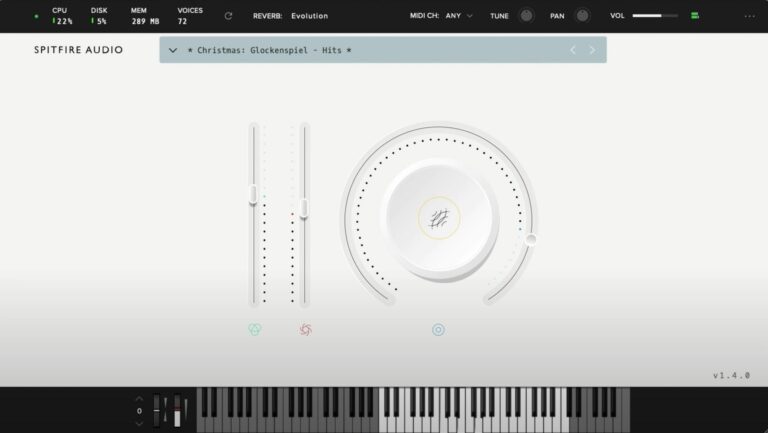
OS: Windows Win Bit Version: 64-bit Developer: Spitfire Audio Size: 478.9 MB Rating: 86/100
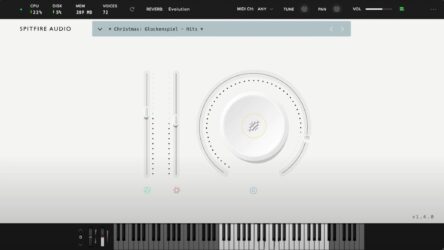
Labs Christmas offers a charming set of holiday sounds designed to bring warmth and sparkle to your music. It includes sleigh bells, glockenspiel, tubular bells, soft vocals, and other festive touches recorded beside a crackling fire for an authentic seasonal tone.
With 13 carefully recorded sounds, this plugin gives you an easy way to create cheerful or cinematic winter moods. Simple controls for reverb, volume, and expression help shape the atmosphere, making it ideal for holiday projects or adding a cozy layer to any track.
Features
- Includes 13 Festive Instrument Sounds
- Features Sleigh Bells And Glockenspiel
- Includes Tubular Bells And Vocals
- Main Dial Blends Sound Layers
- Reverb Selector Adjusts Room Ambience
- Vertical Sliders Control Expression
- MIDI Channel And Tune Controls
- Pan And Volume Adjustments Available
- Works In 64-Bit VST Format
- Keyboard Display Shows Active Notes
Pros
- High quality orchestral recordings
- Lush reverb and spatial depth
- Includes 13 unique sound patches
- Better realism than many free bells
- Cinematic and emotional textures
- Well balanced bell and string mix
- Low CPU and memory use
- Perfect for film and game music
- Custom reverb for room types
- Works great beyond Christmas music
Cons
- Only works on Windows
- No Mac or Linux support
- Small sound library
- Lacks sound editing tools
- No delay or reverb depth
- Interface looks basic
- No modulation or LFO
- Limited tone-shaping
- Less flexible than others
- Requires LABS account
Video Demo
What Users Say
Labs Christmas Tips
- I use the reverb knob to make the bells sound like they are in a big, echoing church.
- I add a delay plugin to give the bells a magical, repeating sparkle.
- I mix the Labs Christmas bells with strings to make my holiday track sound full and rich.
- Use EQ to cut out low frequencies that make the bells sound muddy.
- Try layering Labs Christmas with a choir for a deep, festive sound.
- Use the pan controls to spread the bell notes across the stereo field.
- Try automating the reverb to make some notes feel closer and others far away.
3. Chamber Orchestra 2
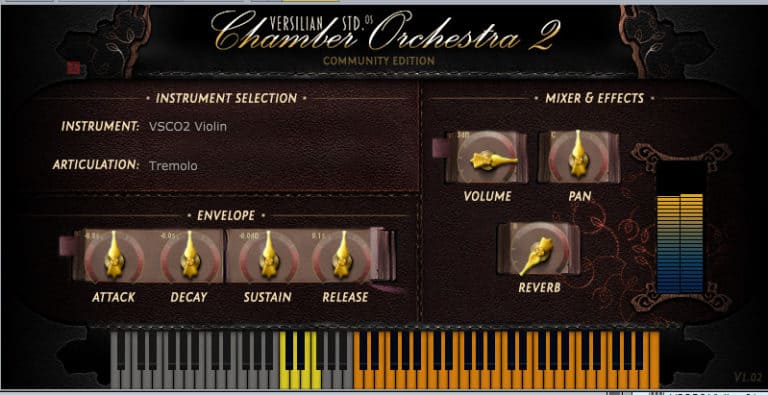
OS: Windows Win Mac Mac Bit Version: 32-bit, 64-bit Developer: Versilian Studios LLC. Size: 1.5 GB Rating: 81/100
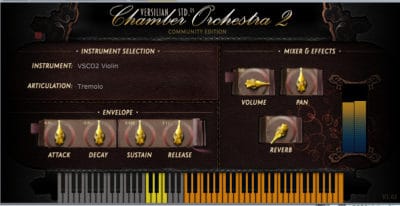
Chamber Orchestra 2 offers a free and open library of orchestral sounds designed for learning and creative projects. It features strings, brass, woodwinds, mallets, and percussion instruments, all recorded with a natural and close style that feels like real players in a small ensemble.
The plugin includes simple controls for volume, tone, and effects like reverb and panning. Users can shape each instrument’s feel with attack, decay, sustain, and release settings. Available for Windows and Mac in VST and AU formats, it’s easy to use for creating realistic orchestral tracks.
Features
- Free 3 GB Sample Library
- Open Source Public Domain License
- VST And AU Plugin Formats
- Adjustable Attack, Decay, Sustain, Release
- Built-In Reverb Effect
- Simple And Clear Interface
- Light On CPU Usage
- Includes Strings, Brass, Woodwinds
- Includes Mallets And Percussion
- Allows Custom Instrument Creation
Pros
- Completely free with no limits
- Works on Windows and Mac
- Includes bells and mallet sounds
- Low CPU and RAM usage
- Offers real, natural instrument tones
- Creative Commons 0 public domain
- Includes multiple articulation options
- Built-in reverb for space and depth
- Better realism than many free VSTs
- Authentic, warm chamber sound
Cons
- Limited modern bell sound variety
- No built-in sound design tools
- Interface looks plain and dated
- Missing advanced modulation controls
- Basic effects compared to other VSTs
- Cannot import custom samples easily
- Few preset options for beginners
- Less polished sound than paid plugins
- Lacks powerful reverb options
- Small community support for updates
Video Demo
What Users Say
Chamber Orchestra 2 Tips
- I often mix in a bell VST on top of violins to add sparkle and brightness to the piece.
- Layer bell VSTs with flutes or violins to add a magical shimmer to the mix.
- I always try to use reverb to help the orchestra sound like it’s playing in a real concert hall.
- Adjust expression and modulation to make each note feel alive and natural.
- Experiment with panning placement to make each section of the orchestra sound like it’s in a real space.
- Add a touch of EQ to remove muddy frequencies from low strings or brass.
- Use automation to fade in the orchestra gently for cinematic builds.
4. Miscellania II: Holiday Bells
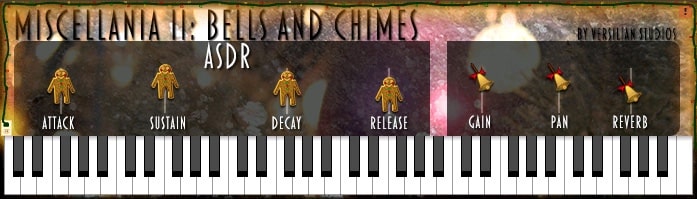
OS: Windows Win Bit Version: 32-bit, 64-bit Developer: Versilian Studios Size: 41 MB Rating: 76/100
Miscellania II: Holiday Bells offers a bright and cheerful range of bell and chime sounds that fit perfectly in festive or playful tracks. Covering six octaves, it includes bells, triangles, finger cymbals, and tambourines, along with ambient loops for extra sparkle and depth.
With simple controls for shaping tone and space, music creators can adjust attack, sustain, and reverb to craft anything from soft background shimmer to lively accents. Its wide range of percussive tones makes it easy to add a hint of seasonal charm or light metallic texture to your music.
Features
- Six Octaves Of Bell Sounds
- Includes Chimes And Triangles
- Adjustable Attack, Decay, Sustain, Release
- Built-In Reverb Effect
- Gain And Pan Controls
- Available In VST And AU
- Supports 32-Bit And 64-Bit
- Lightweight And Quick To Load
- Low CPU Usage
- Clear And Natural Sound
Pros
- Wide six-octave sound range
- Includes many unique bell types
- Natural and sweet tone quality
- Light on CPU resources
- Expressive velocity response
- Very dynamic for a free plugin
- Polished stereo image
- Effective reverb controls
- Great free alternative to paid bells
- Inspires creative and fun compositions
Cons
- Limited sound variety
- No built-in EQ or filters
- No preset saving or loading
- No modulation or LFO options
- Cannot import custom samples
- Too simple interface for pros
- Static sample playback
- No built-in delay or effects
- Lacks velocity curve adjustment
- Interface looks dated
Video Demo
What Users Say
Miscellania II: Holiday Bells Tips
- I often layer different bell sounds together to make the music more full and rich.
- I adjust the reverb to make the bells sound like they are ringing in a big hall or outside in the snow.
- Use panning to spread different bells across the stereo field for a more natural sound.
- Experiment with different velocities to make bells sound more expressive.
- Adding light delay effects can make the bells echo gently and fill up space in the mix.
- Using a small amount of chorus effect can make digital bells sound more real.
- I save my favorite bell settings as presets so I can use them again later.
5. BellsEbuth
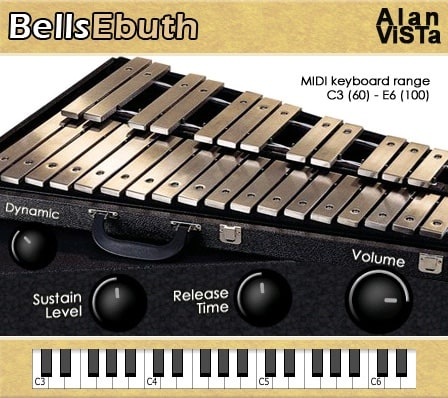
OS: Windows Win Mac Mac Bit Version: 32-bit, 64-bit Developer: Alan ViSTa Size: 63 MB Rating: 75/100
BellsEbuth offers the clear, bright sound of orchestral bells in an easy-to-use VST plugin for Windows and Mac. It uses 40 stereo samples recorded from real glockenspiel performances, giving your tracks a natural tone that fits well in many music styles.
You can shape your sound with simple controls for sustain, release time, and dynamic range. BellsEbuth works smoothly with MIDI keyboards, covering notes from C3 to E6. It’s a practical choice for adding bell melodies, accents, or shimmering textures to your music.
Features
- Sampled Orchestral Bell Sounds
- 40 Stereo 24-Bit Samples
- Release Time Adjustment
- Sustain Level Control
- Amplitude Dynamic Range Control
- Dynamic Sound Response
- Low CPU Usage
- Formats VST And AU
- Available In 32 And 64 Bit
- MIDI Range From C3 To E6
Pros
- Realistic orchestral bell sound
- Uses 40 rich stereo samples
- Low CPU on any system
- Works on Windows and Mac
- Available in VST and AU
- Adjustable release and sustain
- Dynamic range adds realism
- Natural stereo field presence
- Light file size, fast install
- No registration needed
Cons
- Limited sound customization options
- No built-in reverb effect
- Lacks advanced modulation tools
- Few tone shaping controls
- Cannot load user samples
- No built-in EQ or filter
- Limited automation options
- Dynamics feel flat
- Not many presets
- Interface looks plain
Video Demo
What Users Say
BellsEbuth Tips
- I like to layer BellsEbuth with soft pads to make the bells sound fuller and warmer.
- Use EQ to cut low frequencies so the bells don’t sound muddy in the mix.
- Add chorus or shimmer effects to make the bells sound wider and more magical.
- Pan different bell notes left and right to give the song more space and depth.
- Try adjusting the ADSR envelope to shape how quick or slow the bell sound fades.
- Sometimes I add a little delay to BellsEbuth to make a dreamy or magical vibe.
6. Medicine Bell
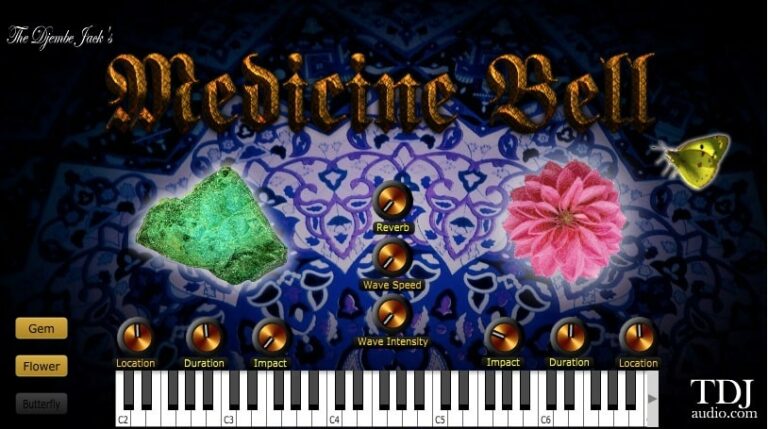
OS: Windows Win Bit Version: 32-bit, 64-bit Developer: TDJaudio Size: 7 MB Rating: 75/100
Medicine Bell offers a rich collection of chime and bell tones that adapt to any creative style. Its sound ranges from bright, sparkling highs to deep, calming lows, making it useful for leads, background moods, or atmospheric layers in modern music production.
With simple controls for wave speed, intensity, and reverb, Medicine Bell lets you shape your sound’s motion and space easily. Switch between Gem, Flower, and Butterfly modes to explore crystal-like, soft, or airy tones that bring depth and texture to your tracks.
Features
- Chime And Bell Sound Engine
- Three Selectable Instrument Modes
- Gem Mode For Crystal Tones
- Flower Mode For Soft Sounds
- Butterfly Mode For Airy Textures
- Reverb Control For Spacious Sound
- Wave Intensity Knob Adjusts Depth
- Built-In Playable Keyboard Interface
- Available In VST And AU Formats
- Simple And Clean User Interface
Pros
- Warm and rich bell tones
- Three unique sound modes
- Crystal and airy sound options
- Subtle and musical saturation
- Built-in reverb for space
- Low CPU usage performance
- Creative sound design controls
- Feels like analog warmth
- Nice stereo width control
- Free and easy to download
Cons
- No built-in preset browser
- Limited modulation options
- Few sound-shaping controls
- No MIDI learn support
- No envelope or filter control
- Lacks built-in arpeggiator
- No layering between sound modes
- Interface looks old-fashioned
- Few options for sound automation
- No velocity curve adjustment
Video Demo
What Users Say
Medicine Bell Tips
- I try layering two bell sounds at different octaves to make the melody richer.
- I always add a touch of reverb to the bell so it sounds like it’s in a real space.
- I tweak the attack and decay sliders to make the bell hit softer or harder.
- Experiment with the built-in effects to find unique textures that fit the track.
- Try using sidechain compression so the bell doesn’t clash with the kick drum.
- Adjust the stereo width to keep the bell centered or spread it across the mix for atmosphere.
7. B-2 BELLY
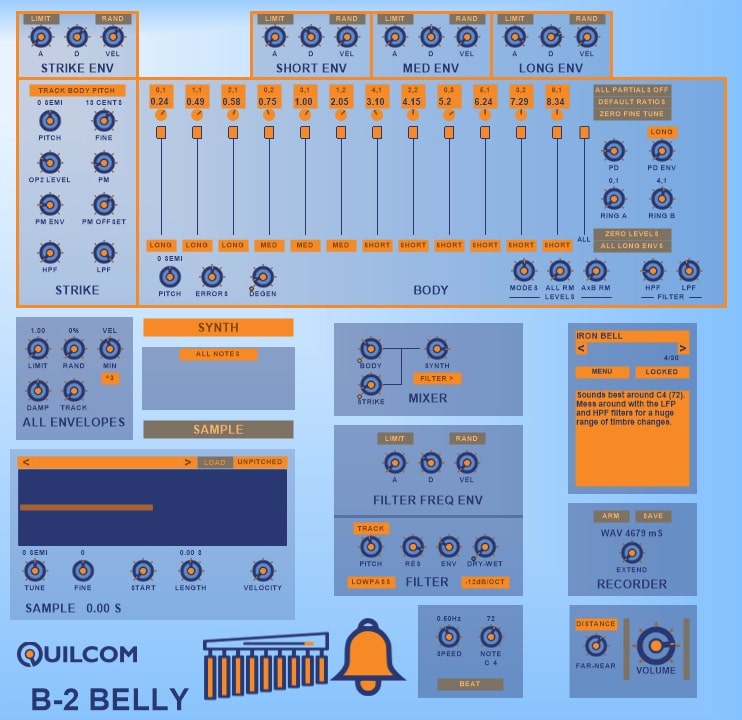
OS: Windows Win Bit Version: 32-bit, 64-bit Developer: Quilcom Size: 28 MB Rating: 74/100
B-2 BELLY offers an expressive way to create bell-like and metallic tones using both synthesis and sampling. It includes tools to shape strikes, body tones, and resonance, giving producers flexibility to design shimmering bells, percussive metallic hits, or smooth synthetic sounds.
The plugin also lets you blend samples with its synth engine, apply filters, and record new sounds as WAV files for later use. Its presets act as starting points for creative sound design, helping music makers quickly build unique tones that can range from bright chimes to deep, evolving textures.
Features
- Creates Bell-Like And Metallic Sounds
- Includes Synth And Sample Sections
- Flexible Sample Player With Filters
- Offers Frequency And Phase Modulation
- Adds Natural Sound Imperfections
- Multiple Envelope Controls For Sound Shaping
- Customizable Sound Modes And Layers
- Built-In Recorder Exports WAV Files
- Supports Both 32-Bit And 64-Bit Formats
- Reasonable CPU Usage During Playback
Pros
- Creates rich bell-like tones
- Unique physics-based synthesis engine
- Mixes samples with synthesis
- Includes built-in sound recorder
- Can export WAV files directly
- Wide variety of presets included
- Low CPU use for big sounds
- Flexible sound shaping controls
- Natural, organic sound character
- Loads and edits samples easily
Cons
- No macOS version available
- Interface looks dated
- Limited sound layering options
- Few included acoustic samples
- No built-in modulation matrix
- Preset sounds feel similar
- Limited automation support
- No built-in reverb or delay
- Sample import lacks drag-and-drop
- Less vibrant bell quality
Video Demo
What Users Say
B-2 BELLY Tips
- I adjust the attack and decay to make the bell sound softer or sharper depending on the song.
- I use the detune control to add a little shimmer and make the bells sound more alive.
- I like to mix B-2 BELLY with reverb to make it sound like the bells are in a big hall.
- When I use multiple instances, I pan each one differently to create a wide stereo field.
- Use automation to change parameters over time and keep the bell sound interesting.
- If the sound is too harsh, I roll off the high end with an EQ to make it smoother.
- Add a touch of delay to give the bells a dreamy, echoing quality.
8. Labs Hand Bells
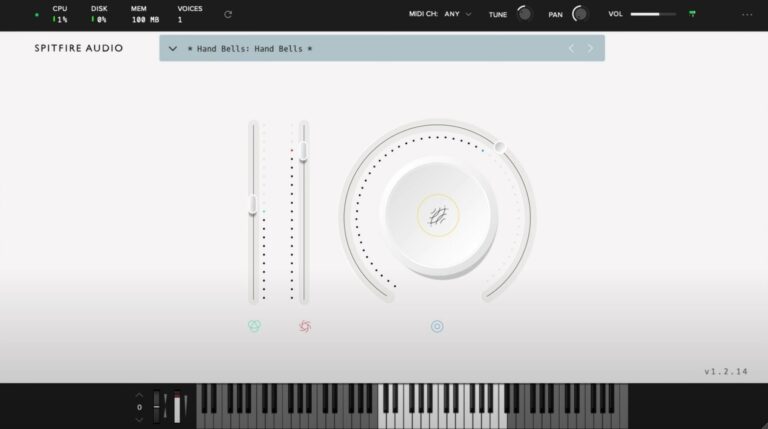
OS: Windows Win Bit Version: 64-bit Developer: Spitfire Audio Size: 134.5 MB Rating: 71/100
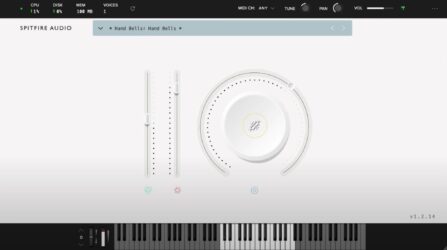
Labs Hand Bells offers bright, shimmering tones recorded from real hand bells at Spitfire Studios. The sounds include natural vibrato and subtle ghostly effects, giving them a lively and slightly unpredictable character that works well for gentle melodies or festive layers.
This plugin features three sound options and simple controls for volume, tone, and dynamics. Its clear interface makes it easy to adjust the bell textures, from soft background sparkles to fuller, ringing tones, adding warmth and charm to any musical track.
Features
- Includes Three Hand Bell Sounds
- Available In VST And AU
- Supports 64-Bit Operation
- Library Menu For Sound Selection
- Round Dial For Tone Blending
- Keyboard Display Shows Played Notes
- MIDI Channel Selection Option
- Tune Control Adjusts Pitch
- Pan Control Adjusts Stereo Position
- Includes Vibrato And Ghostly Effects
Pros
- Free and high quality sounds
- Warm and glistening bell tone
- Better realism than most free bells
- Low CPU and memory use
- Soft or strong tone control
- Vibrato adds gentle motion
- Instant nostalgic and dreamy sounds
- Great for cinematic sound design
- Great layering under pianos
- Very small file size
Cons
- Too few sound options
- No built-in reverb control
- Limited tonal variety
- No built-in EQ tools
- Sound can feel synthetic
- No velocity sensitivity options
- Few customizable settings
- No ADSR envelope control
- Hard to blend with others
- Loads slower than some VSTs
Video Demo
What Users Say
Labs Hand Bells Tips
- I like to layer the Labs Hand Bells with a pad sound to make the music sound richer and fuller.
- I use a little reverb to make the bells sound like they are in a big hall.
- I like to pan different bell notes left and right for a wider stereo feel.
- I use EQ to take out some low frequencies so the bells sound clean and bright.
- Adding delay can make a single bell hit echo nicely through the mix.
- Bells sound best when played with space between notes; letting them ring gives life to the music.
- Automating volume changes can make a bell line feel more alive and expressive.
9. Sonatina Chimes
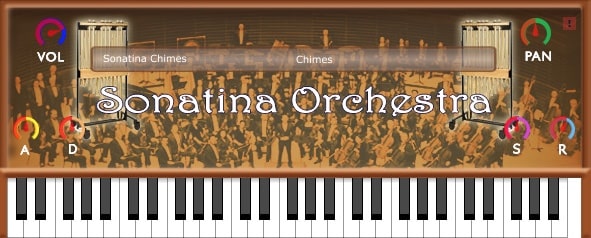
OS: Windows Win Bit Version: 32-bit, 64-bit Developer: bigcat Instruments Size: 12 MB Rating: 62/100
Sonatina Chimes is a virtual instrument that brings the clear, resonant sound of tubular bells to your digital studio. Taken from the public domain Sonatina Orchestra library, it captures the natural tone of real chimes for use in orchestral, cinematic, or ambient music projects.
The plugin includes simple sound shaping tools such as volume, pan, attack, decay, sustain, and release. An instrument selector allows switching between chimes and other orchestra sounds, and the built-in keyboard makes it easy to preview and play notes directly within the plugin.
Features
- Sampled Tubular Bells Instrument
- Available In VST And AU
- Supports 32-Bit And 64-Bit
- Volume Control For Sound Level
- Pan Control For Stereo Balance
- Attack Adjusts Sound Start Time
- Decay Controls Sound Drop Speed
- Sustain Sets Note Hold Time
- Release Adjusts Sound Fade Duration
- Built-In Keyboard For Note Play
Pros
- Free and easy to download
- Clean and natural chime sounds
- Realistic tubular bell sampling
- Low CPU use for smooth play
- Adjustable sustain for lasting tones
- Works on both 32-bit and 64-bit
- Available in VST and AU formats
- Part of full orchestra library
- Open source and community supported
- Great for film and game music
Cons
- Sound can be uneven in chords
- Limited to basic sound controls
- No built-in reverb or effects
- Interface looks old and plain
- No macOS or Linux support
- No velocity or expression control
- Not very CPU efficient
- Hard to fit in modern mixes
- No updates or support team
- Cannot import user samples
What Users Say
Sonatina Chimes Tips
- I use reverb to make the chimes sound like they’re ringing in a big room.
- I try layering the chimes with a soft pad sound for a dreamy feeling.
- I change the velocity of each note to make my chime parts sound more human.
- Add a slight delay effect to give the bells a shiny, echoing sound.
- EQ out some low mids if the chimes sound too thick or muddy.
- Experiment with pitch shifting to create small chime harmonies or layers.
10. Christmas Belly
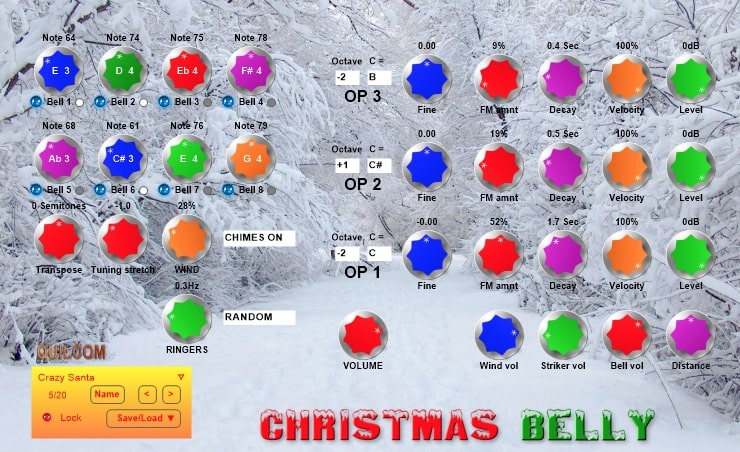
OS: Windows Win Bit Version: 32-bit Developer: Quilcom Size: 18 MB Rating: 58/100
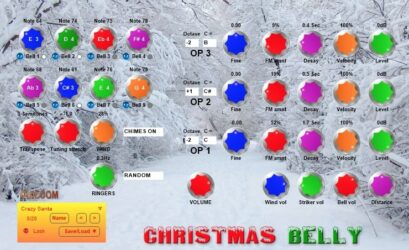
Christmas Belly is a VST plugin that models a set of lively wind chimes. It combines a simple FM synthesizer, a wind generator, and a striker filter to create natural, shifting bell tones. Wind intensity adjusts the timing and feel of each strike, keeping every playthrough fresh.
You can shape your sound by setting up to eight tunable bells and mixing wind, ringers, and ambience levels. A MIDI input lets you perform freely, while pitch, scale, and tuning controls make it easy to craft anything from gentle background chimes to bright, holiday sparkle.
Features
- Models Realistic Wind Chime Sounds
- Simple FM Sound Generator
- Up To Eight Tunable Bells
- Adjustable Wind Strike Control
- MIDI Input For Instrument Play
- Adjustable Ambience And Distance
- Octave And Semitone Shifting
- Reverb And EQ Sections Included
- Preset Save And Load Feature
- Round-Robin Layering System
Pros
- Unique mix of wind and bells
- Up to eight tunable bells
- Custom scales and transposing options
- Wind intensity adds realism
- Random strikes make sounds organic
- Mixable sound layers enhance variety
- Stretch tuning for creative dissonance
- Round-robin layers reduce repetition
- Animated bell gives visual feedback
- Light on CPU usage
Cons
- Only works on Windows
- No support for Mac
- Only 32-bit version
- Not compatible with modern DAWs
- Limited to simple bell tones
- Lacks deep sound design tools
- No built-in effects
- Few presets available
- Interface feels outdated
- Does not support 64-bit hosts
Video Demo
What Users Say
Christmas Belly Tips
- I adjust the attack setting to make the bells sound softer or sharper, depending on the song.
- I use reverb to make the bell tones sound like they are in a big room or a church.
- I change the decay to control how long the bell sound rings—long for dreamy songs, short for fast rhythms.
- Using EQ can help remove extra low frequencies that bells don’t need.
- Layering multiple bell presets together can create a lush, festive sound.
- Velocity sensitivity settings help make the bells sound more natural when played on a MIDI keyboard.
- Pan some bells slightly left or right to give the stereo field more space.
11. Carillon
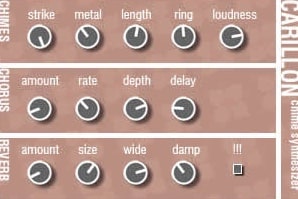
OS: Windows Win Bit Version: 32-bit Developer: Tweakbench Size: 1 MB Rating: 58/100
Carillon offers a collection of bell and chime tones shaped through physical modeling, chorus, and reverb effects. It creates soft, bright, or haunting notes that fade naturally, letting you shape everything from gentle metallic hits to eerie, dreamlike textures with a few simple controls.
This plugin is designed for Windows and works as a 32-bit VST. Its lo-fi charm adds tape-like noise, shimmer, and wobble that fit nostalgic or spooky tracks. Carillon’s mix of warmth and imperfection gives music a mysterious tone that stands out in atmospheric styles.
Features
- Physically Modeled Bell Synthesizer
- Strike Control Adjusts Hit Strength
- Metal Control Changes Tone Brightness
- Ring Adjusts Echo And Resonance
- Reverb Amount Controls Effect Level
- Chorus Amount Adds Sound Richness
- Special Knob Alters Sound Character
- Produces lo-fi And Noisy Textures
- Creates Eerie And Dreamy Tones
- Low CPU Usage On 32-bit Systems
Pros
- Very unique lo-fi bell sound
- Built-in chorus and reverb
- Adds dreamy, old-tape vibe
- Adjustable echo and ring time
- Customizable chime strength
- Warm, tape-like character
- Sounds like real broken chimes
- Distinct tone unlike other bell VSTs
- Ideal for horror or dream music
- Low CPU use on most systems
Cons
- Only works on Windows systems
- No native Mac version available
- Runs only in 32-bit mode
- No support for VST3 format
- Limited number of sound presets
- Lacks built-in preset browser
- No MIDI learn or automation
- Effects sound outdated or thin
- Can’t resize plugin window
- Interface looks small and plain
Video Demo
What Users Say
Carillon Tips
- I use reverb to make the bells sound like they’re playing in a big hall.
- I like to layer Carillon with another soft pad to make the bells sound fuller.
- I adjust the tone knob to find the perfect brightness for my song.
- I use velocity changes to make the bells sound more natural, just like a real player.
- Using a high-pass filter removes extra low-end noise from bell sounds.
- Adjusting stereo width can make the bells spread nicely across the mix.
- Experimenting with tempo-synced delay can make bell patterns sound rhythmic.
12. IOTA MINI
OS: Windows Win Mac Mac Bit Version: 64-bit Developer: AngelicVibes Size: 573 MB Rating: 51/100
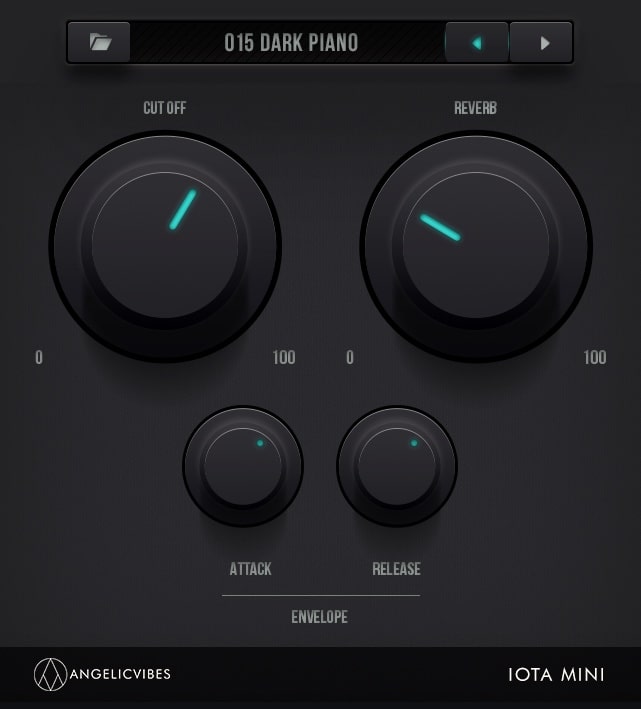
IOTA MINI is a free virtual instrument by AngelicVibes made for producers creating Trap, Hip Hop, and RnB. It includes 50 ready-to-use presets and 10 drum kits with bold 808s, keys, and plucks to help spark new musical ideas quickly and easily.
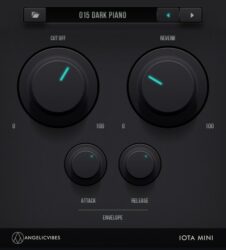
IOTA MINI offers a simple interface with essential controls like reverb, cutoff, attack, and release for shaping sounds. It can also load expansion packs for more variety. Designed with modern sounds, it’s a compact option for producers looking to add sharp melodies and drums to their tracks.
Features
- Free Trap Virtual Instrument Plugin
- Includes 50 Factory Presets
- Comes With 60 Drum Samples
- Built-In Drum Machine Feature
- Supports VST And AU Formats
- Designed For Trap And Hip Hop
- Cutoff Control Adjusts Sound Brightness
- Reverb Effect Adds Space And Echo
- Modern And Simple User Interface
- Compatible With 64-Bit Systems
Pros
- Free to download and use
- Includes 50 factory presets
- Designed for Trap and Hip Hop
- Modern and clean interface
- Reverb control adds great space
- Attack and release adjustments
- Professional quality sound design
- Expansion packs for more options
- Quick preset browser for workflow
- Light download size for storage
Cons
- High CPU usage during playback
- Crashes on some DAWs frequently
- Not optimized for low-end PCs
- Reports of possible virus issues
- No clear customer support help
- Slow developer response times
- Few sound customization controls
- Limited variety of bell sounds
- Missing modern plugin effects tools
- Competitors offer more realistic tones
Video Demo
What Users Say
IOTA MINI Tips
- I use the filter knob to soften harsh highs and make the bell sound smoother.
- I often layer the same bell sound with a slightly detuned copy to make it sound wider.
- I adjust the reverb size until the bell feels just right for the mix—too much can make it blurry.
- I turn down the low frequencies on bell sounds so they don’t clash with the bass.
- Experiment with panning bells left and right to create a wide stereo sound.
- Use modulation effects, like chorus or phaser, to make the bell sound move and shimmer.
Bell VST Plugins Compared
This table compares the bell plugins by operating system, bit version, format, and rating.
| Details | Desk Bell | Labs Christmas | Chamber Orchestra 2 | Miscellania II: Holiday Bells | BellsEbuth | Medicine Bell | B-2 BELLY | Labs Hand Bells | Sonatina Chimes | Christmas Belly | Carillon | IOTA MINI |
|---|---|---|---|---|---|---|---|---|---|---|---|---|
| Image | 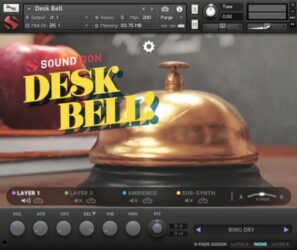 |
 |
 |
 |
 |
 |
 |
 |
|
 |
|
 |
| Rating | ||||||||||||
| OS | Windows, Mac | Windows | Windows, Mac | Windows | Windows, Mac | Windows | Windows | Windows | Windows | Windows | Windows | Windows, Mac |
| Formats | Kontakt | VST | VST, AU | VST, AU | VST, AU | VST, AU | VST | VST, AU | VST, AU | VST | VST | VST, AU |
| Bit Version | 32-bit, 64-bit | 64-bit | 32-bit, 64-bit | 32-bit, 64-bit | 32-bit, 64-bit | 32-bit, 64-bit | 32-bit, 64-bit | 64-bit | 32-bit, 64-bit | 32-bit | 32-bit | 64-bit |
| Developer | Soundiron | Spitfire Audio | Versilian Studios LLC. | Versilian Studios | Alan ViSTa | TDJaudio | Quilcom | Spitfire Audio | bigcat Instruments | Quilcom | Tweakbench | AngelicVibes |
| License | Commercial | Freeware | Commercial | Freeware | Freeware | Freeware | Freeware | Freeware | Freeware | Freeware | Freeware | Freeware |
| Sample-Based | Yes | Yes | Yes | Yes | Yes | Yes | Yes | Yes | Yes | Select | Yes | Yes |
| Download Size | 590 MB | 478.9 MB | 1.5 GB | 41 MB | 63 MB | 7 MB | 28 MB | 134.5 MB | 12 MB | 18 MB | 1 MB | 573 MB |
| CPU Load | Low | Low | Low | Low | Low | Low | Low | Low | Low | Low | Low | Low |
| Polyphony | 12 | 64 | 256 | 64 | 32 | 8 | 8 | 64 | 32 | 8 | 8 | 8 |
| Features | Multi-layer interface, Dynamic round-robins, Ambient pads, Custom FX presets, Advanced arpeggiator, Modulation controls, Convolution reverb | Festive instruments, Layer blending, Volume control, Reverb options, Keyboard display, MIDI control, Cinematic textures | Open-source library, Orchestral instruments, Multiple articulations, Expression controls, Built-in reverb, Visual keyboard, Customizable samples | Chimes variety, Round-robin tambourines, Wind chime loops, Bell ambiance, Velocity dynamics, Simple interface, Reverb control | Sampled Orchestral Bells, Stereo Samples, Release Time, Sustain Control, Dynamic Range, Volume Control, MIDI Range | Gem instrument, Flower instrument, Butterfly instrument, Reverb control, Wave speed, Wave intensity, Impact control | Bell synthesis, Sample layering, Dynamic filtering, Inbuilt recorder, Sound shaping, Preset library, Modulation control | Hand bell samples, Vibrato effects, Ghostly textures, Layer blending, Volume control, Pitch tuning, Pan adjustment | Volume control, Panning, Attack, Decay, Sustain, Release, Instrument selector | FM synthesis, Random wind, Tunable bells, MIDI control, Ambience control, Scale shifting, Animated interface | Physically modeled synthesis, Bell tones, Chorus effect, Reverb effect, Lo-fi texture, Atmospheric sound, Simple interface | Trap Sounds, Drum Machine, Factory Presets, Expansion Packs, Modern Interface, Reverb Control, Sound Design |
| Controls | Layer 1, Layer 2, Ambience, Sub-Synth, Volume, Attack, Release | Instrument Menu, Main Dial, Vertical Sliders, Reverb Selector, Keyboard Display, MIDI Controls, Version Number | Instrument Selector, Articulation Picker, Attack Control, Decay Control, Sustain Control, Release Control, Volume Knob | Attack, Sustain, Decay, Release, Gain, Pan, Reverb | Dynamic Control, Sustain Level, Release Time, Volume Control, Dynamic Range, Keyboard Range, Keyboard Display | Gem Button, Flower Button, Butterfly Button, Reverb Knob, Wave Speed Knob, Wave Intensity Knob, Location Knob | Strike Env, Body Envs, Pitch & Fine, HPF & LPF, FM/PM Offset, Error & Degen, Sample Section | Library Menu, Vertical Slider, Round Dial, Colored Icons, Keyboard, Top Bar Meters, MIDI Channel Selector | Volume, Pan, Attack, Decay, Sustain, Release, Instrument Selector | Notes And Bells, Semitones, Transpose, Tuning Stretch, WAND, Chimes On, Ringers | Strike, Metal, Length, Ring, Loudness, Chorus Amount, Reverb Amount | Preset Selector, Previous Button, Next Button, Cut Off, Reverb, Attack, Release |
| Effects Included | Phaser, flanger, delay, distortion, amp simulator, cabinet simulator, compressor, EQ, rotator, reverb | Reverb | Reverb | Reverb | Release Time, Sustain Level, Amplitude Dynamic Range, Volume, Basic Filter | Reverb, Limiter, Saturation | Phaser, High-pass filter, Low-pass filter, Dynamic filter | Vibrato, ghostly effects | Attack, Decay, Sustain, Release | Reverb, EQ | Chorus, Reverb | Cut Off, Reverb, Attack, Release |
| MIDI Learn | Unknown | Unknown | No | Unknown | Unknown | Unknown | Unknown | Unknown | Unknown | Unknown | Unknown | Unknown |
| Presets | 20 | 9 | N/A | 26 | N/A | 50 | 32 | 2 | N/A | 12 | 16 | 50 |
| Standalone | No | No | No | Yes | No | Yes | Yes | No | No | Yes | No | No |
| Last Updated | 02/25/2021 | 12/14/2023 | 05/12/2024 | 12/20/2021 | 06/25/2018 | 03/14/2024 | 03/23/2023 | 04/25/2019 | 09/17/2016 | 12/24/2020 | 06/26/2006 | 09/10/2023 |
Favorite Bell VST Plugin
Our top pick for the best free bell VST plugin is Christmas by Spitfire Audio. It offers high quality samples, a clean interface, and is available for Windows and Mac.
| Details | Labs Christmas |
|---|---|
| Image |
|
| Rating | |
| OS | Windows |
| Formats | VST |
| Bit Version | 64-bit |
| Developer | Spitfire Audio |
| License | Freeware |
| Sample-Based | Yes |
| Download Size | 478.9 MB |
| CPU Load | Low |
| Polyphony | 64 |
| Features | Festive instruments, Layer blending, Volume control, Reverb options, Keyboard display, MIDI control, Cinematic textures |
| Controls | Instrument Menu, Main Dial, Vertical Sliders, Reverb Selector, Keyboard Display, MIDI Controls, Version Number |
| Effects Included | Reverb |
| Download | Download Labs Christmas |
Bell VST FAQs
How to Install Bell VST Plugins
To install bell VST plugins on Windows or Mac, extract the files from the Zip or Rar. Move the files (.dll for Windows or .component for Mac) into your DAW’s plugin folder. Then restart your software and rescan the directory to complete the process. Tutorial: How to Install VST Plugins
Windows:
Extract the downloaded zip file and copy the .dll file into the VST plugins folder scanned by your DAW. Restart your music software and rescan your plugin directory to begin using the new VST.
Mac OS X:
Extract the downloaded archive and move the .component or .VST file to the plugin folder. It is usually /Library/Audio/Plug-Ins/Components or /Library/Audio/Plug-Ins/VST. Restart your DAW and rescan your plugins to complete the installation.
What Is A Bell VST Plugin?
A bell VST plugin is a virtual instrument that reproduces bell sounds, often used in orchestral or choral music. These plugins can contain audio samples recorded from real bell instruments or produce synthesized bell sounds.
Bell sounds are commonly used in orchestras, church music, or holiday music. These free bell plugins are great alternatives if you do not have a bell instrument handy.
I hope you found this list of free bell VST plugins helpful.
Related: Best Free Orchestral VST Plugins






The BBC Orcherstra Discover from Spitfire audio also has great bells and it’s free