Here are the best free Linn drum VST plugin alternatives for music producers looking for a vintage drum sound. This list includes free Linn Drum plugins for Windows and Mac.
How we rate plugins: We rate each linn drum VST plugin based on sound quality, design, performance, features, usability, and compatibility. We rate plugins on a scale of 1 to 100.
Table of Contents
I have spent over 15 years testing and comparing hundreds of free and paid VST plugins, supported by hands-on demos on our YouTube channel which has 11,000+ subscribers.
Free Linn Drum VST Plugins
This table compares linn drum VST plugins by operating system, bit version, format, and rating.
| # | Plugin | OS | Formats | Bit Version | Ratings |
|---|---|---|---|---|---|
| 1 | SUB | Windows Mac | VST, AU | 64-bit | |
| 2 | DJinnDrum | Windows Mac | VST | 64-bit | |
| 3 | RVK-808 | Windows Mac | VST, VST3, AU | 64-bit | |
| 4 | Tromine GT | Windows | VST | 32-bit | |
| 5 | T-Rex 606 | Windows Mac | VST, AU | 32-bit, 64-bit | |
| 6 | T.REX 1982 | Windows Mac | VST, AU | 32-bit, 64-bit | |
| 7 | SD 2100 | Windows | VST | 32-bit | |
| 8 | The Drum Source | Windows | VST | 32-bit | |
| 9 | Roland TR707 | Windows | N/A | 32-bit | |
| 10 | JM-1 Drum | Windows | VST | 32-bit |
1. SUB
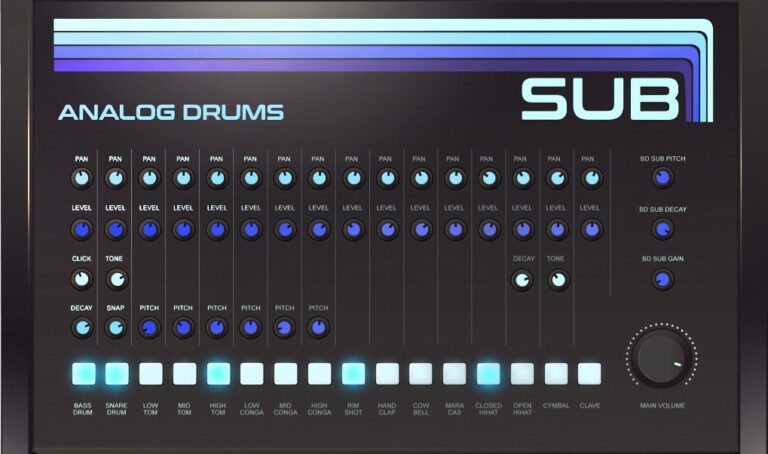
OS: Windows Win Mac Mac Bit Version: 64-bit Developer: Sampleson Size: 35MB Rating: 84/100
SUB offers classic analog drum sounds combined with a deep sub-bass oscillator for extra punch. It recreates vintage drum tones using pure synthesis, not samples, giving producers more control to shape their sound. The plugin is lightweight, quick to load, and doesn’t need any extra software.
With 18 drum sounds, pan and volume controls, and a clear layout, SUB provides a simple way to build rich drum tracks. Its flexible tone and decay controls let creators dial in tight hits or long, deep lows that suit any style of music production.
Features
- 18 Classic Analog Drum Sounds
- Fully Synthesized Drum Engine
- Sub-Bass Oscillator Included
- Adjustable Pitch And Decay
- Mixer With Pan And Volume
- Drive Control Adds Extra Harmonics
- HD Scalable User Interface
- Low CPU Usage Performance
- No Samples Or Libraries Needed
- Compatible With Major DAWs
Pros
- Warm and rich analog drum tones
- No samples, pure synthesis design
- Sub oscillator adds deep bass
- Low CPU use for smooth play
- Fast loading with tiny file size
- Clean and easy-to-use interface
- Instant play with no setup
- Tight MIDI timing and response
- Competes with paid analog drum plugins
- Flexible sound shaping controls
Cons
- Limited to basic analog sounds
- Cannot import your own samples
- No preset library included
- Lacks modern sound layering features
- No randomization or humanize controls
- Few modulation or filter options
- No built-in reverb or delay
- Limited drum variety compared to rivals
- Minimal visual feedback when tweaking
Video Demo
What Users Say
SUB Tips
- It’s helpful to start with a basic pattern, then copy and change small parts for variation.
- Adding swing or shuffle in the sequencer can make the beat sound more human.
- Automating parameters in the drum sequencer adds movement and excitement to the rhythm.
- Using ghost notes in drum patterns can make beats feel more full and natural.
- Backing up presets and patterns helps save time when starting new projects.
2. DJinnDrum
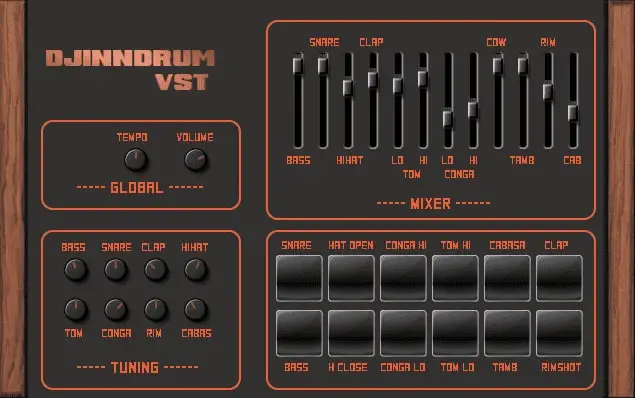
OS: Windows Win Mac Mac Bit Version: 64-bit Developer: SimpleRecorder Size: 6 MB Rating: 79/100
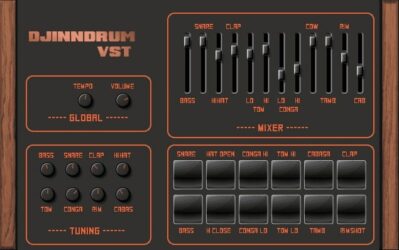
DJinnDrum offers classic 80s drum machine sounds with a clean, dry tone that’s easy to shape. Created by SimpleRecorder, it includes core drum voices like snare, bass, and hi-hat with simple tuning and mixing controls for shaping your groove.
This free plugin runs on Windows and Mac, providing pitch and tempo adjustments for flexible sound control. Its minimal interface includes sliders and drum pads that make sound shaping quick and direct, giving producers room to add EQ or effects for their ideal mix.
Features
- Free Digital Drum Machine Plugin
- Pitch And Tuning Controls
- Mixer For Balancing Drum Levels
- Individual Drum Pads For Triggering
- Includes Bass, Snare, Clap, Hihat
- Swing And Flam Controls Available
- Low Cpu Usage Performance
- Fast Loading And Stable Operation
- Classic 80s Drum Machine Style
- Compatible With Windows And Mac
Pros
- Authentic vintage Linn sound
- Light on CPU resources
- Has swing and flam controls
- Separate volume for each drum
- Quick tuning and pitch changes
- Works on Mac and Windows
- Dry sound great for mixing
- Clear and punchy drum tones
- Simple mixer for fast balance
- Low latency and stable performance
Cons
- No built-in reverb or effects
- No pattern or step sequencer
- No MIDI learn functionality
- Limited sound customization options
- No support for multiple outputs
- No velocity sensitivity support
- Lacks drum layering feature
- No built-in presets or kits
- Interface looks very basic
- Mac version may have stability issues
Video Demo
What Users Say
DJinnDrum Tips
- I often adjust the pitch of each drum sound to match the key of my song.
- I like to add a little reverb to give the drums more space in the mix.
- I always try layering the DJinnDrum with another drum plugin for a fuller tone.
- I sometimes use velocity changes to make my drum patterns sound more human and alive.
- Experiment with vintage-style saturation plugins to give the Linn Drum sounds extra warmth.
- Try using the drum machine’s individual outputs if available to mix tracks separately.
- Automate filter sweeps or volume in DJinnDrum for exciting fills or transitions.
3. RVK-808
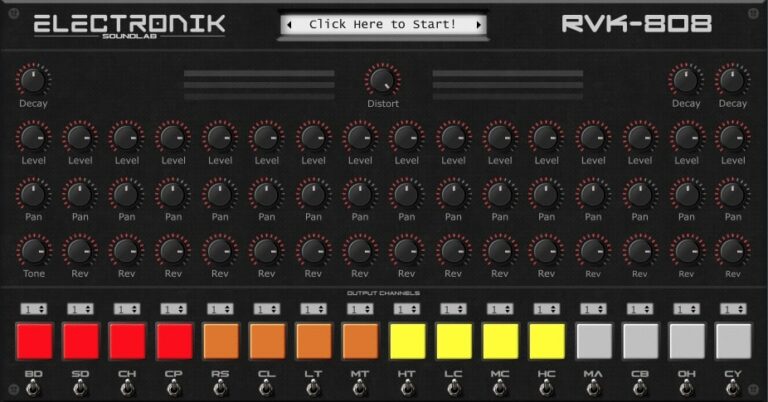
OS: Windows Win Mac Mac Bit Version: 64-bit Developer: Electronik Sound Lab Size: 585 MB Rating: 77/100
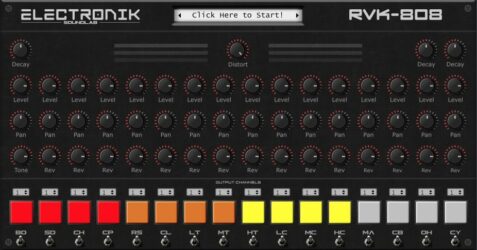
RVK-808 is a drum plugin modeled after the classic TR-808, built for quick and powerful beat creation. It includes 272 quality samples and 17 drum kits that cover a wide range of modern music styles, from hip-hop to electronic.
RVK-808 offers control over decay, volume, panning, reverb, and distortion for each drum sound. With assignable outputs and support for both Windows and Mac, it gives creators clear, punchy sounds ready for stage use or studio mixing.
Features
- Includes 272 Quality Samples
- Offers 17 Drum Kits
- Assignable Output Channels
- MIDI Compatible Plugin
- Features Decay, Level, Pan Controls
- Reverb And Distortion Knobs
- Color-Coded Drum Pads
- Works In VST, AU, VST3 Formats
- Supports Windows And Mac Systems
- Low CPU Usage Performance
Pros
- Includes 17 full drum kits
- Comes with 272 clean samples
- Has assignable output channels
- Has reverb and distortion knobs
- Better sound variety than many free Linn Drum VSTs
- Low CPU usage performance
- Works on Windows and Mac
- MIDI compatible for easy control
- Bright color pads for each drum
- Modern design and clear layout
Cons
- No step sequencer
- Limited kit variety
- No built-in effects
- No sample import
- Not resizable GUI
- Few sound-shaping tools
- Missing MIDI learn
- Can’t tune individual drums
- Lacks pattern saving
- May not work on new macOS
Video Demo
What Users Say
RVK-808 Tips
- When I want a more human feel, I add small timing changes to each drum hit.
- I always check the tuning of each drum sample so it blends better with the music’s key.
- Using the Linn Drum VST can add that classic 80s feel to a track.
- Shortening the snare and hi-hat samples can help create tighter and punchier beats.
- The kick drum can be layered with a low-frequency sine wave for a stronger bass presence.
- Producers can automate volume or filter changes to make drum parts more dynamic.
4. Tromine GT
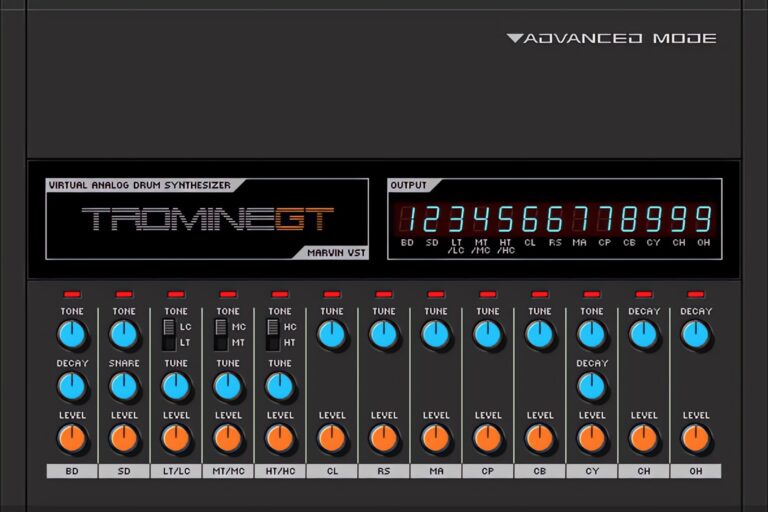
OS: Windows Win Bit Version: 32-bit Developer: Marvin Pavilion Size: 1 MB Rating: 73/100
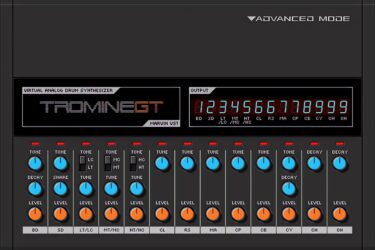
Tromine GT offers a classic TR-808 style drum sound in a simple plugin format. It includes 16 analog drum parts like bass drum, snare, toms, and hi-hats. Each sound has easy tone, decay, and volume controls, giving producers quick access to shaping their drum tones.
With nine outputs and MIDI automation support, Tromine GT allows flexible routing and control for detailed mixing. Its clean analog character and punchy sound make it a useful choice for creating vintage-style beats across hip-hop, electro, and dance music.
Features
- Classic Analog Drum Emulation
- 16 Analog Drum Synths
- Nine Independent Audio Outputs
- Tone Control For Each Drum
- MIDI CC Control Support
- Automation Feature Available
- Simple User-Friendly Interface
- Light On CPU Usage
- Bass Drum Sound Shaping
- Free Analog Drum Synth Plugin
Pros
- Authentic classic 808 drum sound
- Very low CPU usage
- Includes 16 analog drum types
- Separate outputs for flexible mixing
- Faithful 808-style emulation
- MIDI CC control support
- Supports automation in DAWs
- Mix-ready drums with little tweaking
- Fast setup for quick creativity
- Free and easily downloadable
Cons
- Only works on Windows computers
- Not available in 64-bit version
- No macOS or Linux support
- No built-in drum sequencer
- Limited control over each drum
- No drag-and-drop MIDI patterns
- Outdated 32-bit plugin format
- GUI not resizable or updated
- No built-in reverb or delay
- No built-in compressor or EQ
Video Demo
What Users Say
Tromine GT Tips
- I use the shuffle or swing knob to make my rhythm feel more natural.
- I use EQ to cut out extra low or high sounds that I don’t need.
- The Tromine GT works best when mapped to a MIDI controller for quick hands-on control.
- Layering Tromine GT sounds with a Linn Drum VST can create warm vintage grooves.
- Experimenting with the velocity settings can make patterns feel more human.
- Adding a bit of drive or distortion gives drums extra energy and character.
- Using both the Tromine GT and Linn Drum VST together can blend modern punch with classic flavor.
5. T-Rex 606
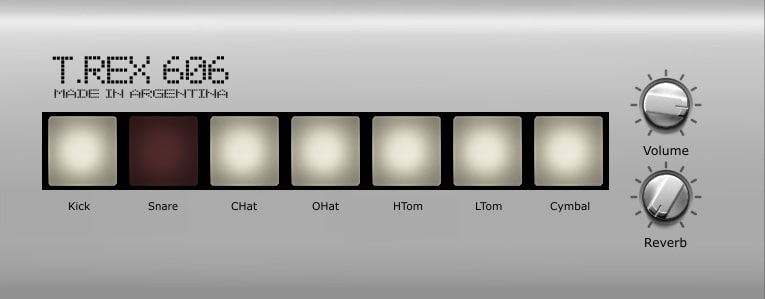
OS: Windows Win Mac Mac Bit Version: 32-bit, 64-bit Developer: Max Project Size: 2 MB Rating: 72/100
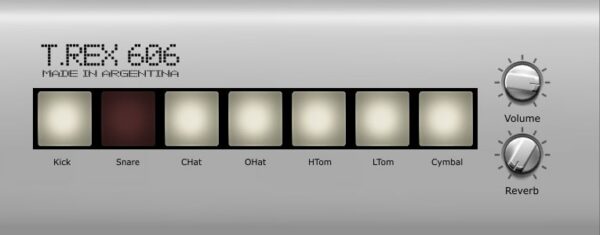
T-Rex 606 is a drum plugin based on the classic Roland TR-606. It offers seven classic drum sounds, including kick, snare, toms, and cymbals, with controls for volume and reverb. Its retro look mirrors the feel of vintage hardware.
T-Rex 606 runs on Windows and Mac in VST and AU formats. It delivers punchy, clean tones that fit styles from electronic to rock. Simple controls let music makers shape their beats quickly while keeping the classic character of the original drum machine.
Features
- Seven Classic Drum Samples
- Authentic TR-606 Sound Emulation
- Adjustable Reverb Effect
- Lightweight On CPU
- Vintage Style Interface
- Individual Sound Buttons
- Works With Many DAWs
- Available In VST And AU
- Supports 32-Bit And 64-Bit
- Runs On Windows And Mac
Pros
- Authentic vintage 606 drum sound
- Light on computer resources
- Works on Windows and Mac
- Includes seven classic drum sounds
- Adjustable reverb for depth
- Faithful TR-606 analog feel
- Ideal for retro and acid beats
- Customizable sound mix options
- Stable and bug-free performance
- One of the best free 606s
Cons
- Only seven drum sounds available
- No built-in step sequencer
- Limited sound shaping controls
- Cannot load custom drum samples
- No tuning or pitch adjustment
- No velocity sensitivity support
- Lacks multiple output routing
- No MIDI mapping flexibility
- No pattern-saving feature included
- Very basic interface design
Video Demo
What Users Say
T-Rex 606 Tips
- I like to start by picking a drum kit preset that fits my song and then tweak the sounds one by one.
- I like to add a touch of compression to make the Linn Drum sounds hit harder.
- Try layering different Linn Drum samples to create a richer and more full sound.
- Be sure to set each drum’s volume and pan so that no sound is too loud or hidden.
- Use automation in your DAW to make the drum pattern move and feel alive over time.
- Experiment with swing or shuffle settings to make the rhythm groove more naturally.
6. T.REX 1982
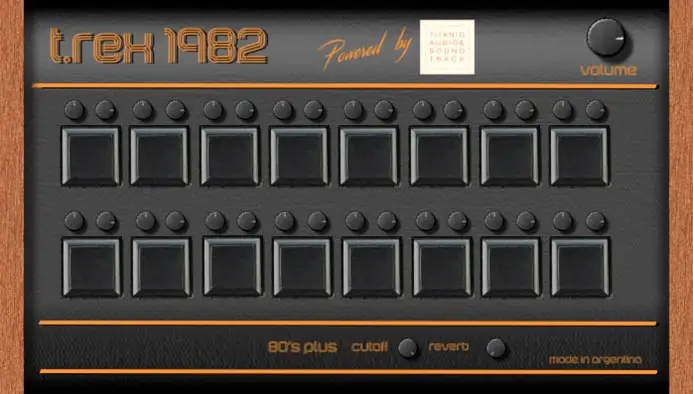
OS: Windows Win Mac Mac Bit Version: 32-bit, 64-bit Developer: Max Project Size: 2.6 MB Rating: 66/100
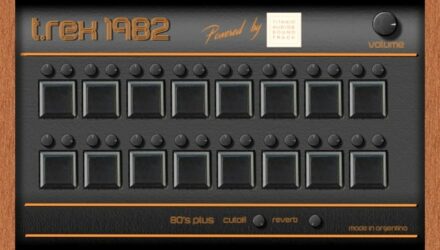
T.REX 1982 offers the classic punch of the LinnDrum sound in a simple and modern plugin. It includes 16 drum samples with individual volume and pan controls, along with a master volume knob for quick mixing adjustments. The 64-bit processing keeps the retro feel while sounding fresh and clear.
This plugin features a built-in reverb and a special “80s Plus” effect for shaping tone and space. Its vintage-style interface adds character, making it easy to explore drums ideal for retrowave, vaporwave, and synthwave tracks on both Windows and Mac systems.
Features
- 16 Classic Drum Sounds Included
- Individual Volume And Pan Controls
- Built-In Algorithmic Reverb Effect
- Special “80s Plus” Filter Mode
- Vintage-Style Graphical Interface
- Low CPU Usage Performance
- Optimized For Retro-Inspired Genres
- Available In VST And AU Formats
- Supports 32-Bit And 64-Bit Systems
- Master Volume For Overall Mix
Pros
- Classic LinnDrum sound character
- Unique “80s Plus” filter effect
- Built-in reverb adds depth
- Rich sound from 64-bit processing
- Low CPU usage performance
- Quick setup, no extra samples needed
- Each drum sound has pan control
- Modern tone with retro vibe
- Free and easy to install
- Works on Windows and Mac
Cons
- Only 16 drum sounds available
- No custom sample loading
- Limited sound control
- No pitch adjustment
- No MIDI mapping
- No step sequencer
- No compression or EQ
- Lacks velocity dynamics
- No multi-output support
- Sounds can feel thin
Video Demo
What Users Say
T.REX 1982 Tips
- I always turn down the master volume first to keep my speakers safe when testing new samples.
- I like to blend the plugin’s snare with a modern snare to make it pop.
- I try adjusting the pitch of the kicks to match the key of my song.
- I layer real drum samples with the plugin’s sounds for a fuller groove.
- Use EQ to boost the highs on hi-hats and the lows on kicks for balance.
- Adjust the swing setting to make rhythms feel more natural and groovy.
- Use short decay on drums if you want tight, snappy beats.
7. SD 2100
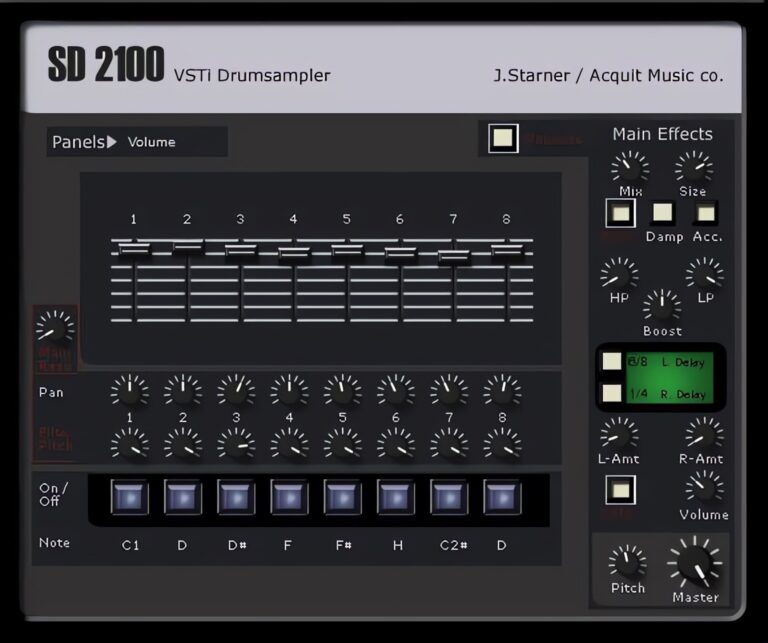
OS: Windows Win Bit Version: 32-bit Developer: Acquit Music Size: 2 MB Rating: 66/100
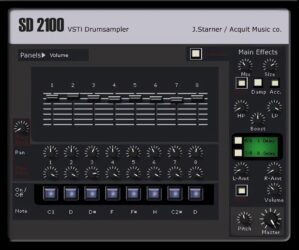
SD 2100 offers a classic drum machine vibe with a focus on punchy, vintage-style beats. Made by Acquit Music, it recreates the tone and workflow of the Emu SP 1200 Beat Box. With sliders, pan knobs, and pitch filters, users can shape each drum sound easily.
It includes controls for mixing effects, adjusting tone, and shaping reverb and delay. The plugin’s simple layout helps producers fine-tune kicks, snares, and hi-hats for a gritty, old-school sound. SD 2100 is ideal for adding a vintage edge to modern tracks on Windows systems.
Features
- Emulates Classic Emu SP 1200 Sound
- Supports Classic Lo-Fi Drum Tones
- Includes Volume Sliders And Pan Knobs
- Has Step Grid For Beat Patterns
- Includes Swing And Velocity Sensitivity
- Contains Reverb And Echo Adjustments
- Provides Delay Left And Right Options
- Includes Master And Pitch Controls
- Supports High And Low Pass Filters
- Works With Most Music Software
Pros
- Authentic vintage drum machine sound
- Faithful Emu SP 1200 emulation
- Adjustable pitch for every drum
- Filter section adds tonal control
- Built-in delay and reverb effects
- Authentic 12-bit crunchy character
- Great swing and groove options
- Switch between kits while playing
- Good dynamic range with velocity
- Lightweight and fast to load
Cons
- Only works on Windows computers
- No 64-bit plugin version
- Not available for Mac users
- User interface looks outdated
- Limited sound customization options
- No built-in sequencer tools
- Few presets compared to others
- Missing advanced mixing features
- Does not sync to tempo well
- Uses more CPU than expected
Video Demo
What Users Say
SD 2100 Tips
- I layer two drum sounds to make my beats feel full and punchy.
- Try using the SD 2100’s vintage filter to give the drums a warm, classic sound.
- Mix the Linn Drum VST with modern samples for a cool retro-meets-new sound.
- Use compression lightly to tighten the drum mix without crushing the dynamics.
- Adjust the swing control to make beats feel more human and less robotic.
- Use EQ to carve space for other instruments so the drums don’t overpower the mix.
8. The Drum Source

OS: Windows Win Bit Version: 32-bit Developer: Witech Size: 7 MB Rating: 65/100
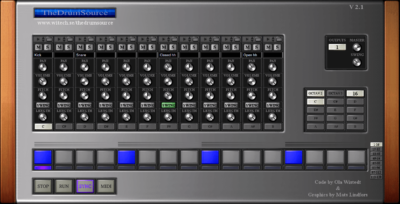
The Drum Source offers a classic drum machine experience inside your DAW. It includes a built-in sample browser and 24-step sequencer, letting you load and arrange your own drum sounds with ease. Each channel has settings for volume, pitch, pan, and swing for shaping rhythms.
This plugin supports many sample formats and includes 12 output channels for flexible routing. Its resizable interface keeps everything visible on one screen. With options for RUN, SYNC, and MIDI modes, The Drum Source keeps your beats tight and in time with the rest of your music.
Features
- 24-Step Sequencer Patterns
- Built-In Drum Sample Browser
- 12 Separate Output Channels
- Adjustable Swing Per Channel
- Volume, Pitch, And Pan Controls
- Mute And Solo Channel Functions
- MIDI Control For Expression
- Resizable User Interface
- Lightweight And CPU Friendly
- Step Pads For Beat Creation
Pros
- Fun built-in step sequencer
- Built-in sample browser included
- 24 sequences for creative beats
- 12 output channels for routing
- Groovy swing and length control
- Drag-and-drop sample loading
- Resizable interface for any screen
- Supports many sample formats
- Works with MIDI for more control
- Lightweight and CPU friendly
Cons
- Only works on Windows systems
- Interface looks dated and plain
- Can crash in some DAWs
- No built-in effects like reverb
- Lacks velocity sensitivity for pads
- No drag-and-drop from DAW
- Only 32-bit version available
- No support for VST3 format
- Limited audio output options
- Sequencer feels basic compared to others
Video Demo
What Users Say
The Drum Source Tips
- I try changing the swing amount to make the beat feel more human and less robotic.
- I sometimes layer two kick samples in The Drum Source to make the low end sound stronger.
- I use velocity changes to make each hit sound a bit different, like a real drummer.
- Use pattern chaining to build longer drum sections without copying notes manually.
- Drag and drop samples directly into The Drum Source’s slots to speed up your workflow.
- Listening on different speakers or headphones helps check that the drum mix is balanced.
9. Roland TR707
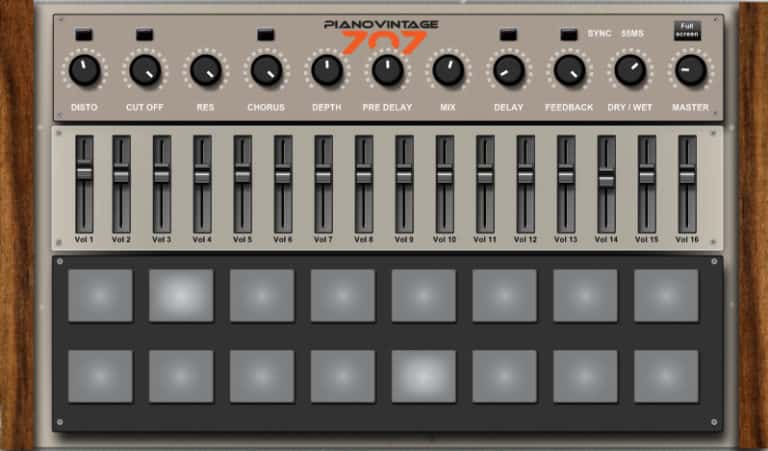
OS: Windows Win Bit Version: 32-bit Developer: Pianovintage Size: 6 MB Rating: 58/100
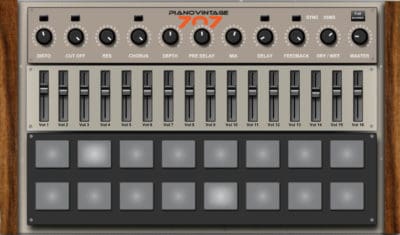
Roland TR707 offers a classic drum machine experience that brings the vintage sound of the 1980s into today’s studios. Created by Pianovintage, this free Windows plugin includes 16 sampled drum sounds with controls for LP filter, distortion, chorus, and sync delay.
It lets you shape your drums using simple controls for tone, depth, delay, and mix. Each sound can be adjusted with sliders and pads for quick changes. Perfect for adding retro rhythm to tracks, the TR707 plugin delivers reliable electronic drum tones without extra setup.
Features
- 16 Sample Drum Kit
- LP Filter With Cutoff Control
- Built-In Distortion Effect
- Chorus Effect For Depth
- Sync Delay Function
- Volume Sliders For Each Sound
- Trigger Pads For Drum Sounds
- Master And Dry/Wet Controls
- Low CPU Usage Performance
- Free To Download And Use
Pros
- Free to download and use
- Faithful classic 707 drum sounds
- Built-in distortion adds crunch
- Chorus makes sounds feel bigger
- Sync delay keeps timing tight
- Low latency for real-time play
- Very light on computer CPU
- Sounds close to real hardware
- Perfect for layering drum tracks
- No registration or login needed
Cons
- Only works on Windows
- No macOS support
- Outdated 32-bit format
- No built-in sequencer
- Limited sound editing
- No individual routing
- GUI looks outdated
- May crash on newer DAWs
- Samples lack dynamics
- Effects sound dated
Video Demo
What Users Say
Roland TR707 Tips
- I use the built-in mixer to balance the snare and hi-hats until they fit nicely in my track.
- I layer the TR707 kick with another drum sample to create a fuller low end.
- I sometimes mix TR707 samples with Linn Drum samples to get the best of both worlds.
- Try adjusting the output volume of each channel to get a more balanced mix right inside the plugin.
- Experiment with small amounts of saturation to make the digital drums sound warmer and more alive.
- Use a compressor after the TR707 plugin to glue the drum sounds together smoothly.
10. JM-1 Drum
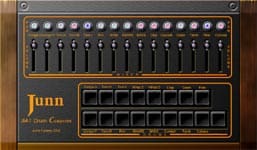
OS: Windows Win Bit Version: 32-bit Developer: SynthEdit Size: 1 MB Rating: 55/100
JM-1 Drum offers classic electronic drum sounds based on vintage machines like the Boss DR-110. It includes 16 drum voices, each with its own volume and pan controls for shaping your mix. The plugin’s simple design makes it easy to trigger, adjust, and blend each sound.
Each drum pad represents a different sound such as kick, snare, toms, or cymbals. Mute and solo buttons give quick control during beat-making, while MIDI support helps match your playing style. JM-1 provides a retro tone that fits electronic, synth-pop, or experimental tracks.
Features
- Sixteen Classic Drum Sounds
- Midi-Controlled Knobs And Sliders
- Pan Knobs For Stereo Position
- Mixer Section For Sound Balancing
- Vintage Hardware Style Interface
- Randomize Feature For New Kits
- Velocity Sensitivity For Each Drum
- Kick, Snare, Toms, Cymbals, Claps
- Filtered Noise And Sine Oscillators
- Free 32-Bit VST Plugin
Pros
- Classic Linn Drum style sounds
- Analog-style sound generation engine
- Includes sixteen drum sounds
- Has a full mixer section
- Randomize tool makes new kits
- Mute and solo buttons included
- Pan knobs for stereo control
- Kick and snare sound powerful
- Looks like vintage hardware gear
- Uses very little computer power
Cons
- Only works on Windows systems
- No 64-bit version available
- Interface looks old and dated
- Limited to basic drum sounds
- No sample import feature
- No built-in step sequencer
- No built-in effects
- Not compatible with macOS
- Lacks preset management tools
- Lacks advanced sound layering
Video Demo
What Users Say
JM-1 Drum Tips
- I try adjusting the pitch of the snare and kick to make them fit better in my mix.
- I use panning to spread the drums so each one has its own space in the stereo field.
- Use the velocity control to make the drum hits sound more dynamic and less robotic.
- Try adding a low-cut filter to keep the kick drum clean and punchy.
- Layer claps and snares from different kits to give your groove more impact.
- I add light compression to glue my drum sounds together.
Linn Drum VST Plugins Compared
This table compares the Linn Drum plugins by operating system, bit version, format, and rating.
| Details | SUB | DJinnDrum | RVK-808 | Tromine GT | T-Rex 606 | T.REX 1982 | SD 2100 | The Drum Source | Roland TR707 | JM-1 Drum |
|---|---|---|---|---|---|---|---|---|---|---|
| Image | 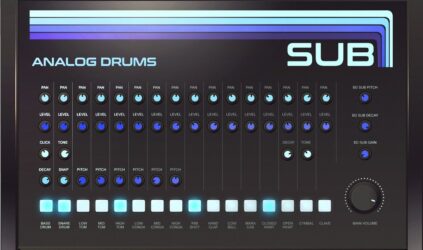 |
 |
 |
 |
 |
 |
 |
 |
 |
|
| Rating | ||||||||||
| OS | Windows, Mac | Windows, Mac | Windows, Mac | Windows | Windows, Mac | Windows, Mac | Windows | Windows | Windows | Windows |
| Formats | VST, AU | VST | VST, VST3, AU | VST | VST, AU | VST, AU | VST | VST | N/A | VST |
| Bit Version | 64-bit | 64-bit | 64-bit | 32-bit | 32-bit, 64-bit | 32-bit, 64-bit | 32-bit | 32-bit | 32-bit | 32-bit |
| Developer | Sampleson | SimpleRecorder | Electronik Sound Lab | Marvin Pavilion | Max Project | Max Project | Acquit Music | Witech | Pianovintage | SynthEdit |
| License | Freeware | Freeware | Freeware | Freeware | Freeware | Freeware | Freeware | Freeware | Freeware | Freeware |
| Sample-Based | No | Yes | Yes | Select | Yes | Select | Select | Yes | Yes | Select |
| Download Size | 35MB | 6 MB | 585 MB | 1 MB | 2 MB | 2.6 MB | 2 MB | 7 MB | 6 MB | 1 MB |
| CPU Load | Low | Low | Low | Low | Low | Low | Low | Low | Low | Low |
| Polyphony | 16 | 12 | 64 | 64 | 6 | 8 | 64 | 24 | 10 | 32 |
| Features | Analog drum synthesis, Sub-bass oscillator, 18 drum sounds, Built-in mixer, Scalable interface, Instant load, No activation | Dry sound, Pitch control, Tempo adjustment, Volume control, Mixer balance, Drum pads, Tuning options | High-quality samples, Multiple drum kits, Assignable outputs, MIDI compatibility, User-friendly interface, Live performance ready, Genre versatility | TR-808 Emulation, 16 Drum Synths, MIDI Automation, Multiple Outputs, Tone Control, Decay Control, Volume Control | Classic drum samples, Volume control, Reverb effects, Vintage design, Individual sound buttons, TR-606 emulation, Easy installation | Classic drum sounds, Individual volume control, Algorithmic reverb, “80s Plus” filter, Vintage GUI, Genre optimization, Master volume. | SP-1200 Emulation, Volume Sliders, Pan Knobs, Pitch Filters, Effects Control, Mix Knob, High-Low Filters | Sample Browser, Step Sequencer, Resizable GUI, Volume Control, Pitch Control, Swing Function, MIDI Mode | 16-Sample Kit, LP Filter, Distortion, Chorus, Sync Delay, Adjustable Controls, Drum Pads | Drum Pads, Mixer Section, Pan Knobs, Volume Faders, Mute Buttons, Solo Buttons, Randomize Feature |
| Controls | Pan, Level, Click/Tone, Decay/Snap, Pitch, BD Sub Pitch, Main Volume | Tempo, Volume, Bass, Snare, HiHat, Clap, Mixer | Start Button, Decay Knob, Level Knob, Pan Knob, Reverb Knob, Distort Knob, Output Buttons | Tone, Decay, Level, Output Display, Bass Drum, Snare Drum, High Tom | Kick, Snare, CHat, OHat, HTom, LTom, Cymbal | Volume Knob, Drum Pads, 80s Plus Button, Cutoff Button, Reverb Button, Power Label, Wood Panels | Volume Sliders, Pan Knobs, Filter Pitch, Note Buttons, Main Effects, Mix Knob, Size Knob | Volume, Pan, Pitch, Swing, Length, Mute, Solo | Disto, Cut Off, Res, Chorus, Depth, Mix, Master | Pan Knobs, Volume Faders, Drum Pads, Mute Buttons, Solo Buttons, Mixer Section, Labels |
| Effects Included | Unknown | Swing, Flam | Reverb, Distortion | Unknown | Reverb | Reverb, Lowpass filter, Chorus, Delay | Echo, Reverb, Delay, High Pass Filter, Low Pass Filter, Tape Saturation, Sidechain/Ducking | Volume, Pan, Pitch, Swing, Length | LP filter, distortion, chorus, sync delay, reverb | Unknown |
| MIDI Learn | Yes | Unknown | Unknown | Unknown | Unknown | Unknown | Unknown | Yes | Unknown | Unknown |
| Presets | 15 | N/A | 272 | 25 | 15 | 50 | 75 | N/A | N/A | N/A |
| Standalone | Yes | Yes | Yes | Select | Yes | Yes | Select | Yes | Yes | Yes |
| Last Updated | 06/12/2019 | 05/09/2024 | 08/03/2021 | 04/14/2024 | 06/11/2020 | N/A | N/A | 06/04/2014 | 12/02/2023 | N/A |
Favorite Linn Drum VST Plugin
Our top pick for the best free Linn Drum plugin alternative is SUB by Sampleson. It is a reliable plugin with solid sounds, a vintage interface, and is for Windows and Mac.
| Details | SUB |
|---|---|
| Image |
|
| Rating | |
| OS | Windows, Mac |
| Formats | VST, AU |
| Bit Version | 64-bit |
| Developer | Sampleson |
| License | Freeware |
| Sample-Based | No |
| Download Size | 35MB |
| CPU Load | Low |
| Polyphony | 16 |
| Features | Analog drum synthesis, Sub-bass oscillator, 18 drum sounds, Built-in mixer, Scalable interface, Instant load, No activation |
| Controls | Pan, Level, Click/Tone, Decay/Snap, Pitch, BD Sub Pitch, Main Volume |
| Effects Included | Unknown |
| Download | Download SUB |
Linn Drum VST FAQs
How to Install Linn Drum VST Plugins
To install linn drum VST plugins on Windows or Mac, extract the files from the Zip or Rar. Move the files (.dll for Windows or .component for Mac) into your DAW’s plugin folder. Then restart your software and rescan the directory to complete the process. Tutorial: How to Install VST Plugins
Windows:
Extract the downloaded zip file and copy the .dll file into the VST plugins folder scanned by your DAW. Restart your music software and rescan your plugin directory to begin using the new VST.
Mac OS X:
Extract the downloaded archive and move the .component or .VST file to the plugin folder. It is usually /Library/Audio/Plug-Ins/Components or /Library/Audio/Plug-Ins/VST. Restart your DAW and rescan your plugins to complete the installation.
What Is A Linn Drum VST Plugin?
A Linn Drum VST plugin is an emulation of the famous Linn Drum, a classic drum machine used extensively in the 1980s. The original Linn Drum, created by Roger Linn, was one of the first drum machines to use digital samples of acoustic drums, influencing the sound of pop, dance, and electronic music of that era.
I hope you found this list of free Linn Drum VST plugin alternatives helpful. They are great free alternatives to the classic drum machine.