Here are the best free Drummer VST plugins for Windows and Mac. We have included videos, reviews, features, pros, cons, and plugin ratings.
How we rate drummer plugins: We rate each drum plugin based on sound quality, design, performance, features, usability, and compatibility. We rate plugins on a scale of 1 to 100.
Table of Contents

I have spent over 15 years testing and comparing hundreds of free and paid VST plugins, supported by hands-on demos on our YouTube channel, which has 12,000+ subscribers.
Best Free Drummer VST Plugins
This table compares Drummer VST plugins by operating system, format, and rating.
| # | Plugins | Ratings | OS | Formats |
|---|---|---|---|---|
| 1 | MT Power Drum Kit | Windows Mac | VST, VST2, VST3, AU, AAX | |
| 2 | Exc!te Snare Drum | Windows Mac Linux | VST | |
| 3 | Black Noh Snare | Windows Mac | VST, AU | |
| 4 | Dark VX Kick | Windows Mac | VST, AU | |
| 5 | Steven Slate Drums | Windows Mac | VST | |
| 6 | SM Drums | Windows Mac | SFZ | |
| 7 | Cherry Snare | Windows | VST, AU | |
| 8 | Line of Legends | Windows Mac | VST, AU | |
| 9 | Royotoms | Windows Mac | VST, AU | |
| 10 | Organic Calfskin Kit | Windows Mac | AU, RTAS | |
| 11 | Cymbalistic | Windows Mac | VST, AU | |
| 12 | Divine Kit | Windows Mac | VST, AU | |
| 13 | DPC 3 | Windows | VST | |
| 14 | Snare VST | Windows | VST | |
| 15 | DrumKit1 | Windows | VST |
1. MT Power Drum Kit
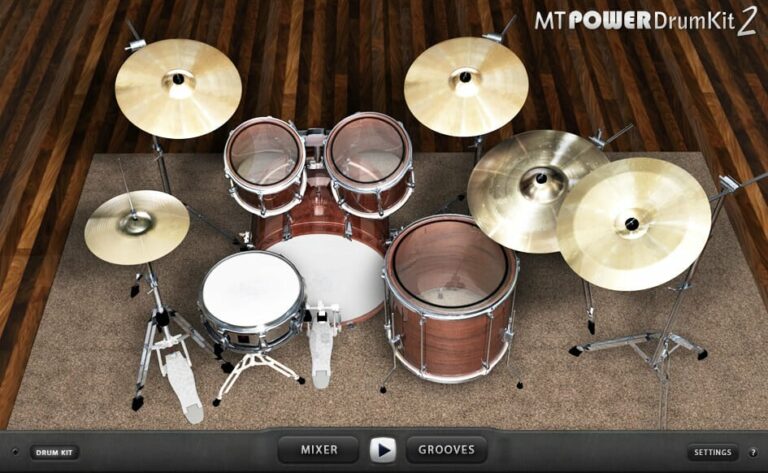
OS: Windows Win Mac Mac Bit Version: 32-bit, 64-bit Developer: Manda Audio Size: 60 MB Rating: 85/100
MT Power Drum Kit offers realistic acoustic drum sounds that fit easily into pop, rock, and metal tracks. Its samples are pre-processed with compression and EQ, giving them a clear and punchy tone that blends well in a mix without extra tweaking.
The built-in Groove Library includes thousands of rhythms and fills that let you build smooth and natural drum parts in minutes. With detailed cymbal recordings and lifelike hi-hat dynamics, MT Power Drum Kit delivers professional-quality drums for any studio project.
Features
- High-Quality Acoustic Drum Sounds
- Pre-Processed With Compression And EQ
- Realistic Hi-Hat And Cymbal Samples
- Built-In Mixer For Drum Balance
- Large Groove Library Included
- Smooth And Realistic Drum Fills
- Full Drum Kit Visual Interface
- Supports VST, AU, And AAX Formats
- Works On Windows, Mac, And Linux
- Mix-Ready Sounds For Any Genre
Pros
- Realistic acoustic drum sounds
- Ready-to-mix processed samples
- Huge groove and fill library
- Light on CPU and memory
- Works on Windows, Mac, Linux
- Adjustable mixer for each drum
- Built-in compressor control
- Mix-ready sound out of box
- Reliable and low-latency performance
- Professional results for free
Cons
- Limited drum kit variety
- Cannot load custom samples
- Few mixing customization options
- No built-in effects
- Groove library feels dated
- No humanize or swing controls
- Missing detailed velocity layers
- No multi-output routing
- Not updated frequently
- Less dynamic than paid plugins
Testimonials
2. Exc!te Snare Drum
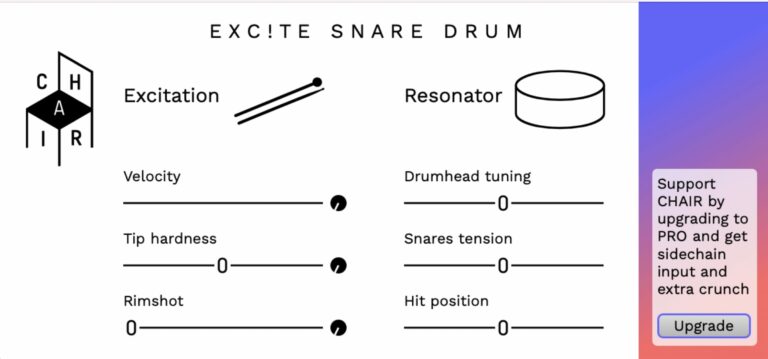
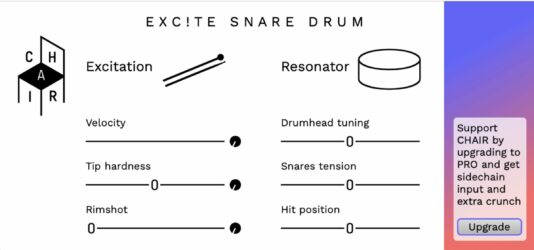
OS: Windows Win Mac Mac Linux Linux Bit Version: 64-bit Developer: CHAIR Size: 3.1 MB Rating: 83/100
Exc!te Snare Drum offers realistic snare sounds using advanced physical modeling. It simulates the details of acoustic drums, from rimshots to snare tension, so you can shape your sound naturally. Each strike responds to your playing dynamics, adding depth and realism to your tracks.
You can adjust the drumhead tuning, hit position, and tip hardness to match different styles. MIDI control lets you trigger hits and modify sounds for more expression. Exc!te Snare Drum is a free VST available for Windows, macOS, and Linux systems.
Features
- Realistic Physical Modeling Sound Engine
- Blendable Rimshot And Normal Hits
- Customizable Drumhead Tuning Options
- Snares Tension For Tone Control
- Variable Hit Position Adjustment
- MIDI Triggering For Drum Hits
- Velocity Control For Dynamic Response
- Waveguide Resonator Drum Algorithm
- Lightweight And CPU Efficient Performance
- Free 64-Bit VST Plugin Version
Pros
- Realistic snare sound modeling
- Unique physical modeling technology
- Adjustable tip hardness control
- Rimshot blending adds realism
- Change hit position for tone
- Control snare tension smoothly
- Fine-tune drumhead pitch easily
- Lightweight compared to sample models
- Low CPU use for efficiency
- Great dynamic and velocity response
Cons
- Limited sound variety for genres
- No built-in reverb or effects
- No preset browser for sounds
- Lacks multiple mic position options
- Cannot load own samples
- No built-in EQ controls
- No humanization randomizer feature
- May crash on some DAWs
- Not available in AU format
- Only works in 64-bit systems
Testimonials
3. Black Noh Snare
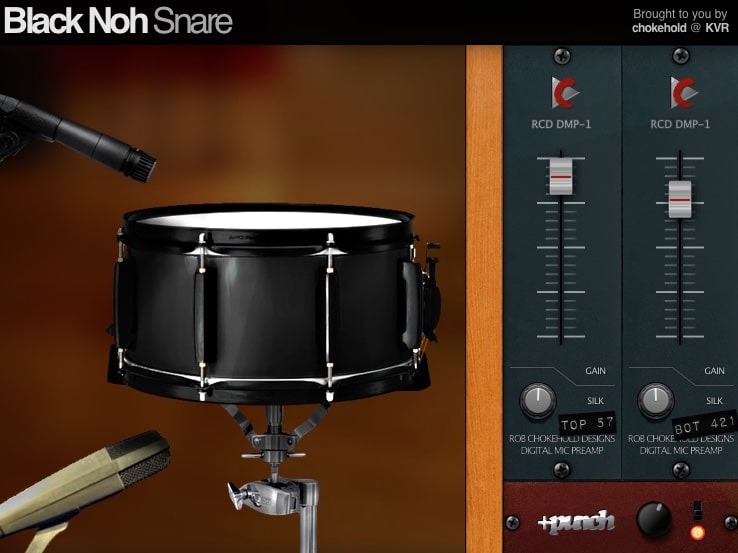
OS: Windows Win Mac Mac Bit Version: 64-bit Developer: Chokehold Size: 15 MB Rating: 78/100
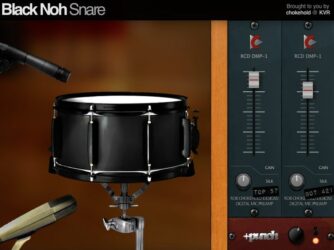
Black Noh Snare offers a realistic and punchy snare drum sound made from real drum samples. It includes nine velocity layers and eight random-round samples, giving each hit a natural feel. The included subkick and rimshot features help it stand out in dense mixes.
You can shape the tone with “Silk” knobs for each microphone and use the “+Punch” button for more impact. The plugin’s bright, low-end-light character fits especially well in rock and metal tracks. It runs on Windows, Mac, and Linux in both VST and AU formats.
Features
- Sampled Snare Drum Model
- Nine Velocity Layers
- Eight Random-Robin Samples
- Includes Subkick Option
- +Punch Module Adds Power
- Silk Controls Adjust Attack
- Mute Each Microphone Separately
- Top And Bottom Mic Gain
- Light CPU Usage
- 64-Bit VST And AU Formats
Pros
- Realistic snare sound with dynamics
- Nine velocity layers add depth
- Eight random-robins prevent repetition
- Includes subkick for fuller tone
- +Punch button adds extra power
- Silk knobs shape smoothness easily
- Mute mics for creative control
- Lightweight and easy on CPU
- Loads instantly for fast workflow
- Natural sound compared to other free snares
Cons
- Outdated look and dull interface
- Limited to one snare model
- Fixed pitch, no tuning control
- Few sound-shaping features overall
- No built-in reverb options
- No built-in compressor included
- Limited control over dynamics
- GUI not resizable for comfort
- Older code, not often updated
- No stereo width adjustment
Testimonials
4. Dark VX Kick
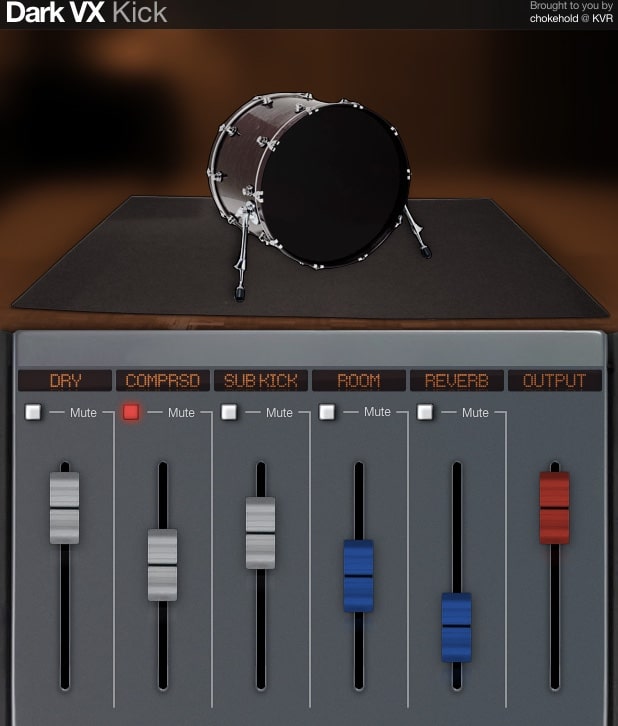
OS: Windows Win Mac Mac Bit Version: 32-bit Developer: Chokehold Size: 6 MB Rating: 78/100
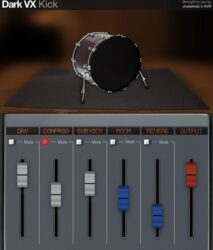
Dark VX Kick offers a focused way to shape strong and deep kick drum sounds. It provides four velocity layers, round-robin sampling, and multiple mixer channels such as DRY, COMPRSD, SUB KICK, ROOM, and REVERB to control tone and depth with precision.
Each channel brings a unique touch—from analog-style warmth and compression to powerful sub-bass and room ambience. Simple sliders and mute buttons help adjust or isolate each part of the sound, making it easy to craft punchy kicks that blend smoothly in any mix.
Features
- Layered Sampled Kick Drum Sounds
- Four Adjustable Velocity Layers
- Round-Robin Sample Variation
- Analog Hardware Equalizer Processing
- Sub Kick Channel For Deep Bass
- Independent Mixer Channel Controls
- Octave Tuning Matches Song Key
- Noise Control Adds Subtle Grit
- Supports VST And AU Formats
- Works On Windows And Mac
Pros
- Rich analog hardware tone
- Deep and strong sub-bass
- OCTave tuning for key matching
- Light CPU use compared to others
- Free to use with no limits
- Instant punchy 808-style kicks
- Customizable attack and tone
- Four velocity layers for realism
- Independent mixer channels
- Useful noise knob for texture
Cons
- Only one basic kick sample
- No variety of drum kits
- Lacks built-in synth engine
- No multi-sample drum support
- No advanced EQ or filter tools
- Only 32-bit plugin format
- No visual waveform display
- Outdated user interface design
- Cannot load external samples
- Does not support side-chaining
Testimonials
5. Steven Slate Drums

OS: Windows Win Mac Mac Bit Version: 64-bit Developer: Steven Slate Drums Size: 44.8 MB Rating: 77/100
Steven Slate Drums is a drum instrument plugin with the free, fully working SSD 5.5 demo. It includes the Deluxe 2 kit, a processed snare, and three presets: Deluxe 2 Free, Hugo, and Dry n’ Tight.
It provides raw and processed samples, MIDI grooves, and controls for building, editing, mixing, mapping, and saving kits. The library covers rock, vintage, and metal sounds, with 135 snares, 112 kicks, toms, hi-hats, crashes, rides, and splashes.
Features
- Free Never Expiring Demo
- Deluxe 2 Drum Kit
- Three Included Kit Presets
- 135 Snare Drum Samples
- 112 Kick Drum Samples
- Raw And Processed Samples
- Included MIDI Grooves
- MIDI Controller Support
- Drum Kit Building Tools
- Custom Kit Saving
Pros
- Free, fully working drum plugin
- Professional, mix-ready drum sounds
- Includes the Deluxe 2 Kit
- Offers three useful kit presets
- Includes the popular Hugo kit
- Great rock and metal sounds
- Useful vintage drum sounds
- Includes processed drum samples
- Includes raw drum samples
- Flexible MIDI mapping controls
Cons
- Only one free drum kit
- No included MIDI grooves
- No free Groove AI tools
- Basic mixer limits sound shaping
- Free version blocks expansion packs
- Needs a host DAW
- Uses about 15GB of space
Testimonials
6. SM Drums

OS: Windows Win Mac Mac Bit Version: 64-bit Developer: SM Drums Size: 2.2 GB Rating: 76/100
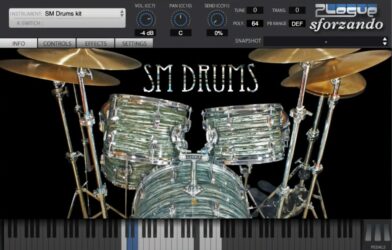
SM Drums is a free SFZ drum library for the Sforzando player. It includes about 2.2 GB of sampled drum sounds, with multiple velocity layers and round robins for more varied performances.
Use the full-kit version for stereo output, or load separate drum buses on different tracks for individual effects. Controls include volume, pan, tuning, and pitch, with templates for Reaper and FL Studio.
Features
- Free SFZ Drum Library
- About 2.2 GB Of Samples
- Multi-Sampled Drum Sounds
- Multiple Velocity Layers
- Round Robin Sample Playback
- Streams Samples From Disk
- Separate Drum Bus Versions
- Controls For Individual Kit Pieces
- Adjustable Volume, Pan, And Tune
- External Effects For Separate Buses
Pros
- Completely free drum library
- Large 2.2 GB sound library
- Many layers for each drum hit
- Plenty of round robin samples
- Streams sounds straight from your drive
- Works with the free Sforzando player
- Separate buses make mixing easier
- Add effects to each drum bus
- Wide drum tuning controls
- Shape sounds with envelope controls
Cons
- Requires Sforzando to play
- Only 64-bit support is listed
- Large sample files need space
- Other DAWs may need more setup
- GM note mapping may need changes
- Single-kit version outputs stereo only
- Separate buses need extra player instances
Testimonials
7. Cherry Snare
OS: Windows Win Bit Version: 32-bit, 64-bit Developer: Plugins4Free Size: 72 MB Rating: 75/100
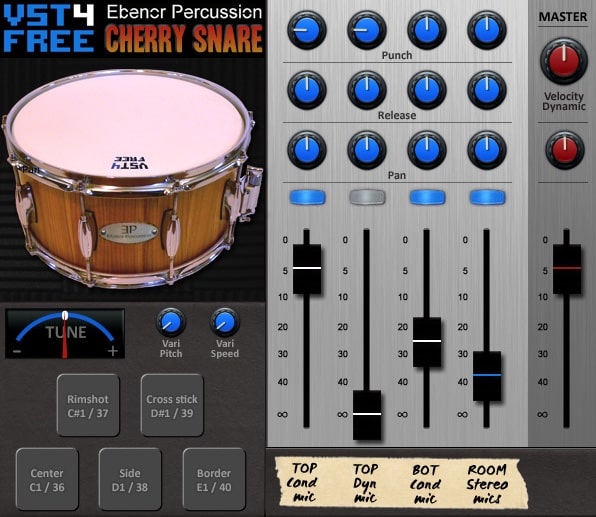
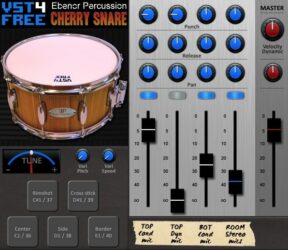
Cherry Snare offers a realistic acoustic snare drum sound made from samples of a 14-inch cherry wood drum. It uses multiple microphones and layers to capture detail and depth, giving music creators clean and natural snare tones ready for mixing and shaping.
With controls for tuning, punch, release, and pan, Cherry Snare lets you adjust tone, power, and space quickly. The plugin also includes pitch and velocity options for lifelike playing response, making it a useful tool for both traditional and modern drum sounds.
Features
- 208 Real Snare Drum Samples
- Five Microphone Recording Setup
- Four Channel Mixing Options
- Punch Control Adjusts Attack Strength
- Tune Knob Changes Drum Pitch
- Five Stroke Techniques Included
- Three Velocity Layers Available
- Five Round-Robin Samples Per Layer
- Low CPU Usage Performance
- Supports VST And AU Formats
Pros
- Real acoustic cherry wood sound
- Five microphone recording setup
- Adjustable sustain with Punch knob
- Natural pitch variation with Vari Pitch
- Separate mic channel mixing control
- Three velocity layers for realism
- Five round-robin samples per hit
- High sound quality with 24-bit samples
- Strong punch cuts through any mix
- Free and easy to install plugin
Cons
- Limited sound shaping controls
- No built-in reverb or effects
- Can sound fake without EQ
- Velocity sensitivity can bug out
- No built-in preset browser
- Limited tonal variety overall
- Interface looks a bit dated
- No MIDI learn option
- No dedicated EQ section
- Only one drum type included
Testimonials
8. Line of Legends
OS: Windows Win Mac Mac Bit Version: 32-bit, 64-bit Developer: Plugins4Free Size: 8 MB Rating: 74/100
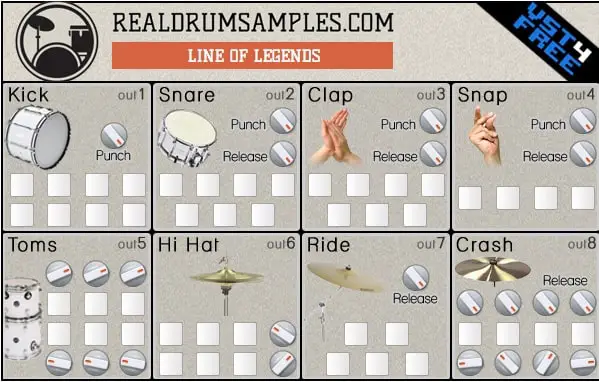
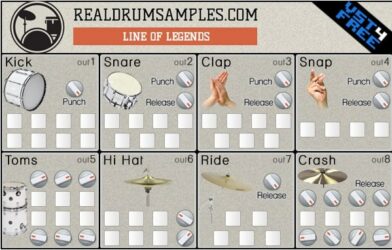
Line of Legends offers a solid set of hip-hop drum sounds designed for quick and powerful beat creation. It includes 47 punchy samples across 8 drum sections such as Kick, Snare, Clap, and Hi-hat, each with its own individual output for flexible mixing.
Each section includes punch, release, and pan knobs to shape tone, timing, and space. The layout is simple and focused, letting producers adjust drum strength and length with ease. Line of Legends runs on Windows and Mac and supports both VST and AU formats.
Features
- 47 High-Quality Drum Samples
- 8 Separate Drum Sections
- Individual Outputs For Each Section
- Punch Knobs For Attack Control
- Release And Pan Knobs
- Easy-To-Use Interface
- Low CPU Usage
- VST And AU Formats
- Supports 32-Bit And 64-Bit Systems
- Designed For Hip-Hop Production
Pros
- High-quality drum sounds for free
- Each drum has its own output
- Powerful punch controls for attack
- Release knob shapes sound length
- Low CPU usage performance
- Crisp and strong kick samples
- Bright and cutting snare hits
- Works with most DAWs easily
- Clean separation for mixing control
- Competitor to paid drum plugins
Cons
- Only one drum kit available
- No built-in effects or EQ
- No pattern or step sequencer
- Outdated 32-bit format support
- No sample import feature
- Few customization options for sounds
- Very basic user interface design
- No drum layering or tuning control
- Cannot save custom kits easily
- Feels dated compared to newer VSTs
Testimonials
9. Royotoms

OS: Windows Win Mac Mac Bit Version: 32-bit, 64-bit Developer: Alan ViSTa Size: 81 MB Rating: 69/100
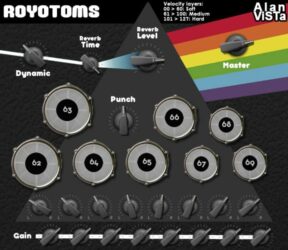
Royotoms is a free drum plugin with eight sampled rototoms, tuned to recreate the pattern heard in Pink Floyd’s “Time.” It includes dry and reverb samples, with three velocity layers and two sample variations for each layer.
Adjust each drum’s volume and pan, shape its punch, and control the reverb. Royotoms runs as a VST or AU on Windows and Mac, but it offers basic strikes rather than the full range of real rototom playing.
Features
- Eight Sampled Rototom Sounds
- 48 Dry Mono Samples
- 48 Stereo Reverb Samples
- Three Velocity Layers
- Two Round-Robin Samples Per Layer
- Adjustable Reverb Time And Level
- Punch Control Adds Attack
- Individual Drum Volume And Pan
- Dynamic Response Control
- VST And AU Plugin Formats
Pros
- Eight tuned rototoms in one plugin
- A rare rototom sound beside full kits
- Made for Pink Floyd’s “Time”
- Includes 96 recorded samples
- Three layers add playing feel
- Soft, medium, and hard hits
- Two samples help vary each layer
- Dry samples leave room for effects
- Set how long reverb lasts
- Punch adds more hit and impact
Cons
- Not a full drum kit
- No built-in MIDI groove library
- Few sounds for other music styles
- Hard to build full drum tracks
- Only three hit strength layers
- Limited ways to shape each sound
- Some DAWs may not find it
Testimonials
10. Organic Calfskin Kit

OS: Windows Win Mac Mac Bit Version: 64-bit Developer: Organic Drum Loops Size: 3 GB Rating: 68/100
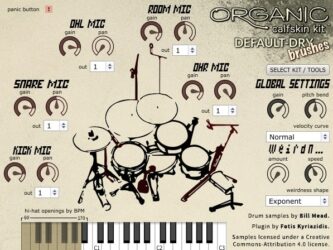
Organic Calfskin Kit is an acoustic drum plugin with 18 kits played using sticks, brushes, or mallets. It uses multi-velocity samples to offer varied drum sounds for music production.
Shape the sound with five microphone channels, each with gain, pan, and output controls. The plugin also includes responsive hi-hats, cymbal choking, and global controls for pitch, velocity, and speed.
Features
- 18 Kits With Different Playing Tools
- Three-Layer Multi-Velocity Drum Samples
- Five Microphone Channels With Routing
- Adjust Microphone Gain, Pan, And Output
- Hi-Hat Openings Respond To BPM
- Cymbal Choking
- Global Pitch, Velocity, And Speed Controls
- Panic Button Stops All Sounds
Pros
- Offers 18 playable kit choices
- Includes sticks, brushes, and mallets
- Uses samples with changing hit strength
- Includes thousands of drum samples
- Mixes sound from five microphones
- Adjust each mic’s volume and pan
- Send drums to separate mixer tracks
- Hi-hats respond to song tempo
- Cymbals can be choked by hand
- Shape how hard hits sound
Cons
- Only three sample layers are listed
- No built-in drum grooves are listed
- No beat builder like MT Power
- No sample swapping like Sitala
- Custom sample loading is not listed
- Built-in effects are not listed
- Drum tuning controls are not listed
Testimonials
11. Cymbalistic

OS: Windows Win Mac Mac Bit Version: 32-bit, 64-bit Developer: Alan ViSTa Size: 164 MB Rating: 68/100
Cymbalistic is a free cymbal VST instrument for Windows and Mac. It includes 68 stereo, 24-bit samples of hi-hats, rides, crashes, and Chinese cymbals, with controls for volume, pan, and release.
Shape soft and loud hits with dynamic range and velocity layers, then choose from several playing techniques. Four stereo outputs let you route hi-hats, rides, crashes, and Chinese cymbals to separate tracks. It comes in VST and AU formats, in 32-bit and 64-bit versions.
Features
- 68 Stereo 24-Bit Samples
- Hi-Hat, Ride, Crash, And Chinese Cymbals
- Individual Cymbal Volume And Pan Controls
- Adjustable Cymbal Release Time
- Four Separate Stereo Outputs
- Adjustable Amplitude Dynamic Range
- Velocity Layers Respond To Playing Strength
- Seven Selectable Playing Techniques
- VST And AU Formats
- Available In 32-Bit And 64-Bit
Pros
- Free cymbal add-on for drum kits
- 68 stereo 24-bit cymbal samples
- Covers four useful cymbal types
- Includes four crash cymbal sizes
- Offers two Chinese cymbal sizes
- Hi-hat has volume, pan, and release controls
- Four outputs split cymbal groups
- Velocity layers add softer and louder hits
- Play bell, choke, splash, and mallet sounds
- MIDI labels show assigned keys
Cons
- Cymbals only, not full drums
- No built-in groove library
- No ready-made beat patterns
- No drum-kit building tools
- No drum tuning controls
- No sample import tool listed
- Fewer editing controls than SSD
Testimonials
12. Divine Kit

OS: Windows Win Mac Mac Bit Version: 32-bit, 64-bit Developer: Axel Schneider Size: 3 MB Rating: 60/100
Divine Kit is a free acoustic drum VST with six sampled parts: kick, snare, toms, ride, crash, and hi-hat. Individual volume controls let you balance each sound, while master volume adjusts the full kit.
A master reverb adds room sound and echo, and multiple outputs let you route drum parts separately in your DAW. Divine Kit is available for Windows and Mac in VST and AU formats, with 32-bit and 64-bit versions.
Features
- Six Acoustic Drum Sounds
- Individual Drum Volume Controls
- Separate Outputs For Each Drum
- Built-In Master Reverb Effect
- Master Volume Control
- Recorded Drum Samples
Pros
- Free acoustic drum kit
- Six sounds cover basic drum parts
- Easy controls for each drum
- Control each sound’s volume
- Master volume balances the whole kit
- Built-in reverb adds room sound
- Separate outputs help shape sounds
- Recorded samples by John Haddad
- High-quality samples for free
- Good fit for rock and metal
Cons
- Only six drum sounds
- No built-in drum grooves
- No standard GM MIDI map
- Some DAWs may play kick only
- No layered hit sounds
- Few sound-shaping controls
- Snare may sound weak
Testimonials
13. DPC 3

OS: Windows Win Bit Version: 32-bit Developer: GTG Size: 1.4 MB Rating: 56/100
DPC 3 is a free drum sampler for Windows in 32-bit VST format. Play its pads with a mouse or use MIDI to trigger bass drum, snare, hi-hats, toms, and cymbals.
Load your own samples and adjust volume, decay, tuning, pan, and reverb for each sound. Global controls shape room size, stereo width, damping, and mix, with displays showing current values.
Features
- Mouse Playable Drum Pads
- Ten Drum Sound Pads
- Individual Reverb Sends
- Auto Mute Group
- Load Your Own Samples
- Reverb And Room Size Controls
- Stereo Width And Damping Controls
- Volume Decay Tuning And Pan
- MIDI Channel Control
- Digital Control Value Displays
Pros
- Load your own drum samples
- Adjust each sound’s volume
- Set pan for every sound
- Individual reverb sends add control
- Change room size and damping
- Shape stereo width and mix
- Set each drum’s tuning
- Change each sound’s decay
- Built-in auto-mute group
- Set MIDI channel directly
Cons
- Windows only limits your choices
- 32-bit format may not work
- Only ten drum pads included
- No built-in drum grooves
- Sample files must be 16-bit
- Some users report crashes
- No VST3 or AU version listed
Testimonials
14. Snare VST
OS: Windows Win Bit Version: 32-bit Developer: Xoxos Size: 1 MB Rating: 55/100
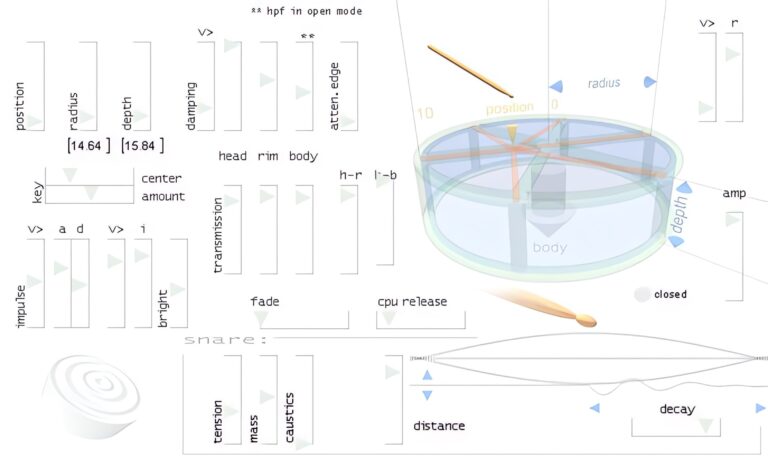
Snare VST offers a realistic drum sound that captures the energy of a live snare. Created by Xoxos, it uses wave modeling to shape detailed drum tones without relying on samples. Its 32-bit Windows format keeps it simple and easy for producers to use.
It includes controls for position, depth, damping, rim, and more, letting you shape each hit’s character and tone. From tight, crisp snaps to heavy, full strikes, Snare VST gives music creators a wide range of snare styles for electronic or acoustic-inspired tracks.
Features
- Four Adjustable Snare Vectors
- Position Control For Drum Hits
- Depth Control For Drum Body
- Tension Control For Pitch Change
- Snare Control For Rattle Effect
- Decay Control For Sound Length
- Impulse Control For Hit Force
- Low CPU Usage Performance
- Simple And Clear Interface
- Wide Range Of Snare Sounds
Pros
- Unique waveguide drum modeling
- Adjustable drum head and rim
- Customizable fade and decay
- No extra samples needed
- Lots of sound tweaking options
- Supports many snare styles
- Nice balance between digital and analog
- Free and simple to install
- Very light on computer power
- Sounds clear and punchy
Cons
- Only works on Windows
- Limited to 32-bit
- Not compatible with VST3
- No built-in EQ or compressor
- No preset browser
- Crashes on some DAWs
- Outdated interface design
- Lacks velocity sensitivity
- Few sound shaping options
- Sounds less realistic
Testimonials
15. DrumKit1

OS: Windows Win Bit Version: 32-bit Developer: MaxSynths Size: 6 MB Rating: 46/100
DrumKit1 is a free 32-bit drum VST for Windows from MaxSynths. It uses Ken Ardency’s drum soundfont to deliver a rock-focused acoustic drum sound.
The plugin has no controls or settings, so its sound is fixed. Its compact design makes it a simple option for adding drums to rock tracks.
Features
- Free Drum VST Plugin
- Rock Drum Kit Sounds
- Uses Ken Ardency’s Soundfont
- No Adjustable Plugin Controls
- Compact Plugin File Size
- Plug And Play Design
Pros
- Free to download and use
- Tiny 6.7 MB download
- Works with Windows VST hosts
- Supports older 32-bit Windows systems
- Simple plug-and-play setup
- Uses Ken Ardency’s drum soundfont
- Rock-ready acoustic drum sound
- Dynamic feel praised by users
- Snare has a clear sound
- Built-in reverb adds room sound
Cons
- Details name a different plugin
- Windows only
- 32-bit only
- VST format only
- No sound settings
- One fixed drum kit
- Drum levels cannot be changed
Best Drummer Plugins Compared
This table compares drummer plugins by features, controls, effects, formats, and more.
| Details | MT Power Drum Kit | Exc!te Snare Drum | Black Noh Snare | Dark VX Kick | Steven Slate Drums | SM Drums | Cherry Snare | Line of Legends | Royotoms | Organic Calfskin Kit |
|---|---|---|---|---|---|---|---|---|---|---|
| Image | 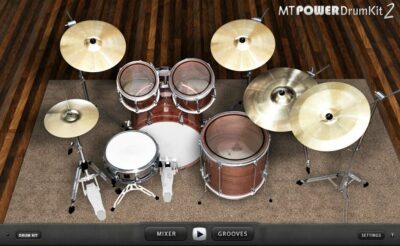 |
 |
 |
 |
 |
 |
 |
 |
 |
 |
| Rating | ||||||||||
| OS | Windows, Mac | Windows, Mac, Linux | Windows, Mac | Windows, Mac | Windows, Mac | Windows, Mac | Windows | Windows, Mac | Windows, Mac | Windows, Mac |
| Formats | VST, VST2, VST3, AU, AAX | VST | VST, AU | VST, AU | VST | SFZ | VST, AU | VST, AU | VST, AU | AU, RTAS |
| Bit Version | 32-bit, 64-bit | 64-bit | 64-bit | 32-bit | 64-bit | 64-bit | 32-bit, 64-bit | 32-bit, 64-bit | 32-bit, 64-bit | 64-bit |
| Developer | Manda Audio | CHAIR | Chokehold | Chokehold | Steven Slate Drums | SM Drums | Plugins4Free | Plugins4Free | Alan ViSTa | Organic Drum Loops |
| License | Donationware | Freeware | Donationware | Freeware | N/A | Freeware | Freeware | Freeware | Freeware | Freeware |
| Sample-Based | Yes | Select | Select | Yes | Yes | Yes | Select | Select | Yes | Yes |
| Download Size | 60 MB | 3.1 MB | 15 MB | 6 MB | 44.8 MB | 2.2 GB | 72 MB | 8 MB | 81 MB | 3 GB |
| CPU Load | Low | Low | Low | Low | Medium | Low | Low | Low | High | High |
| Polyphony | 64 | N/A | 2 | 1 | N/A | N/A | 8 | 32 | N/A | N/A |
| Features | Realistic drum sounds, Pre-processed samples, Built-in compression, Groove library, Fill generation, Mixer control, Drum kit view | Physical modeling, Realistic sound, Tip hardness, Rimshot control, Snare tension, Hit position, Drumhead tuning | Sampled Snare, Velocity Layers, Random-Robin Samples, Subkick Included, +Punch Module, Silk Controls, Rimshot Trigger | Layered Kick Sounds, Velocity Layers, Analog Processing, Sub-Bass Channel, Room Ambience, Reverb Control, Independent Mixer Channels | MIDI Grooves, Mix-Ready Presets, Raw Samples, MIDI Controller Support, Resizable GUI, Premium Drum Kits, Genre Libraries | Multisampled drums, Velocity layers, Round robins, Disk streaming, Per-bus outputs, Kit controls, DAW templates | Multi-mic recording, Four-channel mixing, Punch control, Vari-pitch, Velocity layers, Round-robin sampling, Stroke techniques | 47 Drum Samples, 8 Sections, Independent Outputs, Punch Control, Release Control, Pan Control, Easy Workflow | Eight Rototoms, Pink Floyd Tuning, Velocity Layers, Round-Robin Samples, Reverb Controls, Individual Drum Controls, Punch Control | 18 Drum Kits, Sticks Brushes Mallets, Multi-Velocity Samples, Five Microphone Channels, BPM-Responsive Hi-Hats, Cymbal Choking, Global Sound Controls |
| Controls | Drum Kit View, Mixer Button, Grooves Button, Drum Kit Button, Settings Button, Compression Control, Groove Library | Velocity, Tip Hardness, Rimshot, Drumhead Tuning, Snares Tension, Hit Position, Upgrade Button | Snare Drum Image, Top Microphone, Bottom Microphone, Gain Slider, Silk Knob, Punch Button, RCD DMP-1 Channel | Dry, Comprsd, Sub Kick, Room, Reverb, Output, Mute Buttons | Create, Edit, Mix, Map, Grooves, Settings, Instruments | Instrument, Key Switch, Volume, Pan, Send, Tune, Transpose | Tune, Vari Pitch, Vari Speed, Punch, Release, Pan, Volume Faders | Kick, Snare, Clap, Snap, Toms, Hi Hat, Ride | Dynamic, Reverb Time, Reverb Level, Punch, Pan Controls, Gain Controls, Master | Kit Selection, Playing Tool, Mic Gain, Mic Pan, Output Routing, Global Controls, Hi-Hat Timing |
| Effects Included | Compressor, EQ | Unknown | +Punch, Silk | Reverb, Echo, Compression, Sub-Bass, Room Ambience, EQ, Noise | Unknown | Unknown | Tune, Vari Pitch, Vari Speed, Punch, Release, Pan | Punch, Release, Pan, Reverb | Reverb, punch | Unknown |
| MIDI Learn | No | Unknown | Unknown | Unknown | Yes | No | Unknown | Unknown | No | No |
| Presets | 8 | N/A | N/A | N/A | 148 | N/A | N/A | N/A | N/A | N/A |
| Standalone | No | Yes | Yes | Yes | No | No | No | No | Select | No |
| Last Updated | 07/10/2013 | 03/01/2024 | N/A | 01/18/2021 | 11/05/2026 | 11/12/2026 | 07/01/2021 | 08/10/2021 | N/A | N/A |
Best Drummer VST Plugin
Our top pick for the best free Drummer VST plugin is MT Power Drum Kit by Manda Audio. It offers a cool interface, and great sounds and controls.
| Details | MT Power Drum Kit |
|---|---|
| Image | |
| Rating | |
| OS | Windows, Mac |
| Formats | VST, VST2, VST3, AU, AAX |
| Bit Version | 32-bit, 64-bit |
| Developer | Manda Audio |
| Download Size | 60 MB |
| Download | Visit MT Power Drum Kit |
FAQs
How to Install Drummer VST Plugins
To install drummer VST plugins on Windows or Mac, extract the files from the Zip or Rar. Move the files (.dll for Windows or .component for Mac) into your DAW’s plugin folder. Then restart your software and rescan the directory to complete the process. Tutorial: How to Install VST Plugins
Windows:
Extract the downloaded zip file and copy the .dll file into the VST plugins folder scanned by your DAW. Restart your music software and rescan your plugin directory to begin using the new VST.
Mac OS X:
Extract the downloaded archive and move the .component or .VST file to the plugin folder. It is usually /Library/Audio/Plug-Ins/Components or /Library/Audio/Plug-Ins/VST. Restart your DAW and rescan your plugins to complete the installation.
What Are Drummer VST Plugins?
Drummer VST plugins allow you to add drummer-like sounds to your music. They typically come with various presets, so you can find a sound that matches the style of music you’re trying to create.
I hope you found this list of free drummer VST plugins helpful.
You May Also Like: