Here are the best free bassline VST plugins for Windows and Mac. We have included video demos, feature lists, pros, cons, and plugin ratings.
How we rate plugins: We rate each bassline VST plugin based on sound quality, design, performance, features, usability, and compatibility. We rate plugins on a scale of 1 to 100.
Table of Contents
I have spent over 15 years testing and comparing hundreds of free and paid VST plugins, supported by hands-on demos on our YouTube channel, which has 11,000+ subscribers.
Free Bassline VST Plugins
This table compares bassline VST plugins by operating system, bit version, format, and rating.
| # | Plugin | OS | Formats | Bit Version | Ratings |
|---|---|---|---|---|---|
| 1 | Ample Bass P Lite | Windows Mac | VST, VST2, AU, AAX | 32-bit, 64-bit | |
| 2 | TAL–Bassline | Windows Mac | VST, AU | 32-bit, 64-bit | |
| 3 | Subdivine Lite | Windows Mac | VST3, AU | 64-bit | |
| 4 | 808 Bass Module 2 Lite | Windows Mac | VST, AU | 32-bit, 64-bit | |
| 5 | FunkBass | Windows Mac | VST, VST3, AU | 64-bit | |
| 6 | Dolphin Bassline | Windows | VST | 32-bit, 64-bit | |
| 7 | Bass Module | Windows | VST | 32-bit | |
| 8 | Bassline | Windows | VST | 32-bit | |
| 9 | MONSTER Bass | Windows | VST | 32-bit | |
| 10 | 4Front Bass | Windows Mac | VST, AU | 32-bit, 64-bit | |
| 11 | Devil Bass Module | Windows | VST | 32-bit | |
| 12 | FabBass | Windows | VST | 32-bit | |
| 13 | Bassline II | Windows | N/A | 32-bit | |
| 14 | DSK BassZ | Windows | VST | 32-bit |
1. Ample Bass P Lite
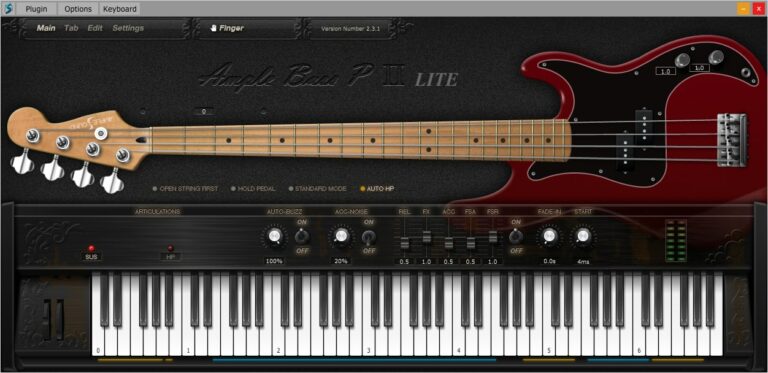
OS: Windows Win Mac Mac Bit Version: 32-bit, 64-bit Developer: Ample Sound Size: 450 MB Rating: 84/100
Ample Bass P Lite offers a realistic Fender Precision Bass sound in a compact, free plugin. It uses detailed sampling and features like Poly Legato, Slide Smoother, and Auto Buzz to deliver natural playing nuances. The plugin captures finger noise and subtle details for authentic bass tones.
The built-in Tab Player supports popular tablature formats, allowing users to load, view, and export bass lines directly as audio. With controls for tone, dynamics, and style, Ample Bass P Lite provides flexible performance options suited for any DAW setup or standalone use.
Features
- Recorded From Fender Precision Bass
- Realistic Fingering And String Noise
- Auto Buzz System For Realism
- Polyphonic Legato And Slide Smoother
- Manual Vibrato Wheel For Expression
- Finger Or Pick Playing Modes
- Custom Parameters Control Via MIDI
- Capo Function For Easy Transpose
- Tab Player Supports Multiple File Formats
- Available In VST, AU, And AAX Formats
Pros
- Realistic Fender Precision Bass tone
- Rich and detailed finger noise
- Supports both pick and finger modes
- DFD technology for smooth playback
- Poly Legato makes smooth slides
- Auto Buzz adds real string feel
- Tab Player supports many formats
- Exports tabs as audio easily
- Capo feature for easy tuning
- Better realism than most free VSTs
Cons
- Limited articulations compared to paid version
- Small sample library reduces realism
- Lower bit depth affects clarity
- Few customization options available
- Heavier on CPU for some systems
- No built-in amp or effects
- Range limited to D1–F4 only
- No round-robin for all notes
- Less dynamic response than others
- Hard to blend in a mix
Video Demo
What Users Say
Ample Bass P Lite Tips
- I often use the built-in compressor to make sure my bass is even and clear in the mix.
- I sometimes double the bass track with a distorted version for extra punch in metal mixes.
- Use the “Humanize” feature to make the bass feel like it’s being played by a real person.
- Layer the Ample Bass P Lite with a sub-bass synth to fill out the low end for modern metal mixes.
- Match the bass tone with the kick drum so they work together instead of clashing.
- Try routing the output of the plugin through an external distortion or amp sim for a heavier tone.
2. TAL–Bassline
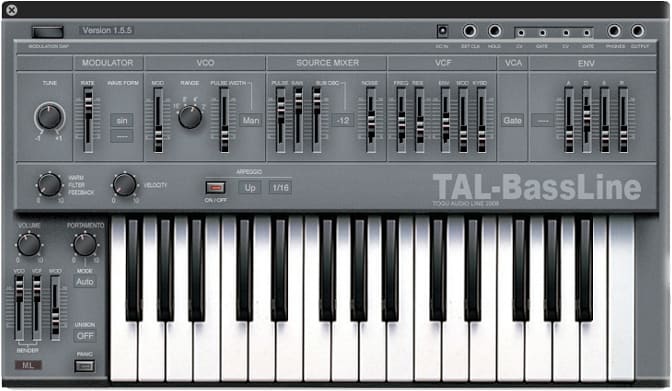
OS: Windows Win Mac Mac Bit Version: 32-bit, 64-bit Developer: TAL Software Size: 1 MB Rating: 84/100
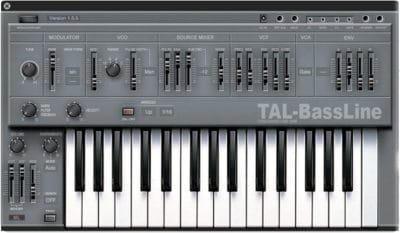
TAL–Bassline offers a classic analog-style bass experience in a modern plugin format for Windows and Mac. It recreates the sound and feel of vintage hardware with a warm tone shaped by its special -18dB low-pass filter and responsive nonlinear envelopes.
This synth includes band-limited oscillators, a sub-oscillator, and a simple arpeggiator to craft smooth basslines or sharp acid tones. With features like unison mode, MIDI automation, and precise control of sliders, TAL–Bassline helps producers build solid, character-rich low-end sounds quickly.
Features
- Virtual Analog Bass Synthesizer
- Multiple Band-Limited Oscillators
- Sub-Oscillator For Deep Tones
- Special -18dB Low Pass Filter
- Nonlinear Envelope Generator
- LFO With Various Waveforms
- Unison Mode For Thick Sound
- MIDI Automation For All Controls
- Analog-Style Warm Sound
- 2x Oversampling Processing
Pros
- Warm and rich analog tone
- Fast envelopes for punchy sound
- Great for acid bass lines
- Has unison mode for fullness
- Sub-oscillator adds deep bass
- Sounds close to real hardware
- Has built-in arpeggiator
- Offers 2x oversampling clarity
- Produces gritty and lo-fi tones
- Very low CPU usage
Cons
- No built-in effect section
- No modulation matrix control
- Limited modulation routing choices
- No built-in reverb or delay
- Lacks modern GUI resizing
- No polyphonic mode available
- Few waveforms compared to rivals
- Cannot import external MIDI patterns
- Interface looks a bit old
- Limited envelope shape control
Video Demo
What Users Say
TAL–Bassline Tips
- I use the envelope modulation to make my bassline sound more punchy and alive.
- I often play with the drive knob to add a bit of grit and warmth to my sound.
- I like to sync the LFO to the tempo for rhythmic movement that matches my song.
- Use a high-pass filter on other instruments to leave space for the TAL-Bassline in the mix.
- Automate filter cutoff changes to create movement and keep your bassline engaging.
- Use a compressor after the plugin to even out dynamics and add punch.
- Keep an eye on the low end in your mix with an EQ analyzer to avoid muddiness.
3. Subdivine Lite
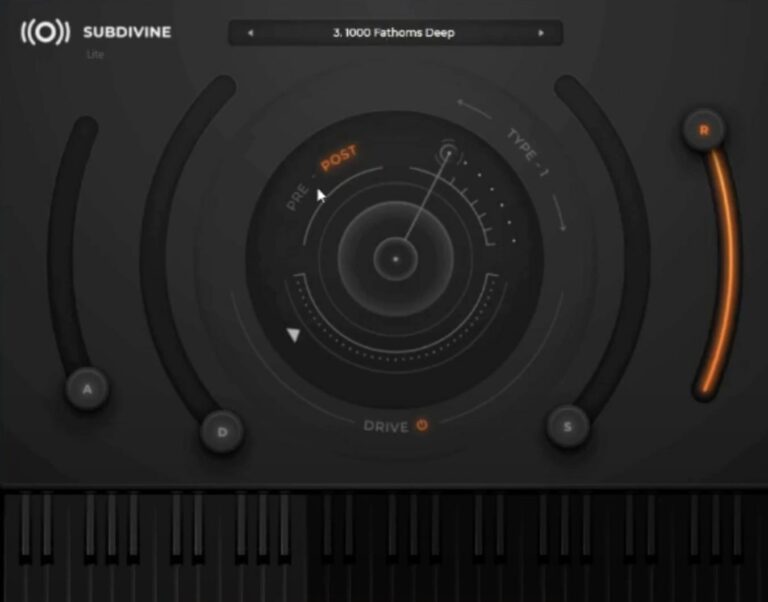
OS: Windows Win Mac Mac Bit Version: 64-bit Developer: Diginoiz Size: 254 MB Rating: 83/100
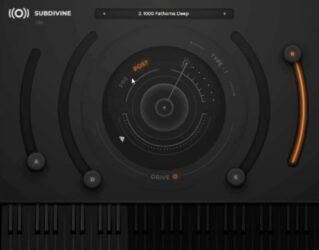
Subdivine Lite offers a solid way to create deep and punchy 808-style bass sounds. It includes six preset sounds, an adjustable drive control, and basic ADSR shaping tools. The pitch bend adds flexibility, making it easy to create smooth slides and dynamic low-end parts.
This plugin works well for Trap, Hip-Hop, R&B, and other modern styles. Its clean interface keeps everything focused on sound, letting you build heavy bass lines quickly. Subdivine Lite is a great starting point for exploring powerful low-end tones without extra cost.
Features
- Six High-Quality 808 Presets
- Adjustable Drive Control
- Partly Modifiable ADSR
- Fully Functional Pitch Bend
- Simple And Clean Interface
- Preset Display For Quick Selection
- Output Meter For Level Monitoring
- Optimized For Low CPU Usage
- Works In AU And VST3 Formats
- Designed For Modern Urban Music
Pros
- Powerful 808-style bass tones
- Rich, deep low-end sound
- Low CPU use on laptops
- Adjustable drive for more punch
- Partly editable ADSR controls
- Supports AU and VST3 formats
- Works on Mac and Windows
- Fast setup and small file size
- Better sound than many free basses
- Clean and simple interface
Cons
- Very limited sound variety
- No built-in effects section
- Partial ADSR control only
- Lacks advanced modulation options
- Cannot layer multiple sounds
- No EQ or filtering section
- Missing glide or portamento feature
- Very basic user interface
- Limited tone shaping options
- Cannot import custom samples
Video Demo
What Users Say
Subdivine Lite Tips
- When I layer bass with kicks, I sidechain compress the bass to make room for the kick drum.
- I use EQ to remove harsh highs and let the sub-bass stay clean and warm.
- Always check the bass in mono to ensure it doesn’t lose power when played on smaller speakers.
- Cut frequencies below 30Hz to avoid muddying the mix while keeping the sub strong.
- Start by exploring the Subdivine Lite preset library to find tones that fit your genre.
- Try layering Subdivine Lite with another synth for a richer and more complex bass sound.
- Automation of filter cutoff or volume can make the bass line more exciting over time.
4. 808 Bass Module 2 Lite
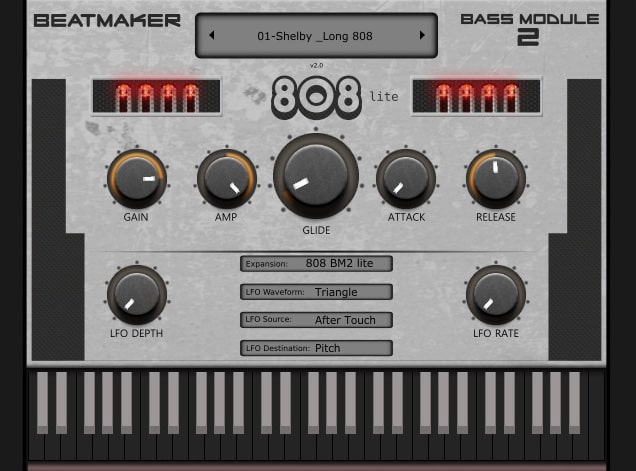
OS: Windows Win Mac Mac Bit Version: 32-bit, 64-bit Developer: BeatMaker Size: 32 MB Rating: 75/100
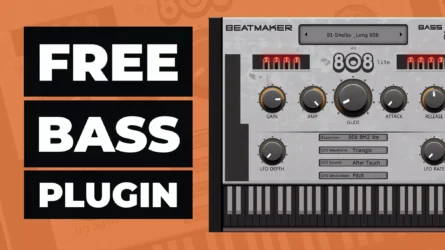
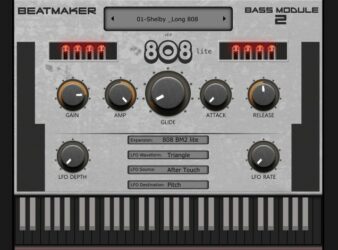
808 Bass Module 2 Lite is a free 808 bass plugin by BeatMaker made for creating strong, low-end sounds in trap, hip-hop, and electronic music. It includes 10 layered presets that match the key of your project, helping you get heavy bass tones quickly and easily.
It offers controls for gain, amp, glide, attack, release, and a flexible LFO section to shape movement and depth. The glide feature gives smooth note transitions, while the LFO rate and waveform options add motion to your bass. It works on both Windows and Mac.
Features
- Ten Ready-To-Use Layered Presets
- Plays In Key Of Project
- Glide Knob For Smooth Slides
- Attack And Release Controls
- LFO Rate And Depth Adjustments
- Aftertouch For Extra Expression
- Built-In Preset Selection Menu
- Keyboard For Direct Note Playing
- Supports VST And AU Formats
- Runs On Windows And Mac
Pros
- Powerful and rumbling bass tones
- Glide control for smooth slides
- Great low end without muddiness
- Adjustable LFO rate and depth
- Attack and release shaping options
- Low CPU usage and stable
- Free and professional sounding plugin
- Sounds fit key of your song
- Perfect for trap and hip-hop
- Works well in all major DAWs
Cons
- Lite version lacks sound variety
- No built-in effects like reverb
- Limited tone shaping controls
- No filter cutoff or resonance
- No built-in EQ controls
- Presets sound too similar
- Cannot import custom samples
- Missing advanced modulation settings
- No support for velocity layers
- Lacks creative sound design depth
Video Demo
What Users Say
808 Bass Module 2 Lite Tips
- Using sidechain compression helps the bass and kick drum work together without clashing.
- Keeping the bass in mono prevents phase problems in the low end.
- Adding a touch of saturation keeps the bass warm and full even on small speakers.
- I keep an EQ after the 808 Bass Module 2 Lite to shape the low end cleanly.
- I often tune the bass sound to the key of my song so it blends better.
- I use the Attack and Release knobs to make my bass hit harder or smoother.
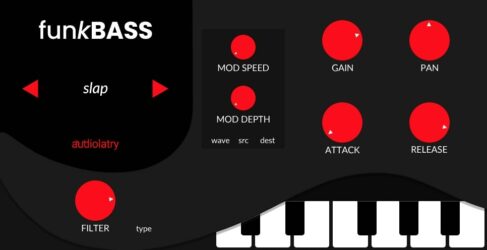
5. FunkBass
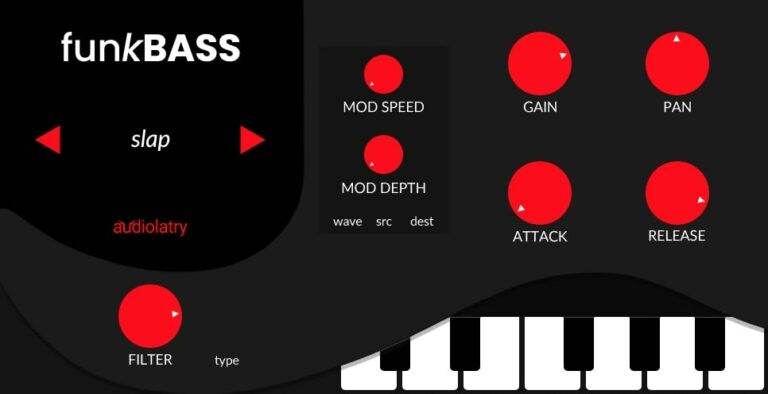
OS: Windows Win Mac Mac Bit Version: 64-bit Developer: Audiolatry Size: 67 MB Rating: 72/100
FunkBass offers a quick and reliable way to create solid bass lines for styles like Funk, Soul, Pop, and EDM. It features eight presets, including finger, slap, pick, and synth options, all recorded from real instruments and processed for a rich and clean tone.
The plugin includes simple controls like attack, release, filter, and modulation, allowing easy sound shaping. Its compact size makes it an efficient choice for quick music sketches or full productions, giving producers tight and groovy bass sounds without any extra setup.
Features
- 21 Electric And Synth Bass Presets
- 8 Core Bass Playing Styles
- Built-In Chorus And Reverb Effects
- Distortion With Cabinet Emulation
- High-Quality 24-Bit Recorded Samples
- Glide Control For Portamento Effect
- Filter Section With Cutoff Control
- Lightweight And Low CPU Usage
- Simple One-Screen User Interface
- Free To Download Donationware Plugin
Pros
- Warm and punchy bass tones
- Includes 21 bass presets
- Good mix of electric and synth
- Built-in effects like chorus
- Filter section for tone shaping
- Includes glide for smooth notes
- Adjustable attack and release
- Light on computer resources
- Works on both Windows and Mac
- No extra sampler needed
Cons
- Limited preset variety and depth
- No built-in compressor effect
- Lacks real-time velocity response
- Not compatible with Pro Tools
- Only basic sound-shaping controls
- No advanced amp simulation options
- No drag-and-drop sample loading
- Few articulation choices for realism
- Does not support MIDI learn
- No built-in equalizer for tone
Video Demo
What Users Say
FunkBass Tips
- I often tweak the ADSR controls to make the bass sound tighter or smoother.
- I add a bit of compression to make my bass notes sound even and punchy.
- I layer FunkBass with a sub-bass plugin when I want more low-end power.
- EQ out some of the high frequencies if the bass fights with guitars or keys.
- Adding a touch of saturation or drive helps the bass stand out in busy mixes.
- Use a sidechain compressor with the kick drum to keep the low-end balance smooth.
6. Dolphin Bassline

OS: Windows Win Bit Version: 32-bit, 64-bit Developer: Signaldust Size: 1 MB Rating: 69/100
Dolphin Bassline offers a classic mono synth sound inspired by vintage 80s gear. It focuses on creating tight, punchy bass lines using saw or square waves. With controls for tuning, cutoff, resonance, decay, and accent, it gives clear control over tone and movement.
This plugin is designed for electronic and techno music, allowing quick tweaks for sharp, acid-style bass sounds. MIDI note synchronization and velocity accents help bring rhythmic life to patterns. Dolphin Bassline is a simple yet effective tool for shaping bold, energetic low-end tones.
Features
- Monophonic Bass Synth Plugin
- Adjustable Cutoff And Resonance
- Envelope Modulation Control
- Decay And Accent Knobs
- Velocity-Triggered Accents
- Tuning For Pitch Adjustment
- Low CPU Usage
- Classic 303 Style Sound
- 32-Bit And 64-Bit Support
- Free VST Plugin
Pros
- Classic 303-style acid sound
- Accurate vintage 80s synth vibe
- Strong and punchy bass tone
- Adjustable filter for tone control
- Expressive accent feature included
- Two waveform types for variety
- Light on CPU resources
- Quick sound design workflow
- Handles overlapping notes smoothly
- Useful for layering with 808s
Cons
- No Mac or Linux support
- Sound variety is very limited
- No built-in presets available
- Lacks advanced modulation features
- No built-in effects section
- Sometimes causes note hanging bugs
- No glide or slide tuning option
- Not resizeable for large screens
- Interface is small and plain
- Cannot save user preset banks
Video Demo
What Users Say
Dolphin Bassline Tips
- I sidechain the bass to the kick drum so the mix doesn’t get muddy.
- I use gentle distortion to give my 808 bass more character and warmth.
- Always check your bass in mono to make sure it doesn’t lose power when summed.
- Use a spectrum analyzer to make sure the low end isn’t clashing with the kick drum.
- Balance the attack and release in the envelope so the bass grooves with your drums.
- I often layer the Dolphin Bassline with a clean sub to make it hit harder on big speakers.
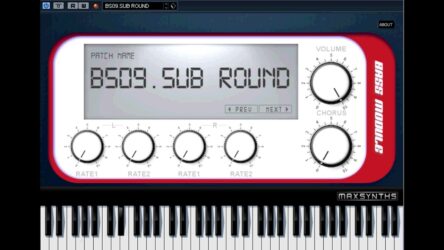
7. Bass Module
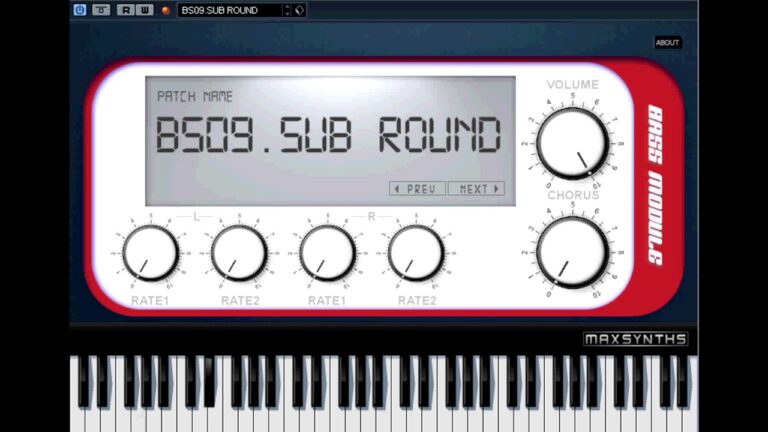
OS: Windows Win Bit Version: 32-bit Developer: MaxSynths Size: 101 MB Rating: 69/100
Bass Module is a free bass plugin by MaxSynths designed for Windows users who need strong, reliable bass tones. It includes 64 original patches with both acoustic and synthetic sounds, offering over 100MB of sample data to cover genres like dance, rock, and metal.
Bass Module offers a built-in chorus effect and simple controls for quick sound shaping. With volume, rate, and patch selection knobs, producers can easily switch tones and adjust motion. It’s a compact tool for adding full, rich bass to any track.
Features
- 64 Original Bass Patches
- Acoustic And Synth Bass Sounds
- Over 100MB Sample Library
- Custom Chorus Effect Included
- Internal Dynamic Processor
- Low CPU Usage
- Clean And Simple Interface
- Designed For Multiple Music Styles
- Rich And Full Bass Tone
- MIDI Keyboard Support
Pros
- Very light on CPU
- Rich acoustic and synth tones
- Fast preset switching feature
- Deep bass fits mixes easily
- Chorus effect adds fullness
- Small file size for storage
- Free and donation supported
- Works great on older PCs
- Instant sound change buttons
- Balanced tone across presets
Cons
- Only works on Windows
- Limited to 32-bit
- Lacks sound shaping tools
- No built-in filter controls
- No reverb or delay
- Can’t load samples
- No preset saving
- Outdated interface
- No multi-out support
- Not great for modern genres
Video Demo
What Users Say
Bass Module Tips
- I always adjust the filter cutoff to shape how deep or bright my bass sounds.
- I often turn down the release time so my bass doesn’t overlap too much with the kick drum.
- Balance the bass and kick by using an EQ to separate their main frequencies.
- Use a compressor to keep the bass smooth and even throughout the song.
- Try adding a small amount of saturation to make the bass sound warmer and fuller.
- Cut any very low frequencies below 30 Hz to clean up the mix.
- Check your bassline on both headphones and speakers to make sure it sounds good everywhere.
8. Bassline

OS: Windows Win Bit Version: 32-bit Developer: EVM Synths Size: 1 MB Rating: 65/100
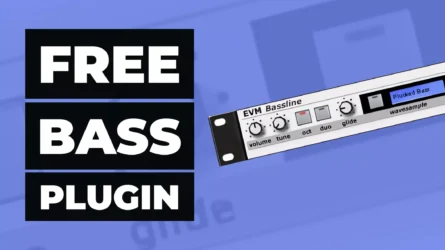
Bassline offers a simple way to create strong bass sounds with classic character. Designed by EVM Synths for Windows, it can run in monophonic or duophonic mode while giving control over tuning, glide, and filters. Its resonance and envelope tools shape deep or punchy tones easily.
This plugin includes adjustable attack, decay, sustain, and release settings for shaping how notes start and fade. Its wave sample options let producers choose different bass textures, from smooth synth tones to 808-style thumps. Bassline is compact, fast, and reliable for everyday music production.
Features
- Multi-Mode Filter With Resonance
- Envelope Trigger And Gating
- Monophonic Or Duophonic Mode
- Adjustable Glide Control
- Wave Sample Selection
- Attack Speed Control
- Decay Time Adjustment
- Low CPU Usage
- Compact And Simple Interface
- Free 32-Bit VST Format
Pros
- Very low CPU usage
- Warm, punchy bass tone
- Has monophonic and duophonic modes
- Glide makes notes sound smooth
- Filter adds deep sound shape
- Envelope gives sound more life
- Resonance control boosts tone power
- Octave change allows wide range
- Tuning and pitch are easy
- Stable even on lightweight setups
Cons
- Only works on Windows computers
- No native 64-bit version
- No support for macOS systems
- Not updated in many years
- Lacks modern sound-shaping tools
- No built-in distortion effects
- Basic GUI feels outdated
- Cannot load external samples
- No built-in preset browser
- Lacks deep sub-bass power
Video Demo
What Users Say
Bassline Tips
- I try adding a little bit of distortion to make my 808s sound more powerful.
- Sidechain compression can make the bass duck under the kick for a clean, modern sound.
- Adding subtle saturation brings out harmonics and makes the bass more audible on small speakers.
- EQing out muddy frequencies around 200–300 Hz can help the mix sound clearer.
- When I mix, I make sure to cut low frequencies in other instruments so my bass stands out.
- Using envelopes to shape the attack and decay can change the groove and energy of the track.
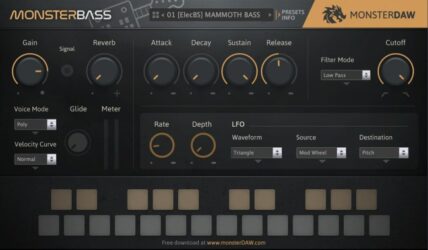
9. MONSTER Bass
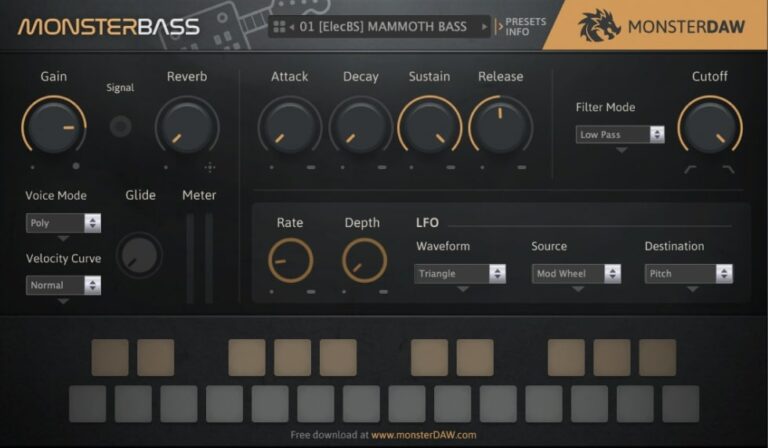
OS: Windows Win Bit Version: 32-bit Developer: MonsterDAW Size: 7 MB Rating: 62/100
MONSTER Bass offers a wide range of deep and clear bass sounds made for any music style. It includes electric, synth, and acoustic bass options, letting you shape tones easily with controls like filter, ADSR, glide, and LFO. Each preset provides strong, ready-to-use lows for your tracks.
With 42 presets and regular sound updates, MONSTER Bass continues to grow with new expansion libraries. It supports Windows and Mac in multiple formats, allowing flexible use across DAWs. Quick setup steps make it easy to load sounds, adjust settings, and start creating solid basslines fast.
Features
- Three Bass Categories Available
- Forty-Two Presets Included
- ADSR And Filter Controls
- LFO And Glide Functions
- Polyphonic And Monophonic Modes
- Parameter Automation Supported
- Supports Major Plugin Formats
- Regular Expansion Sound Updates
- Global Volume And Reverb
- Free To Download And Use
Pros
- Includes electric and acoustic bass
- Glide knob for smooth note play
- LFO adds motion and texture
- ADSR lets you shape sound
- Expanding library keeps it fresh
- Regular free sound updates
- Strong low-end sound quality
- Nice preset variety for genres
- Excellent sound for a free plugin
- Good 808 alternatives built-in
Cons
- No VST3 version available
- Can crash during preset change
- Limited sound design controls
- No built-in distortion effects
- No visual waveform display
- Can sound harsh or boomy
- Volume can clip too easily
- Poor optimization for older PCs
- Still lacks Pro Tools support
- Updates released very slowly
Video Demo
What Users Say
MONSTER Bass Tips
- Start by choosing the correct key and tuning for MONSTER Bass to match your track.
- I add sidechain compression with my kick to make sure both kick and bass fit together nicely.
- I use the Glide knob to blend notes smoothly when I want a sliding bass sound.
- Use EQ to remove sub frequencies under 30Hz so the mix stays clean.
- Add gentle saturation or distortion to make your bass stand out in a busy mix.
- I always check the sub-bass on headphones and small speakers to make sure it sounds clear everywhere.
- Keep some headroom when mixing MONSTER Bass so mastering has space to enhance the track.
10. 4Front Bass
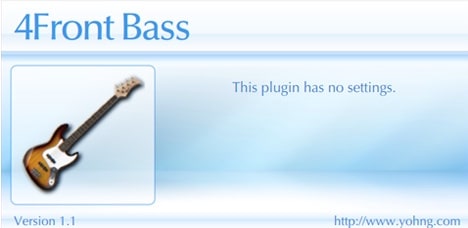
OS: Windows Win Mac Mac Bit Version: 32-bit, 64-bit Developer: 4Front Size: 4 MB Rating: 62/100
4Front Bass offers a simple way to add solid electric bass sounds to your music. It combines sample playback and synthesis to create a smooth, natural tone that fits many styles, from rock to hip-hop. Its compact design and instant playability make it easy to use.
With no knobs or settings to adjust, 4Front Bass focuses on quick results and dependable sound. It loads instantly and blends easily into mixes, making it helpful for songwriting, demos, or practice tracks when you need a steady bass foundation fast.
Features
- Sample And Synth Hybrid Engine
- Original String Recordings
- Realistic Bass Guitar Tone
- Low CPU Usage
- Instant Loading Time
- VST And AU Formats
- Supports 32-Bit And 64-Bit
- Works In Many Music Genres
- Compact Interface Display
- Free Bass VST Plugin
Pros
- Very easy to use
- Uses very little CPU power
- Realistic bass sound quality
- Switches between sample and synth mode
- Free and simple to install
- Stable and reliable performance
- Perfect for fast demo creation
- Mixes well with other instruments
- Good for layer and support bass
- Lightweight for laptop use
Cons
- Lacks realistic playing dynamics
- Sound can feel too static
- No built-in effects or EQ
- No preset library available
- Limited to one bass tone
- Not suitable for pro mixing
- Cannot adjust attack or decay
- No support for custom samples
- Outdated interface design
- Very basic with zero flexibility
Video Demo
What Users Say
4Front Bass Tips
- I use EQ to cut a little of the low mids so my bass does not sound muddy.
- I like to use a compressor to keep the bass even and strong in every note.
- EQ the kick drum and bass so they do not fight for the same low frequencies.
- I always check how my bass sounds on small speakers to make sure it’s still clear.
- Keep bass levels below clipping so the mix stays clean and doesn’t distort.
- Use reference tracks to match your bass levels and tone to professional mixes.
11. Devil Bass Module
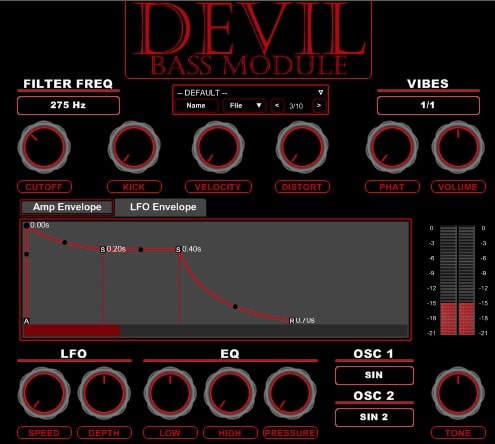
OS: Windows Win Bit Version: 32-bit Developer: Devil Soundz Size: 5.2 MB Rating: 57/100
Devil Bass Module offers a flexible way to design deep and heavy bass sounds for electronic music. It uses two oscillators with multiple waveforms, along with a drawable envelope and filter controls, to shape both clean and gritty tones with precision and impact.
The plugin includes an LFO for movement, EQ for tone balance, and a pressure knob to strengthen low-end punch. Extra settings like distortion, velocity, and phatness allow fine-tuning of power and texture, making it useful for producing bold basslines across many modern genres.
Features
- Two Oscillators With Eighteen Waveforms
- Drawable Envelope For Amplitude Control
- Filter With Frequency And Cutoff Adjust
- Distortion For Gritty Bass Textures
- Phat Control For Thicker Bass
- LFO With Speed And Depth Settings
- Built-In Chorus And Delay Effects
- Velocity-Responsive Note Dynamics
- Preset Save And Load Function
- CPU-Friendly Performance Design
Pros
- Eighteen waveforms for sound variety
- Drawable envelope adds easy control
- Vibes selector gives groove options
- Pressure knob boosts low-end punch
- Includes distortion for gritty tones
- Phat control adds extra weight
- Arpeggiator for rhythmic basslines
- Filter shapes tone with precision
- LFO adds cool movement effects
- CPU friendly for smooth playback
Cons
- Only works on Windows systems
- No native 64-bit support
- Outdated plugin interface design
- Lacks advanced modulation features
- No built-in reverb effect
- Few preset sounds included
- No visual waveform display
- Doesn’t support MIDI learn
- No glide or portamento control
- No resizable interface option
Video Demo
What Users Say
Devil Bass Module Tips
- I roll off the low frequencies below 30 Hz to keep my mix balanced.
- I mix the dry and wet signals to make the bass sound bigger but still clean.
- I add a little distortion when I want the bass to cut through the mix.
- Try sidechain compression with the kick for a nice pumping groove.
- Balance the stereo field so that the bass stays centered in the mix.
- Use compression to smooth out the bassline and make it consistent.
- Layer sub-bass underneath for extra depth in electronic tracks.
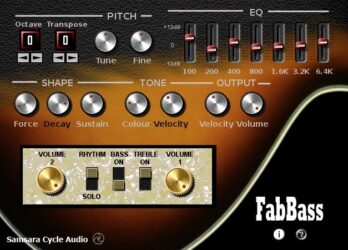
12. FabBass
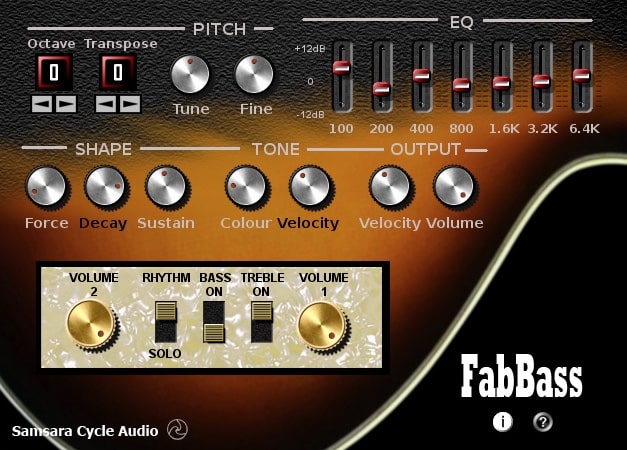
OS: Windows Win Bit Version: 32-bit Developer: Samsara Cycle Audio Size: 3 MB Rating: 56/100
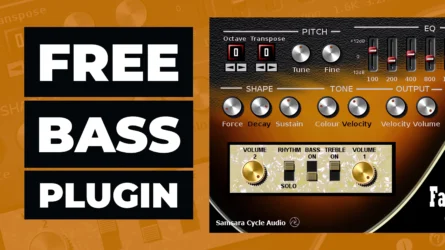
FabBass offers the classic tone of a 1960s violin bass in a free VST plugin for Windows. It lets you shape your sound with controls for pitch, tuning, and tone brightness. You can fine-tune note length, sustain, and fading to match your playing style.
The plugin includes a seven-band graphic EQ and separate volume controls for neck and bridge pickups. With options for plectrum or finger dynamics and strong velocity response, FabBass gives music creators tools to craft warm, vintage-style basslines with adjustable detail and clarity.
Features
- Recreates 1960s Violin Bass Sound
- Plectrum And Finger Dynamics
- Octave And Transpose Controls
- Velocity Sensitive Response
- Bass And Treble Pickup Controls
- Seven Band Graphic EQ
- Adjustable Sound Brightness
- Note Length And Fade Control
- Low CPU Usage Performance
- Simple And Clear Interface
Pros
- Captures classic 1960s violin bass sound
- 7-band EQ for tone shaping
- Separate neck and bridge volumes
- Offers real analog warmth
- Low CPU for smooth play
- Octave and transpose flexibility
- Strong velocity response control
- Bright to dull tone range
- Good sustain and decay control
- Free and easy to install
Cons
- Only available for Windows users
- No support for 64-bit systems
- Does not run on macOS
- Outdated user interface design
- No support for VST3 format
- Limited to vintage bass sounds
- Crashes when changing presets
- Not compatible with most DAWs
- Few tone shaping options
- No built-in effect section
Video Demo
What Users Say
FabBass Tips
- I often use the drive knob lightly; it adds warmth without making the tone too harsh.
- I use the tone controls to keep my bass clear but still full in a mix.
- I adjust the input level carefully so I get punch without clipping the signal.
- Layer FabBass under a synth bassline for a fuller and more grounded sound.
- Use reference tracks when dialing in your FabBass tone to match commercial bass clarity.
13. Bassline II

OS: Windows Win Bit Version: 32-bit Developer: EVM Synths Size: 1 MB Rating: 54/100
Bassline II offers a simple way to create solid bass sounds using classic wave-sample playback. It includes controls for tuning, octaves, filters, and ADSR shaping, giving you the ability to adjust how each note starts, holds, and fades for clear tonal control.
The plugin includes preset options and an Env Fit control for fine-tuning how the envelope affects your tone. Designed for Windows, Bassline II is useful for building tight bass lines or acid-style grooves that stand out in mixes without requiring complex setup.
Features
- WaveSample Bass Player Design
- Tune And Pitch Control
- Filter Frequency Adjustment
- Attack, Decay, Sustain, Release Controls
- Preset Program Selection
- Simple And Clear Interface
- Low CPU Usage
- Creates Classic 303-Style Bass
- Produces Clean, Punchy Bass Tones
- Stable Performance In Most DAWs
Pros
- Free and easy to download
- Low CPU needs for smooth play
- Great for 303 style bass
- Warm, punchy vintage bass sound
- Filter gives strong tone control
- ADSR makes sound shaping fun
- Octave shift adds deep range
- Perfect for acid techno songs
- Stable plugin with no crashes
- Lightweight compared to newer VSTs
Cons
- Only works on Windows systems
- No 64-bit version available
- Not compatible with macOS
- Old-style user interface
- No built-in effects like reverb
- Limited sound design options
- No automation mapping features
- No native support for MIDI learn
- Few preset sound choices
- Outdated compared to modern VSTs
What Users Say
Bassline II Tips
- I adjust the oscillator mix until I get a thick but clean bass sound that doesn’t clash with the kick drum.
- I like layering Bassline II with another bass VST to get a fuller sound.
- Combine Bassline II with sidechain compression to let the kick cut through the bass clearly.
- Try modulating the cutoff frequency with an LFO for a pulsing, moving bass sound.
- Use a spectrum analyzer to make sure the low end is balanced and not overpowering the mix.
- I love using automation on the filter cutoff to make the bass groove evolve in a song.
14. DSK BassZ
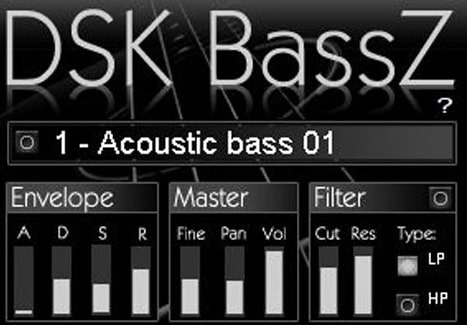
OS: Windows Win Bit Version: 32-bit Developer: DSK Music Size: 7.5 MB Rating: 47/100
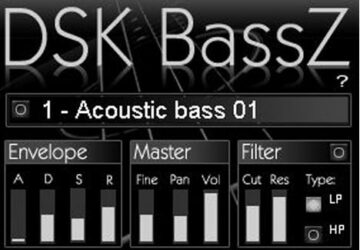
DSK BassZ offers 24 acoustic and synth bass sounds designed to add depth and power to your tracks. Its simple controls let you shape your tone with an amp envelope, filter section, and master tools for volume, pan, and fine-tuning.
This plugin responds naturally to your playing dynamics, giving each note realistic movement and energy. With its focused sound selection and clear layout, DSK BassZ is a handy choice for music creators looking for solid, ready-to-use bass tones without extra setup.
Features
- 24 Bass Sounds Included
- Acoustic And Synth Bass Options
- Attack, Decay, Sustain, Release Controls
- Filter With Cut And Resonance
- Switchable Low Pass And High Pass
- Velocity-Sensitive Sound Response
- Simple And User-Friendly Interface
- Natural And Dynamic Sound Quality
- Low CPU Usage
- Free To Download
Pros
- Comes with 24 bass presets
- Good mix of acoustic and synth
- Natural and powerful bass tone
- Low CPU use while playing
- Envelope gives control over sound
- Filter adds tone shaping options
- Velocity makes sound more real
- Strong and punchy bass response
- Loads fast in most DAWs
- Good sound variety for a free plugin
Cons
- No macOS version available
- Only 32-bit support
- Crashes in some DAWs
- Lacks visual interface design
- Limited number of presets
- No built-in effects section
- No MIDI learn function
- Missing advanced modulation options
- Less stable under heavy CPU load
- Lacks modern sound shaping tools
Video Demo
What Users Say
DSK BassZ Tips
- I always check the low end with headphones to make sure my bass sounds clear and clean.
- I use the attack knob to make my bass hit faster when I want more punch.
- I blend my bass with the kick drum so both work together nicely.
- Use compression to even out the volume and keep the bass steady.
- Combine DSK BassZ with a sub-bass layer for extra depth.
- Keep the bass simple in the song so it doesn’t clash with other instruments.
Bassline VST Plugins Compared
This table compares the bassline plugins by features, controls, bit version, format, and rating.
| Details | Ample Bass P Lite | TAL–Bassline | Subdivine Lite | 808 Bass Module 2 Lite | FunkBass | Dolphin Bassline | Bass Module | Bassline | MONSTER Bass | 4Front Bass | Devil Bass Module | FabBass | Bassline II | DSK BassZ |
|---|---|---|---|---|---|---|---|---|---|---|---|---|---|---|
| Image | 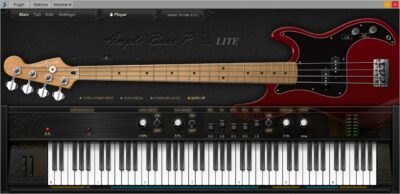 |
 |
 |
 |
 |
|
 |
 |
 |
|
 |
 |
 |
 |
| Rating | ||||||||||||||
| OS | Windows, Mac | Windows, Mac | Windows, Mac | Windows, Mac | Windows, Mac | Windows | Windows | Windows | Windows | Windows, Mac | Windows | Windows | Windows | Windows |
| Formats | VST, VST2, AU, AAX | VST, AU | VST3, AU | VST, AU | VST, VST3, AU | VST | VST | VST | VST | VST, AU | VST | VST | N/A | VST |
| Bit Version | 32-bit, 64-bit | 32-bit, 64-bit | 64-bit | 32-bit, 64-bit | 64-bit | 32-bit, 64-bit | 32-bit | 32-bit | 32-bit | 32-bit, 64-bit | 32-bit | 32-bit | 32-bit | 32-bit |
| Developer | Ample Sound | TAL Software | Diginoiz | BeatMaker | Audiolatry | Signaldust | MaxSynths | EVM Synths | MonsterDAW | 4Front | Devil Soundz | Samsara Cycle Audio | EVM Synths | DSK Music |
| License | Freeware | Freeware | Freeware | Freeware | Freeware | Donationware | Freeware | Freeware | Freeware | Freeware | Freeware | Freeware | Freeware | Freeware |
| Sample-Based | Yes | No | Yes | Yes | Yes | Select | Yes | No | Yes | No | Select | Select | No | Yes |
| Download Size | 450 MB | 1 MB | 254 MB | 32 MB | 67 MB | 1 MB | 101 MB | 1 MB | 7 MB | 4 MB | 5.2 MB | 3 MB | 1 MB | 7.5 MB |
| CPU Load | Low | Low | Low | Low | Low | Low | Low | Low | Low | Low | Low | Low | Low | Low |
| Polyphony | 8 | 1 | 1 | 1 | 10 | 1 | 8 | 1 | 16 | 64 | 64 | 8 | 6 | 8 |
| Features | Realistic articulations, Auto Buzz, Poly Legato, Slide Smoother, Capo function, Tab Player, MIDI control | Analog Bass Synthesis, Unique Low-Pass Filter, Non-Linear Envelopes, Band-Limited Oscillators, Sub-Oscillator, Simple Arpeggiator, Unison Mode | 808-type bass, Six presets, Adjustable drive, Modifiable ADSR, Pitch bend, Simple interface, Urban genres | Layered presets, Key tracking, LFO controls, LFO waveform, Glide knob, Attack release, Amplitude control | Bass presets, Modulation controls, Filter section, Envelope shaping, Distortion effect, Chorus effect, Easy interface | Monophonic Synth, Saw/Square Oscillator, Variable Filter, Envelope Modulation, Velocity Accents, Decent Sound Quality, User-Friendly Interface | 64 Bass Patches, Acoustic & Synth Bass, Custom Chorus FX, Internal Dynamics, MIDI Support, Simple Interface, Genre Versatility | Multi-mode filter, Envelope gating, Duo mode, Adjustable glide, WaveSample selection, Pitch tuning, Resonance control | Presets Library, Sound Categories, ADSR Control, Filter Section, LFO Modulation, Glide Knob, Expansion Updates | High-quality bass, Versatile design, Sample-synth switch, Simple interface, No settings, Authentic modeling, Free plugin | Dual oscillators, Drawable envelope, Adjustable filter, Vibes selector, Two-band EQ, Pressure control, LFO modulation | Octave Control, Transpose Function, Fine-Tune Adjustment, Velocity Sensitivity, Tone Brightness, 7-Band EQ, Pickup Volume Control | Tune adjustment, Octave shifting, Program select, Filter control, ADSR controls, Env Fit, WaveSample engine | Bass presets, Master controls, Amp envelope, Velocity response, Filter section, Simple interface, Free download |
| Controls | Main Menu Bar, Finger Mode, Bass Display, Keyboard, Velocity Knob, Tone Knob, Volume Knob | Tune, Waveform Selector, Filter Cutoff, Filter Resonance, Envelope, Arpeggiator, Unison Mode | Preset Display, Type Knob, Main Dial, Drive Knob, Side Sliders, Keyboard Section, Output Meter | Preset Menu, Gain, Amp, Glide, Attack, Release, LFO Depth | Preset Selector, Mod Speed, Mod Depth, Gain, Pan, Attack, Filter | Tuning, Cutoff, Resonance, Env Mod, Decay, Accent, Waveform | Patch Name Display, Prev Button, Next Button, Volume Knob, Chorus Knob, Rate1 Knob, Rate2 Knob | Volume, Tune, Oct, Duo, Glide, Wavesample, Freq | Gain, Signal Meter, Reverb, ADSR Envelope, Filter Mode, Voice Mode, Glide Knob | Bass Image, No Settings Message, Version Display, Plugin Title, Status Indicator, Output Level, Preset Label | Cutoff, Kick, Velocity, Distort, Phat, Volume, Amp Envelope | Octave, Transpose, Tune, Fine, EQ, Force, Colour | Volume, Tune, Octave, Program Select, Filter, Attack, Decay | Preset Selector, Envelope ADSR, Master Section, Fine Tune, Pan Control, Volume Level, Filter Section |
| Effects Included | Unknown | Low pass filter, Resonant filter, LFO, Envelope, Portamento, Unison, Arpeggiator | Drive | LFO | Chorus, Distortion with cabinet emulation, Reverb, Filter, Modulation, Tremolo, Glide | Cutoff filter, Resonance, DC offset | Chorus, Dynamic Processor | Filter with resonance, Distortion | Reverb, Filter, LFO | Unknown | Distortion, Chorus, Delay | EQ, Decay, Sustain, Filter | Filter | Filter (Cut, Resonance, Type) |
| MIDI Learn | Yes | Yes | Unknown | No | Unknown | Unknown | Yes | Yes | Unknown | No | Unknown | Select | Yes | Select |
| Presets | N/A | 23 | 30 | 10 | 40 | N/A | 128 | 16 | 30 | N/A | N/A | 40 | 16 | 24 |
| Standalone | Yes | Yes | No | No | Yes | Yes | No | Yes | Yes | No | Select | Select | No | No |
| Last Updated | 04/25/2024 | 08/14/2023 | 08/10/2020 | 04/06/2020 | 01/14/2023 | 07/16/2023 | 05/01/2009 | 06/30/2023 | 03/25/2024 | 06/14/2010 | N/A | N/A | 01/22/2006 | 03/27/2008 |
Favorite Bassline VST Plugin
Our top pick for the best free Bassline VST plugin is Ample Bass P Lite II by Ample Sound. It offers the most realistic sound, bass controls, and it’s available for both Windows and Mac.
| Details | Ample Bass P Lite |
|---|---|
| Image |
|
| Rating | |
| OS | Windows, Mac |
| Formats | VST, VST2, AU, AAX |
| Bit Version | 32-bit, 64-bit |
| Developer | Ample Sound |
| License | Freeware |
| Sample-Based | Yes |
| Download Size | 450 MB |
| CPU Load | Low |
| Polyphony | 8 |
| Features | Realistic articulations, Auto Buzz, Poly Legato, Slide Smoother, Capo function, Tab Player, MIDI control |
| Controls | Main Menu Bar, Finger Mode, Bass Display, Keyboard, Velocity Knob, Tone Knob, Volume Knob |
| Effects Included | Unknown |
| Download | Download Ample Bass P Lite |
I hope you found this list of free bassline VST plugins helpful. If I missed any great bassline-related plugins, please let me know in the comments.